Recommended resources
The freely available resources this lesson will direct you to.
Hello! In the previous lesson, you distinguished blocking calls from operations that can give the event loop a chance to handle other work. Now you’ll put that distinction into Python code. You’ll define an async function, call it correctly, and replace a simulated wait with a real asynchronous HTTP request—the same kind of outbound call an incident API might make to another service.
Allow about 40 minutes to watch the short video segments, read the documentation, and run the examples.
An async function must be driven to completion
Start with the distinction between an async function and the object you get when you call it. Corey Schafer’s Python Tutorial: AsyncIO, particularly its animated examples, makes this easier to see than syntax alone.
Python Tutorial: AsyncIO - Complete Guide to Asynchronous Programming with Animations
Watch the selected parts of Corey Schafer’s Python Tutorial: AsyncIO to see what the event loop does when a function reaches an awaited operation.
Watch the event loop for asyncio.run(), awaitables, and why a synchronous function cannot simply be awaited. Then watch coroutine calls for the difference between defining an async function, calling it, and awaiting its result. You can leave the later discussion of scheduling multiple tasks for the next lesson.
Python’s Coroutines and tasks documentation gives the precise terminology. Read only its introductory examples; the later task-management APIs are not needed yet.
Read the Python standard library’s “Coroutines and tasks” documentation to pin down what a call to an async def function returns.
In Coroutines, start at the opening explanation and read the basic example. Continue through the asyncio.run() and direct-await examples, stopping before the example using asyncio.create_task(). In Awaitables, read the definition, then find the “Important” note and stop after its distinction between a coroutine function and a coroutine object. Focus on why calling alone does not produce the function’s result.
Here is a small version you can run as a standalone script:
import asyncio


async def load_incident(incident_id: int) -> str:
    print("Starting lookup")
    await asyncio.sleep(0.2)
    return f"Incident {incident_id} is open"


async def main() -> None:
    message = await load_incident(42)
    print(message)


if __name__ == "__main__":
    asyncio.run(main())
load_incident is a coroutine function. Calling load_incident(42) creates a coroutine object; it does not immediately run the lookup or return the string. Inside main, await runs that coroutine and obtains its eventual str result. At the bottom, asyncio.run(main()) starts and manages an event loop for this standalone script.
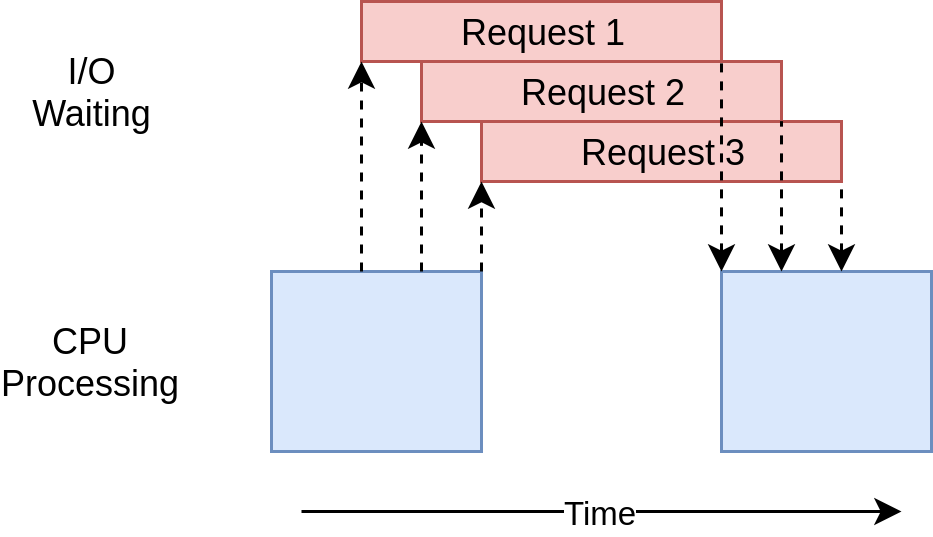
The sleep call is a teaching substitute for an I/O wait: it suspends the current task without holding the event-loop thread for 0.2 seconds. It does not query an incident store. Notice also that this script performs just one lookup. Async code has not made that lookup faster or started a second one; it has made the waiting portion capable of yielding if the loop has other work to do.
An easy mistake is to remove await:
message = load_incident(42) # A coroutine object, not a str
That assignment does not give you the incident message, and a coroutine left unawaited may produce a runtime warning. The complementary mistake is to put a blocking call such as time.sleep(0.2) inside load_incident: declaring the function with async def would not make that call yield.
Await a real network operation
An incident service might consult another internal API for status or enrichment data. To see an actual network request without relying on a third-party service, you’ll run a small local FastAPI server and call it using HTTPX’s asynchronous client. The server will simulate a slow upstream response; the client’s HTTP request is the real I/O operation.
First, watch Patrick Loeber’s HTTPX Tutorial for the client syntax.
HTTPX Tutorial - A next-generation HTTP client for Python
Watch the asynchronous-client example in Patrick Loeber’s HTTPX Tutorial before reading the two-file demonstration below.
Watch the async client. Notice the different jobs done by async with (managing the client), await client.get(...) (waiting for the response), and asyncio.run(...) (starting a standalone program).
In a temporary practice directory, save this as mock_upstream.py. Use your existing project environment, which already has FastAPI and an ASGI server from the preceding module.
import asyncio

from fastapi import FastAPI

app = FastAPI()


@app.get("/incidents/{incident_id}/status")
async def incident_status(incident_id: int) -> dict[str, int | str]:
    await asyncio.sleep(0.25)  # Simulated upstream delay
    return {"incident_id": incident_id, "status": "open"}
Add httpx as a runtime dependency using your project’s dependency workflow, and update its lock file. Then save the caller as check_status.py in the same directory:
import asyncio

import httpx


async def fetch_status(
    client: httpx.AsyncClient, incident_id: int
) -> str:
    response = await client.get(
        f"/incidents/{incident_id}/status"
    )
    response.raise_for_status()

    data: dict[str, object] = response.json()
    status = data.get("status")
    if not isinstance(status, str):
        raise ValueError("Upstream status must be a string")
    return status


async def summarize_status(incident_id: int) -> str:
    async with httpx.AsyncClient(
        base_url="http://127.0.0.1:8765",
        timeout=5.0,
    ) as client:
        status = await fetch_status(client, incident_id)

    return f"Incident {incident_id}: {status}"


if __name__ == "__main__":
    print(asyncio.run(summarize_status(42)))
From that practice directory, start the mock server in one terminal:
uvicorn mock_upstream:app --host 127.0.0.1 --port 8765
With the same project environment active, run the caller in a second terminal:
python check_status.py
You should see Incident 42: open. If the server is not running, the request fails rather than returning a status; that is useful evidence that client.get() is making a network call.
Trace the successful call carefully. asyncio.run() drives summarize_status() in the script. That function enters an async HTTP client and awaits fetch_status(). Within fetch_status(), await client.get(...) is the meaningful non-blocking I/O wait: while the server is responding, the client-side task can suspend and let its event loop run other ready work. Once the response arrives, raise_for_status() checks the HTTP status and response.json() parses the received body. Those last two methods are ordinary synchronous operations on a response already in memory; they do not need await.
The client’s timeout=5.0 prevents this demonstration from waiting indefinitely for an unresponsive server. The type check protects the function’s str return contract if the upstream response has an unexpected shape. Neither feature is what makes the request asynchronous; that depends on using httpx.AsyncClient and awaiting its async request method.
Where the event loop comes from in FastAPI
A script needs a top-level entry point such as asyncio.run(main()). A FastAPI application is different: its ASGI server already manages the event loop for async route functions. In an async def route, you would call an async helper with await—not start another event loop with asyncio.run().
For example, the essential call inside a route would be:
status = await fetch_status(client, incident_id)
Here client must be an httpx.AsyncClient made available to the route. Managing a shared client’s startup and shutdown is a later architecture topic; the short-lived client in the standalone script keeps today’s example self-contained.
This separation is useful in an incident API: the route can handle HTTP concerns, while fetch_status() contains the outbound request and its immediate response checks. The rule from the previous lesson still applies throughout that call chain. If a helper were to make a long synchronous network call instead, wrapping it in async def would not prevent it from blocking the event-loop thread.
Takeaways
An async def defines a coroutine function; calling it creates a coroutine object, and awaiting it obtains its result. Use asyncio.run() to enter async code from a standalone script, but use await inside an async FastAPI route. Non-blocking I/O requires an async-capable operation—here, await client.get(...)—not just async syntax around a blocking library.
You have now written and called an async function through a real HTTP request. The next lesson asks a different question: when multiple independent operations are needed, how can you run them concurrently and handle their failures predictably?