Recommended resources
The freely available resources this lesson will direct you to.
Welcome to the next lesson in our journey through C and algorithms. In our last session, we saw how C represents strings as character arrays ending with a null terminator. We also touched upon a curious fact: using the == operator on two string arrays doesn't compare their content, but rather their location in memory. This hints at a deeper level of how C works.
Today, we'll explore that deeper level. This lesson will demystify the concepts of memory and addresses. You will learn what a memory address is, how every variable you declare is associated with one, and how a running C program organizes its memory into different regions for different purposes. This is a foundational concept that will prepare you for one of C's most powerful features: pointers.
1. Variables, Values, and Addresses
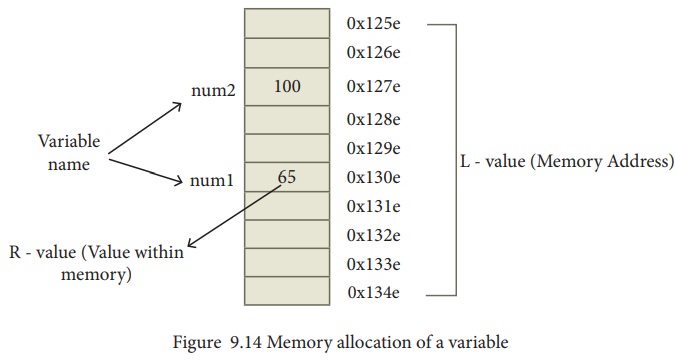
At its core, a computer's memory (RAM) is a vast sequence of numbered storage locations, much like a street with uniquely numbered houses. Each location can hold a small piece of data. When you declare a variable, you are asking the C compiler to reserve one or more of these locations to store its value.
Every variable, therefore, has two key properties:
- Its value: The data we stored in it (e.g., the number
42). - Its address: The numerical location in memory where that value is stored.
In C terminology, the value is sometimes called an R-value (the "read value" on the right side of an assignment), and the memory address is called an L-value (the "location value" on the left side of an assignment).
The following video provides an excellent analogy to help visualize these ideas.
Learn C memory addresses in 7 minutes 📬
This video from Bro Code introduces the concept of memory addresses using a street-and-house analogy.
Watch the first part of the video, from the beginning to the analogy. Focus on how declaring a variable is like reserving a "house" (a memory block) on a "street" (memory), where the house has a unique address.
2. Data Types and Memory Size
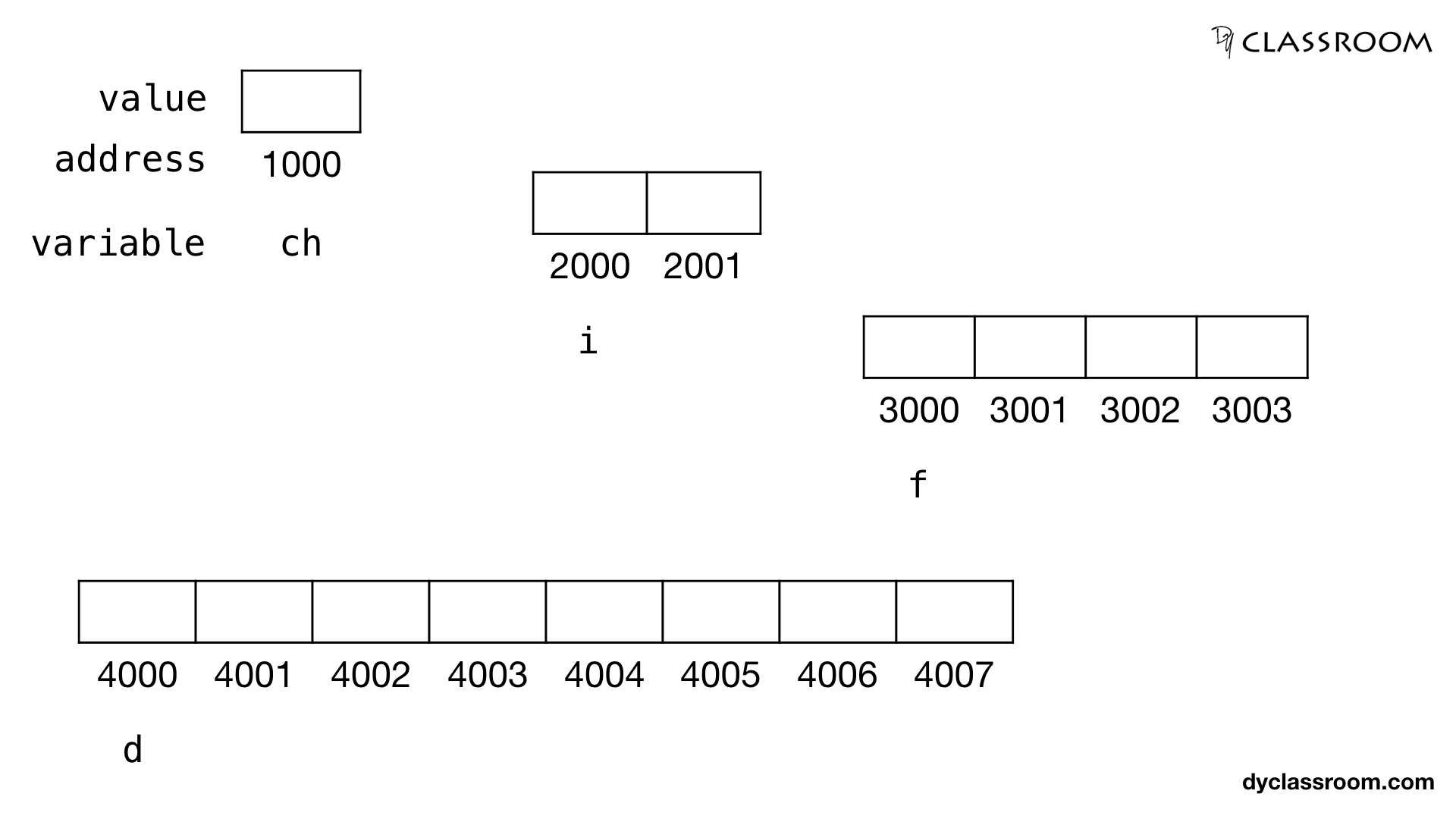
Not all variables occupy the same amount of space. A char typically needs only one "memory block" (one byte), while an int or a double requires several. You can find out exactly how much memory a data type uses on your system with the sizeof operator.
For example, on a typical modern system:
sizeof(char)is 1 byte.sizeof(int)is 4 bytes.sizeof(double)is 8 bytes.
This means when you declare int x;, the compiler reserves 4 consecutive bytes of memory to hold its value.
3. Finding a Variable's Address in C
C gives you a direct way to find out the memory address of any variable: the address-of operator (&). When you place & before a variable name, the expression evaluates to the memory address of that variable.
To print an address, you use the printf format specifier %p, which stands for "pointer". It displays the address in hexadecimal, a base-16 numbering system commonly used for memory addresses.
Let's see this in action with a simple program:
#include <stdio.h>

int main() {
    int age = 30;
    char initial = 'J';
    double weight = 150.5;

    printf("--- Values ---\n");
    printf("Value of age: %d\n", age);
    printf("Value of initial: %c\n", initial);
    printf("Value of weight: %f\n\n", weight);

    printf("--- Memory Addresses (in Hexadecimal) ---\n");
    printf("Address of age: %p\n", &age);
    printf("Address of initial: %p\n", &initial);
    printf("Address of weight: %p\n", &weight);

    printf("\n--- Memory Sizes (in bytes) ---\n");
    printf("Size of int: %zu bytes\n", sizeof(int));
    printf("Size of char: %zu bytes\n", sizeof(char));
    printf("Size of double: %zu bytes\n", sizeof(double));

    return 0;
}
When you run this code, you will see the values, addresses, and sizes. Notice that the addresses are large hexadecimal numbers. The exact numbers will be different each time you run the program, as the operating system allocates memory differently on each execution.
The following video demonstrates these C features and further explains how the addresses relate to the size of the data types.
Learn C memory addresses in 7 minutes 📬
Let's return to the Bro Code video to see these concepts applied in C.
Watch the following segments: sizeof demonstration: See the sizeof operator used on char variables. Printing addresses: Watch how the & operator and %p format specifier are used to print the memory addresses. Addresses and data types: Pay close attention to how the addresses change for short, int, and double. The difference between consecutive addresses reveals the size of the data type.
4. The Big Picture: Program Memory Layout
We've seen how a single variable is stored. But where in the computer's vast memory do all the different parts of your program—global variables, local variables, the code itself—actually live? A running C program's memory is not a random jumble; it's neatly organized into several distinct segments. Understanding this layout is key to understanding variable lifetime, scope, and many common C bugs.
The following resource provides an excellent overview of this memory organization.
Understanding Functions, Memory, and Pointers in C
This article from Jyoti Prakash's blog provides a detailed map of a C program's memory. We will focus on the main segments.
First, study the diagram and introduction in the section titled "4.1 The Big Picture: Memory Segments". This diagram is your map for the rest of the lesson. Next, read through "4.3 Detailed Breakdown of Each Segment". For each segment (Text, Data, BSS, Heap, Stack), focus on understanding: What's stored there? (e.g., code, global variables, local variables) What are its key characteristics? (e.g., read-only, grows upward/downward)
To summarize the key points from the reading:
- Text Segment: Contains your compiled machine code. It's typically read-only to prevent your program from accidentally modifying its own instructions.
- Data Segment: Stores global and
staticvariables that are initialized with a specific value in your code. These variables exist for the entire duration of the program. - BSS Segment: Stores global and
staticvariables that are uninitialized. The system automatically fills this memory with zeros at the start of the program. - Heap: A region of memory for dynamic allocation. When you use
malloc()(which we will cover in a later module), memory is allocated from the heap. This memory persists until you explicitly free it. It typically grows "upward" to higher memory addresses. - Stack: Used for local variables, function parameters, and return addresses. When a function is called, a new "stack frame" is pushed onto the stack for its local data. When the function returns, the frame is popped off, and its local variables are destroyed. The stack is fast but limited in size, and it grows "downward" toward lower memory addresses.
5. Your Turn: Map the Variables
To solidify your understanding, let's analyze a piece of code and determine where each variable lives. Examine the code below (which is also available in the article you just read under section "4.2 A Complete Example"). For each numbered variable, predict which memory segment it will be stored in.
#include <stdio.h>
#include <stdlib.h>

// 1. Where does global_initialized live?
int global_initialized = 100;

// 2. Where does global_uninitialized live?
int global_uninitialized;

void a_function() {
    // 3. Where does local_to_function live?
    int local_to_function = 25;

    // 4. Where does pointer_itself live?
    // 5. Where does the data it points to live?
    int *pointer_itself = malloc(sizeof(int));

    printf("Address of local_to_function: %p\n", &local_to_function);
}

int main() {
    // 6. Where does local_to_main live?
    int local_to_main = 10;

    a_function();

    return 0;
}
Click for the solution and explanation
global_initialized: Lives in the Data Segment. It's a global variable with an explicit initial value.global_uninitialized: Lives in the BSS Segment. It's a global variable without an initial value, so it will be automatically set to 0.local_to_function: Lives on the Stack. It's a local variable insidea_function, so it is created when the function is called and destroyed when it returns.pointer_itself: The pointer variable itself lives on the Stack. It is a local variable withina_function.- The data pointed to by
pointer_itself: Lives on the Heap. Themalloc()function allocates memory from the heap. local_to_main: Lives on the Stack. It's a local variable inside themainfunction. Notice that its address will likely be higher thanlocal_to_function's address, becausea_functionis called afterlocal_to_mainis created, so its stack frame is placed at a lower memory address.
Conclusion
In this lesson, we pulled back the curtain on how C interacts with memory. You now have a mental model for what happens "under the hood" when you declare and use variables.
Key Takeaways:
- Every variable has a value and a memory address.
- The
&operator retrieves a variable's memory address. - The
%pformat specifier is used to print addresses in hexadecimal. - The
sizeofoperator tells you how many bytes a data type or variable occupies. - A running program's memory is organized into segments: Text (code), Data/BSS (globals/statics), Heap (dynamic memory), and Stack (locals/functions). The location of a variable determines its scope and lifetime.
Preview of the Next Lesson:
We've learned what an address is and how to get it. The natural next question is: can we store an address in a variable and use it? The answer is yes, and that is precisely what a pointer is. In the next lesson, we will formally introduce pointers, learn how to declare them, and use the dereference operator (*) to access and manipulate data indirectly through its address. This will unlock a new level of programming capability in C.