Recommended resources
The freely available resources this lesson will direct you to.
In our previous lesson, we explored how arrays allow us to store and manage collections of data, like a list of numbers. This was a big step up from using individual variables. Now, we'll build directly on that knowledge to answer a fundamental question: how does C handle text?
This lesson focuses on strings. In C, there isn't a special "string" data type. Instead, strings are represented as a special kind of array: an array of characters. You will learn how C uses a "null terminator" to know where a string ends and how to use essential functions from the standard library (strlen, strcpy, and strcmp) to perform common operations like finding a string's length, copying it, and comparing it to another.
1. Strings as Null-Terminated Character Arrays
In C, a string is a sequence of characters stored in a char array. But how does the program know where the text ends? For example, if you have a character array of size 50, but your string is only "Hello", how does printf know to stop printing after the 'o'?
The answer is the null terminator: a special, non-printable character represented as \0. Every string in C must end with this character. It acts as a sentinel, signaling the end of the string data.
So, the string "Hello" is actually stored in memory as six characters: 'H', 'e', 'l', 'l', 'o', and '\0'.
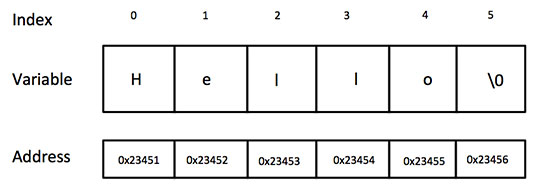
When you initialize a string using double quotes, the C compiler automatically adds the null terminator for you.
// The compiler allocates 6 bytes for this: 5 for "Hello" and 1 for '\0'
char greeting[] = "Hello";

// This is the manual equivalent, which makes the null terminator explicit.
// You rarely need to do this, but it's important for understanding.
char greeting_manual[] = {'H', 'e', 'l', 'l', 'o', '\0'};
The following video provides a great visual introduction to these concepts.
String Basics | C Programming Tutorial
This video from Portfolio Courses introduces how strings are represented as character arrays in C.
Pay close attention to these parts: The manual way: See how a string is built character by character, ending with \0. Using string literals: Understand how double quotes "" make initialization easier by adding the null terminator automatically. Automatic sizing: See how the compiler can figure out the array size for you.
2. The Nature of the Null Terminator
To really understand C strings, it helps to know what the null terminator \0 actually is. All characters are represented by numbers (their ASCII codes). The character \0 is simply the character with the integer value 0.
This has two important implications:
- It's different from the character
'0', which has a non-zero ASCII value (48). - Since 0 is considered
falsein C's boolean logic, the null terminator can be used to control loops that process strings. We'll explore this more when we cover pointers.
This next video dives deeper into the null terminator.
Null Terminator | C Programming Tutorial
This video, also from Portfolio Courses, provides an excellent deep dive into the null terminator.
Watch these segments to solidify your understanding: Basic concept: A recap of the null terminator's role. Affecting string end: See what happens when you manually place a null terminator in the middle of a string. It's just zero: This crucial part explains that \0 is represented by the integer 0, unlike other characters. Using the integer 0: A demonstration showing that assigning the integer 0 to a char array element is the same as assigning \0.
3. The <string.h> Library and Common Functions
Manually manipulating character arrays is tedious. C provides a standard library of functions for common string operations. To use them, you must include the header file at the top of your program:#include <string.h>
We'll now cover three of the most fundamental functions from this library. This article provides clear examples for each.
Strings in C - String manipulation in C - EmbeTronicX
This article from EmbeTronicX gives concise code examples for the functions we're about to discuss. Keep it open as a reference.
Familiarize yourself with the sections titled "strlen()", "strcpy()", and "strcmp()". Note the simple main function structure and the required #include <string.h> header.
strlen() - Get String Length
The strlen() function calculates the length of a string. It does this by counting characters until it finds the null terminator.
- Syntax:
size_t strlen(const char *str); - Return value: The number of characters in the string, not including the null terminator.
size_tis an unsigned integer type.
char my_name[] = "Alex";
size_t len = strlen(my_name); // len will be 4

// The actual size of the array in memory is 5 (to include '\0')
strcpy() - Copy a String
In the last lesson, you learned that you can't assign one array to another using the = operator. The same is true for strings. You must copy the characters one by one. The strcpy() function does this for you.
- Syntax:
char* strcpy(char *destination, const char *source); - Action: Copies the characters from the
sourcestring into thedestinationarray, including the null terminator.
char source[] = "Hello World";
char destination[20]; // Make sure the destination is large enough!

strcpy(destination, source);
// Now, the 'destination' array contains "Hello World\0"

printf("Copied string: %s\n", destination);
Warning: strcpy() is a common source of bugs and security vulnerabilities. It does not check if the destination array is large enough to hold the source string. If the source is larger, strcpy() will write past the end of the destination's allocated memory (a "buffer overflow"), leading to undefined behavior. Always ensure your destination buffer is sufficiently large.
strcmp() - Compare Strings
Just as you can't use = to copy strings, you can't use == to check if two strings are identical. The == operator would compare the memory addresses of the two arrays, not their character content. To compare the content, you must use strcmp().
- Syntax:
int strcmp(const char *str1, const char *str2); - Action: Compares
str1andstr2character by character based on their ASCII values. - Return value:
0ifstr1andstr2are identical.- A negative value if
str1comes beforestr2alphabetically (e.g.,strcmp("apple", "banana")). - A positive value if
str1comes afterstr2alphabetically (e.g.,strcmp("cat", "banana")).
-a000c2e1cf0141c19c168599fa1c0c34.png)
4. Your Turn: String Manipulator
Let's write a small program to put these three functions into practice.
Task:
Write a program that does the following:
- Includes the necessary headers (
stdio.handstring.h). - Declares a character array named
secret_wordand usesstrcpy()to copy the string"recursion"into it. - Declares another character array named
user_guessof size 50. - Prompts the user to "Guess the secret word: " and reads their input into
user_guessusingscanf("%s", user_guess). - Uses
strcmp()to check if theuser_guessmatches thesecret_word. - If they match, print a success message.
- If they don't match, print a failure message and also print the length of the secret word and the length of the user's guess using
strlen().
Click here for the solution
#include <stdio.h>
#include <string.h>

int main() {
  // 1. Declare and initialize the secret word
  char secret_word[50];
  strcpy(secret_word, "recursion");

  // 2. Declare an array for the user's guess
  char user_guess[50];

  // 3. Prompt for and read user input
  printf("Guess the secret word: ");
  scanf("%s", user_guess);

  // 4. Compare the strings
  if (strcmp(secret_word, user_guess) == 0) {
      // 5. Success case
      printf("Congratulations! You guessed it correctly.\n");
  } else {
      // 6. Failure case
      printf("Sorry, that's not correct.\n");

      // Get lengths using strlen()
      size_t secret_len = strlen(secret_word);
      size_t guess_len = strlen(user_guess);

      printf("The secret word has %zu characters.\n", secret_len);
      printf("Your guess has %zu characters.\n", guess_len);
  }

  return 0;
}
Note: We use the %zu format specifier to print size_t values, which is the return type of strlen. On some systems, %lu (for long unsigned int) may also work.
Conclusion
In this lesson, you've connected your knowledge of arrays to one of C's most important data types: strings. You now understand the critical role of the null terminator and how to use key library functions to work with string data safely and effectively.
Key Takeaways:
- Strings in C are arrays of characters that must end with a null terminator (
\0). - The
<string.h>header provides essential functions for string manipulation. strlen()returns the number of characters in a string, excluding the null terminator.strcpy()is used to copy string content from a source to a destination. You must ensure the destination is large enough.strcmp()is used to compare the content of two strings. A return value of0means they are identical.- The assignment (
=) and equality (==) operators do not work for copying and comparing string content.
Preview of the Next Lesson:
We've seen that operators like == behave differently with arrays and strings than with simple types like int. When used on arrays, == compares their locations in memory, their addresses. But what exactly is a memory address? In the next lesson, we will dive into the concept of memory itself and introduce pointers—special variables that are designed to hold memory addresses. This will unlock a deeper understanding of how C operates and give you much more power and flexibility.