Recommended resources
The freely available resources this lesson will direct you to.
Welcome to the start of a new module! In our last lesson, we focused on refactoring code into functions to make it more modular and readable. This was about organizing the actions in our programs. Now, we'll turn our attention to organizing the data. So far, we've only used simple variables, each holding a single value. But what if you needed to store the test scores for 30 students, or the daily high temperature for a month? Creating 30 or 31 separate variables would be incredibly cumbersome.
This lesson introduces a fundamental data structure in C called the array. You will learn how to declare a one-dimensional array to hold a collection of related data, how to initialize it with values, and how to access and modify each individual element. This is the first step toward managing more complex data and is a cornerstone for building almost any significant algorithm.
1. Why Do We Need Arrays?
Imagine you want to write a program to calculate the average of five numbers. Without arrays, you might do this:
#include <stdio.h>

int main() {
    int score1 = 88;
    int score2 = 92;
    int score3 = 79;
    int score4 = 95;
    int score5 = 85;

    double average = (score1 + score2 + score3 + score4 + score5) / 5.0;
    printf("The average score is: %.2f\n", average);

    return 0;
}
This works for five scores, but it's easy to see the problem. What if you had 100 scores? Or 1000? Declaring each variable individually is not practical. This approach doesn't scale.
An array solves this by letting us store a fixed-size, sequential collection of elements of the same data type under a single variable name.
#19 C Arrays | [2025] C Programming For Beginners
To see a clear explanation of this problem, watch the introduction of this video from Programiz.
Watch from the beginning up to the motivating example. It effectively illustrates why individual variables are not enough when dealing with collections of data.
2. Declaring and Initializing an Array
To use an array, you must first declare it, telling the compiler its type, name, and size.
Declaration
The basic syntax for declaring an array is:
data_type array_name[array_size];
For example, to declare an array to hold 5 integer scores:
int scores[5];
This reserves a contiguous block of memory large enough for 5 integers. An important rule in C is that the size of this type of array is fixed at compile time and cannot be changed later in the program.
Initialization
You can initialize an array when you declare it using an initializer list (curly braces {}).
// Declaration and initialization in one step
int scores[5] = {88, 92, 79, 95, 85};
There are a few convenient variations:
-
Size Inference: You can let the compiler determine the size of the array from the number of elements in the initializer list.
// Compiler will set the size to 5 int scores[] = {88, 92, 79, 95, 85}; -
Partial Initialization: If you provide fewer initializers than the array size, the remaining elements are automatically initialized to zero.
// scores[0] is 88, scores[1] is 92.
// scores[2], scores[3], and scores[4] are all initialized to 0.
int scores[5] = {88, 92};
One common mistake is trying to use an initializer list to assign values to an array after it has been declared. This is not allowed in C.
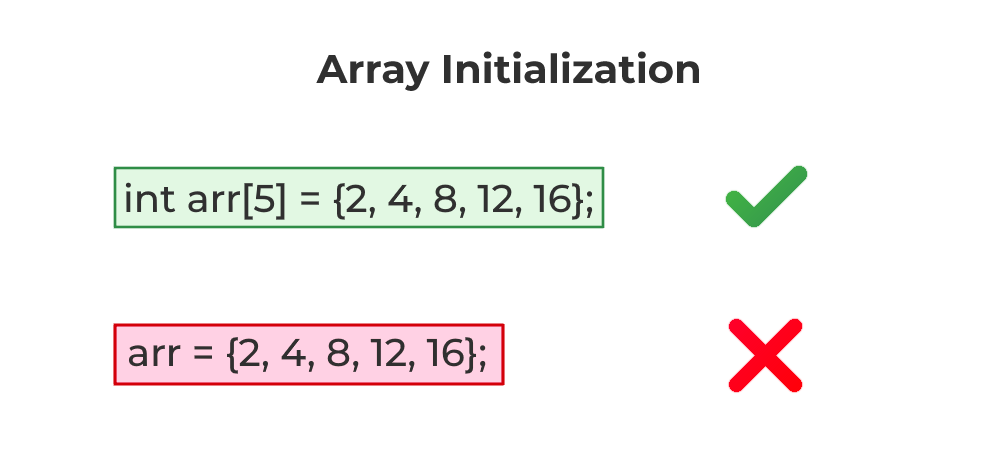
The following video segment will walk you through these syntax rules.
#19 C Arrays | [2025] C Programming For Beginners
This part of the Programiz video demonstrates the syntax for declaring and initializing arrays.
Watch the sections on array declaration and initialization. Pay attention to the different ways you can provide initial values.
3. Accessing and Modifying Array Elements
Once an array is created, you need a way to get to the individual values stored inside. You do this using an index.
Think of an array as a row of numbered boxes. The index is the number on the box. In C, and most modern programming languages, indexing is zero-based. This means the first element is at index 0, the second at index 1, and so on. For an array of size N, the last element is at index N-1.
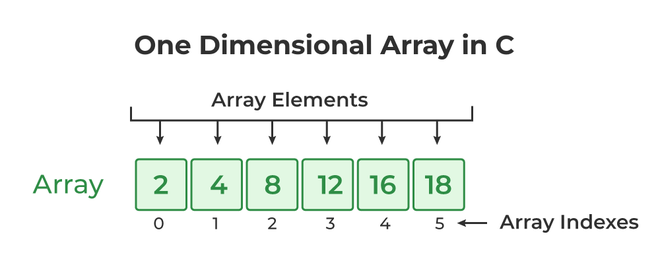
To access an element, you use the array name followed by the index in square brackets [].
int scores[5] = {88, 92, 79, 95, 85};

// Accessing an element to read its value
int first_score = scores[0]; // first_score is now 88
int third_score = scores[2]; // third_score is now 79

// Accessing an element to modify its value
scores[2] = 81; // The third element is now 81
An element of an array, like scores[2], can be used just like any other variable of that type (int in this case). You can use it in calculations, print it, or assign a new value to it.
#19 C Arrays | [2025] C Programming For Beginners
This next segment demonstrates how to use indices to work with individual array elements.
Focus on these parts: Accessing elements to print their values. Assigning values individually after declaration. Changing a value that's already in the array.
4. Using Loops with Arrays
The true power of arrays becomes apparent when you combine them with loops. A for loop is perfect for iterating through an array to perform an operation on every element, saving you from writing repetitive code.
Example: Printing all scores
#include <stdio.h>

int main() {
    int scores[] = {88, 92, 79, 95, 85};
    int size = 5;

    printf("The scores are: \n");
    for (int i = 0; i < size; i++) {
        printf("Score at index %d: %d\n", i, scores[i]);
    }

    return 0;
}
In this loop, the variable i starts at 0 and goes up to 4. In each iteration, i is used as the index to access the next element in the scores array. This is far more scalable than printing each element manually. The same principle applies to reading user input into an array.
The final segments of the video show how to use loops for both input and output.
#19 C Arrays | [2025] C Programming For Beginners
This part of the video demonstrates the most common and powerful way to work with arrays: using loops.
Watch the section on taking user input manually and then see how it's improved by using loops for both input and output.
A Critical Warning: Array Bounds
When you have an array of size 5, the valid indices are 0, 1, 2, 3, and 4. What happens if you try to access scores[5] or scores[-1]?
C does not stop you from doing this. Accessing an array "out of bounds" reads from or writes to a part of memory that doesn't belong to your array. This leads to undefined behavior: your program might crash, it might produce strange, incorrect results, or it might appear to work correctly only to fail later. This is one of the most common and difficult-to-find bugs in C programming. Always ensure your loop conditions and indices are correct.
#19 C Arrays | [2025] C Programming For Beginners
This short but crucial clip explains the danger of going out of bounds.
Watch the final segment starting from "Let me show you something interesting" to understand this critical concept.
5. Your Turn: Basic Array Operations
Now it's time to put these concepts into practice. Your task is to write a C program that performs several common array operations.
Problem:
Write a C program that does the following:
- Declares an integer array that can hold 5 numbers.
- Uses a
forloop to prompt the user to enter 5 integers and stores them in the array. - Uses a second
forloop to process the array to find the sum of all elements and the maximum element. - After the loop, calculates the average of the elements.
- Finally, prints the calculated sum, average, and maximum value.
You can find the necessary code snippets for input, processing, and output in this article. Try to assemble them into a working program yourself before checking the solution.
A Complete Beginner's Guide to Dealing with Arrays in C ...
This resource contains a complete solution to the problem described above. First, try to write the code on your own. Then, use the provided solution to check your work or to help you if you get stuck.
Focus on the section titled "Your Turn!". Study the code provided there. Compile and run it to see how it works. Make sure you understand how the input loop, the processing loop, and the final output statements all work together.
Click here to see the complete solution
#include <stdio.h>

int main() {
  int numbers[5];
  int sum = 0;
  int max;

  // 1. Input: Read 5 numbers from the user into the array
  printf("Enter 5 integer numbers:\n");
  for (int i = 0; i < 5; i++) {
      printf("Enter number %d: ", i + 1);
      scanf("%d", &numbers[i]);
  }

  // 2. Processing: Calculate sum and find the maximum number
  // Initialize max with the first element before the loop
  max = numbers[0];
  for (int i = 0; i < 5; i++) {
      // Add the current element to sum
      sum += numbers[i];

      // Check if the current element is greater than the current max
      if (numbers[i] > max) {
          max = numbers[i];
      }
  }

  // 3. Output: Display the results
  printf("\n--- Results ---\n");
  printf("Sum of the numbers: %d\n", sum);
  // Cast sum to float for accurate floating-point division
  printf("Average of the numbers: %.2f\n", (float)sum / 5);
  printf("Maximum number: %d\n", max);

  return 0;
}
Conclusion
Excellent work! You have just learned about one of the most essential tools in C programming. Arrays provide a powerful and efficient way to handle collections of data, forming the basis for many algorithms and more complex data structures you will encounter later.
Key Takeaways:
- An array is a collection of elements of the same data type stored under a single name.
- Arrays are declared with a type, name, and a fixed size:
int myArray[10];. - Array elements are accessed via a zero-based index, from
0tosize - 1. - Loops, especially
forloops, are the standard way to iterate over all elements in an array. - Accessing an array out of bounds is a serious error in C that leads to undefined behavior.
Preview of the Next Lesson:
So far, we've used arrays to store numbers. But how does C handle text, like a person's name or a sentence? In the next lesson, we will see that strings are implemented as a special kind of array: a null-terminated array of characters. You will learn how to work with these character arrays and use standard library functions to manipulate strings.