Recommended resources
The freely available resources this lesson will direct you to.
Welcome to the fourth module of our course. In the last lesson, we established a crucial concept: every variable in your C program has not only a value but also a specific address in memory. We learned how to find this address using the & operator. This naturally leads to a powerful question: can we store these memory addresses in other variables and use them to manipulate data indirectly?
This lesson answers that question with a resounding "yes." We will introduce pointers, one of C's most defining and powerful features. You'll learn what a pointer is, how to declare a pointer variable to store a memory address, and how to use the "address-of" (&) and "dereference" (*) operators to work with them. Mastering this topic is fundamental to understanding arrays, strings, dynamic memory, and many advanced algorithms in C.
1. What is a Pointer?
In the previous lesson, we used the analogy of memory as a street of houses, each with a unique address. A regular variable, like int x = 10;, is like a house that contains something (the value 10). A pointer is different. It doesn't hold the "stuff" itself; instead, it holds the address of another house.
A pointer is a special type of variable designed specifically to store a memory address.
To get a clear mental model, let's start with a reading that introduces this concept using the "house address" analogy.
C Pointers for Beginners: A Gentle, Visual Introduction
This section from the article "C Pointers for Beginners" on techbuddies.io provides an excellent, non-technical introduction to the concept of a pointer.
Read the section titled "What Is a Pointer in C, in Plain English?". Focus on the distinction between a variable that holds a value and a pointer that holds the location of a value.
Now, let's watch a video that visualizes how variables and pointers are represented in a computer's memory. This will build directly on the memory diagrams from our last lesson.
Introduction to pointers in C/C++
This video from mycodeschool, titled "Introduction to pointers in C/C++," provides a clear, animated view of computer memory and the role of pointers.
Watch the following two segments: Memory and Variables: This is a quick review of how variables of different types are stored at specific memory addresses. Introducing Pointers: This part defines a pointer as a variable that stores the address of another variable, visually demonstrating how one variable can "point to" another.
2. The Core Pointer Operators: * and &
Working with pointers involves three fundamental actions:
- Declaring a pointer variable.
- Assigning a memory address to it.
- Accessing the value at the memory address it holds.
These actions are accomplished using two key operators: the asterisk * and the ampersand &. Confusingly, the asterisk * is used for two different things: declaring a pointer and accessing its value. Let's break this down.
2.1. Declaring a Pointer
You declare a pointer by specifying the data type it will point to, followed by an asterisk *, and then the pointer's name.
data_type * pointer_name;
For example:
int *p_int;    // A pointer that can store the address of an integer
char *p_char;  // A pointer that can store the address of a character
The data type is crucial. It tells the compiler what kind of data is at the address the pointer will hold. An int * must point to an int, and a char * must point to a char.
2.2. Assigning an Address (&)
You use the address-of operator (&), which you've already seen, to get the memory address of a variable. You can then assign this address to a pointer of the corresponding type.
int number = 42;
int *p_number;

p_number = &number; // p_number now holds the memory address of 'number'
After this code runs, p_number doesn't contain 42. It contains the address where 42 is stored.
2.3. Accessing the Value (*)
To get the value stored at the address a pointer is holding, you use the dereference operator, which is also an asterisk *. This is the second use of the * symbol. When used in an expression (not a declaration), * means "the value at the address pointed to by...".
int number = 42;
int *p_number = &number;

int value = *p_number; // 'value' is now 42. We "dereferenced" p_number.
You can also use the dereference operator to change the value at that address:
*p_number = 99; // The value at the address stored in p_number is now 99.
                // This means the 'number' variable itself is now 99!
This is the key to a pointer's power: it allows one part of your program to modify a variable located elsewhere, just by knowing its address.
The following video segments walk through the syntax for these three operations.
Introduction to pointers in C/C++
Let's return to the mycodeschool video to see the syntax for declaring, assigning, and dereferencing pointers.
Declaration Syntax: Shows how to declare a pointer variable. Assigning an Address: Explains how to use the & operator to get an address and store it in a pointer. Dereferencing: This is the most important part. It explains how to use * to get the value at an address and even modify it. Operator Recap: A quick summary of the * and & operators.
This diagram provides a great visual summary of the process:
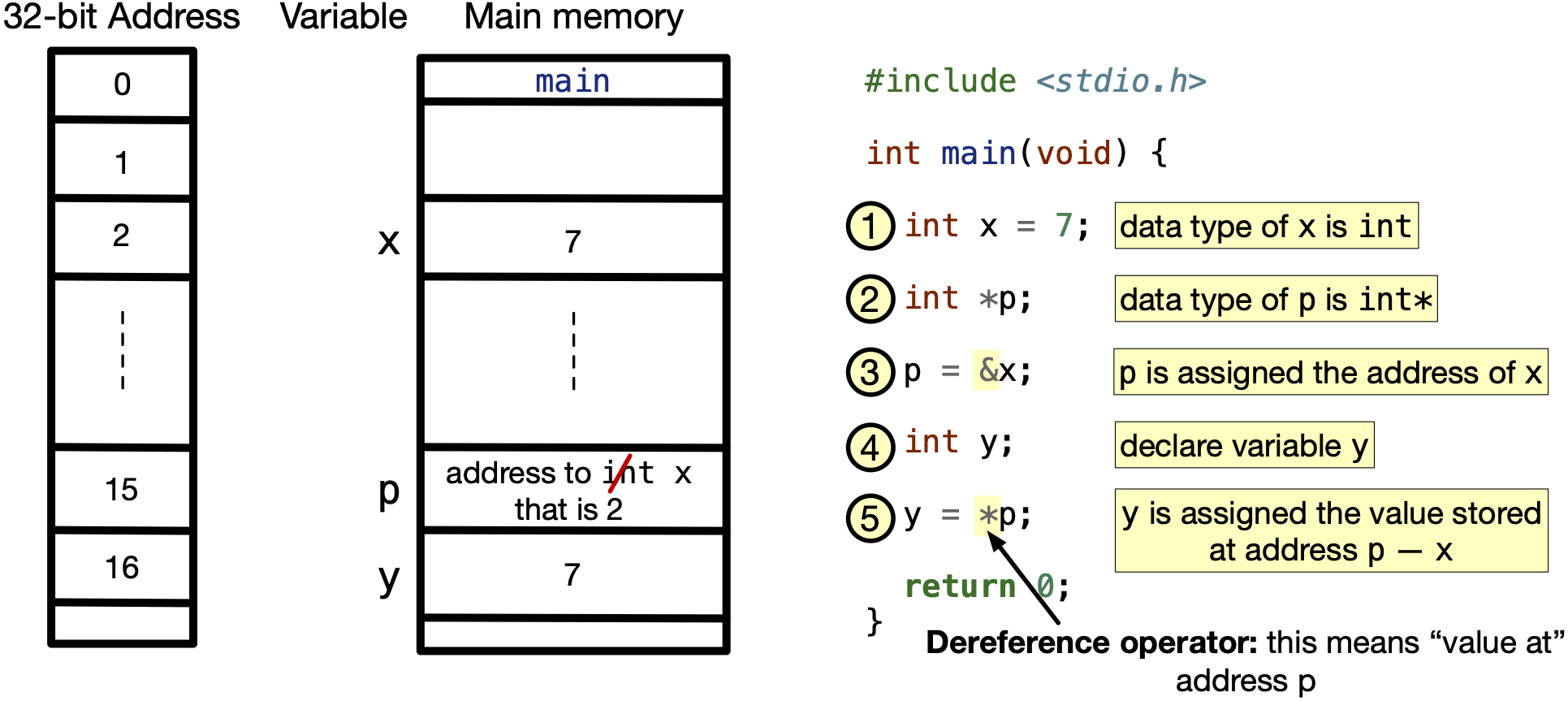
3. A Complete Example
Theory is important, but seeing pointers in a real program makes the concepts concrete. Let's walk through a small but complete C program that demonstrates everything we've just discussed.
The following code:
- Declares an integer
number. - Declares a pointer
ptrand assigns it the address ofnumber. - Prints the values and addresses to show the relationship.
- Changes the value of
numberthrough the pointer. - Prints the values again to prove the change happened.
#include <stdio.h>

int main(void) {
    int number = 10;

    // 1. Declare a pointer and store the address of 'number' in it.
    int *ptr = &number;

    printf("--- Initial State ---\n");
    printf("Value of 'number': %d\n", number);
    printf("Address of 'number' (&number): %p\n", &number);
    printf("Value of 'ptr' (the address it holds): %p\n", ptr);
    printf("Value at the address 'ptr' points to (*ptr): %d\n\n", *ptr);

    // 2. Change the value using the pointer.
    printf("--- Changing value via pointer: *ptr = 25 ---\n");
    *ptr = 25;

    // 3. Observe the results.
    printf("Value of 'number' after change: %d\n", number);
    printf("Value pointed to by 'ptr' after change (*ptr): %d\n", *ptr);

    return 0;
}
Expected Output (addresses will vary):
--- Initial State ---
Value of 'number': 10
Address of 'number' (&number): 0x7ffc1a4b6c34
Value of 'ptr' (the address it holds): 0x7ffc1a4b6c34
Value at the address 'ptr' points to (*ptr): 10

--- Changing value via pointer: *ptr = 25 ---
Value of 'number' after change: 25
Value pointed to by 'ptr' after change (*ptr): 25
Notice how the value of ptr is the same as the address of number. Most importantly, when we executed *ptr = 25;, the original number variable was modified. This demonstrates that number and *ptr refer to the same data in memory.
Conclusion
In this lesson, you took a major step in your C programming journey by learning the fundamentals of pointers. This concept of indirect data manipulation is central to many of C's other features.
Key Takeaways:
- A pointer is a variable that stores the memory address of another variable.
- You declare a pointer with an asterisk:
int *ptr;. The type (int) must match the data it will point to. - The address-of operator (
&) gets the memory address of a variable so you can assign it to a pointer:ptr = &number;. - The dereference operator (
*), when used in an expression, accesses the value at the pointer's stored address:int val = *ptr;or*ptr = 100;. - The asterisk
*has two distinct meanings: it indicates a pointer in a declaration, and it dereferences a pointer in an expression.
Preview of the Next Lesson:
Now that you can declare and use basic pointers, we'll explore their deep and powerful relationship with another fundamental C structure: arrays. You'll learn how C treats an array name as a pointer to its first element, and we'll introduce pointer arithmetic, which allows you to navigate through an array's elements using a pointer.