Recommended resources
The freely available resources this lesson will direct you to.
In our previous lesson, we unlocked the concept of pointers, learning how to store memory addresses in variables and use the & and * operators to work with data indirectly. That foundation is about to become incredibly powerful as we connect it to another fundamental C feature: arrays.
This lesson delves into the intimate relationship between arrays and pointers in C. You will discover that an array's name is not just an identifier but also a pointer to its first element. We will explore pointer arithmetic, a technique that allows you to navigate through an array's memory using a pointer, providing an alternative to standard index-based access. By the end, you'll be able to traverse and manipulate array elements fluently using both array notation and pointer notation.
1. The Core Relationship: An Array's Name is a Pointer
Let's begin with the single most important rule governing arrays and pointers in C: in most contexts, an array's name is treated as a pointer to its first element.
This means that if you have an array int numbers[5];, the identifier numbers itself holds the memory address of the first element, numbers[0]. They are not just related; they are equivalent.
To see this in action, study the first two code examples in the following article.
Arrays and Pointers in C: A Complete Guide for Beginners
This article by Steve Sanderson provides an excellent, clear explanation of the array-pointer connection.
Read the section titled "The Relationship Between Arrays and Pointers". Pay close attention to the printf outputs in the example code, which prove that numbers and &numbers[0] yield the same memory address. Also, notice how *numbers can be used to access the first element's value, just like numbers[0].
Because the array name numbers is a pointer to the first element, we can dereference it to get the value of that element. This gives us our first key equivalence:
numbers[0]is the same as*numbers
This is a neat trick for the first element, but what about the rest? This is where pointer arithmetic comes in.
2. Pointer Arithmetic: Moving Through Memory
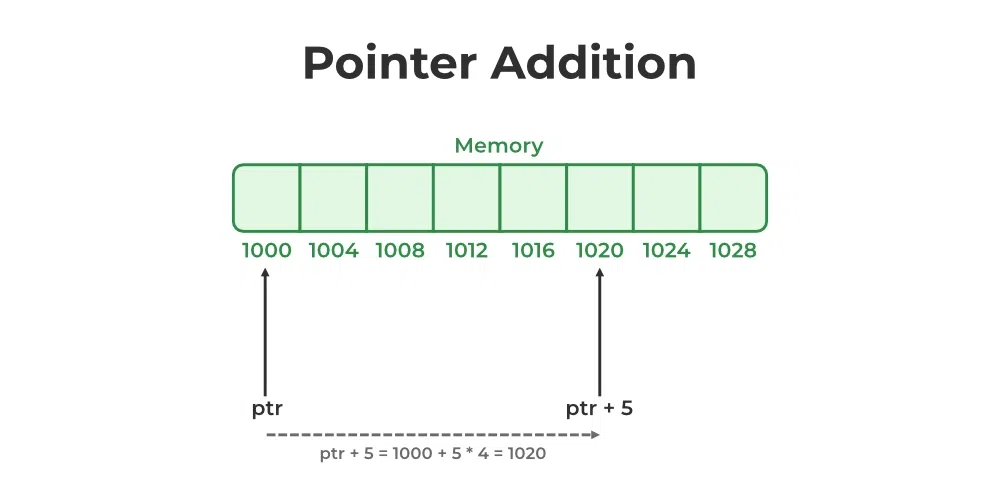
When you perform arithmetic on a pointer, C does something clever. If you have a pointer ptr and you calculate ptr + 1, the compiler doesn't just add 1 to the memory address. Instead, it advances the address by the size of the data type the pointer points to.
For an int pointer that points to address 2000 on a machine where int is 4 bytes, ptr + 1 results in the address 2004, not 2001. This "scaled" arithmetic is precisely what allows us to "walk" through the contiguous memory blocks of an array.
This leads to our second, more general key equivalence:
- The address of the
i-th element,&numbers[i], is the same asnumbers + i. - The value of the
i-th element,numbers[i], is the same as*(numbers + i).
The familiar square bracket notation numbers[i] is essentially "syntactic sugar" that the C compiler translates into the pointer expression *(numbers + i) behind the scenes.
Let's watch a video that visualizes this process of accessing array elements using pointer arithmetic.
#24 C Pointers and Arrays | C Programming For Beginners
This video from Programiz, "#24 C Pointers and Arrays", clearly demonstrates how to use pointer notation to access array elements.
Watch the following segments: Addresses and the Array Name: This part reinforces that the array name points to the first element's address. Pointer Arithmetic with + i: This section shows how numbers + i gives you the address of the i-th element. Dereferencing with *(numbers + i): Here, you'll see how to combine the dereference operator * with pointer arithmetic to get the element's value.
3. Traversing an Array with Pointers
Now that we know numbers[i] and *(numbers + i) are equivalent, we can write a loop to traverse an array using either notation.
The following code demonstrates both methods. Compile and run it to see that the output is identical.
#include <stdio.h>

int main(void) {
    int grades[5] = {88, 92, 75, 98, 85};
    int size = 5;

    printf("--- Traversing with Array Notation ---\n");
    for (int i = 0; i < size; i++) {
        printf("grades[%d] = %d\n", i, grades[i]);
    }

    printf("\n--- Traversing with Pointer Notation ---\n");
    for (int i = 0; i < size; i++) {
        // *(grades + i) is equivalent to grades[i]
        printf("*(grades + %d) = %d\n", i, *(grades + i));
    }

    return 0;
}
Using a Separate Pointer Variable
While you can use the array name directly, a very common C idiom is to use a separate pointer variable to traverse an array. This gives you more flexibility.
There is one crucial difference: an array name is a constant pointer. You cannot change the address it holds. An expression like grades++ will cause a compile error. However, a regular pointer variable is not constant. You can initialize it to the start of the array and then increment it freely.
int grades[5] = {88, 92, 75, 98, 85};
int *ptr = grades; // ptr now points to grades[0]

ptr++; // This is perfectly valid! ptr now points to grades[1].
Let's look at a tutorial that demonstrates this technique for both forward and backward traversal.
Mastering Array Traversal with Pointers in C
This tutorial from LabEx provides a hands-on guide to using incrementing and decrementing pointer variables for array traversal.
Read the following two sections: "Implementing Pointer Increment for Array Traversal": Focus on how the ptr++ operator is used within a loop to move from one element to the next. Note the compact *ptr++ syntax. "Implementing Backward Traversal using Pointer Decrement": See how you can initialize a pointer to the end of the array (&arr[4]) and use ptr-- to walk backwards.
4. Your Turn: Reverse an Array with Pointers
It's time to put these concepts into practice. Your task is to write a function that reverses an array in-place using pointers. This means you should modify the original array directly.
Here's the plan:
- Define a function
reverseArraythat takes a pointer to an integer (int *arr) and the array's size (int size) as arguments. - Inside the function, create two pointers:
startinitialized to the beginning of the array, andendinitialized to the last element of the array. - Use a
whileloop that continues as long as thestartpointer is pointing to an address before theendpointer. - Inside the loop:
- Swap the values pointed to by
startandend. - Increment the
startpointer (start++). - Decrement the
endpointer (end--).
- Swap the values pointed to by
Fill in the missing parts of the code below, compile it, and verify that it correctly reverses the array.
#include <stdio.h>

void reverseArray(int *arr, int size) {
    // 1. Create a pointer to the start of the array.
    int *start = arr;

    // 2. Create a pointer to the end of the array.
    // Remember, if size is 5, the last index is 4.
    int *end = arr + size - 1;

    int temp; // A temporary variable for swapping.

    printf("\nReversing array...\n");

    // 3. Loop until the pointers meet or cross.
    while (start < end) {
        // 4. Swap the values at the start and end pointers.
        temp = *start;
        // Your code here to complete the swap.

        // 5. Move the pointers towards the center.
        // Your code here to increment start and decrement end.
    }
}

int main(void) {
    int my_array[] = {10, 20, 30, 40, 50, 60};
    int size = 6;

    printf("Original array: ");
    for (int i = 0; i < size; i++) {
        printf("%d ", my_array[i]);
    }

    reverseArray(my_array, size);

    printf("Reversed array: ");
    for (int i = 0; i < size; i++) {
        printf("%d ", my_array[i]);
    }
    printf("\n");

    return 0;
}
Click here for the solution to the missing code.
  // Inside the while loop:

  // 4. Swap the values at the start and end pointers.
  temp = *start;
  *start = *end;
  *end = temp;

  // 5. Move the pointers towards the center.
  start++;
  end--;
Conclusion
In this lesson, we demystified one of C's most characteristic features: the deep connection between pointers and arrays. You've learned not just the theory but also the practical application of using pointers to efficiently move through and manipulate data in memory.
Key Takeaways:
- An array's name acts as a constant pointer to its first element.
- The array indexing notation
arr[i]is equivalent to the pointer notation*(arr + i). - Pointer arithmetic is automatically scaled by the size of the data type it points to, making it perfect for traversing arrays.
- You can traverse an array by incrementing (
++) or decrementing (--) a pointer variable that you've initialized to point into the array.
Preview of the Next Lesson:
We've now seen how pointers work and how they relate to arrays. In the next lesson, we will leverage this knowledge to understand how to pass pointers to functions. This will enable us to write functions that can modify their arguments—a technique often called "pass-by-reference"—which is essential for creating modular and powerful C programs.