Recommended resources
The freely available resources this lesson will direct you to.
Introduction
In our last lesson, we successfully set up distributed tracing, giving us the ability to visualize the entire journey of a request as it flows through our hierarchical agentic system. We saw how OpenTelemetry stitches together spans from different agents into a single, cohesive trace, providing a powerful narrative for debugging individual requests. However, to manage a production-grade system, looking at individual traces isn't enough. We need to aggregate this data to understand the overall health, performance, and cost of our service.
This lesson builds directly on that foundation. We will move from qualitative visualization to quantitative measurement by learning how to monitor two of the most critical metrics for any LLM-powered application: token usage and latency. You will learn how to extract this data from the traces you're already generating and how to create dedicated OpenTelemetry metrics for powerful, long-term monitoring. This will enable you to answer crucial questions like "Which agent is the most expensive?" and "Is our response time degrading under load?"—essential for managing both your budget and your user experience.
Part 1: Tokens - The Currency of LLMs
Before we can monitor tokens, it's worth taking a moment to solidify our understanding of what they are and why they are so fundamental to cost. As you know from your work with the Vercel AI SDK, every interaction with an LLM—both the prompt you send and the completion you receive—is measured and billed in tokens.
Most devs don't understand how LLM tokens work
This short video from Matt Pocock, titled "Most devs don't understand how LLM tokens work," provides an excellent and concise refresher on the topic. It clearly explains how text is converted into tokens and why different models can produce different token counts for the same input.
Please watch the first two sections to reinforce these core concepts: Tokens as Currency (Tokens as Currency): This part explains the billing model for input and output tokens. The Tokenization Mystery (What are tokens?): This section reveals how LLMs use a vocabulary to encode text into the numerical tokens they process.
The key takeaway is that token count is a direct proxy for cost. Therefore, tracking input_tokens and output_tokens per agent and per request is non-negotiable for financial observability.
Part 2: Monitoring from Span Attributes
The great news is that the OpenTelemetry instrumentation in the Vercel AI SDK, which you enabled in the previous lesson, already captures a wealth of information as span attributes. These are key-value pairs attached to each span that provide detailed context about the operation.
Token Usage Attributes
When you use functions like generateText or streamText with telemetry enabled, the SDK automatically records the token counts.
The official Vercel AI SDK documentation on telemetry details the specific data collected. This is our ground truth for what's available out-of-the-box.
Please review the "Span Details" section, focusing on these two subsections: Basic LLM span information: Notice the attributes ai.usage.completionTokens and ai.usage.promptTokens. These are the raw token counts for the output and input, respectively. Call LLM span information: This section shows the more standardized GenAI semantic convention attributes, such as gen_ai.usage.input_tokens and gen_ai.usage.output_tokens, which many observability platforms are designed to recognize.
With this data embedded in your traces, an observability platform can automatically parse it to display cost and usage information directly within the trace view.

Latency Attributes
Latency is even more fundamental: the duration of a span is the latency of that operation. When you create a span for an agent invocation (e.g., invoke_agent supervisor-agent), its duration directly tells you how long that agent took to complete its task.
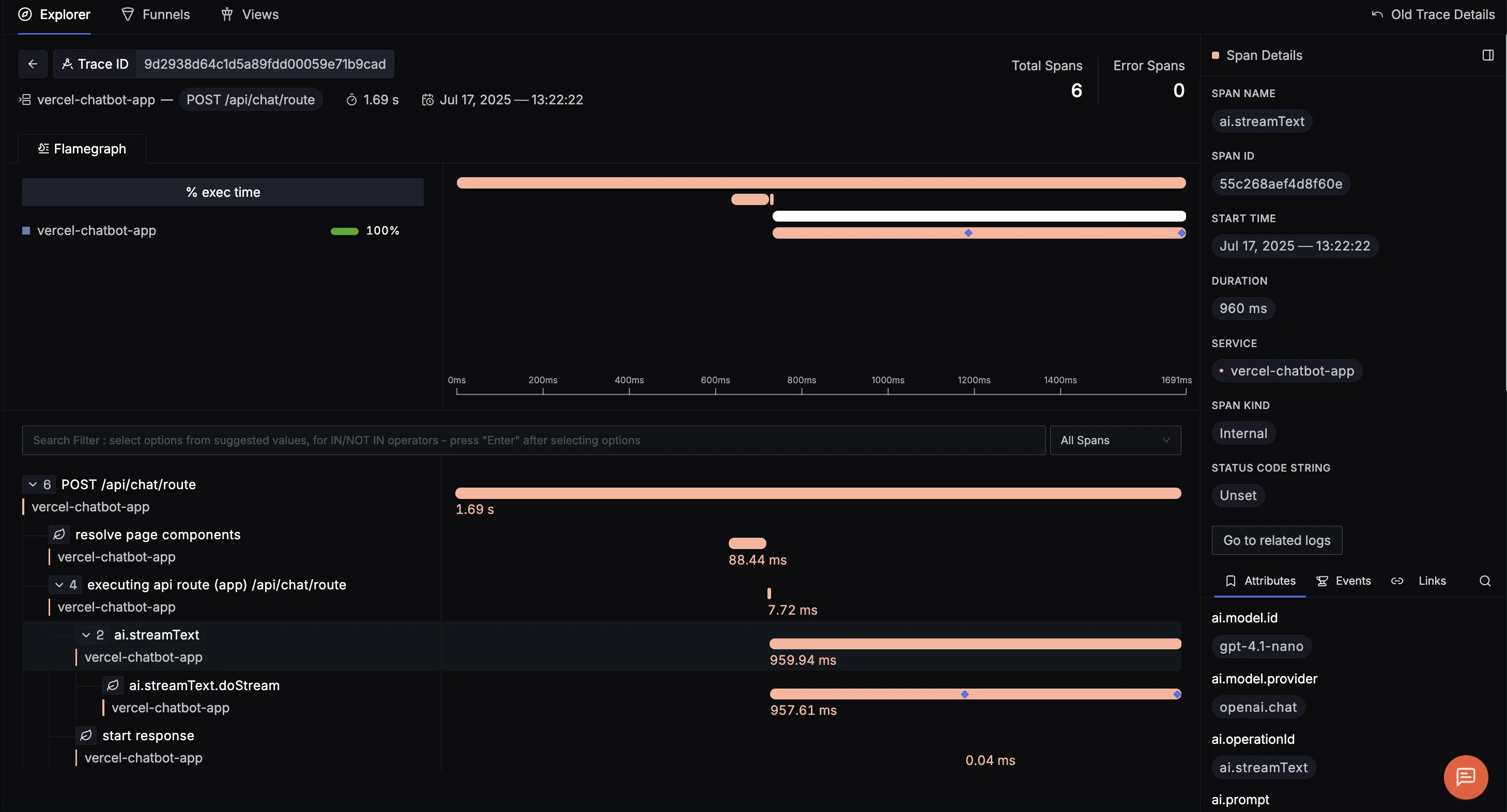
Furthermore, for streaming use cases, the AI SDK provides even more granular latency metrics that are vital for user-perceived performance.
Let's refer back to the AI SDK telemetry documentation one more time.
Now, examine the attributes listed under the streamText function section. Pay close attention to: ai.response.msToFirstChunk: This is the Time to First Token (TTFT), a crucial metric for how responsive your application feels to the user. ai.response.msToFinish: The total time until the stream is complete. ai.response.avgCompletionTokensPerSecond: The token throughput, a measure of the generation speed.
By inspecting these attributes on your spans, you can already perform detailed analysis on a per-request basis. However, to monitor trends, you need to aggregate this data.
Part 3: Creating Aggregate Metrics with OpenTelemetry
While individual traces are invaluable for debugging, monitoring requires a higher-level view. You need to answer questions like:
- What is the average latency of the
research-agentover the last hour? - What is our total token cost for the day across all tenants?
- What is the 95th percentile (P95) response time for our main API endpoint?
This is the domain of OpenTelemetry Metrics. We can use the OTel SDK to create instruments that record measurements, which are then exported to your observability backend for aggregation and visualization in dashboards. The two most common instruments we'll use are:
- Counter: A value that only increases (e.g.,
total_tokens_consumed,total_requests_processed,total_cost_usd). Perfect for tracking cumulative usage. - Histogram: Records a distribution of values (e.g.,
request_duration_ms,tokens_per_request). Your backend can use this to calculate averages, sums, and percentiles (like P50, P90, P95).
OpenTelemetry in Node.js - Traces, Metrics and Logs
The "OpenTelemetry in Node.js" video we used in the previous lesson has an excellent section on implementing metrics. It's a perfect practical guide to the API.
Please watch the section on Metrics Implementation (Metrics). This will walk you through: Acquiring a meter from the OTel API. Creating a counter to track the number of dice rolls. Creating a histogram to measure the duration of an HTTP request. The patterns shown here are directly applicable to what we need to build.
Part 4: A Production-Ready Instrumentation Pattern
Now, let's bring everything together. Given your experience, we can implement a robust and clean pattern using the Vercel AI SDK's middleware capabilities. Instead of scattering metric recording logic throughout your application, we can centralize it in a single middleware that wraps every LLM call.
The LanguageModelV3Middleware interface in the Vercel AI SDK allows you to intercept calls like doGenerate or doStream. This is the perfect place to start a span, measure duration, extract token usage from the result, and record our metrics.
The following guide provides an exemplary implementation of this pattern.
Vercel AI SDK OpenTelemetry Instrumentation - Complete AI ...
This guide from Base14 is a production-focused walkthrough of instrumenting the Vercel AI SDK. It aligns perfectly with your goal of building a robust agentic infrastructure.
Please read the following sections carefully: GenAI Semantic Convention Middleware: This is the core of the lesson. Study the createSemconvMiddleware function. Note how it: Creates a tracer and a meter. Initializes a opDurationHistogram, tokenUsageHistogram, and costCounter. Wraps the doGenerate call in a tracer.startActiveSpan. Calculates duration and records it to the duration histogram. Extracts inputTokens and outputTokens from the result and records them to the token histogram. Calculates cost in USD based on model pricing and increments the cost counter. Wrapping Models: This shows the simple utility function withSemconv used to apply the middleware to any AI SDK model instance. Multi-Provider Support: This demonstrates a practical approach to managing metadata and pricing for different LLM providers, which is essential for accurate cost tracking. FAQ: Tracking Cost: This short section explicitly states the end goal: enabling queries like sum(gen_ai.client.cost) by (gen_ai.provider.name) in your dashboards.
By implementing this middleware, you create a centralized, reusable, and highly effective mechanism for capturing the exact metrics needed to monitor token usage and latency per agent and per request. Every single LLM call made by any agent in your hierarchy will be automatically instrumented for cost and performance, with the data flowing into your observability platform for aggregation and analysis.
Conclusion
In this lesson, we have moved beyond simply observing traces to actively measuring the critical performance and cost indicators of our agentic system. You are now equipped with the knowledge and patterns to build a comprehensive monitoring solution.
Key Takeaways:
- Tokens and Latency are Key Metrics: Token usage directly maps to cost, while latency is fundamental to user experience and system performance.
- Spans Contain Rich Data: The Vercel AI SDK automatically enriches spans with valuable attributes like
ai.usage.promptTokensandai.response.msToFirstChunk. - OTel Metrics Enable Aggregation: Counters and Histograms allow you to aggregate data from individual requests into meaningful dashboards that track trends over time.
- Middleware is a Powerful Pattern: Using
LanguageModelV3Middlewareprovides a clean, centralized, and production-ready way to instrument every LLM call for traces and metrics without cluttering your business logic.
With this robust monitoring in place, you are no longer flying blind. You have the data to make informed decisions about optimization, cost control, and reliability. In our next lesson, "Diagnose a multi-agent failure scenario using the implemented logging and tracing tools," we will put this entire observability stack to the test by simulating a failure and using our new tools to pinpoint the root cause.