Recommended resources
The freely available resources this lesson will direct you to.
Introduction
In our last lesson, we established a solid foundation for observability by implementing structured logging. We saw how capturing agent events in a machine-readable JSON format, enriched with a manual requestId, allows us to group logs related to a single transaction. While powerful, this is only the first step. Sifting through raw log files, even when correlated, can still be a painstaking way to debug complex flows, especially for identifying latency issues or understanding intricate dependencies in your agent hierarchy.
This lesson takes the next leap forward by formalizing the concept of correlation IDs through distributed tracing. We will move beyond simply tagging logs to creating a complete, visual narrative of a request's journey across your entire system. You will learn how to use OpenTelemetry (OTel) to trace a single request as it flows from the orchestrator, through supervisor agents, and down to individual worker agents, stitching together every operation into a single, cohesive view. This will provide you with a "superpower" for debugging: the ability to see exactly where time is spent and where failures occur in your distributed agentic architecture.
From Correlated Logs to Distributed Traces
Structured logs with a correlation ID are like a detailed, timestamped list of events. You can filter for a traceId and get a chronological report of what happened. This is immensely useful, but it doesn't intuitively show causality, parallelism, or bottlenecks.
Distributed tracing builds on this by adding two key components:
- Hierarchy: Spans (representing individual operations) are linked in parent-child relationships, creating a tree structure that mirrors the execution flow of your code.
- Timing: Each span records a precise start and end time, allowing you to visualize not just the sequence but also the duration and latency of every part of the request.
The result is a "flame graph," a powerful visualization that instantly reveals the story of a request.
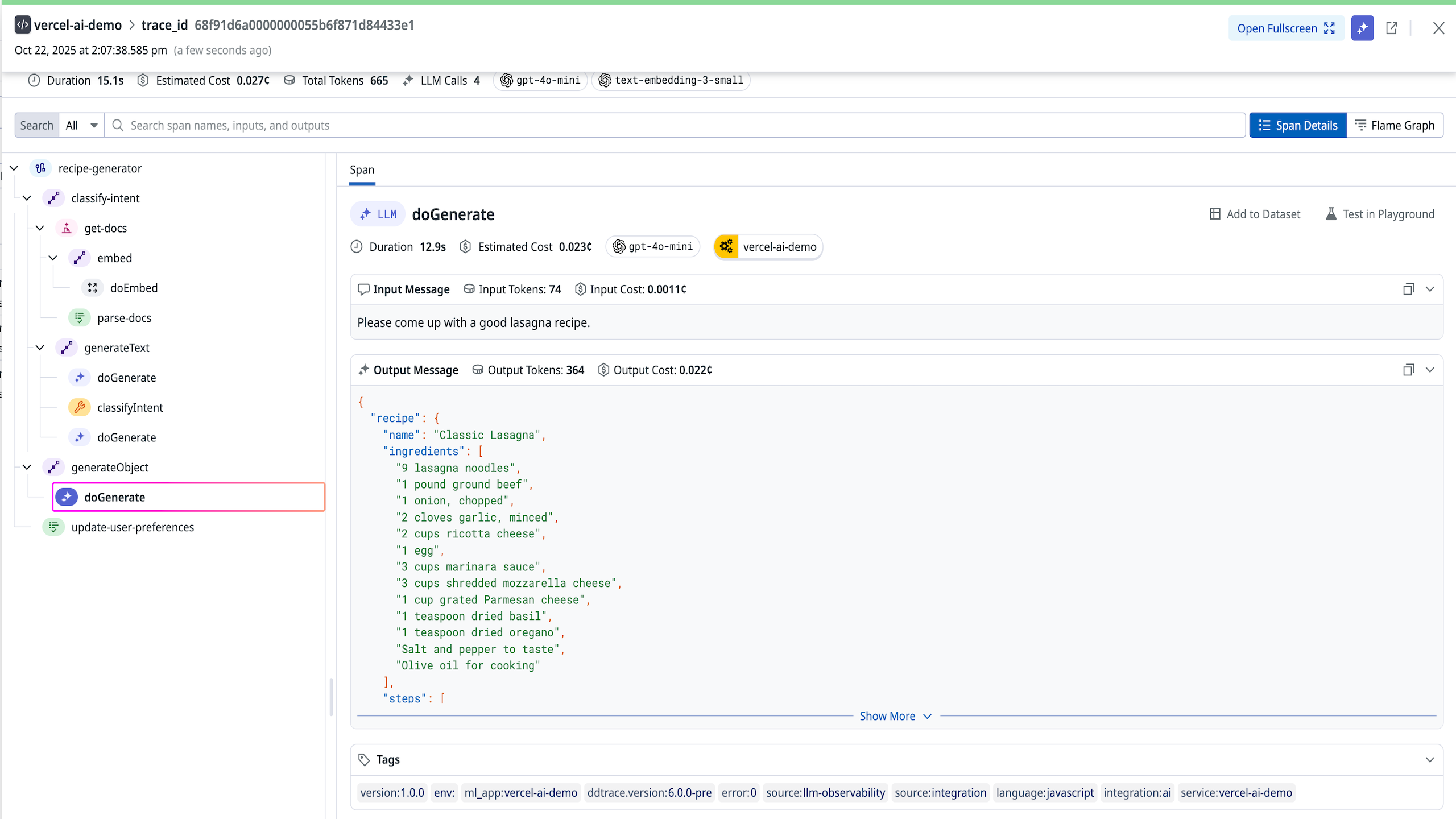
Let's explore the core problem that distributed tracing solves in more detail.
Distributed Tracing Explained: OpenTelemetry & Jaeger Tutorial
The video "Distributed Tracing Explained" from the DevOps & AI Toolkit channel provides an excellent explanation of why traditional logs and metrics fall short in distributed systems, which share many of the same challenges as our multi-agent architecture.
Please watch the first two segments: The Problem with Logs and Metrics (The Problem): This section sets the stage by describing the difficulty of debugging intermittent slowdowns in a complex system where individual components seem healthy. It perfectly frames the need for a tool that can follow a single user action across service boundaries. Traces, Spans, and Context Propagation (The Solution): Here, the video introduces the fundamental building blocks of distributed tracing: traces, spans, and the "magic" of context propagation that ties them together. Pay close attention to these definitions, as they are central to our work today.
The Anatomy of a Trace
As you just saw, OpenTelemetry provides the vocabulary for distributed tracing. Let's formalize these key terms:
- Trace: Represents the entire end-to-end journey of a request. It is defined by a unique Trace ID. This
traceIdis the formal, industry-standard version of the correlation ID we've been discussing. - Span: Represents a single, named, and timed operation within a trace. A span can be an HTTP request, a database query, a function call, or, in our case, an agent invocation or a tool execution. Each span has its own unique Span ID.
- Parent-Child Relationship: Spans can be nested. A span created inside another span becomes its child. The child span records the Parent Span ID. This is how the hierarchy is built. The very first span in a trace is called the root span.
- Attributes: Key-value pairs that provide metadata about a span (e.g.,
http.method="GET",db.statement="...",gen_ai.agent.name="research-agent"). - Events: Timestamped messages within a span, effectively structured logs attached to a specific operation.
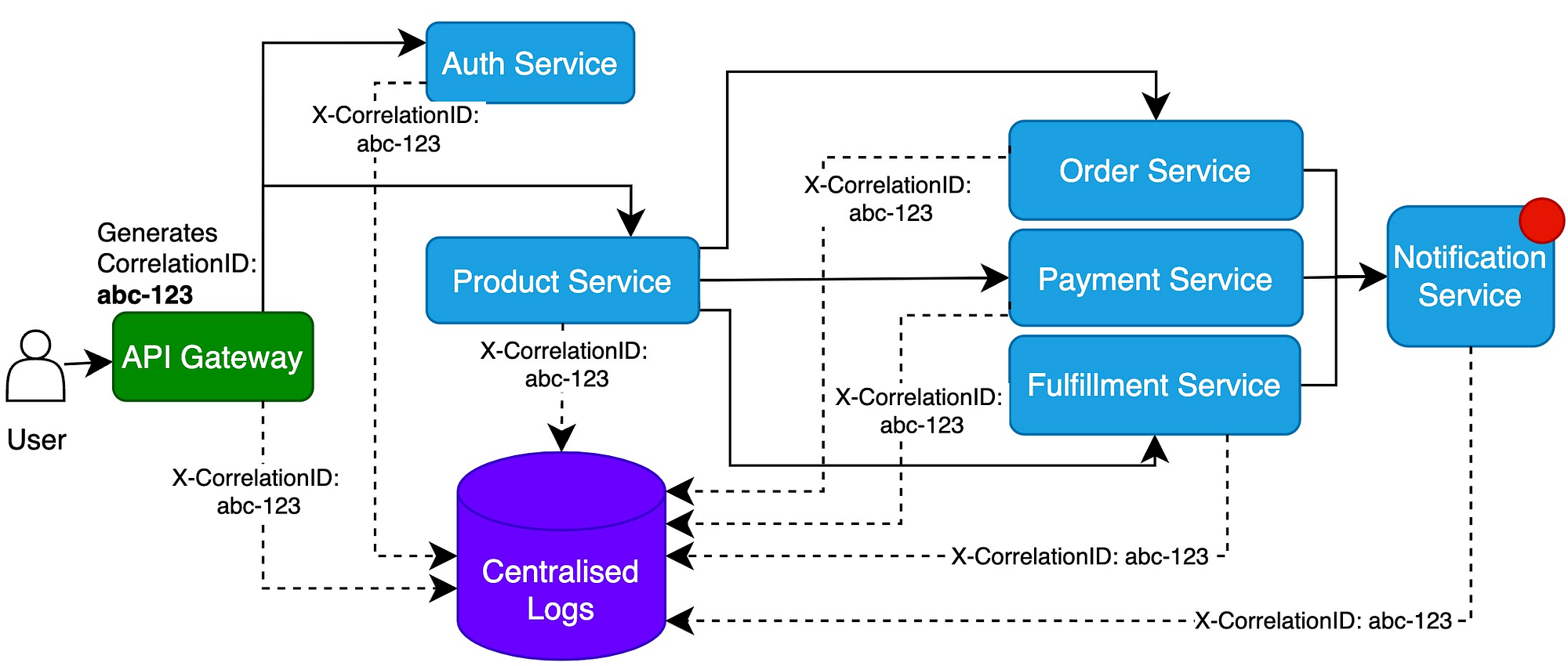
- Context Propagation: The mechanism by which the
traceIdand currentspanId(which becomes the next span's parent ID) are passed between processes. In a system of agents communicating over HTTP, this is typically done by injecting and extracting standardized HTTP headers.
The diagram below illustrates this flow. The API Gateway generates a CorrelationID (our traceId) and passes it in the header of every subsequent request it makes. Each service that receives this header continues the same trace.
Instrumenting Your Agents for Tracing
Given your background in Node.js and your work in the previous lesson, you already have the basic OTel SDK setup. Now, we'll enhance it to emit rich, meaningful traces for your agentic workflows.
While auto-instrumentation is great for common libraries (like Express or fetch), the real power for AI observability comes from creating custom spans that describe the unique logic of your agents. For this, the OpenTelemetry community has developed a set of Semantic Conventions for Generative AI. These are standardized names for spans and attributes, ensuring that traces from AI applications are consistent and understandable across different tools.
OpenTelemetry for AI Agents: Observability, Tracing, and the GenAI ...
The article "OpenTelemetry for AI Agents" from Zylos.ai is a forward-looking but highly relevant resource that details the emerging standards for tracing AI systems. It provides the specific vocabulary we need.
Please read the section The OTel GenAI Semantic Conventions. Focus on understanding the three main types of spans and their key attributes: LLM Client Spans: For calls to models like Anthropic or OpenAI. Auto-instrumentation libraries like OpenLLMetry often handle these. Agent Spans: High-level spans like invoke_agent that represent the execution of an entire agent. These are perfect for wrapping our supervisor and worker agents. Tool Execution Spans: Spans like execute_tool for when an agent uses one of its tools. Notice the example hierarchy provided; this is exactly the kind of structure we aim to build.
To implement this, you'll use the tracer.startActiveSpan function you saw in the video tutorials. This function is particularly useful because it automatically manages the active context, ensuring any spans created within its callback are correctly nested as children.
Here is a conceptual example of how you might instrument an agent's main execution function:
import { trace, SpanKind, SpanStatusCode } from '@opentelemetry/api';

// Get a tracer instance, typically once per file/module
const tracer = trace.getTracer('my-agent-library', '1.0.0');

async function invokeSupervisorAgent(userInput: string) {
  // Create the root span for the agent invocation
  return tracer.startActiveSpan(
    `invoke_agent supervisor-agent`, // Span name using GenAI conventions
    {
      kind: SpanKind.INTERNAL, // This is an internal process, not a client/server call
      attributes: {
        'gen_ai.operation.name': 'invoke_agent',
        'gen_ai.agent.name': 'supervisor-agent',
        'input.prompt': userInput,
      },
    },
    async (agentSpan) => {
      try {
        // ... agent logic to classify task and delegate ...

        // This call will be automatically traced as a child span
        // if the 'delegateToWorker' function is also instrumented or
        // uses an auto-instrumented HTTP client.
        const result = await delegateToWorker('worker-researcher', 'some sub-task');

        agentSpan.setAttribute('output.result', JSON.stringify(result));
        agentSpan.setStatus({ code: SpanStatusCode.OK });
        agentSpan.end(); // Always end your span!
        return result;
      } catch (err) {
        agentSpan.recordException(err as Error);
        agentSpan.setStatus({ code: SpanStatusCode.ERROR, message: (err as Error).message });
        agentSpan.end();
        throw err;
      }
    }
  );
}
This pattern of wrapping key functions in startActiveSpan is the core technique for manual instrumentation.
Propagating Context Across the Hierarchy
Creating nested spans within a single service is straightforward. The crucial challenge in a distributed system is propagating the trace context across process boundaries—for instance, when your orchestrator calls a supervisor agent over an HTTP API.
This is where context propagation comes in. The OpenTelemetry SDK automates this for you when you use auto-instrumented HTTP clients.
- Injection: When the client (e.g., your orchestrator) makes an outgoing HTTP request, the OTel SDK injects the current trace context into the request headers. The standard header is
traceparent. - Extraction: When the server (e.g., your supervisor agent) receives the request, its OTel SDK extracts the context from the
traceparentheader. - Continuation: The server then creates its own spans as children of the context it received, thus continuing the trace seamlessly.
The following resource provides an excellent, from-the-ground-up explanation of this process.
How to Build Request Tracing in Node.js
This article from OneUptime is perfect for an experienced developer as it first builds request tracing manually before introducing OpenTelemetry, giving you a deep understanding of the mechanics.
Please focus on these two parts: Propagating Context in HTTP Headers: This section shows exactly how you would manually wrap fetch or use an Axios interceptor to add trace headers (x-trace-id, x-span-id, etc.) to outgoing requests. This is what OpenTelemetry's auto-instrumentation does for you automatically. Correlating Traces Across Services: This provides a full multi-service example (API Gateway -> Order Service -> Payment Service). Notice how fetch is used to call the downstream service. With the OTel SDK and HTTP auto-instrumentation initialized in each service, the trace context propagation happens transparently. This is a direct parallel to your orchestrator-agent architecture.
To make this fully production-ready, you would configure each of your services (orchestrator, agents) with the OTel SDK. The video below walks through the full setup, from installing packages to configuring exporters that send trace data to a backend for visualization.
OpenTelemetry in Node.js - Traces, Metrics and Logs
The video "OpenTelemetry in Node.js" by Better Stack provides a complete, practical walkthrough. It's a great reference for ensuring your setup is correct.
Review these sections to see the full implementation: SDK Setup and Auto-instrumentation (Setup and Auto-instrumentation): This covers initializing the NodeSDK and enabling auto-instrumentation. When you run your application with this setup, any fetch calls between agents will automatically carry the trace context. Creating Custom Spans (Creating Custom Spans): This is a great practical demonstration of using tracer.startActiveSpan to add custom business-logic spans, just as we discussed for invoke_agent and execute_tool. Configuring Exporters (Configuring Exporters): This final piece shows how to replace the Console...Exporter with an OTLP...Exporter to send data to a real backend like Jaeger or an observability platform.
By combining auto-instrumentation for network calls with manual instrumentation for your agent-specific logic, you get the best of both worlds: effortless context propagation and rich, domain-specific trace data.
Conclusion
In this lesson, we have elevated our observability from simple logging to full-fledged distributed tracing. You've seen how a trace provides a complete, hierarchical, and timed narrative of a request's journey, making it an indispensable tool for debugging performance and reliability in a complex agentic system.
Key Takeaways:
- Distributed Tracing visualizes the end-to-end flow of requests across service or agent boundaries, showing both timing and relationships.
- Traces are composed of Spans, which represent individual units of work and are linked in a parent-child hierarchy.
- The
traceIdacts as the ultimate correlation ID, linking all operations for a single request. - Context Propagation is the mechanism that passes the trace context (e.g., in HTTP headers like
traceparent) between agents, allowing OpenTelemetry to automatically stitch the trace together. - Using GenAI Semantic Conventions for span names and attributes (
invoke_agent,execute_tool) makes your traces more meaningful and standardized.
The traces you can now generate are not just for visualization; they are a rich source of data. In our next lesson, "Monitor token usage and latency per agent and per request," we will learn how to extract metrics from these traces. We'll see how to aggregate data like token counts and durations to create dashboards that monitor the cost, performance, and health of your entire agentic infrastructure.