Recommended resources
The freely available resources this lesson will direct you to.
- Building durable Agents with Workflow DevKit & AI SDK - Peter Wielander, Vercelwww.youtube.com
- An introduction to the Workflow Development Kitwww.youtube.com
- From Black Box to Traceable Swarm: OpenTelemetry Patterns for AI ...dev.to
- Observability and Tracing for the Vercel AI SDK - Langfusejs-sdk-v3.docs-snapshot.langfuse.com
Introduction
Welcome to the final lesson in our module on observability and debugging. In our previous lessons, we have meticulously built an observability stack, first by implementing distributed tracing to visualize request flows and then by adding metrics to monitor token usage and latency. You now have the instruments to see what is happening in your agentic system. Today, we put those instruments to the test.
This lesson is purely practical. We will shift from building tools to using them for their ultimate purpose: diagnosing and resolving failures. We will simulate a realistic multi-agent failure, and I will guide you through a systematic investigation process using the very traces and metrics you've learned to implement. This is the crucial skill that separates a prototype from a production-ready service, allowing you to maintain reliability and user trust.
A Taxonomy of Failure in Agentic Systems
Before we dive into our specific scenario, it's helpful to understand the common failure modes in multi-agent systems. When a request goes wrong, the cause usually falls into one of these categories:
- LLM-Level Failures: The model itself misbehaves. This includes generating factually incorrect information (hallucinations), failing to follow instructions, or producing malformed outputs like invalid JSON when a specific schema is required.
- Tool-Execution Failures: An agent successfully invokes a tool, but the tool fails. This is often due to external factors like network errors, API rate limits, authentication issues, or simply bugs in the tool's own logic.
- Orchestration & Logic Failures: The error lies in the "connective tissue" between agents. Examples include a supervisor agent delegating to the wrong worker, failing to propagate critical context, or getting stuck in a loop between two agents.
- Infrastructure Failures: The underlying platform causes a problem. This could be a serverless function timing out on a long-running task, a database connection being dropped, or out-of-memory errors.
Understanding these categories helps you form hypotheses as you begin your investigation.
The Scenario: A Faulty Research Report
Imagine a user submits a request to our system: "Generate a research report on Vercel, including a summary of their recent product announcements."
Our orchestrator routes this to a supervisor-agent, which delegates the sub-task "Find recent product announcements for Vercel" to a research-agent. The research-agent has a tool, search_web, which in turn calls an external search engine API.
After a long wait, the user receives a report that is incomplete and nonsensical. The summary is garbled, and there's no mention of product announcements. This is our starting point—the user-facing symptom.
The Investigation: From Symptom to Root Cause
As a senior developer, you know the first step is to reproduce the issue or find the exact request that failed. Let's assume the user provides a request ID, which we've wisely propagated as the traceId.
Step 1: Find and Analyze the Trace
We'll use our observability platform (e.g., Langfuse, which is shown in the images) to pull up the full trace for this request. The initial view might look something like this.
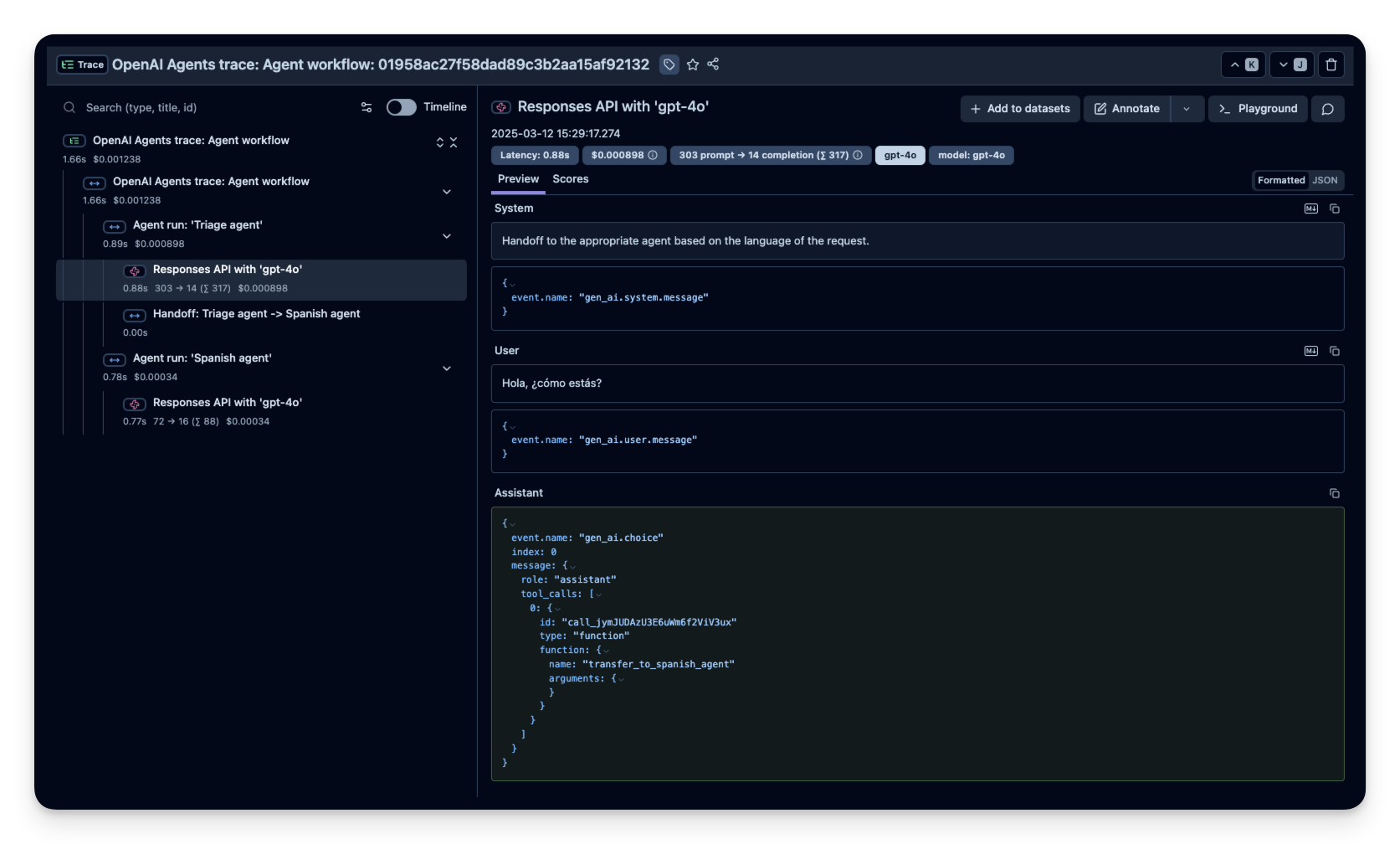
Upon examining the trace, we immediately look for visual cues of failure:
- Error Status: Spans marked in red indicate an explicit error was thrown and caught.
- Unusual Latency: A span that is unexpectedly long could indicate a timeout or a performance bottleneck. A span that is too short might mean a process exited prematurely.
- Missing Spans: If the
research-agentwas supposed to call thesearch_webtool, but there is no correspondingtool_callspan, it points to a logic failure within the agent.
In our scenario, we scan the trace and see a tool_call span for search_web marked with an error.
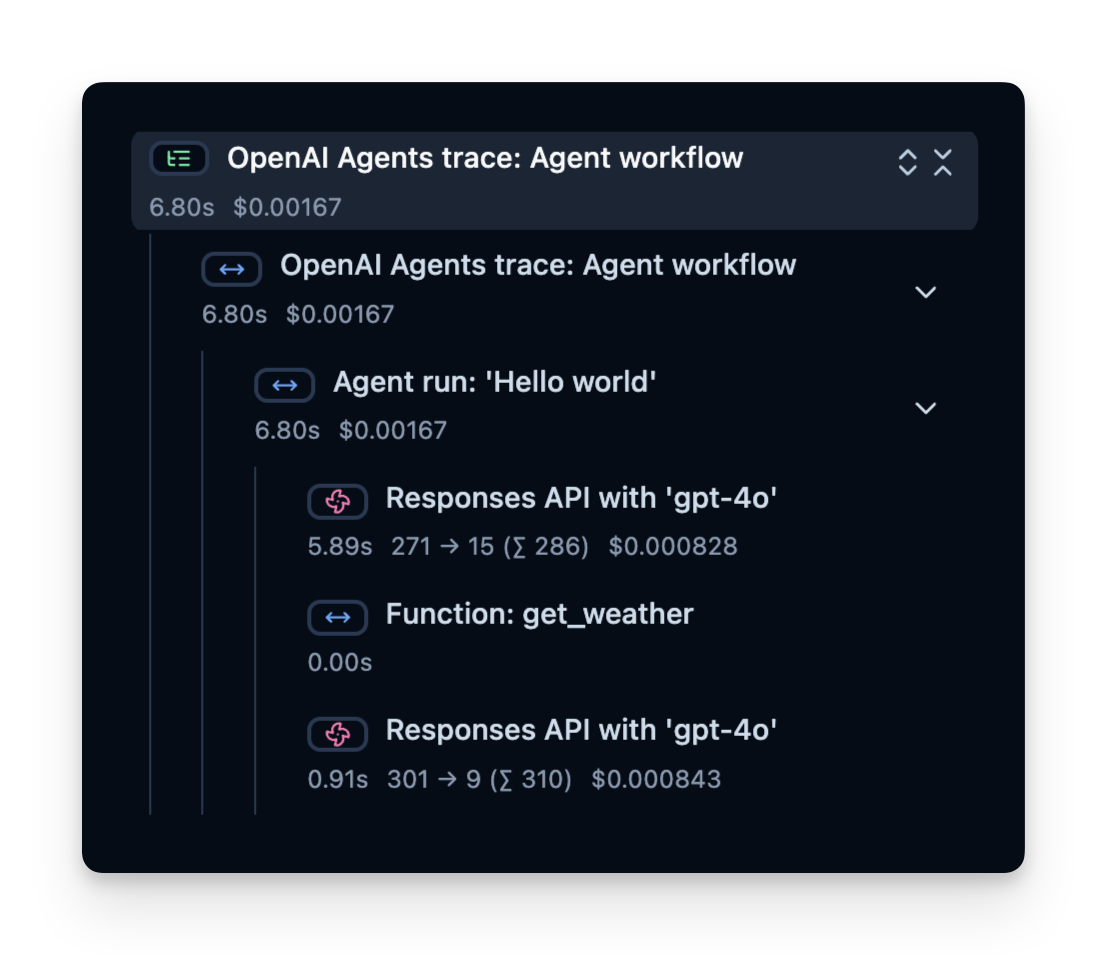
Step 2: Drill Down into the Failed Span
Now that we've identified the point of failure, we click on the erroneous span to inspect its attributes, events, and logs. Here, we'd find attributes like:
tool.name:search_webtool.arguments:{"query": "Vercel recent product announcements"}error.message:API rate limit exceeded. Please try again later.error.type:429 Too Many Requests
We have found the root cause: the external search API used by our tool is rate-limiting our requests. The research-agent received this error, couldn't complete its task, and returned a poorly formed or empty result to the supervisor-agent. The supervisor, not having a robust strategy for handling failed sub-tasks, attempted to synthesize a report from incomplete data, leading to the garbled output the user saw.
Mitigating Failures with Durable Workflows
This type of transient failure—rate limits, network blips, temporary service unavailability—is extremely common in distributed systems. While we could implement custom retry logic with exponential backoff for every tool, a more robust and scalable solution is to use a durable workflow engine.
The Vercel Workflow Development Kit, which is built to integrate with the AI SDK, is designed precisely for this. It allows you to transform your agentic logic into durable, resumable, and observable workflows.
An introduction to the Workflow Development Kit
To understand the motivation, let's watch a few clips from "An introduction to the Workflow Development Kit" by Vercel. This video clearly articulates the problem and the proposed solution.
Focus on these key segments: The Problem (The Problem): The speaker explains why simple serverless functions are brittle for complex, long-running agent tasks. The Solution (The Solution): Introduction to useStep and how workflows can be suspended and resumed, making them resilient to infrastructure limits. Built-in Observability (Observability): This shows that workflows automatically generate their own detailed traces. A Real-World Example (Real-World Example): See how a complex multi-agent system for healthcare uses the workflow's observability UI to trace a running job.
By wrapping our tool calls and agent invocations in useStep, the workflow engine automatically handles state management and retries. If our search_web tool fails with a 429 error, the engine can automatically wait and retry the step.
Building durable Agents with Workflow DevKit & AI SDK - Peter Wielander, Vercel
This talk, "Building durable Agents with Workflow DevKit," goes deeper into the implementation details and benefits.
Please watch these sections to see how this directly solves our problem: Marking Steps (Marking Steps): See how easy it is to wrap a tool's execute function with useStep. The speaker explicitly mentions that this enables automatic caching and retries if the step fails. Inspecting Runs (Inspecting Runs): This demonstrates the npx workflow web command, which provides a local, trace-like UI to inspect every step, its inputs, and its outputs. This is another powerful diagnostic tool. Failure Handling (Failure Handling): In this Q&A, the speaker discusses timeouts, state persistence on failure, and how the system is designed to retry and resume from the point of failure, ensuring no work is lost.
Using a durable workflow engine transforms our debugging process. Instead of just identifying the failure, the trace might now show a failed step followed by a successful retry, with the overall workflow completing correctly. The problem fixes itself.
Hardening the Observability Layer
Our investigation was successful, but a production system requires a production-grade observability layer. Simply logging everything naively can introduce security risks and even cause application crashes.
This article provides critical, battle-tested patterns for instrumenting agent swarms safely.
From Black Box to Traceable Swarm: OpenTelemetry Patterns for AI ...
This article from dev.to addresses the subtle but critical issues that arise when instrumenting complex AI systems in production.
Please read these sections carefully: The Standardized Agent Event: This section proposes a crucial concept: defining a strict event schema (plan, model_call, tool_call, etc.) to bridge the gap between unstructured LLM outputs and structured OTel spans. The Hardened OTel Emitter: This is the core of the article. Study the safeStringify function. It solves two critical problems: Security: It redacts sensitive keys like password or api_key before they are sent to your logging provider. Stability: It prevents TypeError: Converting circular structure to JSON crashes, which can easily happen with complex, nested tool arguments. Pitfalls and Gotchas: This section is essential for any senior developer. It warns about: Async Context Dropping: A common Node.js issue where traces become fragmented. Payload Size Limits: Why you shouldn't log massive RAG documents directly into span attributes. High Cardinality Nightmare: The danger of using dynamic user input in span names, which can lead to massive cost overruns with your observability vendor.
By adopting these patterns, you ensure that your observability system is not only powerful but also secure, stable, and cost-effective.
Conclusion
In this lesson, you've put your observability knowledge into practice, transforming from a builder of tools to a skilled investigator. You've learned how to follow the breadcrumbs from a high-level symptom down to the root cause buried deep within a multi-agent interaction.
Key Takeaways:
- Systematic Debugging: The process of diagnosing failures is systematic: start with the symptom, find the corresponding trace, identify anomalies (errors, latency), and drill into the specific span attributes to find the root cause.
- Traces Tell the Story: A well-instrumented trace is a narrative of your request. It's the single most powerful tool for understanding the complex, distributed behavior of an agentic system.
- Durability Solves Transient Failures: Many common errors (rate limits, network issues) can be automatically mitigated by building on a durable workflow engine like the Vercel Workflow DevKit.
- Production-Grade Observability is Hardened: A robust observability pipeline must be secure (redacting PII), stable (handling circular JSON), and cost-effective (avoiding high-cardinality data).
You have now completed the Observability and Debugging module. You are fully equipped to not only build a complex agentic system but also to confidently operate it in a production environment. In our next module, we will begin the final phase of our course: End-to-End System Integration, where we will assemble all the components we've built into a single, cohesive, multi-tenant application.