Recommended resources
The freely available resources this lesson will direct you to.
Welcome back! In our previous lessons, we built two essential utilities for our crawler: a RobotParser to respect robots.txt files and a normalize_url function to bring consistency to the URLs we discover. We now have the tools to manage which pages we can crawl and to ensure we don't process the same page multiple times under different URLs.
Today, we will assemble these pieces into a working web crawler. This lesson focuses on building a single-threaded web crawler that systematically explores a website. This serves as the fundamental building block for the more advanced, concurrent crawler we will develop later in this module.
Our goals for this lesson are to:
- Model the web as a graph and use Breadth-First Search (BFS) for traversal.
- Implement the core crawling loop using a queue for the "frontier" of URLs to visit.
- Use a set to track visited URLs, preventing loops and redundant work.
- Integrate our
normalize_urlfunction to handle link discovery cleanly.
Let's begin by visualizing the crawling process.
1. Web Crawling as Graph Traversal
At its core, a web crawler's job is to traverse a graph. In this graph:
- Nodes are the individual web pages.
- Edges are the hyperlinks (
<a>tags) connecting one page to another.
The goal is to start at a given node (the "seed URL") and visit every reachable node within a certain boundary, typically the same website domain. The algorithm we use for this traversal is Breadth-First Search (BFS).
BFS is an excellent choice for a web crawler because it explores the graph layer by layer. It will find all pages that are one click away from the start page, then all pages that are two clicks away, and so on. This is often more desirable than Depth-First Search (DFS), which would follow a single path of links as deep as it could go before backtracking.
To understand how BFS works algorithmically, let's watch a short, clear explanation.
Breadth First Search (BFS): Visualized and Explained
This video from Reducible provides a fantastic visual and step-by-step explanation of the Breadth-First Search algorithm.
Watch the first 5 minutes of the video (00:00 - 05:12). Focus on two key aspects: The Intuition (00:30 - 02:36): How BFS explores nodes level by level, finding the shortest path in an unweighted graph. The Implementation (02:36 - 05:12): Pay close attention to the roles of the queue (to store nodes to visit) and the visited list/set (to prevent reprocessing nodes).
As the video demonstrates, the two central data structures for BFS are:
- A queue to hold the URLs we've discovered but haven't visited yet. This is often called the "frontier."
- A visited set to keep track of all the URLs we've already processed, ensuring we don't get stuck in infinite loops or waste time re-crawling pages.
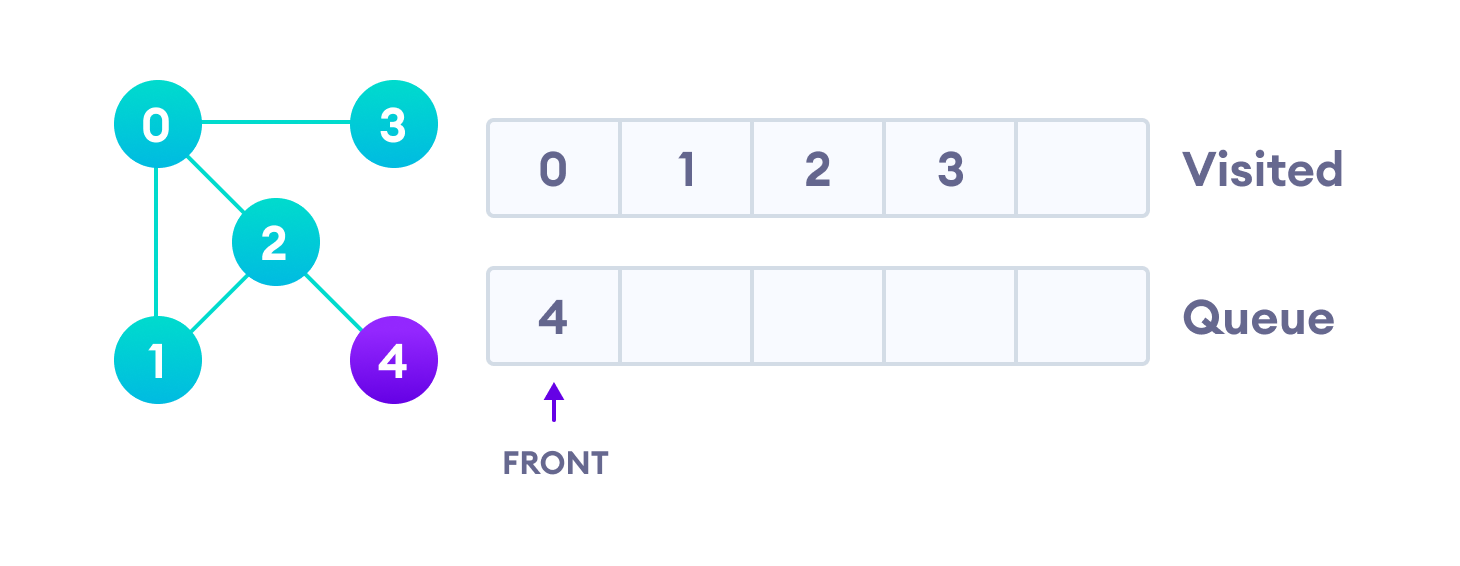
2. Implementing the Single-Threaded Crawler
Now, let's translate the BFS algorithm into a Python web crawler. We will use the requests library to fetch HTML and BeautifulSoup to parse it and extract links.
The following article provides an excellent, practical code implementation that we will adapt.
How to crawl the website with Python
The article 'How to crawl the website with Python' from the WebcrawlerAPI Blog gives a clear, step-by-step guide to building a simple crawler. We will focus on the section that implements the multi-page crawler logic.
First, read the section "Installing the Required Libraries" to see the tools we'll use. Then, focus on the section "Following Links to Crawl Multiple Pages". Analyze the Python code block provided. Notice how it directly maps to the BFS algorithm: it uses a deque as a queue and a visited set to track progress.
Building on the code from the article, we can construct our single-threaded crawler. The logic is a direct implementation of the flowchart and BFS algorithm:
- Initialize a
dequewith the seed URL. - Initialize a
setto store visited URLs. - Loop as long as the
dequeis not empty:
a. Dequeue the next URL to process.
b. If the URL has already been visited,continue.
c. Add the URL to thevisitedset and process it (e.g., print it).
d. Fetch the page's HTML. Handle potential errors like timeouts or HTTP errors.
e. Parse the HTML to find all<a>tags with anhrefattribute.
f. For each link found:
i. Use ournormalize_urlfunction to create an absolute, canonical URL.
ii. Check if the normalized URL is within the same domain as the seed URL.
iii. If it's a valid, same-domain URL, enqueue it.
Putting It All Together
Here is a complete, runnable Python script for our single-threaded crawler. It includes the normalize_url function from our previous lesson for self-containment. Notice how all the pieces—URL normalization, BFS traversal, and domain checking—fit together.
import requests
from collections import deque
from urllib.parse import urljoin, urlsplit, urlunsplit, parse_qs, urlencode
from bs4 import BeautifulSoup
import time

def normalize_url(base: str, url: str) -> str:
    """Resolves a URL against a base and normalizes it."""
    absolute_url = urljoin(base, url)
    parts = urlsplit(absolute_url)
    scheme = parts.scheme.lower()
    hostname = parts.netloc.lower()
    if hostname.startswith('www.'):
        hostname = hostname[4:]
    if (scheme == 'http' and hostname.endswith(':80')) or \
       (scheme == 'https' and hostname.endswith(':443')):
        hostname = hostname.rsplit(':', 1)[0]
    path = parts.path
    if len(path) > 1 and path.endswith('/'):
        path = path[:-1]
    if not path:
        path = '/'
    query_params = parse_qs(parts.query)
    tracker_params = {'utm_source', 'utm_medium', 'utm_campaign', 'utm_term', 'utm_content'}
    filtered_params = {k: v for k, v in query_params.items() if k not in tracker_params}
    query = urlencode(sorted(filtered_params.items()), doseq=True)
    fragment = ''
    return urlunsplit((scheme, hostname, path, query, fragment))

def single_thread_crawler(seed_url: str, max_pages: int = 50):
    """
    Crawls a website starting from a seed URL using single-threaded BFS.

    Args:
        seed_url: The starting URL for the crawl.
        max_pages: The maximum number of pages to crawl.
    """


    # Use a deque for an efficient queue implementation (BFS)
    frontier = deque([seed_url])


    # Use a set for O(1) average time complexity checks of visited URLs
    visited = set()


    # Get the domain from the seed URL to stay on the same site
    domain = urlsplit(seed_url).netloc

    crawled_count = 0
    print(f"Starting crawl at {seed_url} within domain {domain}\n" + "="*40)

    while frontier and crawled_count < max_pages:
        current_url = frontier.popleft()


        # Skip if we have already processed this URL
        if current_url in visited:
            continue


```grasp
{
  "type": "exercise",
  "id": "5ea4b732-6673-4af1-abc0-614f0fc9ffc3"
}
    # Mark as visited and process
    visited.add(current_url)
    crawled_count += 1
    print(f"[{crawled_count}/{max_pages}] Crawling: {current_url}")

    try:


        # Add a small delay to be polite to the server
        time.sleep(0.1)
        response = requests.get(current_url, timeout=5, headers={'User-Agent': 'MyCoolCrawler/1.0'})
        response.raise_for_status() # Raise an exception for bad status codes (4xx or 5xx)


        # Check if content is HTML before parsing
        if 'text/html' not in response.headers.get('Content-Type', ''):
            continue

    except requests.exceptions.RequestException as e:
        print(f"  -> Failed to fetch {current_url}: {e}")
        continue


    # Parse the HTML with BeautifulSoup to find all links
    soup = BeautifulSoup(response.content, 'html.parser')

    for link_tag in soup.find_all('a', href=True):
        link = link_tag['href']


        # Normalize the discovered link relative to the current URL
        normalized_link = normalize_url(current_url, link)


        # Check if the link is within the same domain and not yet visited/queued
        if urlsplit(normalized_link).netloc == domain:
            if normalized_link not in visited and normalized_link not in frontier:
                frontier.append(normalized_link)

print("="*40 + f"\nCrawl finished. Total pages visited: {len(visited)}")
if name == 'main':
# We use 'quotes.toscrape.com', a website designed for scraping.
start_url = "http://quotes.toscrape.com"
single_thread_crawler(start_url, max_pages=15)
**To run this code:**
1.  Save it as `crawler.py`.
2.  Make sure you have the necessary libraries installed: `pip install requests beautifulsoup4`.
3.  Run it from your terminal: `python crawler.py`.

You will see it start at the seed URL and discover new pages, printing them as it goes, stopping after 15 pages. This is a real, working web crawler.

---


```grasp
{
  "type": "exercise",
  "id": "cb50b83a-3480-47fc-815e-3e30bb57c9a9"
}
Conclusion
In this lesson, you successfully built a single-threaded web crawler from the ground up. You've seen how a core computer science algorithm, Breadth-First Search, can be applied to solve a real-world problem. By combining this with the normalize_url utility from our last session, you've created a robust foundation for web exploration.
Key Takeaways:
- Web crawling can be modeled as a graph traversal problem.
- Breadth-First Search (BFS) is a natural fit for web crawling, exploring a site layer by layer.
- The essential data structures for a BFS-based crawler are a queue (
collections.deque) for the frontier and a set for tracking visited URLs. - A robust implementation requires error handling for network requests and logic to stay within a specified domain.
Next Lesson Preview
Our current crawler works, but it's slow. Because it's single-threaded, it processes only one page at a time, spending most of its time waiting for network responses. In the next lesson, we will address this major performance bottleneck by converting our crawler to a concurrent version using asyncio. This will allow it to handle many network requests simultaneously, dramatically speeding up the crawling process.