Recommended resources
The freely available resources this lesson will direct you to.
Hello! Welcome back.
In our last lesson, we built a functional but slow single-threaded web crawler. We identified its primary bottleneck: it can only fetch one URL at a time, spending most of its execution waiting for network I/O. This is a classic example of an I/O-bound problem.
Today, we will directly address this limitation. This lesson will teach you how to convert our single-threaded crawler into a high-performance concurrent version using Python's asyncio library. We will fetch multiple URLs simultaneously, dramatically reducing the total crawl time.
Given your background in Rust and Tokio, you'll find many of the concepts in asyncio quite familiar. asyncio provides a framework for writing single-threaded concurrent code using an event loop, coroutines, and tasks—much like Tokio does for Rust. We'll be mapping concepts like tokio::spawn and channels to their Python equivalents.
1. Understanding Asynchronous Execution
Before we dive into code, let's solidify our understanding of what asynchronous execution means and why it's so effective for I/O-bound tasks like web crawling. In a synchronous model, when we ask for a web page, our program stops and waits. In an asynchronous model, we can ask for the page and immediately move on to ask for another, managing the responses as they arrive.
To get a more dynamic feel for this, let's start with a short video that introduces the core ideas behind asyncio and its basic syntax.
Intro to async Python | Writing a Web Crawler
The video 'Intro to async Python' by mCoding provides a great real-world analogy for asynchronous operations and then introduces the fundamental syntax of asyncio.
Please watch from the beginning until 03:12. Focus on: The Analogy (00:15 - 01:33): Understand how waiting for a package, laundry, and a cake all at once is the essence of async programming. Core Syntax (01:33 - 03:12): Pay attention to the async def syntax for defining coroutines, the await keyword for pausing execution, and the role of asyncio.run().
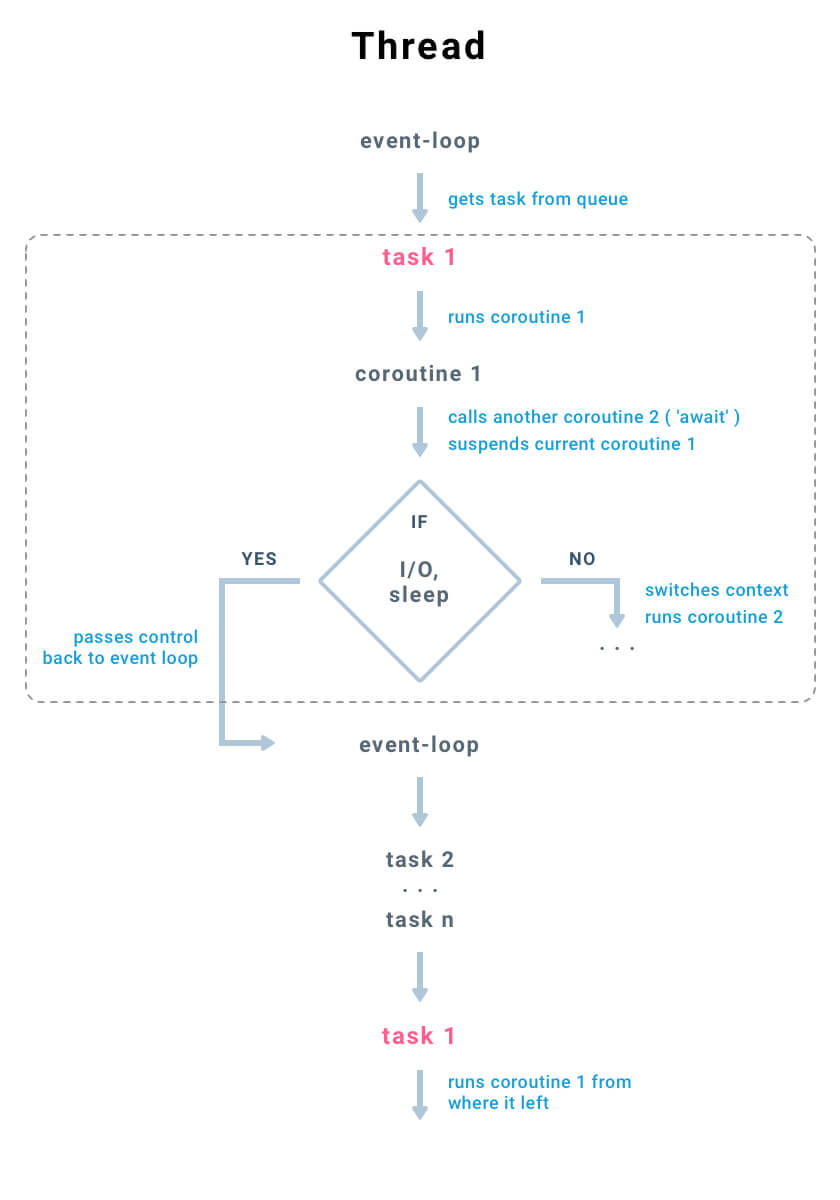
As the video explained, the key components are:
- Coroutines (
async def): These are special functions that can be paused and resumed. When you call one, it returns a coroutine object, not the result. - The
awaitkeyword: This is where the magic happens. It pauses the current coroutine, yields control back to the event loop, and waits for the awaited operation (like a network request) to complete before resuming. - The Event Loop: This is the heart of
asyncio. It's a scheduler that keeps track of all running tasks and decides which one to execute next. When a task isawaiting I/O, the event loop runs another task that is ready to do work.
2. From Sequential to Concurrent Fetching
Our single-threaded crawler had a loop like this:
# The old, slow way
while frontier:
    url = frontier.popleft()
    html = requests.get(url) # This blocks!


    # ... process html ...
If we simply replace requests.get() with an asynchronous fetch inside the loop, we won't gain any concurrency, because await will still pause execution until that single fetch is done:
# Still sequential!
while frontier:
    url = frontier.popleft()
    html = await aiohttp_session.get(url) # This still processes one-by-one


    # ... process html ...
The key is to start multiple fetch operations at once and then wait for all of them to complete. asyncio.gather is the tool for this job. It takes a series of awaitables (like our coroutines) and runs them concurrently.
Let's watch two more clips that demonstrate this powerful pattern.
Next-Level Concurrent Programming In Python With Asyncio
First, this clip from ArjanCodes vividly shows the performance difference asyncio.gather makes when fetching multiple API endpoints.
Watch the segment from 06:31 to 09:46. Notice how he transforms a slow for loop of await calls into a fast, concurrent operation using asyncio.gather and measures the speedup.
Intro to async Python | Writing a Web Crawler
Now, let's return to the mCoding video, which explains how to use asyncio.create_task and asyncio.wait (which is similar to gather) to achieve the same concurrency.
Watch from 03:12 to 05:53. This explains the mechanics of creating tasks and waiting for them. This pattern is analogous to tokio::spawn followed by a join.
To summarize the pattern:
- Create a list of coroutine objects for the tasks you want to run (e.g.,
[fetch(url1), fetch(url2), ...]). - Pass them to
asyncio.gather(*coroutines). awaitthe result ofgather. This will pause your main coroutine until all the fetching tasks are complete.
3. A More Dynamic Approach: The Worker Pattern
While gather is great for a fixed batch of work, a web crawler discovers new work (links) dynamically. A more robust and scalable pattern is to use workers and a queue. This will likely feel very familiar to you from your work with scheduling services like Rudi.
The pattern works like this:
- An
asyncio.Queueholds the URLs to be crawled (the frontier). - We spawn a number of
workercoroutines. - Each worker runs in an infinite loop, pulling a URL from the queue with
await queue.get(). - After fetching and processing a URL, the worker adds any new, unseen links back into the queue with
queue.put_nowait(). - Crucially, the worker calls
queue.task_done()to signal that it has finished processing one item. - The main coroutine can then simply
await queue.join(), which will pause until every item that has ever been put into the queue has been processed (i.e., matched with atask_done()call).
This is a powerful pattern for managing a dynamic workload. Let's explore a detailed explanation.
A Web Crawler With asyncio Coroutines
The article 'A Web Crawler With asyncio Coroutines' is an in-depth guide written by one of Python's core asyncio developers and its creator. It perfectly describes the evolution from callbacks to coroutines and details the worker pattern we need.
Please read the section titled "Coordinating Coroutines". This section explains exactly how to use asyncio.Queue to coordinate multiple worker coroutines. Pay close attention to: The structure of the crawl (main) and work (worker) coroutines. How queue.join() is used to detect when the crawl is complete. How the worker tasks are started and, importantly, gracefully cancelled at the end.
4. Putting It All Together: The Concurrent Crawler Code
Now, let's combine these concepts to convert our single-threaded crawler into a fully concurrent one using the worker pattern. We'll use aiohttp for asynchronous HTTP requests and asyncio.Queue to manage the frontier.
Compare this implementation with the single-threaded version from the previous lesson. Notice that the core BFS logic is the same, but it's now distributed across multiple concurrent workers.
import asyncio
import aiohttp
from collections import deque
from urllib.parse import urljoin, urlsplit
from bs4 import BeautifulSoup
import time


# Re-using our normalize_url function from the last lesson
def normalize_url(base: str, url: str) -> str:


    # (Implementation is the same as the previous lesson)
    absolute_url = urljoin(base, url)
    parts = urlsplit(absolute_url)
    scheme = parts.scheme.lower()
    hostname = parts.netloc.lower()
    if hostname.startswith('www.'):
        hostname = hostname[4:]
    path = parts.path or '/'
    if len(path) > 1 and path.endswith('/'):
        path = path[:-1]
    fragment = '' # Remove fragments
    query = '' # For simplicity, remove query params. Can be enhanced.
    return urlunsplit((scheme, hostname, path, query, fragment))

async def worker(name: str, session: aiohttp.ClientSession, queue: asyncio.Queue, visited: set, domain: str):
    """A worker that fetches URLs from the queue, processes them, and adds new links back."""
    print(f"[{name}] Starting...")
    while True:
        try:
            current_url = await queue.get()


            # Use a lock-free check. Another worker might be processing it, which is fine.
            # The critical check is adding to visited *before* yielding control again.
            if current_url in visited:
                queue.task_done()
                continue


            # Add to visited immediately to prevent other workers from picking it up.
            visited.add(current_url)
            print(f"[{name}] Crawling: {current_url}")

            async with session.get(current_url, timeout=10) as response:
                if response.status != 200 or 'text/html' not in response.headers.get('Content-Type', ''):
                    queue.task_done()
                    continue

                html = await response.text()
                soup = BeautifulSoup(html, 'html.parser')

                for link_tag in soup.find_all('a', href=True):
                    link = link_tag['href']
                    normalized_link = normalize_url(current_url, link)
                    if urlsplit(normalized_link).netloc == domain and normalized_link not in visited:


                        # We don't need to check if it's in the queue; the `visited` check is sufficient
                        await queue.put(normalized_link)

            queue.task_done()
        except asyncio.CancelledError:
            print(f"[{name}] Stopping...")
            break
        except Exception as e:
            print(f"[{name}] Error crawling {current_url}: {e}")
            if 'current_url' in locals() and queue.unfinished_tasks > 0:
                 queue.task_done() # Ensure task is marked done even on error

async def concurrent_crawler(seed_url: str, max_workers: int = 10):
    """
    Crawls a website concurrently using asyncio workers and a queue.
    """
    domain = urlsplit(seed_url).netloc
    queue = asyncio.Queue()
    await queue.put(seed_url)

    visited = set()


    # aiohttp.ClientSession is crucial for connection pooling and performance.
    async with aiohttp.ClientSession(headers={'User-Agent': 'MyCoolAsyncCrawler/1.0'}) as session:


        # Create worker tasks. This is analogous to `tokio::spawn`.
        tasks = []
        for i in range(max_workers):
            task = asyncio.create_task(worker(f"Worker-{i+1}", session, queue, visited, domain))
            tasks.append(task)


        # Wait until the queue is fully processed. Analogous to joining on a channel/barrier.
        await queue.join()


        # All work is done, now cancel the worker tasks.
        for task in tasks:
            task.cancel()


        # Wait for all worker tasks to finish their cancellation.
        await asyncio.gather(*tasks, return_exceptions=True)

    print("="*40 + f"\nCrawl finished. Total pages visited: {len(visited)}")

if __name__ == '__main__':
    start_url = "http://quotes.toscrape.com"
    start_time = time.perf_counter()
    asyncio.run(concurrent_crawler(start_url, max_workers=15))
    end_time = time.perf_counter()
    print(f"Total crawl time: {end_time - start_time:.2f} seconds")
To run this code:
- Save it as
async_crawler.py. - Install the required libraries:
pip install aiohttp beautifulsoup4. - Run from your terminal:
python async_crawler.py.
You will see the workers starting up and crawling pages concurrently, and the total execution time will be significantly less than a single-threaded approach for any non-trivial number of pages.
Conclusion
In this lesson, you have taken a major step forward by transforming a slow, sequential process into a highly efficient concurrent one. This is a critical skill for building modern, high-performance services.
Key Takeaways:
asynciois Python's native library for achieving concurrency on a single thread, ideal for I/O-bound tasks.- The
async/awaitsyntax allows for writing asynchronous code that looks and feels like synchronous code, avoiding the "callback hell" of older async models. - For simple concurrent tasks,
asyncio.gatheris a quick way to run a batch of coroutines. - For dynamic, ongoing workloads like a web crawler, the worker and queue pattern (
asyncio.Queue,asyncio.create_task,queue.join()) is a much more robust and scalable architecture. This pattern should be very familiar from your experience with distributed systems and message queues.
Next Lesson Preview
Our concurrent crawler is now very fast, but it's also "impolite." It sends a high volume of requests to the target server in a short period. A real-world crawler must respect server policies and avoid overwhelming the server. In our next lesson, we will integrate a semaphore-based rate limiter into our concurrent crawler to control the number of simultaneous requests and crawl responsibly. This will directly build upon your experience with request throttling and QoS management.