Recommended resources
The freely available resources this lesson will direct you to.
- Asynchronous requests and rate limiting (HTTPX and asyncio.Semaphore)www.youtube.com
- Five Rate Limiting Algorithms ~ Key Concepts in System Designwww.youtube.com
- How to Optimize Concurrent getBlock Requests | Quicknode Docswww.quicknode.com
- Token Bucket Algorithm based async semaphore - Stack Overflowstackoverflow.com
Hello and welcome back.
In our last lesson, we successfully converted our single-threaded web crawler into a high-performance concurrent version using asyncio and a worker/queue pattern. While our crawler is now very fast, it's also "impolite." By launching dozens of requests simultaneously, it can easily overwhelm a server, which may lead to our IP address being temporarily blocked or permanently banned. This is directly related to the QoS and load-shedding challenges you've managed in systems like Rudi at AWS.
This lesson addresses that problem by teaching you how to integrate a semaphore-based rate limiter into the concurrent crawler to respect server policies. We will control the number of in-flight requests, ensuring our crawler is both fast and well-behaved.
1. Concurrency Limiting with Semaphores
A rate limiter's job is to control the rate at which an application sends requests. There are several algorithms for this, like the Token Bucket or Sliding Window, which we'll explore in-depth in a later module.
For now, we'll implement a simple but highly effective form of rate limiting: concurrency limiting. Instead of controlling requests per second, we'll limit the number of requests that can be active at any single moment. This is a common and robust strategy for preventing client-side resource exhaustion and reducing peak load on the server.
The perfect tool for this in asyncio is the Semaphore. You're likely familiar with semaphores from other contexts; asyncio.Semaphore is the asynchronous equivalent. It's a synchronization primitive that maintains an internal counter, which is initialized at creation.
await semaphore.acquire(): Decrements the counter. If the counter is zero, it blocks the coroutine until another coroutine callsrelease().semaphore.release(): Increments the counter, potentially waking up a waiting coroutine.
By creating a semaphore with a value of, say, 10, we can ensure that no more than 10 of our worker coroutines are fetching URLs at the same time.
To see this in action, let's watch a short video that demonstrates how to use asyncio.Semaphore to control the concurrency of asynchronous requests.
Asynchronous requests and rate limiting (HTTPX and asyncio.Semaphore)
The video 'Asynchronous requests and rate limiting' by mildlyoverfitted provides a clear, step-by-step guide to implementing a semaphore to control concurrent HTTP requests. It visually demonstrates the difference between an uncontrolled burst of requests and a controlled, rate-limited execution.
Please watch from 08:56 to 11:43. Pay close attention to: Instantiation (08:56 - 09:52): How the asyncio.Semaphore is created with a specific value representing the concurrency limit. Integration (09:52 - 10:37): The use of the semaphore as an asynchronous context manager (async with semaphore:). This is the key pattern for our implementation. The Result (10:37 - 11:43): Observe how the output logs change from sending all requests at once to an interleaved pattern of sending and receiving, governed by the semaphore's size.
The async with semaphore: syntax is the most convenient and robust way to use a semaphore. It automatically handles acquiring the semaphore upon entering the block and releasing it upon exit, even if an error occurs within the block.
2. Integrating the Semaphore into Our Crawler
Now, let's apply this pattern to the concurrent crawler we built in the previous lesson. The changes are minimal but have a significant impact on the crawler's behavior.
- Instantiate the Semaphore: In the main
concurrent_crawlerfunction, we'll create anasyncio.Semaphorewith our desired concurrency limit. - Pass it to Workers: We'll pass this semaphore instance to each worker task we create.
- Wrap the Critical Section: Inside the
workerfunction, we'll wrap the network request and processing logic within anasync with semaphore:block.
This ensures that only a limited number of workers can be making HTTP requests and processing responses at any given time. Other workers will wait patiently at the async with line for their turn.
Here is the updated code. The new and modified lines are highlighted with comments.
import asyncio
import aiohttp
from urllib.parse import urljoin, urlsplit, urlunsplit
from bs4 import BeautifulSoup
import time


# Normalize_url function remains the same as the previous lesson
def normalize_url(base: str, url: str) -> str:
    absolute_url = urljoin(base, url)
    parts = urlsplit(absolute_url)
    scheme = parts.scheme.lower()
    hostname = parts.netloc.lower()
    if hostname.startswith('www.'):
        hostname = hostname[4:]
    path = parts.path or '/'
    if len(path) > 1 and path.endswith('/'):
        path = path[:-1]
    fragment = '' # Remove fragments
    query = '' # For simplicity, remove query params.
    return urlunsplit((scheme, hostname, path, query, fragment))


# --- MODIFIED WORKER ---
async def worker(
    name: str,
    session: aiohttp.ClientSession,
    queue: asyncio.Queue,
    visited: set,
    domain: str,
    semaphore: asyncio.Semaphore  # New parameter
):
    """A worker that fetches URLs from the queue, processes them, and adds new links back."""
    print(f"[{name}] Starting...")
    while True:
        try:
            current_url = await queue.get()


            # --- SEMAPHORE USAGE ---
            # Acquire the semaphore before making a network request.
            # This will block if the concurrency limit is reached.
            async with semaphore:
                if current_url in visited:
                    queue.task_done()
                    continue

                visited.add(current_url)
                print(f"[{name}] Crawling: {current_url} (Concurrent requests: {semaphore._value + 1}/{semaphore._value + len(semaphore._waiters)})")

                async with session.get(current_url, timeout=10) as response:
                    if response.status != 200 or 'text/html' not in response.headers.get('Content-Type', ''):
                        queue.task_done()
                        continue

                    html = await response.text()


            # The semaphore is automatically released here

            soup = BeautifulSoup(html, 'html.parser')
            for link_tag in soup.find_all('a', href=True):
                link = link_tag['href']
                normalized_link = normalize_url(current_url, link)
                if urlsplit(normalized_link).netloc == domain and normalized_link not in visited:
                    await queue.put(normalized_link)

            queue.task_done()
        except asyncio.CancelledError:
            print(f"[{name}] Stopping...")
            break
        except Exception as e:
            print(f"[{name}] Error crawling {current_url}: {e}")
            if 'current_url' in locals() and queue.unfinished_tasks > 0:
                 queue.task_done()


# --- MODIFIED MAIN CRAWLER FUNCTION ---
async def concurrent_crawler(seed_url: str, max_workers: int = 15, concurrency_limit: int = 5): # New parameter
    """
    Crawls a website concurrently with a semaphore to limit concurrency.
    """
    domain = urlsplit(seed_url).netloc
    queue = asyncio.Queue()
    await queue.put(seed_url)

    visited = set()


    # --- SEMAPHORE CREATION ---
    semaphore = asyncio.Semaphore(concurrency_limit)

    async with aiohttp.ClientSession(headers={'User-Agent': 'MyPoliteAsyncCrawler/1.0'}) as session:
        tasks = []
        for i in range(max_workers):


            # Pass the semaphore to each worker
            task = asyncio.create_task(worker(f"Worker-{i+1}", session, queue, visited, domain, semaphore))
            tasks.append(task)

        await queue.join()

        for task in tasks:
            task.cancel()

        await asyncio.gather(*tasks, return_exceptions=True)

    print("="*40 + f"\nCrawl finished. Total pages visited: {len(visited)}")

if __name__ == '__main__':
    start_url = "http://quotes.toscrape.com"
    start_time = time.perf_counter()


    # Note: We now have separate controls for worker count and concurrency limit
    asyncio.run(concurrent_crawler(start_url, max_workers=20, concurrency_limit=5))
    end_time = time.perf_counter()
    print(f"Total crawl time: {end_time - start_time:.2f} seconds")
When you run this code, you'll notice the print statements show that the number of active crawling requests never exceeds the concurrency_limit you set. We've effectively throttled our crawler. It's important to distinguish between max_workers and concurrency_limit:
max_workers: The total number of coroutines ready to process items from the queue.concurrency_limit: The maximum number of those workers that can be making network requests at the same time.
3. Advanced Context: Dual Gating with Token Buckets
Our semaphore limits concurrency, which is a great start. In high-performance production systems, you often see this combined with a second mechanism that limits the rate of requests over time (e.g., 50 requests per second). This is where the Token Bucket algorithm comes in.
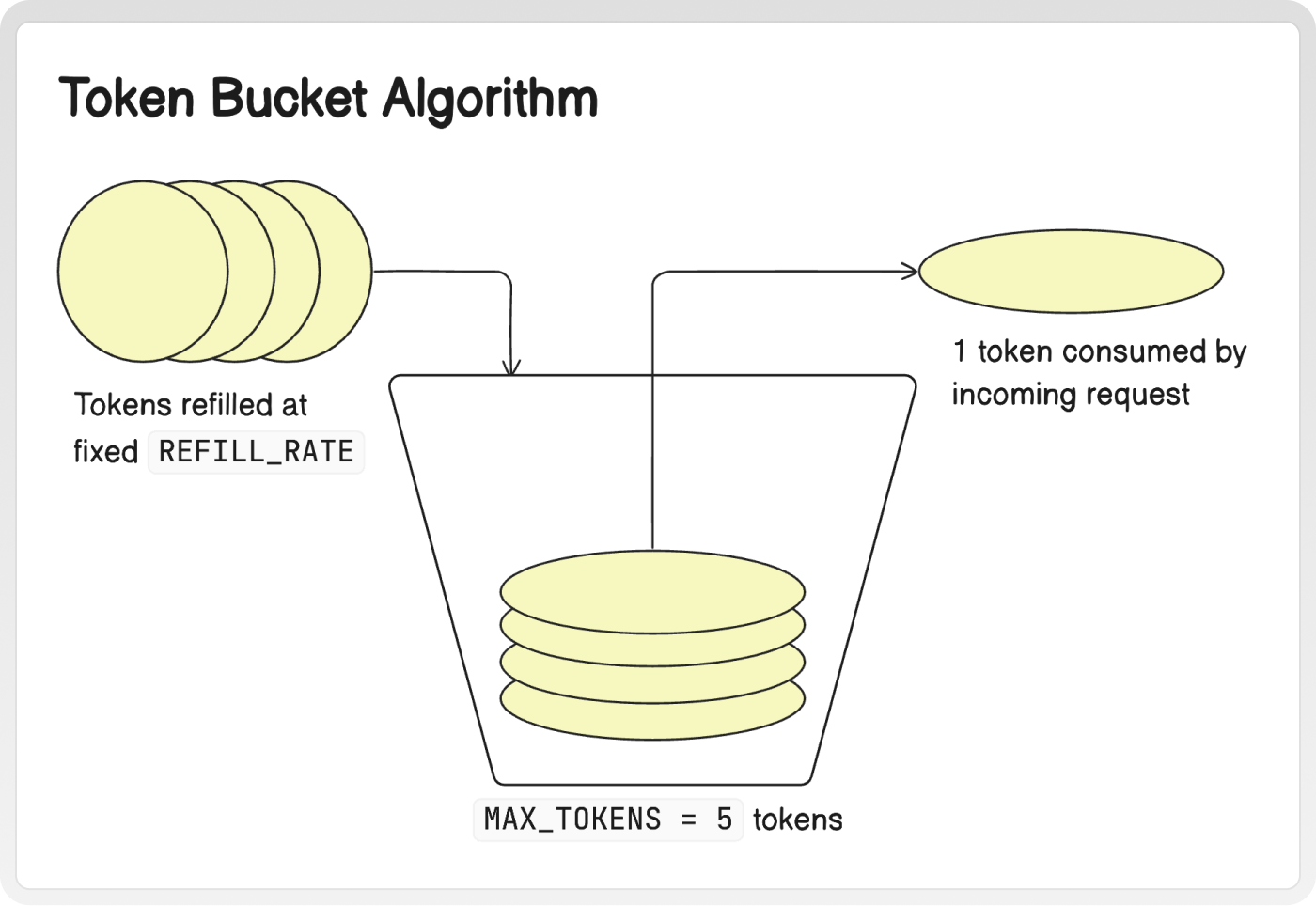
A very robust pattern, which you might find in a system like the one you work on, is "dual gating": using a semaphore and a token bucket together.
- Semaphore (Concurrency Control): Limits how many requests are in-flight simultaneously. This protects the client from opening too many connections.
- Token Bucket (Rate Limiting): Limits how many new requests can be initiated per second. This protects the server from being overwhelmed.
Let's look at a resource that describes this exact pattern.
How to Optimize Concurrent getBlock Requests
The article 'How to Optimize Concurrent getBlock Requests' from QuickNode's documentation is a fantastic real-world example of building a high-throughput client. It explicitly details this 'dual gating' strategy.
Please read the section "Concurrency Control with Retry Logic" and review the Python code block that follows it. Focus on: The description of the dual gating approach, explaining the distinct roles of the Semaphore and the Token Bucket. The implementation of the RateLimiter class, which is a clean, asynchronous Token Bucket. How the get_block_with_retry function uses async with semaphore: and await rate_limiter.acquire() together to implement both gates.
This dual-gating approach gives you fine-grained control over your application's request profile, allowing you to maximize throughput while strictly adhering to API limits and ensuring system stability. While we won't implement the token bucket in our crawler today (as it's a focus of a later module), understanding how it complements the semaphore is a key insight for building production-grade systems.
Conclusion
In this lesson, we've made our concurrent crawler "polite" by integrating a crucial control mechanism. You've learned how to use asyncio.Semaphore to effectively limit the number of concurrent requests, preventing server overload and making our crawler a responsible citizen of the web.
Key Takeaways:
- An
asyncio.Semaphoreis a simple yet powerful tool for limiting concurrency in asynchronous applications. - The
async with semaphore:pattern provides a clean and safe way to acquire and release the semaphore. - Limiting concurrency is a fundamental form of rate limiting that prevents a client from overwhelming a server with a burst of requests.
- For advanced use cases, a semaphore for concurrency can be combined with a token bucket for rate limiting in a "dual gating" pattern for precise traffic shaping.
Next Lesson Preview
Our crawler is now fast and polite, but it's not yet robust. What happens if a server is slow to respond or never responds at all? Our worker could be stuck forever waiting for a session.get() that will never complete. In the next lesson, we will add robust timeout handling to the concurrent crawler to gracefully manage unresponsive servers.