Recommended resources
The freely available resources this lesson will direct you to.
- Python Tutorial: AsyncIO - Complete Guide to Asynchronous Programming with Animationswww.youtube.com
- Make Your HttpClient Resilient - Circuit Breaker, Retry, Timeoutwww.youtube.com
- Advanced Patterns: Timeouts, Futures, and Error Handling | Agent ...agentfactory.panaversity.org
- All you need to know about timeoutsengineering.zalando.com
Hello and welcome back!
In our last lesson, we built a concurrent web crawler that is both fast and "polite" by using an asyncio.Semaphore to limit the number of simultaneous requests. This prevents our crawler from overwhelming a server with traffic.
However, our crawler is still not fully robust. A single slow or unresponsive server can bring a worker coroutine to a grinding halt. Because the worker holds a slot in our semaphore while it waits, a few unresponsive servers can lock up all our concurrency slots, causing a cascading failure that stalls the entire crawl. This is a classic problem in distributed systems, similar to what you've likely engineered defenses for in services like Rudi, where unresponsive dependencies can't be allowed to exhaust system resources.
This lesson directly addresses that vulnerability. Our goal is to add robust timeout handling to the concurrent crawler for unresponsive servers. By setting and gracefully handling timeouts, we'll ensure our crawler remains resilient and productive, even when faced with unreliable network conditions.
1. The "Why" of Timeouts: Fail Fast and Conserve Resources
In any distributed system, assuming that network calls will always succeed quickly is a recipe for disaster. Timeouts are not just an optional feature; they are a fundamental requirement for building resilient, production-grade applications.
To ground our discussion, let's explore the core principles behind using timeouts.
All you need to know about timeouts
The article 'All you need to know about timeouts' from Zalando Engineering provides an excellent overview of why timeouts are critical in microservices architecture. It reinforces the 'fail-fast' principle and highlights the impact of timeouts on resource utilization and throughput.
Please read the sections 'Why set timeout' and 'Connection timeout vs. request timeout'. As you read, focus on these key points: The fail-fast principle: Why it's better to fail and let the client handle the error than to wait indefinitely. Resource utilization: How long-running requests tie up threads, connections, and other resources, ultimately reducing system throughput. The distinction between a connection timeout (time to establish a TCP connection) and a request timeout (time to receive a response after the connection is made).
As the article highlights, setting explicit timeouts is crucial. Default timeouts are often infinite or too high for production use. In our web crawler, a hung request means a worker coroutine is blocked, a semaphore slot is occupied, and no progress is made. By implementing a reasonable timeout, we can free up that worker to move on to other URLs in the queue.
This client-side perspective is directly related to how servers manage their own resources. A server will also have timeouts to protect itself from slow or malicious clients.
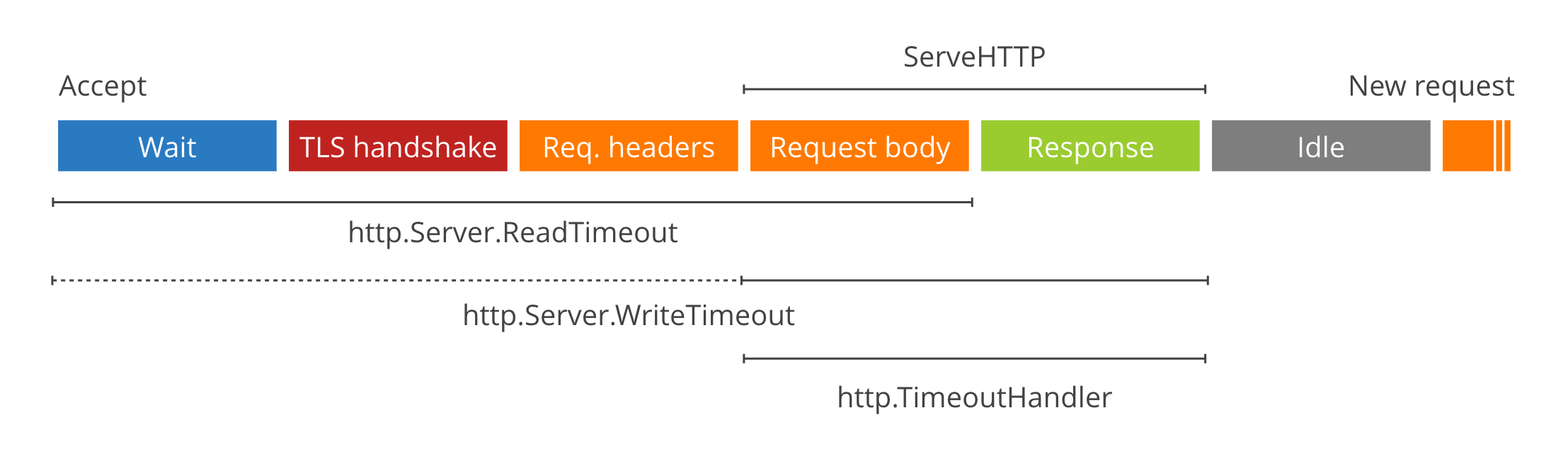
2. Implementing Timeouts in asyncio
Now, let's turn theory into practice. There are two primary ways to implement timeouts for our aiohttp requests: using the library's built-in features or using asyncio's general-purpose timeout tools.
Method 1: aiohttp's Built-in ClientTimeout
The aiohttp library provides a convenient timeout argument. We've been using a simple version of it (timeout=10), but it's actually a powerful aiohttp.ClientTimeout object that allows for granular control. You can specify different values for:
total: The total time for the entire operation (connection, request, and response).connect: The time to establish a connection to the server. This maps directly to the "connection timeout" concept.sock_read: The maximum time for the server to send a chunk of data.
This is often the most direct way to handle timeouts for HTTP requests.
Method 2: The asyncio.timeout() Context Manager
For a more general solution that works with any awaitable operation (not just aiohttp), Python 3.11+ provides the asyncio.timeout() asynchronous context manager. This is the modern, idiomatic way to enforce a time limit on a block of async code.
Let's study how to use it.
Advanced Patterns: Timeouts, Futures, and Error Handling
The article 'Advanced Patterns — Timeouts, Futures, and Error Handling' provides a clear, practical guide to the modern asyncio.timeout() pattern.
Please read the section 'Core 1: Timeout Control with asyncio.timeout()' up to and including 'Handling Timeout Gracefully'. Pay close attention to: The async with asyncio.timeout(seconds): syntax. How it raises an asyncio.TimeoutError if the code inside the block takes too long. The try...except asyncio.TimeoutError pattern used to catch the error and implement fallback logic, which is crucial for preventing a crash.
The key takeaway is that when a timeout occurs, asyncio.TimeoutError is raised. This allows us to gracefully catch the exception, log the issue, and allow our worker to proceed without crashing the entire application.
3. Integrating Timeout Handling into the Crawler
Let's update our worker function to include robust timeout handling. We will use aiohttp's built-in timeout object for its simplicity and direct applicability, and wrap it in a try...except block to catch the resulting asyncio.TimeoutError.
Here is the modified worker function. The changes are focused on making the HTTP request more robust.
import asyncio
import aiohttp
from aiohttp import ClientTimeout
from urllib.parse import urljoin, urlsplit, urlunsplit
from bs4 import BeautifulSoup
import time


# normalize_url function remains the same


# --- MODIFIED WORKER ---
async def worker(
    name: str,
    session: aiohttp.ClientSession,
    queue: asyncio.Queue,
    visited: set,
    domain: str,
    semaphore: asyncio.Semaphore
):
    """A worker that fetches URLs, handles timeouts, and adds new links back."""
    print(f"[{name}] Starting...")


    # Define a timeout configuration for our requests
    # 5-second connection timeout, 10-second total timeout
    timeout_config = ClientTimeout(total=10, connect=5)

    while True:
        try:
            current_url = await queue.get()

            async with semaphore:
                if current_url in visited:
                    queue.task_done()
                    continue

                visited.add(current_url)
                print(f"[{name}] Crawling: {current_url} (Concurrent requests: {semaphore._value + 1}/{semaphore._value + len(semaphore._waiters)})")

                try:


                    # --- TIMEOUT HANDLING ---
                    # Use the timeout config and wrap the request in a try/except block
                    async with session.get(current_url, timeout=timeout_config) as response:
                        if response.status != 200 or 'text/html' not in response.headers.get('Content-Type', ''):
                            queue.task_done()
                            continue

                        html = await response.text()


                # Aiohttp raises asyncio.TimeoutError on timeout
                except asyncio.TimeoutError:
                    print(f"[{name}] Timeout error crawling {current_url}")
                    queue.task_done()
                    continue
                except aiohttp.ClientError as e:
                    print(f"[{name}] Client error crawling {current_url}: {e}")
                    queue.task_done()
                    continue


            # Semaphore is released here

            soup = BeautifulSoup(html, 'html.parser')
            for link_tag in soup.find_all('a', href=True):
                link = link_tag['href']
                normalized_link = normalize_url(current_url, link)
                if urlsplit(normalized_link).netloc == domain and normalized_link not in visited:
                    await queue.put(normalized_link)

            queue.task_done()
        except asyncio.CancelledError:
            print(f"[{name}] Stopping...")
            break
        except Exception as e:


            # General catch-all for unexpected errors
            print(f"[{name}] UNEXPECTED Error for {current_url if 'current_url' in locals() else 'unknown URL'}: {e}")
            if 'current_url' in locals() and queue.unfinished_tasks > 0:
                 queue.task_done()


# The concurrent_crawler and main block remain the same as the previous lesson
# ...
With this change, if a request to a URL takes longer than 10 seconds, aiohttp will raise an asyncio.TimeoutError. Our except block will catch it, print a log message, and importantly, call queue.task_done() before continue-ing to the next loop iteration. This ensures the worker becomes available to process another URL, making our crawler resilient to unresponsive servers.
4. Advanced Topic: Per-Request vs. Total Operation Timeout
We've implemented a per-request timeout. This is essential, but in complex systems, you might also consider a total operation timeout.
Imagine our crawler needs to finish its work within 60 seconds, regardless of how many URLs it finds. A per-request timeout of 10 seconds doesn't guarantee this; the crawl could go on for minutes if it finds many fast-responding pages.
You can enforce a global timeout by wrapping a larger block of code in asyncio.timeout(). For instance:
try:
    async with asyncio.timeout(60): # 60-second global timeout
        await queue.join() # Wait for all tasks to be processed
except asyncio.TimeoutError:
    print("Global crawl timeout reached! Shutting down...")
finally:


    # Cancel all worker tasks
    for task in tasks:
        task.cancel()
    await asyncio.gather(*tasks, return_exceptions=True)
This pattern is powerful. It ensures your entire operation completes within a specific time budget, a common requirement for service-level agreements (SLAs). The C# example in the video "Make Your HttpClient Resilient" demonstrates this concept of an outer timeout that wraps inner operations (including retries). While we won't fully implement it today, recognizing the distinction between per-request and global timeouts is key to designing complex, time-sensitive systems.
Conclusion
In this lesson, we fortified our concurrent web crawler against a common and critical failure mode: unresponsive servers. By implementing and gracefully handling timeouts, we've made our system significantly more robust and production-ready.
Key Takeaways:
- Timeouts are a non-negotiable defense mechanism in distributed systems to enforce the fail-fast principle and conserve resources.
- You can implement timeouts using library-specific features (like
aiohttp.ClientTimeout) or the general-purposeasyncio.timeout()context manager. - The key to resilience is not just setting a timeout, but catching the resulting
asyncio.TimeoutErrorto prevent a crash and allow the application to continue. - It's important to distinguish between per-request timeouts (for individual operations) and global timeouts (for an entire process) and use them according to your system's requirements.
Next Lesson Preview
Our crawler is now fast, polite, and robust against timeouts. However, there's another way it can get stuck: by crawling in circles. If a site has redirect chains that form a loop (e.g., Page A redirects to Page B, which redirects back to Page A), our crawler could get trapped, fetching the same pages endlessly. In our next lesson, we will implement redirect loop detection to make our crawler even smarter and more resilient.