Recommended resources
The freely available resources this lesson will direct you to.
Hello and welcome back.
In our last lesson, we significantly improved our crawler's resilience by implementing timeout handling. This ensures that a single slow server doesn't stall our entire operation—a critical feature for any production-grade distributed application.
However, network timeouts are not the only hazard our crawler faces. Websites can sometimes be configured in a way that creates "crawler traps," and one of the most common is a redirect loop.
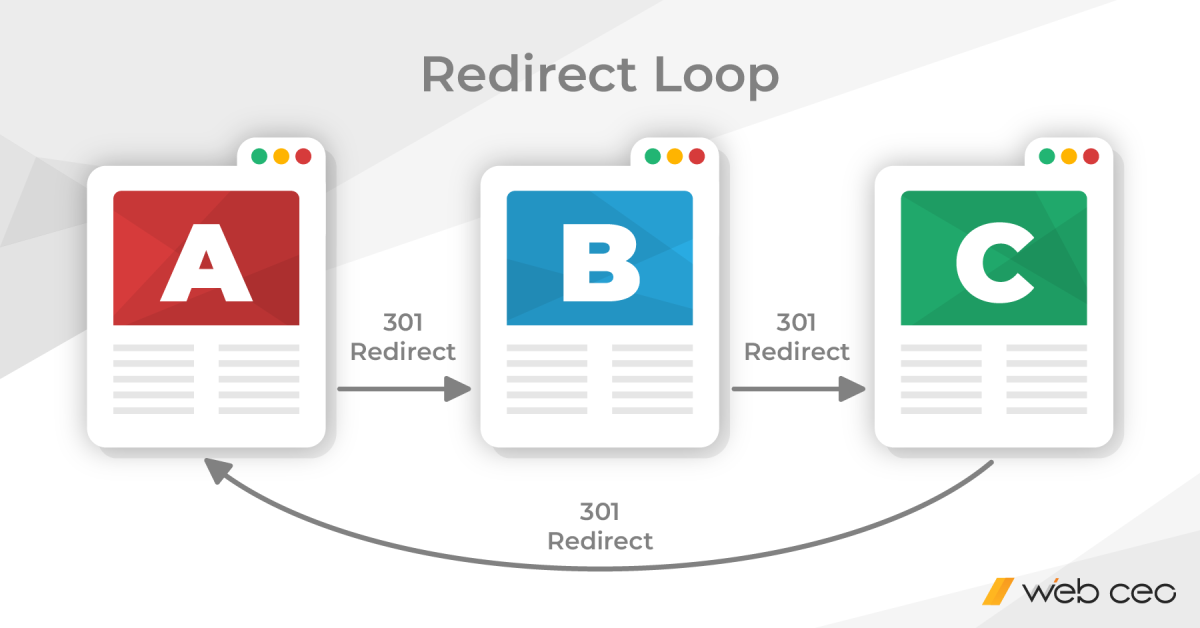
In this lesson, we will focus on the learning outcome: implementing redirect loop detection to prevent the crawler from getting stuck in infinite chains. We'll arm our crawler with the logic to identify and break out of these cycles, making it even more robust and efficient.
1. Understanding Crawler Traps and Redirect Loops
A crawler that is stuck in a loop wastes valuable resources: network bandwidth, CPU time, and memory. In a professional context, this is often referred to as wasting "crawl budget"—the finite amount of resources a crawler (like Google's) will expend on a given site. For a system like the one you built at AWS, Rudi, this would be equivalent to a task that never completes, consuming scheduler capacity and potentially blocking other, more valuable work.
To understand the broader context of this problem, let's look at how redirect loops fit into the category of "crawler traps."
Crawler Traps: Causes, Solutions & Prevention - A Developer's ...
The article 'Crawler Traps: Causes, Solutions & Prevention' from Search Engine Journal provides an excellent overview of this topic. We'll focus on the section that specifically discusses redirect chains.
Please read the section 'Long Redirect Chains & Loops'. Pay attention to: How redirect chains can happen due to misconfigured server rules. The real-world consequence shown in the browser screenshot (ERR_TOO_MANY_REDIRECTS). This is precisely the user-facing error our crawler needs to avoid internally.
The key takeaway is that both infinite loops and excessively long redirect chains are problematic. A robust crawler must have a strategy to handle both.
2. The Strategy: Limiting Redirect Depth
The most common and practical strategy to prevent getting stuck is to limit the maximum number of redirects a crawler will follow for any single starting URL. Instead of trying to detect a loop by remembering the entire path (which can be complex), we simply set a threshold (e.g., 10 redirects). If the chain exceeds this limit, we give up on that path and move on.
This simple policy effectively breaks both infinite loops and very long, inefficient redirect chains. Now, let's see how to implement this in an asyncio environment.
500 Lines or LessA Web Crawler With asyncio Coroutines
The 'A Web Crawler With asyncio Coroutines' article we've referenced before contains a section on coordinating coroutines that includes a clear implementation of manual redirect handling. This approach is highly relevant to our goal.
Please read the part of the 'Coordinating Coroutines' section that explains the redirect handling logic. You can find this by searching for the text 'We promised to explain why the items in the queue are pairs'. Focus on: Why the items in the queue are changed to pairs: (URL, max_redirects_left). The reason for handling redirects manually instead of letting the HTTP library do it automatically (i.e., to 'coalesce redirect paths'). The logic for decrementing the redirect counter and adding the new URL back to the queue.
The core idea from the article—passing a redirect counter along with the URL in the queue—is a clean, stateless approach that fits perfectly with our concurrent worker model. Each work item becomes self-contained.
3. Integrating Redirect Detection into Our Crawler
Let's apply this strategy to our existing code. This requires a few key modifications:
- Set
allow_redirects=False: We must tellaiohttpnot to follow redirects automatically. This gives our code control over the process. - Update the Queue Structure: The queue will now hold tuples of
(url, redirects_left). - Modify the Worker Logic: The worker will check the HTTP status code. If it's a redirect (3xx), it will check the
redirects_leftcounter and enqueue the new location. If it's a success (200), it will parse the page.
Here is the updated code. Pay close attention to the changes in main and the worker function.
import asyncio
import aiohttp
from aiohttp import ClientTimeout
from urllib.parse import urljoin, urlsplit
from bs4 import BeautifulSoup


# --- CONSTANTS ---
MAX_REDIRECTS = 10


# normalize_url function remains the same as before...
def normalize_url(current_page_url: str, link: str) -> str | None:


    # (Implementation from previous lesson)
    try:


        # Properly join the base URL with the relative link
        abs_link = urljoin(current_page_url, link)


        # Rebuild the URL without fragment identifiers
        parts = urlsplit(abs_link)
        if not parts.scheme or not parts.netloc:
            return None # Ignore invalid schemes like 'javascript:void(0)'
        return parts._replace(fragment="").geturl()
    except ValueError:
        return None


async def worker(
    name: str,
    session: aiohttp.ClientSession,
    queue: asyncio.Queue,
    visited: set,
    domain: str,
    semaphore: asyncio.Semaphore,
):
    """A worker that fetches URLs, handles redirects, and adds new links back."""
    print(f"[{name}] Starting...")
    timeout_config = ClientTimeout(total=10, connect=5)

    while True:
        try:


            # --- CHANGE 1: Unpack URL and redirect counter from queue ---
            current_url, redirects_left = await queue.get()

            async with semaphore:
                if current_url in visited:
                    queue.task_done()
                    continue

                visited.add(current_url)
                print(f"[{name}] Crawling: {current_url} (Redirects left: {redirects_left})")

                html = None
                try:


                    # --- CHANGE 2: Disable automatic redirects ---
                    async with session.get(
                        current_url,
                        timeout=timeout_config,
                        allow_redirects=False, # We handle redirects ourselves
                    ) as response:


                        # --- CHANGE 3: Handle redirect status codes ---
                        if 300 <= response.status < 400:
                            if redirects_left > 0:
                                next_url_raw = response.headers.get("Location")
                                if next_url_raw:
                                    next_url = normalize_url(current_url, next_url_raw)
                                    if next_url:
                                        print(f"[{name}] Redirected to: {next_url}")


                                        # Add the new URL to the queue with one less redirect attempt
                                        await queue.put((next_url, redirects_left - 1))
                            else:
                                print(f"[{name}] Redirect limit exceeded for: {current_url}")


                            # This path is done, whether it was a successful redirect or a failed one.
                            queue.task_done()
                            continue

                        if response.status != 200 or "text/html" not in response.headers.get("Content-Type", ""):
                            queue.task_done()
                            continue

                        html = await response.text()

                except asyncio.TimeoutError:
                    print(f"[{name}] Timeout error crawling {current_url}")
                    queue.task_done()
                    continue
                except aiohttp.ClientError as e:
                    print(f"[{name}] Client error crawling {current_url}: {e}")
                    queue.task_done()
                    continue


            # This part only runs if we got a 200 OK with HTML
            if html:
                soup = BeautifulSoup(html, "html.parser")
                for link_tag in soup.find_all("a", href=True):
                    normalized_link = normalize_url(current_url, link_tag["href"])
                    if normalized_link and urlsplit(normalized_link).netloc == domain and normalized_link not in visited:


                        # New links get the full redirect budget
                        await queue.put((normalized_link, MAX_REDIRECTS))

            queue.task_done()
        except asyncio.CancelledError:
            print(f"[{name}] Stopping...")
            break
        except Exception as e:


            # General catch-all
            url_ref = current_url if "current_url" in locals() else "unknown URL"
            print(f"[{name}] UNEXPECTED Error for {url_ref}: {e}")
            if "current_url" in locals() and queue.unfinished_tasks > 0:
                queue.task_done()


async def main():
    start_url = "https://xkcd.com"  # A site known to have some redirects
    domain = urlsplit(start_url).netloc

    queue = asyncio.Queue()


    # --- CHANGE 4: Seed the queue with the starting URL and max redirects ---
    queue.put_nowait((start_url, MAX_REDIRECTS))

    visited = set()
    semaphore = asyncio.Semaphore(10)

    async with aiohttp.ClientSession() as session:
        tasks = [
            asyncio.create_task(
                worker(f"Worker-{i}", session, queue, visited, domain, semaphore)
            )
            for i in range(5)
        ]

        await queue.join()  # Wait for all items to be processed

        for task in tasks:
            task.cancel()

        await asyncio.gather(*tasks, return_exceptions=True)

if __name__ == "__main__":
    asyncio.run(main())
With these changes, our crawler is now immune to getting stuck in redirect loops. It will diligently follow redirects up to a limit, log when it gives up, and continue its work efficiently.
4. Discussion of Trade-offs
As you requested, let's analyze the trade-offs of our approach. In system design, there's rarely a single "best" solution, only one that is most appropriate for a given set of constraints.
-
Manual vs. Library Redirect Handling: We set
allow_redirects=False. Why not useaiohttp's built-inmax_redirectsparameter in theClientSession?- Our approach (Manual): Gives us full control and visibility. We can log each step of the redirect chain. More importantly, as the
aosabook.orgarticle noted, we can add the intermediate redirect URLs to ourvisitedset immediately. IfURL_Aredirects toURL_C, and later we findURL_Bwhich also redirects toURL_C, our checkif current_url in visited:will prevent us from even starting the fetch forURL_B's redirect path, saving a network round trip. This is a significant optimization. - Library's approach (
max_redirects): Simpler to configure initially. However, the entire redirect chain is a black box. You only get the final result, and you lose the opportunity to optimize by deduplicating intermediate redirect targets.
- Our approach (Manual): Gives us full control and visibility. We can log each step of the redirect chain. More importantly, as the
-
Max Depth vs. Path History:
- Our approach (Max Depth): Very simple state management. The
(url, count)tuple is self-contained. This method is effective against both loops and excessively long chains. Its main drawback is that it might give up on a very long but valid chain of redirects. In practice, chains longer than 10 are rare and often indicative of a site configuration issue. - Alternative (Path History): This involves passing the list of visited URLs within the current redirect chain along with the URL in the queue:
(url, path_history). Before following a redirect, you check if the target URL is already inpath_history. This precisely detects loops (e.g., A->B->C->B). However, the state that needs to be passed around is larger and more complex to manage, especially in a highly concurrent system. For most web crawling purposes, the max-depth strategy provides a better balance of simplicity and effectiveness.
- Our approach (Max Depth): Very simple state management. The
Conclusion
In this lesson, we made our concurrent crawler substantially more robust by implementing a defense against redirect loops and long redirect chains. This is a standard feature for any production-ready web crawler.
Key Takeaways:
- Redirect loops are a common "crawler trap" that can waste significant resources.
- The most practical strategy for preventing this is to limit the maximum redirect depth a crawler will follow.
- Implementing this involves disabling automatic redirects (
allow_redirects=False) and manually managing the redirect chain, typically by passing a counter along with the URL in a work queue. - Handling redirects manually provides greater control and opportunities for optimization, such as de-duplicating work for common redirect targets.
Next Lesson Preview
Our crawler is now fast, polite, and resilient to both network hangs and crawler traps. However, it has one major limitation: if the process stops for any reason, all its progress is lost. The visited set and the queue of URLs to crawl (frontier) exist only in memory. In our next lesson, we will solve this by designing a persistence layer for the crawler's state, allowing it to be paused and resumed.