Recommended resources
The freely available resources this lesson will direct you to.
- python: don't use urlparse! (beginner - intermediate) anthony explains #474www.youtube.com
- Sending API URL Queries with Python Requestswww.youtube.com
- How to Normalize URLs at Scale: Protocols, Ports, Trailing Slashes ...thetexttool.com
- Getting Started with Web Crawler Python Development - Decododecodo.com
Welcome back! In our last lesson, we built a RobotParser to ensure our web crawler acts as a good citizen by respecting robots.txt files. We can now determine if we are allowed to fetch a given URL.
Today, we address the next critical step: managing the URLs themselves. On the web, many different URL strings can point to the exact same resource. For example, http://example.com, https://www.example.com, and https://example.com/index.html#top might all lead to the same page.
For a crawler, treating these as unique URLs is highly inefficient. It leads to wasted bandwidth, redundant processing, and inflated storage for tracking visited pages. To solve this, we will implement URL normalization, a process of converting a URL into a standard, canonical form.
This lesson will cover:
- The components of a URL and the best Python tools for parsing them.
- A standard set of rules for normalizing each part of a URL.
- How to implement a robust normalization function in Python that handles relative links, query parameters, and fragments.
This process of creating a canonical representation for an entity is a common pattern in distributed systems to ensure consistency and prevent duplicate state, a concept that's likely familiar from your work managing infrastructure resources.
1. The Anatomy of a URL
Before we can normalize a URL, we must understand its structure. A URL is composed of several distinct parts, each with its own normalization rules.
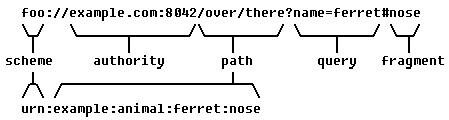
Python's standard library provides tools for this in the urllib.parse module. While you might first reach for urlparse, there's a better alternative.
python: don't use urlparse! (beginner - intermediate) anthony explains #474
This short video from anthonywritescode explains why urlsplit is generally preferred over urlparse for modern applications.
Watch the first 3 minutes and 20 seconds (00:00 - 03:20). Focus on: The outdated params component that urlparse handles. Why urlsplit is both simpler and more performant by treating those parameters as part of the path. \nFor our crawler, performance and adherence to modern standards are key, making urlsplit the right choice.
As the video explains, urlsplit gives us a named tuple containing scheme, netloc (network location, i.e., the authority), path, query, and fragment. We will use this function to deconstruct URLs, normalize each part, and then reconstruct them using urlunsplit.
2. A Comprehensive Guide to Normalization Rules
URL normalization isn't an officially standardized process with one right answer; it's a set of best practices that depends on your goal. For a web crawler, the goal is to reduce equivalent URLs to a single canonical form.
The following article provides an excellent, in-depth guide to the rules and trade-offs for normalizing each part of a URL.
How to Normalize URLs at Scale
We will use this detailed guide from TheTextTool.com to establish a robust set of normalization rules for our crawler.
Please read the sections covering the main URL components. You can skim the deep dives if you're short on time, but pay attention to the core rules: Start with "URL Anatomy: Understanding the Components" to see the parts broken down. Read subsection 1️⃣ Scheme (Protocol). Read subsection 3️⃣ Hostname. Read subsection 4️⃣ Port. Read subsection 5️⃣ Path and then the section "Path Normalization: Slashes, Dots, and Case" for more detail. Read subsection 6️⃣ Query String and then "Query String Normalization: Sorting, Encoding, and Arrays". Read subsection 7️⃣ Fragment (#section) and then "Fragment Normalization: When to Keep, When to Strip".
Based on that reading, here is a summary of the rules we will implement for our web crawler:
- Scheme: Convert to lowercase (e.g.,
HTTP→http). - Hostname: Convert to lowercase. For consistency, we'll also remove the
www.prefix. - Port: Remove default ports (
:80forhttpand:443forhttps). - Path:
- Resolve dot segments (e.g.,
/a/b/../cbecomes/a/c). - Collapse multiple slashes (e.g.,
//pathbecomes/path). - Remove a trailing slash, unless it's the root path (
/).
- Resolve dot segments (e.g.,
- Query Parameters:
- Sort parameters alphabetically by key.
- Remove common tracking parameters (e.g.,
utm_*from marketing campaigns) that don't alter content.
- Fragment: Remove it entirely (
#section), as it's handled client-side and doesn't change the resource fetched from the server.
3. Implementing the URL Normalizer
Now, let's translate these rules into a production-quality Python function. A key requirement for a crawler is handling relative URLs (like /about.html or ../contact) found in a page's <a> tags. We need to resolve them against the page's base URL to get an absolute URL. Python's urllib.parse.urljoin is perfect for this.
Let's start with a simple normalization example and build up to our final, robust function.
The article "Getting Started with Web Crawler Python Development" (LINK) provides a basic function that handles a few of our rules: lowercasing the domain, removing fragments, and stripping trailing slashes. It's a good starting point, but we need something more comprehensive.
Here is a complete, commented implementation that handles all our rules, including resolving relative links.
from urllib.parse import urljoin, urlsplit, urlunsplit, parse_qs, urlencode

def normalize_url(base: str, url: str) -> str:
    """
    Resolves a URL against a base and normalizes it.

    Args:
        base: The base URL (the page where the URL was found).
        url: The URL to normalize (can be relative or absolute).

    Returns:
        The absolute, normalized URL in a canonical form.
    """


    # 1. Resolve the URL against the base to handle relative links.
    # e.g., urljoin('http://a.com/b/c', '../d') -> 'http://a.com/d'
    absolute_url = urljoin(base, url)


    # 2. Split the absolute URL into its components. We use urlsplit.
    parts = urlsplit(absolute_url)


    # 3. Normalize each component
    # Scheme: lowercase
    scheme = parts.scheme.lower()


    # Hostname (netloc): lowercase and remove 'www.'
    hostname = parts.netloc.lower()
    if hostname.startswith('www.'):
        hostname = hostname[4:]


    # Port: remove default ports
    if (scheme == 'http' and hostname.endswith(':80')) or \
       (scheme == 'https' and hostname.endswith(':443')):
        hostname = hostname.rsplit(':', 1)[0]


    # Path: remove trailing slash if not root
    path = parts.path
    if len(path) > 1 and path.endswith('/'):
        path = path[:-1]


    # An empty path is equivalent to '/'
    if not path:
        path = '/'


    # Query: sort params, remove trackers
    query_params = parse_qs(parts.query)


    # Filter out common tracking parameters
    tracker_params = {'utm_source', 'utm_medium', 'utm_campaign', 'utm_term', 'utm_content'}
    filtered_params = {
        k: v for k, v in query_params.items() if k not in tracker_params
    }


    # Re-encode the query string with sorted keys
    query = urlencode(sorted(filtered_params.items()), doseq=True)


    # Fragment: always remove
    fragment = ''


    # 4. Reconstruct the URL
    return urlunsplit((scheme, hostname, path, query, fragment))


```grasp
{
  "type": "exercise",
  "id": "4c51bba7-1909-4f37-a10a-26e532b87287"
}
--- Example Usage ---
if name == 'main':
base_url = 'https://anthropic.com/research/claude-3'
# Test case 1: Relative path
rel_url = '../careers'
# Expected: https://anthropic.com/careers
print(f"Relative: '{rel_url}' -> '{normalize_url(base_url, rel_url)}'")
# Test case 2: Different scheme, www, port, and fragment
messy_url = 'HTTP://www.AnThRoPiC.com:443/research?utm_source=test#summary'
# Expected: https://anthropic.com/research
print(f"Messy: '{messy_url}' -> '{normalize_url(base_url, messy_url)}'")
# Test case 3: Unsorted query parameters and trailing slash
query_url = 'https://anthropic.com/product/?region=us&model=opus/'
# Expected: https://anthropic.com/product?model=opus®ion=us
print(f"Query: '{query_url}' -> '{normalize_url(base_url, query_url)}'")
# Test case 4: Path with dot segments
dot_segment_url = 'https://anthropic.com/research/../research/./claude-3'
# Expected: https://anthropic.com/research/claude-3
print(f"Dot Segments: '{dot_segment_url}' -> '{normalize_url(base_url, dot_segment_url)}'")
# Test case 5: URL with only domain
domain_url = 'http://anthropic.com'
# Expected: http://anthropic.com/
print(f"Domain only: '{domain_url}' -> '{normalize_url(base_url, domain_url)}'")
```grasp
{
  "type": "exercise",
  "id": "baaa65a7-562d-48dd-92ce-963a4a19b2ff"
}
Trade-offs in Normalization
The function we've built enforces a fairly strict set of rules. This is excellent for a general-purpose crawler, as it maximizes deduplication. However, it's worth noting the trade-offs:
- Removing
www: Whilewww.example.comandexample.comusually serve the same content, this is not a guarantee. An aggressive normalizer might miss content on sites that use subdomains distinctly. - Removing Query Parameters: We removed common
utm_*trackers. A more aggressive strategy might remove all query parameters. This would be very effective for blogs or news sites, but it would break sites where parameters control content (e.g., e-commerce sites with filters like?color=blue).
The key is to tailor your normalization strategy to the specific task. For our general-purpose crawler, this implementation strikes a good balance.
Conclusion
In this lesson, you've built a critical component for our web crawler: a robust URL normalizer. By converting URLs into a canonical form, we ensure that our crawler operates efficiently, avoids redundant work, and maintains an accurate record of the web graph it explores.
Key Takeaways:
- URL normalization is the process of converting a URL into a consistent, standard format.
- For a web crawler, this is essential for deduplicating URLs and correctly tracking visited pages.
- A good normalizer handles relative links (
urljoin), standardizes components (scheme, host, path), cleans query parameters, and removes fragments. - Python's
urllib.parsemodule provides all the necessary tools (urlsplit,urlunsplit,urljoin,parse_qs,urlencode).
Next Lesson Preview
With a robots.txt parser and a URL normalizer in hand, we have the foundational utilities for our crawler. In the next lesson, we will assemble these pieces and build the crawler's main loop. You will implement a single-threaded web crawler that uses Breadth-First Search (BFS) to traverse a website, extracting links and using our new normalize_url function to manage its frontier and visited set.