Recommended resources
The freely available resources this lesson will direct you to.
Hello! Welcome to the first lesson in our new module, "Real-World Coding: Concurrent Web Crawler."
In the previous module, we focused on building a robust, incremental system from the ground up, culminating in a DAGScheduler that could safely handle complex task dependencies. Now, we'll apply that same principle of building robust, production-quality components to a new, practical project: a high-performance web crawler.
Introduction
Today, we'll implement the very first component any well-behaved, scalable web crawler must have: a parser for robots.txt files. The Robots Exclusion Protocol (REP), specified in robots.txt, is a web standard that allows site administrators to communicate their crawling policies to automated agents like ours. Adhering to it is a fundamental aspect of ethical and responsible web crawling.
This lesson will cover:
- The purpose, location, and basic syntax of a
robots.txtfile. - The official rules for matching user-agents and evaluating
Allow/Disallowdirectives, with a focus on specificity. - Implementing a Python parser to determine if a given URL is permitted for a specific user-agent, adhering to the core principles of the standard.
Building compliant systems is a key part of production engineering. Just as your work on Rudi required enforcing policies for inference requests, our crawler must begin by correctly interpreting and respecting the rules laid out by web servers.
1. What is the Robots Exclusion Protocol?
At its core, robots.txt is a text file that a website owner places at the root of their domain (e.g., https://example.com/robots.txt). This file contains instructions for web crawlers, dictating which parts of the site they should or should not access. It's important to remember that this is a voluntary protocol; malicious bots can ignore it, but reputable crawlers (like the one we're building) must respect it.
To get a quick overview, please watch this short video from Google Search Central.
This video explains the fundamental purpose of a robots.txt file and its basic structure, including the concept of User-agent and Disallow rules.
Please watch from 01:53 to 03:38. Focus on: Where the robots.txt file must be located. The basic format of rules for all bots (User-agent: *) versus specific bots. The use of Disallow directives to block access to URL paths.
To see what these files look like in practice, here are a couple of examples:
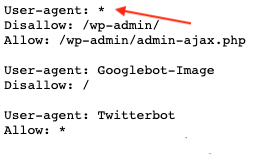
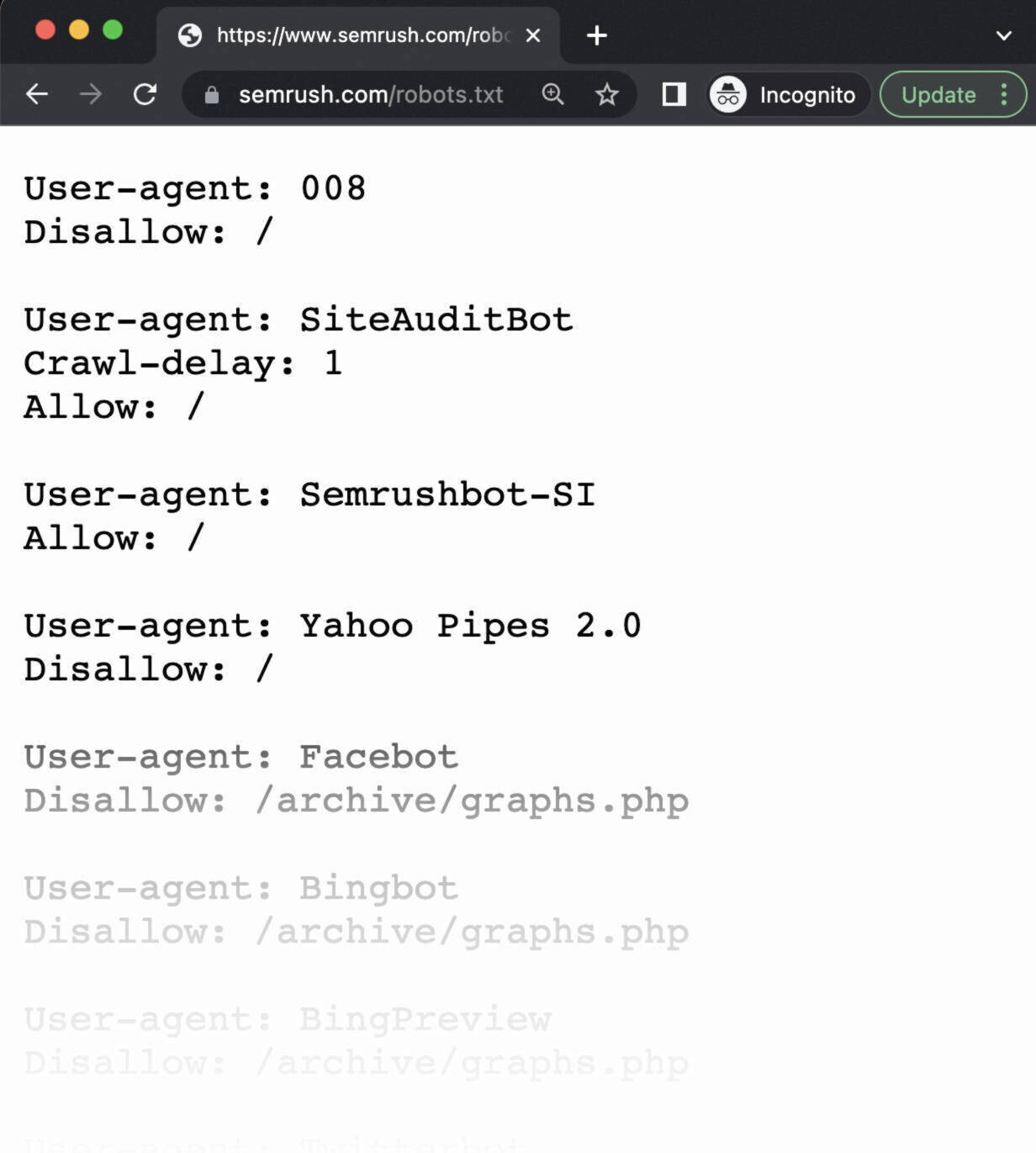
2. The Official Rules: A Deeper Dive with RFC 9309
While the basic concept is simple, the precise rules for parsing robots.txt can be complex. The definitive guide is RFC 9309, which standardized the protocol. To build a compliant parser, we need to understand its key specifications.
Please take some time to read the following sections from the official RFC document. This is dense material, but it contains the ground truth for how a parser must behave.
[PDF] RFC 9309: Robots Exclusion Protocol
We will now consult the official Robots Exclusion Protocol specification, RFC 9309, to understand the precise rules of engagement.
Please read the following sections from the PDF (page numbers refer to the PDF document itself): Section 2.2.1: The User-Agent Line (pages 3-4): Focus on how a crawler finds its matching group of rules, including the role of the * wildcard and what to do if multiple groups match a user-agent. Section 2.2.2: The "Allow" and "Disallow" Lines (page 5): This is the most critical part. Pay close attention to the "most specific match" principle (the one with the most octets/bytes) and the rule for handling ties (allow wins over disallow if they are equivalent). Section 2.2.3: Special Characters (page 6): Understand the meaning of #, $, and * in rule patterns.
To summarize the key takeaways from the RFC:
- Groups: A
robots.txtfile consists of groups. Each group starts with one or moreUser-agentlines and is followed byAllow/Disallowrules. - User-Agent Matching: A crawler finds the single most specific group of rules that applies to it. If an exact match for its name exists, it uses that. If not, it falls back to the
*group, if present. - Path Matching Precedence: To decide if a URL is allowed:
- Find all
AllowandDisallowrules within the chosen group that match the URL's path. - The rule with the longest path pattern wins. For example, a rule
Disallow: /private/data/(14 characters) is more specific thanAllow: /private/(9 characters). - If an
Allowand aDisallowrule have the exact same path length (e.g.,Allow: /pageandDisallow: /page), theAllowrule takes precedence. - If no rules match the URL path, access is implicitly allowed.
- Find all
3. Your Task: Implement a robots.txt Parser
While Python has a built-in urllib.robotparser, it has known limitations. As noted in the article "Respecting Robots Exclusion Protocol or robots.txt at Scale," the standard library module does not fully conform to RFC 9309, particularly regarding the "most specific match" logic.
Therefore, to truly understand the protocol, you will implement the core logic yourself. Your task is to create a simple parser class that correctly applies the specificity rules from the RFC.
Below is a skeleton for a RobotParser class. Your goal is to fill in the parse and can_fetch methods.
import urllib.parse
from collections import defaultdict
from typing import List, Tuple

class RobotParser:
    """
    A simple parser for robots.txt that adheres to the 'most specific match'
    principle from RFC 9309.
    """
    def __init__(self):


        # Maps a user-agent string to a list of (rule_type, path) tuples.
        # e.g., {'*': [('Allow', '/'), ('Disallow', '/private')]}
        self._rules = defaultdict(list)


        # We can also store other directives like crawl-delay here if needed.
        self._sitemaps = []

    def parse(self, content: str):
        """
        Parses the content of a robots.txt file and populates the rules.
        """
        current_agents = []
        for line in content.splitlines():
            line = line.strip()
            if not line or line.startswith('#'):
                continue


            # Split at the first ':'
            parts = line.split(':', 1)
            if len(parts) != 2:
                continue

            key, value = [p.strip() for p in parts]
            key = key.lower() # Keys are case-insensitive

            if key == 'user-agent':


                # A new user-agent line resets the current group
                if current_agents:


                    # This line belongs to a new group, so start fresh
                    current_agents = []
                current_agents.append(value)
            elif key in ('allow', 'disallow') and current_agents:


                # Add the rule to all current user-agents
                for agent in current_agents:
                    self._rules[agent].append((key.capitalize(), value))
            elif key == 'sitemap':
                self._sitemaps.append(value)


            # You can add handling for 'Crawl-delay' here as an extension.


    # --- YOUR IMPLEMENTATION START ---
    def can_fetch(self, user_agent: str, url: str) -> bool:
        """
        Determines if the given user_agent is allowed to fetch the URL.
        """


        # 1. Get the path from the URL.
        path = urllib.parse.urlparse(url).path
        if not path:
            path = '/' # Handle cases like 'http://example.com'


        # 2. Select the correct set of rules.
        # Fallback from specific agent to the wildcard agent '*'.
        agent_rules = self._rules.get(user_agent, self._rules.get('*', []))


        # 3. If no rules apply, access is allowed by default.
        if not agent_rules:
            return True


        # 4. Find all matching rules and their specificity (length of the path pattern).
        matching_rules: List[Tuple[int, str, str]] = [] # (specificity, rule_type, path)
        for rule_type, rule_path in agent_rules:


            # Simple path matching: does the URL path start with the rule's path?
            if path.startswith(rule_path):
                specificity = len(rule_path)
                matching_rules.append((specificity, rule_type, rule_path))


        # 5. If no rules match the path, access is allowed.
        if not matching_rules:
            return True


        # 6. Find the most specific rule. The `max` function on a tuple
        # will sort by the first element (specificity), then the second (rule_type).
        # Since 'Disallow' comes before 'Allow' alphabetically, this would
        # incorrectly prioritize Disallow in a tie. We need to handle the tie-breaker.


        # Sort by specificity (descending)
        matching_rules.sort(key=lambda x: x[0], reverse=True)

        most_specific_rule = matching_rules[0]
        max_specificity = most_specific_rule[0]


        # Check for ties in specificity
        tied_rules = [r for r in matching_rules if r[0] == max_specificity]


        # RFC 9309: If an "allow" and a "disallow" rule are equivalent, the "allow" rule wins.
        for _, rule_type, _ in tied_rules:
            if rule_type == 'Allow':
                return True # Allow wins in a tie


        # If no 'Allow' rule was in the tie, the most specific rule determines the outcome.
        # Since we only have 'Disallow' rules in the tie, the outcome is Disallow.
        return most_specific_rule[1] == 'Allow'


    # --- YOUR IMPLEMENTATION END ---


# --- Example Usage ---
if __name__ == '__main__':
    robots_content = """
    User-agent: *
    Disallow: /private/
    Allow: /private/public-page

    User-agent: MyBot
    Allow: /
    Disallow: /restricted
    Disallow: /admin
    Allow: /admin/login
    """

    parser = RobotParser()
    parser.parse(robots_content)


    # Test case 1: General bot, disallowed path
    assert not parser.can_fetch('*', 'http://example.com/private/secret.html')


    # Test case 2: General bot, more specific 'Allow' wins
    assert parser.can_fetch('*', 'http://example.com/private/public-page')


    # Test case 3: Specific bot, allowed by default
    assert parser.can_fetch('MyBot', 'http://example.com/some/page.html')


    # Test case 4: Specific bot, disallowed path
    assert not parser.can_fetch('MyBot', 'http://example.com/restricted/index.html')


    # Test case 5: Specific bot, longest match wins ('Allow' over 'Disallow')
    assert parser.can_fetch('MyBot', 'http://example.com/admin/login')


    # Test case 6: Specific bot, longest match wins ('Disallow' over 'Allow')
    assert not parser.can_fetch('MyBot', 'http://example.com/admin/dashboard')

    print("All test cases passed!")
Self-Correction in the provided solution: A naive max() on the rules would fail the tie-breaker case. The provided implementation correctly sorts by specificity and then explicitly checks for an Allow rule among the most specific matches, correctly implementing the RFC 9309 standard.
Conclusion
Congratulations on building the first and most fundamental component of our web crawler! By parsing robots.txt according to the official standard, we ensure our crawler will be a good citizen of the web.
Key Takeaways:
robots.txtis a public file that specifies rules for web crawlers based on theirUser-agent.- Parsing this file is not trivial; it requires adhering to the formal specification (RFC 9309).
- The most critical logic is the "most specific match" rule: the longest matching path pattern determines the outcome, with
Allowdirectives winning any ties in specificity. - Building a custom parser, even a simple one, solidifies your understanding of these rules far better than just using a library.
Next Lesson Preview
Now that we can determine if we are allowed to fetch a URL, our next challenge is managing the URLs themselves. Many different URL strings can point to the same content (e.g., with or without www, http vs. https or with tracking parameters). In the next lesson, we will implement URL normalization to canonicalize URLs, preventing us from crawling the same page multiple times and simplifying our visited-set tracking.