Recommended resources
The freely available resources this lesson will direct you to.
- How an HTTP Request Gets Served - In Great Detailwww.youtube.com
- What happens when you type google.com into your browser and press enter? (Detailed Analysis)www.youtube.com
- Populating the page: how browsers work - MDN Web Docsdeveloper.mozilla.org
- What happens when you type a URL into your browser? | Front-End Web & Mobileaws.amazon.com

Hello! In the previous lesson, you used host-level evidence to distinguish CPU, memory, disk-space, and inode problems. A healthy host can still serve an application that users cannot reach. Today you’ll follow one HTTPS request from a hostname to an HTTP response, identifying what DNS, TCP, TLS, and HTTP each contribute—and what a failure at each stage does and does not tell you.
Plan on about 40 minutes, including the short video and reading.
Begin with the URL, not the server
Suppose a client requests https://status.example.org/health. The URL contains three pieces that matter immediately: https calls for a secure HTTP connection; status.example.org names the destination; and /health identifies the resource to request. If no port is specified, HTTPS ordinarily uses TCP port 443.
The client cannot use the path to find a server. It first needs an address for the hostname. DNS can supply an IP address, possibly from a cache; a lookup need not contact an external name server on every request. The answer may point to a load balancer or other front end rather than the machine running the application. DNS answers where the client should try to connect, not whether that destination accepts connections or serves /health.
Watch the selected portions of Dave’s Garage’s How an HTTP Request Gets Served - In Great Detail for a visual account of the request path. We’ll refine a few details afterward.
How an HTTP Request Gets Served - In Great Detail
Dave’s Garage follows a browser request through name resolution, connection setup, security negotiation, and the response. Watch for the distinct question answered at each stage.
Watch name resolution for how the client obtains an address, then connection setup for the TCP and TLS handshakes. Continue with the HTTP request, and skip ahead to the response. Treat this as a conceptual account: a real request may use cached DNS information or an existing connection.
A useful boundary is already visible: successful DNS resolution is not a successful request. It only gives the client an address to try.
TCP establishes a connection; TLS secures it
With an address and port, the client attempts a TCP connection. For our example, it targets the resolved IP address on port 443. TCP establishes the connection through three messages: the client sends SYN, the destination replies SYN-ACK, and the client sends ACK. TCP then provides an ordered, reliable byte stream. It does not decide which web page to return, and a completed TCP handshake does not establish that the connection is secure.
If the connection attempt times out, the client has not obtained a usable TCP connection; a network path or filtering issue is one possibility. If it is refused, something responded but did not accept a connection on that port. Neither observation, by itself, identifies the application’s state.
For HTTPS over TCP, TLS negotiation follows connection establishment. The parties agree on security parameters and establish keys. The client also validates the server’s certificate against the hostname it intended to reach, its validity period, and a trusted issuer. A certificate for the wrong name can therefore prevent the request even when DNS and TCP worked.
The following image helps separate the TCP messages from the later TLS messages. Read it as an illustration, not a universal packet trace.
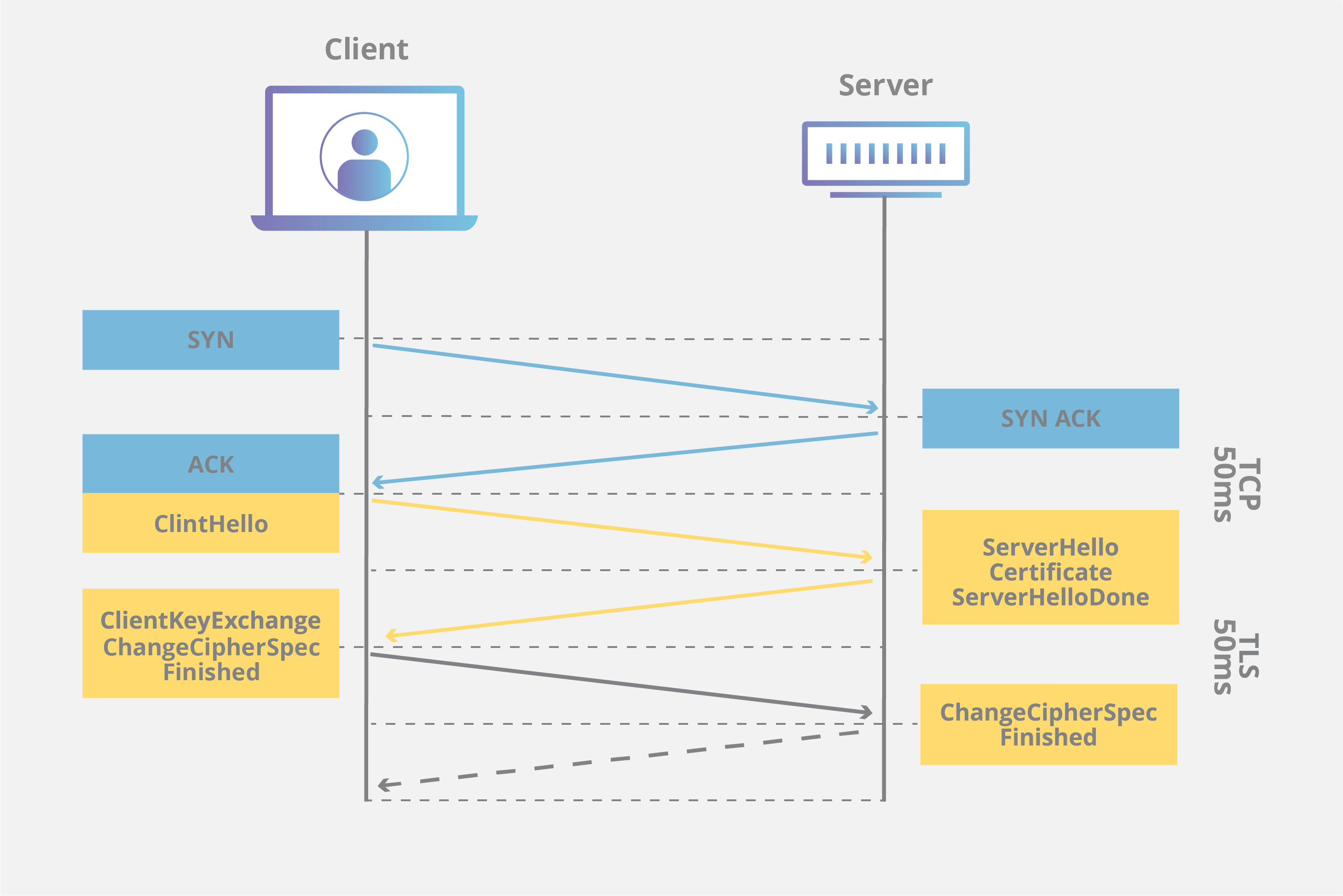
In particular, labels such as ClientKeyExchange, ChangeCipherSpec, and ServerHelloDone reflect an older TLS handshake. Modern TLS 1.3 has a different message sequence. The lasting lesson is the boundary: TCP makes communication possible; TLS authenticates and protects the HTTPS connection; neither is the HTTP request itself.
There is one operational qualification to “the server.” A public-facing proxy or load balancer may terminate the client’s TCP and TLS connections and make a separate connection to the application. A successful client-side TLS handshake proves security for that connection to the front end; it does not prove the backend connection is healthy or uses TLS.
HTTP asks for a resource and reports the result
Only after the HTTPS connection is ready does the client send its HTTP request across it. For an HTTP/1.1 illustration, the request for our example could look like this:
GET /health HTTP/1.1
Host: status.example.org
GET states the action; /health identifies the requested resource; and Host tells the HTTP endpoint which hostname the client intended. The server or front end processes that request and returns an HTTP response with a status, headers, and, where applicable, a body:
HTTP/1.1 200 OK
Content-Type: application/json

{"status":"ok"}
The body is illustrative, not a required format for health endpoints. An HTTP status is evidence about how the endpoint handled this request: 200 indicates success as reported by that endpoint; 404 means the requested resource was not found there; and 503 indicates that an endpoint reported unavailability. A proxy can generate a response itself, so an HTTP error does not automatically identify which backend component failed.
Read the AWS article’s URL, request, and response sections to connect these message fields to the full navigation.
What happens when you type a URL into your browser? | Front-End Web & Mobile
This AWS article shows how a URL becomes an HTTP request and how the server expresses its result. Focus on the message structure rather than its particular website or hosting setup.
In “1. You type https://jennapederson.dev/hello-world in your browser and press Enter,” read the “Scheme” subsection from HTTPS meaning, then the “Path” subsection from path meaning. In “4. Browser sends the HTTP request to the server,” start where the article says the browser follows the rules of HTTP and read request structure through its explanation of the body. In “5. Server processes request and sends back a response,” read response structure, ending after the article explains the 200 status.
Notice that the hostname and path play different roles. DNS resolves the hostname; the HTTP endpoint interprets the path. Reaching the correct IP address cannot, by itself, guarantee the correct HTTP response.
Trace a failure without skipping layers
Imagine users report that https://status.example.org/health is unavailable. A disciplined trace asks where the request stopped:
| Observation | What it establishes | What remains open |
|---|---|---|
| No usable DNS answer | The client lacks an address for this hostname | Whether the service would work if reached another way |
| DNS answer, but no TCP connection | An address was obtained; a connection was not | Routing, filtering, listener, or other connection causes |
| TCP connects, but TLS validation fails | The endpoint accepted TCP; HTTPS was not established successfully | Certificate, hostname, trust, or validity problems |
Valid TLS connection, HTTP 503 |
The client received an HTTP response | Whether the front end or application generated it, and why |
HTTP 200, but the user still sees a failure |
This request received a successful status | Whether its body, dependencies, or other requests are failing |
This is an evidence ladder, not a claim that every request performs four fresh setup operations. DNS answers may be cached, and clients can reuse connections for multiple HTTP requests. Also, the TCP-first trace describes conventional HTTPS over TCP; HTTP/3 uses QUIC instead. For now, the TCP-based path gives you a clear baseline for production troubleshooting.
The distinction between reaching a front end and reaching an application is especially important. If a load balancer accepts TCP, completes TLS, and returns 503, repeating DNS checks will not explain the backend failure. Conversely, application logs may show nothing when the client cannot establish a connection to the front end at all. Identify the last successful stage before choosing where to investigate next.
Key takeaways
For a conventional HTTPS request, DNS supplies an address, TCP establishes a reliable connection, TLS authenticates and secures that connection, and HTTP carries the request and response. Each successful stage narrows the problem, but does not prove later stages succeeded. Keep the client-facing endpoint distinct from any backend it contacts.
Next, you’ll turn this trace into practical checks, using command-line tools to test DNS answers, ports, certificates, and HTTP responses separately.