Recommended resources
The freely available resources this lesson will direct you to.
- How to Make Your Teachers Pay Teachers (TPT) Covers and Thumbnails Popwww.youtube.com
- Designing Covers for TpT Productswww.youtube.com
- How to Create Eye-Catching Covers that Stand Out in the TPT Searchlearn.maliarivera.com
- How to Create a Great Cover for TPT Products - Rhoda Design Studiowww.rhodadesignstudio.com
Welcome back. In our previous lesson, you built a critical system for legally sourcing and managing the fonts and clipart for your products. With that legal and organizational foundation in place, we can now move to one of the most exciting and impactful parts of product creation: designing the cover.
This lesson focuses on how to design a professional, eye-catching product cover that acts as a powerful marketing tool. The cover is the single most important image you will create for your resource. It's the "billboard" that has to stop a teacher mid-scroll and convince them to click. We will break down the essential components of a high-converting cover, analyze what makes successful designs work, and put it all into practice by building your own reusable cover template in Adobe Illustrator.
The Cover: Your Product's First Impression
In the crowded TPT marketplace, you have seconds to grab a buyer's attention. Your product title gets you found in the search, but your cover gets you the click. It needs to communicate what your product is, who it's for, and why it's valuable—all in a single glance.
Let's hear from top TPT seller Lindsay Bowden on why mastering cover design is non-negotiable for success.
How to Make Your Teachers Pay Teachers (TPT) Covers and Thumbnails Pop
This video, from Lindsay Bowden's channel, explains the dual importance of keywords (for being found) and cover photos (for getting clicks).
Watch the opening segment from the introduction. The key takeaway is that even with perfect keywords, a poor cover will prevent clicks. It must look professional and be "scroll-stopping."
The Anatomy of a High-Converting Cover
Successful TPT covers are not random; they are intentionally designed and include several key components that work together. We can think of them as a formula for attracting buyers.

Let's break down each piece of this formula.
-
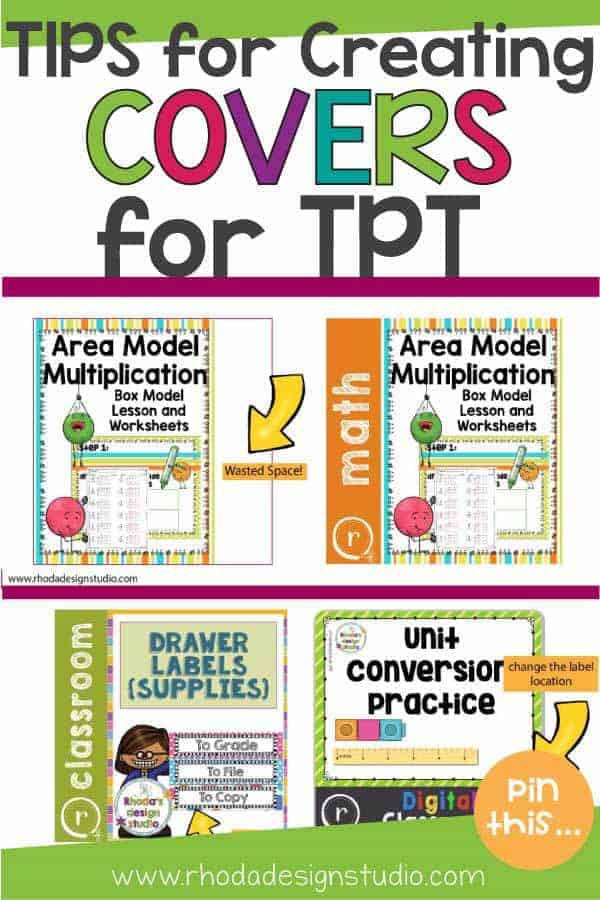
Square Format: Your cover must be square to take full advantage of the "real estate" TPT provides. Using the default 8.5x11" page format results in wasted space and makes your product look unprofessional. Your proficiency in Illustrator makes creating custom-sized artboards simple.
- The standard size is 1080px by 1080px, or 8x8 inches, as noted in the article "How to Create Eye-Catching Covers."
-
Big, Bold, Clear Title: The title is the most important text. It must be readable even when the cover is a tiny thumbnail in search results.
- Use High-Contrast, Sans-Serif Fonts: Choose fonts from your style guide that are thick, clean, and easy to read. Avoid script or overly decorative fonts for the main title. Ensure your text color has high contrast with the background.
- Communicate the "What": The title should clearly state the product's topic (e.g., "Area Model Multiplication," "Common and Proper Nouns").
-
Product Visuals: Buyers want to see what they are buying. Include screenshots or mockups of the actual pages from your resource. This builds trust and shows the quality of your work. The goal is to showcase the resource, not hide it.
-
A "Value Grab": This is a short, punchy statement that highlights the single best thing about your resource. What makes it irresistible?
- Examples: "Includes Video Lessons," "100 Differentiated Worksheets," "No Prep, Print & Go," "Digital & Print."
-
Branding Elements: Consistently include your logo and brand colors. This helps build brand recognition, encouraging repeat purchases from customers who love your work.
To see these principles laid out with clear rationale, take a few minutes to read through this guide.
How to Create a Great Cover for TPT Products - Rhoda Design Studio
This article from Rhoda Design Studio provides foundational rules for creating effective TPT covers, with a specific recommendation for using an Illustrator template.
Read through the following sections to solidify your understanding of the core principles: Make it Square: This reinforces the importance of using the full space provided. Make Your Title Bold, Large, and Clear: Note the advice on using print fonts and communicating the topic and grade level. Don’t Fill it With Clipart and Clutter: This introduces the "less is more" design philosophy. Create a Template: This directly relates to our action step and highlights the efficiency of using Illustrator for this task.
From Theory to Practice: Analyzing Real Covers
The best way to develop an eye for good design is to analyze what works and what doesn't in the real world. Let's start by breaking down the components of several successful covers.
Designing Covers for TpT Products
In this video from Teach the Way They Learn, the host deconstructs several high-quality TPT covers, identifying the consistent elements they share.
Watch the segment from analyzing examples. As you watch, notice how each cover, despite its unique style, contains the core components we just discussed: title, product images, features (value grab), and branding.
Now, let's go deeper with a masterclass in cover critique. Lindsay Bowden provides incredibly specific and actionable feedback on covers submitted by other TPT sellers. This is where you'll see the principles of contrast, font choice, and layout come to life.
How to Make Your Teachers Pay Teachers (TPT) Covers and Thumbnails Pop
This is the most practical part of our lesson. You will watch a live critique session that provides detailed feedback on real TPT covers. This will train your eye to spot opportunities for improvement in your own designs.
Watch the extended segment from on cover critiques. Pay close attention to the feedback regarding: Contrast and Readability: Notice how often she uses a contrast checker and suggests changes to make text pop. Font Choice & Effects: See how effects like shadows can sometimes hurt readability. Layout and Hierarchy: Observe how she suggests repositioning and resizing elements to draw the buyer's eye to the most important information. Clarity of Purpose: Note the feedback about making it instantly clear what the product is and who it's for.
Common Mistakes to Avoid
As you saw in the critiques, it's easy to make mistakes that hurt a cover's effectiveness. Here are the most common pitfalls to avoid.
This video summarizes the key "don'ts" of cover design perfectly.
Designing Covers for TpT Products
This segment explicitly lists and illustrates the most common design mistakes that new TPT sellers make on their covers.
Watch the section on common mistakes. The key takeaways are: Don't use tiny images. Show off your work! Don't use unreadable fonts. Prioritize clarity over beauty. Don't use irrelevant or overpowering clipart. The product is the star. Don't use an oversized logo. You're not Nike (yet).
Action Plan: Build Your Cover Template in Illustrator
Now it's time to put this into action. You will create a reusable cover template in Adobe Illustrator. This template will become a foundational asset for your business, ensuring brand consistency and saving you hours of work in the long run.
Your task is to create an Illustrator Template file (.ait) with the following specifications:
-
Document Setup:
- Create a new Illustrator document with one artboard.
- Size: 1080px wide by 1080px high.
- Color Mode: RGB (for web display).
-
Layered Structure: Create distinct layers for each element to keep your template organized and easy to edit.
Background: For your solid brand color or a subtle background pattern.Mockups: Place placeholder shapes (e.g., rectangles with a light grey fill and a thin stroke) where you will drop in screenshots of your product pages.Text:- Create a text box for your Main Title. Use a bold, sans-serif font from your brand kit.
- Create a smaller text box for the Resource Type (e.g., "Worksheets," "Digital Activity").
Value Prop: Create a shape like a starburst, banner, or circle where you will add your "value grab" text.Logo: Place your store logo, likely in a corner.
-
Branding: Apply the brand colors and fonts you defined in our earlier lesson on design best practices. This ensures every cover you make is instantly recognizable as yours.
-
Save as Template: Go to
File > Save As Template...and name itTPT_Cover_Template.ait. Now, every time you start a new cover, you can open this template and it will create a new, untitled document with all your branding and placeholders ready to go.
Conclusion
In this lesson, you've learned that a product cover is your most important piece of marketing imagery. We've dissected the anatomy of a high-converting cover, establishing that a square format, a clear title, product visuals, a compelling value proposition, and consistent branding are essential. By analyzing expert critiques and common mistakes, you've trained your eye to see what makes a design effective. Most importantly, you have translated this knowledge into a practical business asset by creating your own reusable cover template in Illustrator.
This template-based approach is the key to working efficiently. In our next lesson, we will expand on this concept by developing a complete, multi-page product template in Illustrator. This will streamline your entire creation workflow, from the cover page to the terms of use, allowing you to produce high-quality resources faster.