Recommended resources
The freely available resources this lesson will direct you to.
- How to Deploy LLMs | LLMOps Stack with vLLM, Docker, Grafana & MLflowwww.youtube.com
- Full 2-Hour DevOps Masterclass (Prometheus + Grafana + Slack) Monitoring & Alerting in Real Lifewww.youtube.com
- Monitoring vLLM Inference Servers: A Quick and Easy Guidewww.dataunboxed.io
- Prometheus & Grafana for vLLM, TGI, llama.cpp - Rost Glukhovwww.glukhov.org
Welcome to the third lesson in our module on LLM observability. So far, we have covered the first two pillars: collecting high-level time-series metrics with Prometheus and generating detailed, event-specific structured logs with OpenTelemetry. You now understand how to gather the raw data. The next logical step, and the focus of this lesson, is to transform that raw data into actionable insights.
Your learning goal is to build an operational monitoring dashboard in Grafana that covers latency, throughput, error rates, and GPU metrics. For someone with your extensive SRE background, the concept of a "single pane of glass" for monitoring a service is second nature. Today, we'll apply that principle to the unique challenges of LLM inference, creating the command center you'd use to understand service health at a glance.
1. The Observability Stack: Prometheus and Grafana
The combination of Prometheus and Grafana is a standard in the world of DevOps and SRE, so you'll be on familiar ground. Let's quickly formalize their roles in our LLM Ops stack.
- Prometheus: The database. It actively scrapes (or pulls) metrics from a
/metricsendpoint exposed by our LLM serving framework (like vLLM or TGI) and stores them as time-series data. - Grafana: The visualization layer. It queries the Prometheus database using the Prometheus Query Language (PromQL) and renders the results in dashboards composed of panels (graphs, gauges, tables, etc.).
Monitoring vLLM Inference Servers: A Quick and Easy Guide
This article from Data Unboxed provides a clear, high-level overview of this architecture.
Focus on the "Architecture Overview" section. The simple diagram perfectly illustrates the flow: the vLLM server exposes metrics, Prometheus scrapes and stores them, and Grafana visualizes them.
This separation of concerns is powerful. It allows you to use a standardized visualization tool (Grafana) to monitor any system that can expose metrics in a way Prometheus understands.
2. Key Metrics for an LLM Operational Dashboard
Before building a dashboard, we must define what to display. While traditional metrics like request rate and error rate are necessary, they are not sufficient for LLMs.
Prometheus & Grafana for vLLM, TGI, llama.cpp - Rost Glukhov
This excellent article by Rost Glukhov outlines the specific metrics that matter for LLM inference.
Read the sections "Why you should monitor LLM inference differently" and "Metrics checklist for LLM inference monitoring". Pay close attention to the distinction between request latency and token latency, and why throughput is measured in tokens/sec.
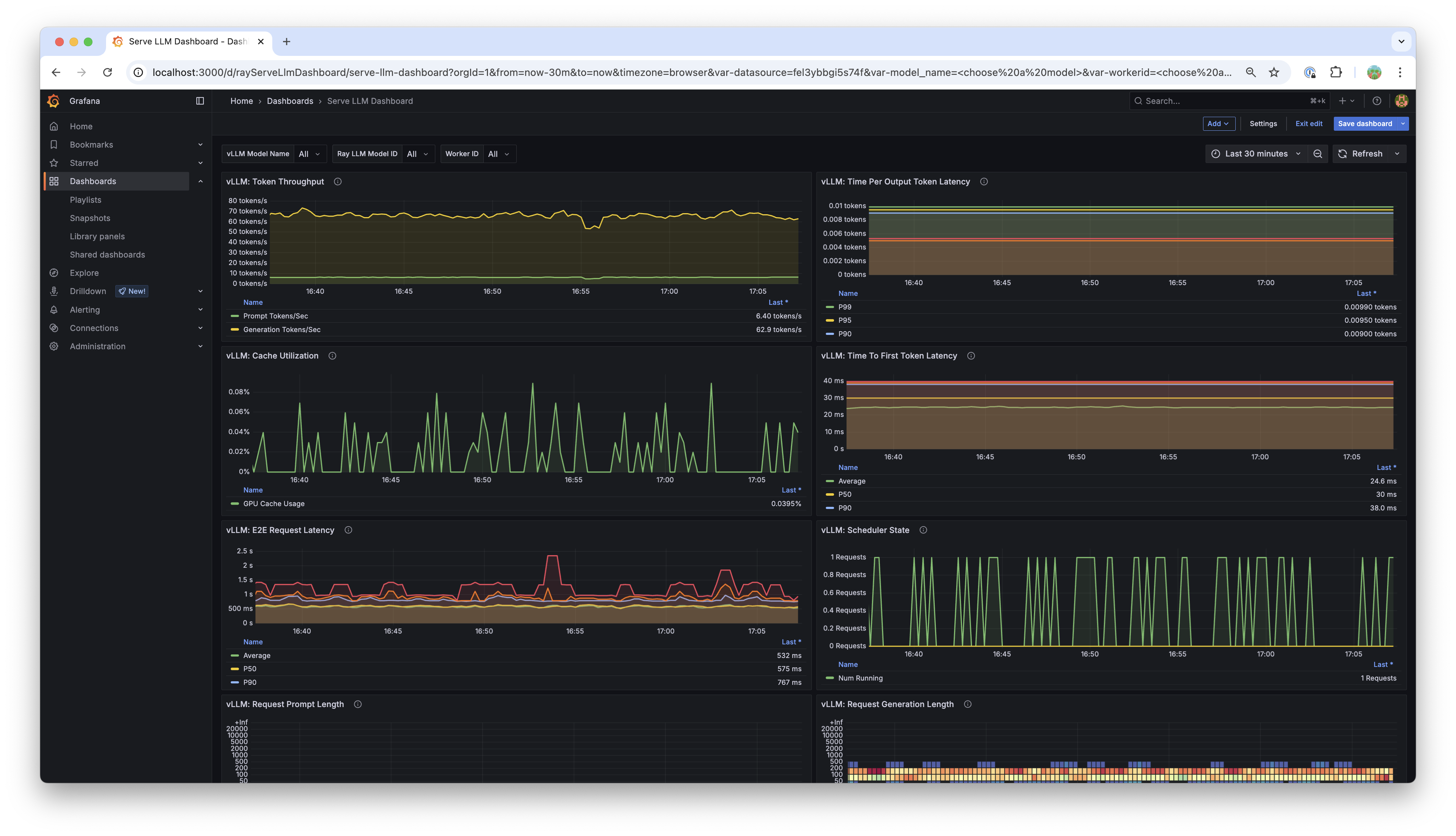
Based on this, a high-signal operational dashboard for an LLM service should be structured around these key areas:
1. User Experience (Latency)
- End-to-End Request Latency: The total time from when a request is received to when the final token is sent. Usually tracked as percentiles (e.g., P90, P95, P99).
- Time To First Token (TTFT): Measures the "responsiveness" of the model. Critical for real-time applications.
- Inter-Token Latency (Time per Output Token): The average time to generate each subsequent token after the first. This helps diagnose decoding phase bottlenecks.
2. Throughput
- Request Rate (RPS): The number of incoming requests per second.
- Token Throughput: The total number of prompt and completion tokens processed per second. This is a truer measure of the "work" the system is doing than RPS.
3. Saturation, Utilization, and Errors
- GPU Utilization & Memory: How much of the GPU's compute and VRAM is being used. Essential for identifying hardware bottlenecks. This data typically comes from a tool like
nvidia-smiexposed via an exporter (e.g., DCGM-exporter). - KV Cache Utilization: The percentage of the dedicated KV cache memory that is in use. A leading indicator of potential performance degradation.
- Queue Depth/Size: The number of requests waiting to be processed. A rising queue is a sign that the system can't keep up with demand.
- Error Rate: The percentage of requests that fail.
The following dashboards are excellent examples of these principles in practice.

3. Building the Dashboard in Grafana
Now, let's walk through the process of creating such a dashboard. We'll use a video that, while not LLM-specific, provides an expert walkthrough of the fundamental Grafana workflow. You can apply these steps to the LLM-specific metrics we've just discussed.
Full 2-Hour DevOps Masterclass (Prometheus + Grafana + Slack) Monitoring & Alerting in Real Life
This masterclass from "LearnwithDevOpsEngineer" provides a fantastic, real-world guide to building dashboards with Prometheus and Grafana.
This is a detailed video, so focus on these key segments to understand the workflow: Connecting the Pieces: Watch the setup to see how to install Grafana and connect it to Prometheus as a data source. This is the foundational step. Creating a Basic Panel: Skim this section to understand the UI for adding a visualization, selecting the data source, and entering a simple query. Building a Health Dashboard: Watch this walkthrough. The instructor builds a multi-panel dashboard for application health. Pay attention to how he adds panels for errors, CPU/memory, and uptime. You will use the exact same process, but with LLM-specific PromQL queries. Creating a Command Center: Finally, watch this part where he builds a more advanced "command center" dashboard. This section is highly relevant as it covers creating panels for P90 latency, error rates, and active alerts, using thresholds to change colors—all techniques you'll use for your LLM dashboard.
4. PromQL Recipes for Your LLM Dashboard
The videos showed you the how in Grafana. Now you need the what—the specific PromQL queries for our LLM metrics. The article from Rost Glukhov is an invaluable resource here.
Below are some essential queries you can adapt for your Grafana panels. These assume your metrics are prefixed with tgi_ (from Text Generation Inference) or vllm:.
Panel: P95 Request Latency (Time Series Graph)
This query calculates the 95th percentile latency over a 5-minute window from a Prometheus histogram metric.
histogram_quantile(
  0.95,
  sum by (le) (rate(tgi_request_duration_bucket[5m]))
)
Panel: Token Throughput (Gauge or Stat Panel)
This calculates the rate of generated tokens per second.
# For completion tokens
sum(rate(vllm:request_output_tokens_total[1m]))


# For prompt tokens
sum(rate(vllm:request_prompt_tokens_total[1m]))
Panel: Error Rate (Stat Panel with Thresholds)
This calculates the ratio of failed requests to total requests.
# Assumes you have counters for successful and total requests
1 - (
  sum(rate(tgi_request_success[5m]))
  /
  sum(rate(tgi_request_count[5m]))
)
Panel: GPU Memory Utilization (Gauge)
This query assumes you are using dcgm-exporter, which exposes NVIDIA GPU metrics.
# Shows the percentage of used framebuffer memory per GPU
avg(DCGM_FI_DEV_FB_USED_PERCENT) by (gpu)
Panel: KV Cache Utilization (Gauge)
This shows the current vLLM KV cache usage, a critical metric for vLLM performance.
max(vllm:kv_cache_usage_perc)
As you build, you can organize these panels into rows as suggested in the "Prometheus & Grafana" article: one row for User Experience, another for System Saturation, and a third for Throughput.
5. A Live LLM Dashboard in Action
To see how all these pieces come together in a live environment, this final video shows a complete LLMOps stack monitoring a vLLM deployment.
How to Deploy LLMs | LLMOps Stack with vLLM, Docker, Grafana & MLflow
This video by Venelin Valkov demonstrates the end-to-end setup and shows the resulting Grafana dashboard in action.
Focus on these two parts: Dashboard Overview: The presenter gives a quick tour of the vLLM dashboard, highlighting the exact metrics we've discussed: time to first token, request latency, and token throughput. Live Metrics: Watch as he sends requests to the model and the dashboard panels update in real-time. This provides a clear, practical demonstration of the value of your monitoring setup.
Conclusion
In this lesson, you've learned how to complete the observability loop by visualizing the metrics you've collected. You now have a blueprint for building a production-ready operational dashboard in Grafana that is tailored to the specific needs of an LLM inference service.
Key Takeaways:
- An effective LLM dashboard goes beyond traditional metrics, focusing on token-level throughput, multiple forms of latency (TTFT, inter-token), and LLM-specific saturation signals like KV cache usage.
- The workflow involves connecting Grafana to a Prometheus data source and building panels using PromQL queries that target the metrics exposed by your serving framework.
- Structuring your dashboard logically (e.g., by user experience, saturation, and throughput) makes it faster to interpret during an incident.
- You can use Grafana features like thresholds to create visual cues (e.g., changing a panel's color to red when latency exceeds a limit) for at-a-glance status checks.
In the previous lessons, you learned to collect metrics and logs. Today, you visualized those metrics. In our next lesson, we will build upon this foundation to track per-request token usage to compute cost-per-request and cost-per-thousand-tokens metrics. This moves from operational monitoring to financial governance—a critical aspect of LLM Ops that your new dashboard skills will help you visualize.