Recommended resources
The freely available resources this lesson will direct you to.
- Langsmith LLMOPS Platform By Langchain-Debug ,Monitor And Build Production Grade LLM Applicationwww.youtube.com
- Introduction to Ingesting OpenTelemetry Logs with Loki | Zero to Hero: Loki | Grafanawww.youtube.com
- What is LLM Monitoring? [Complete Guide] | by Amit Yadavmedium.com
- How to Monitor LLM Applications with OpenTelemetry GenAI ...oneuptime.com
Welcome to the next lesson in our journey to master the system layer for LLM Operations. In our previous session, we focused on collecting metrics—the numerical, time-series data like latency percentiles and token throughput—using Prometheus. These metrics give us a high-level, aggregate view of our system's health.
Today, we shift our focus to the second pillar of observability: structured logs. While metrics tell you what is happening (e.g., "P99 latency has increased"), logs tell you why it's happening by providing rich, event-specific context for each individual request. Your goal for this lesson is to learn how to set up structured logging for inference requests, ensuring you capture critical details like token counts and model metadata. This is fundamental for debugging, cost analysis, and maintaining a robust audit trail.
1. The Anatomy of an LLM Log Entry
For someone with your background in SRE and experience with the ELK stack, the value of structured logging is already clear. Instead of messy, unstructured text strings, we want well-formed JSON objects that can be easily parsed, indexed, and queried. For an LLM inference request, a comprehensive log entry should contain more than just a message; it needs specific metadata.
Key fields to capture for every LLM call include:
- Request/Trace ID: To correlate logs for a single user request across multiple services.
- Timestamp: When the event occurred.
- Model Identifier: The name of the model being called (e.g.,
mistralai/Mistral-7B-v0.1). - Prompt & Completion: The actual input text and the model's generated output. (Note: In production, these may be truncated or omitted for PII and cost reasons).
- Token Counts: The number of input tokens and output tokens. This is non-negotiable for cost tracking and performance analysis.
- Latency: The duration of the call.
- Finish Reason: Why the model stopped generating (e.g.,
stopsequence reached,lengthlimit hit). - Error Information: Any exceptions or failure statuses.
To see what this looks like in a polished, production-grade tool, let's look at LangSmith, a popular LLM Ops platform from LangChain.
Langsmith LLMOPS Platform By Langchain-Debug ,Monitor And Build Production Grade LLM Application
This video from Krish Naik provides a tour of the LangSmith platform, which is built around capturing exactly this kind of structured data.
Watch the following sections to get a feel for the data we want to capture: Introduction to LangSmith: Understand its purpose for debugging, monitoring, and evaluation. Viewing a trace: Pay close attention to the "runnable sequence" view. Notice how it shows the inputs, outputs, and metadata for each step. Cost and token tracking: See how the platform visualizes token counts and associated costs for each request. This is the direct result of structured logging.
The LangSmith dashboard makes it clear: capturing this detailed, structured data for every call is what enables deep debugging and cost control. Now, let's learn how to generate this data ourselves using open standards.
2. The Standard: OpenTelemetry and GenAI Conventions
To avoid reinventing the wheel for every application, the industry is converging on OpenTelemetry (Otel) as the standard for generating and collecting telemetry data (traces, metrics, and logs). You can think of Otel as a universal adapter for observability. It provides a standard format and a set of tools to instrument your code once and send the data to any compatible backend (like ELK, Grafana Loki, Jaeger, or commercial platforms).
A key part of Otel is its semantic conventions: a standardized vocabulary for naming attributes. This ensures that a user_id from one service means the same thing as a user_id from another. Recently, specific conventions have been developed for Generative AI.
How to Monitor LLM Applications with OpenTelemetry GenAI ...
This article from OneUptime introduces the new OpenTelemetry semantic conventions for GenAI and lists the key attributes.
Read the section "What Are GenAI Semantic Conventions?". Focus on understanding the purpose of the gen_ai.* namespace and familiarize yourself with the key attributes listed, especially: gen_ai.system gen_ai.request.model gen_ai.usage.input_tokens gen_ai.usage.output_tokens
These conventions provide the standardized schema we need. When you log gen_ai.usage.input_tokens, any Otel-compatible tool will immediately recognize it as the prompt token count.
The image below shows what this looks like in a real observability tool. Notice the gen_ai.usage.input_tokens and gen_ai.usage.output_tokens fields, which are being captured according to the standard.
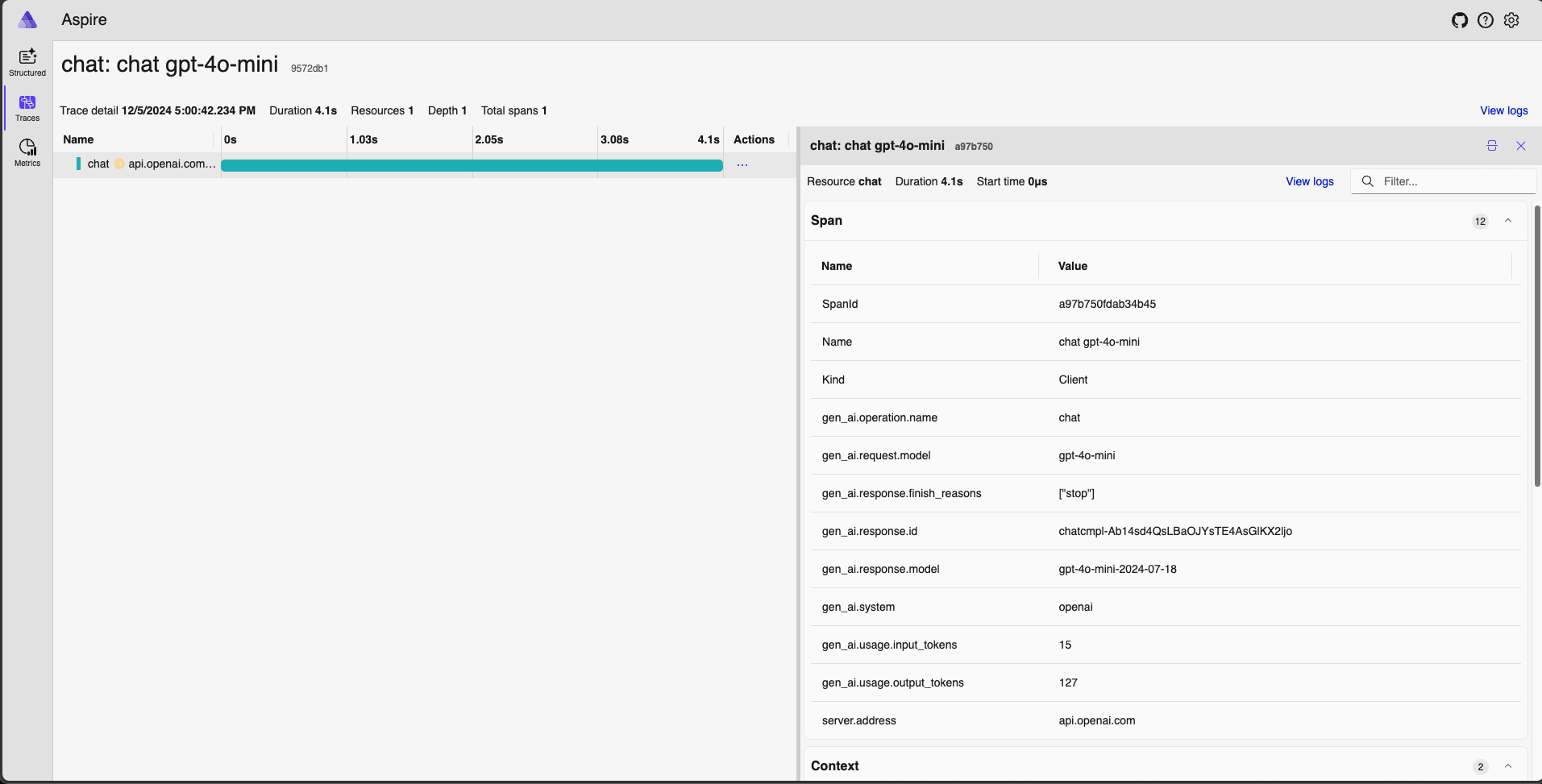
3. Hands-On: Instrumenting an LLM Call with OpenTelemetry
Let's apply this by instrumenting a Python script that calls an LLM. We will use OpenTelemetry to generate structured logs (as spans) that include token counts and model metadata. For simplicity, we'll use the OpenAI API, as its response object conveniently includes a usage field with token counts—a pattern many inference servers now emulate.
Step 1: Project Setup
- Create a new project directory and a virtual environment.
- Install the necessary libraries:
pip install openai "opentelemetry-sdk>=1.25.0" "opentelemetry-api>=1.25.0" - Set your OpenAI API key as an environment variable:
export OPENAI_API_KEY="your-api-key"
Step 2: Create the Instrumented Script
Create a Python file named structured_logger.py. We will configure a simple OpenTelemetry TracerProvider that prints spans to the console in JSON format. This lets us see the structured output directly without needing a full observability backend.
# structured_logger.py
import os
import openai

from opentelemetry import trace
from opentelemetry.sdk.trace import TracerProvider
from opentelemetry.sdk.trace.export import ConsoleSpanExporter, SimpleSpanProcessor


# 1. Configure OpenTelemetry to print spans to the console
provider = TracerProvider()
processor = SimpleSpanProcessor(ConsoleSpanExporter())
provider.add_span_processor(processor)
trace.set_tracer_provider(provider)


# 2. Get a tracer for our application
tracer = trace.get_tracer("llm.inference.service")


# 3. Initialize OpenAI client
client = openai.OpenAI()

def get_completion(user_message: str, model: str = "gpt-3.5-turbo"):


    # 4. Start a new span for the LLM call
    with tracer.start_as_current_span("call_llm") as span:
        print(f"--- Making API call for Trace ID: {span.get_span_context().trace_id:x} ---")


        # 5. Set standard GenAI attributes on the span
        span.set_attribute("gen_ai.system", "openai")
        span.set_attribute("gen_ai.request.model", model)
        span.set_attribute("llm.user_prompt", user_message) # Custom attribute for prompt

        try:


            # Make the actual API call
            response = client.chat.completions.create(
                model=model,
                messages=[{"role": "user", "content": user_message}],
            )


            # 6. Extract metadata from the response
            choice = response.choices[0]
            usage = response.usage


            # 7. Record response metadata using GenAI conventions
            span.set_attribute("gen_ai.response.model", response.model)
            span.set_attribute("gen_ai.response.finish_reasons", [choice.finish_reason])


            # THIS IS THE KEY PART for token counts
            span.set_attribute("gen_ai.usage.input_tokens", usage.prompt_tokens)
            span.set_attribute("gen_ai.usage.output_tokens", usage.completion_tokens)

            span.set_status(trace.StatusCode.OK)
            return choice.message.content

        except Exception as e:


            # Record any errors
            span.set_status(trace.StatusCode.ERROR, str(e))
            span.record_exception(e)
            raise

if __name__ == "__main__":
    prompt = "Explain the role of an SRE in five words."
    completion = get_completion(prompt)
    print("\n--- LLM Response ---")
    print(completion)
    print("--- Check console output for the JSON trace ---")
Step 3: Run and Inspect the Output
Run the script from your terminal:
python structured_logger.py
You will see the LLM's response, followed by a JSON object printed to the console. This JSON object is your structured log (span). Inspect it and find the "attributes" section. It will contain all the metadata we added, including gen_ai.usage.input_tokens and gen_ai.usage.output_tokens.
This hands-on exercise demonstrates the core principle: you wrap your LLM call in a span and attach standardized attributes to it. The ConsoleSpanExporter is great for local development. In production, you would swap it for an OTLPSpanExporter to send this data to your observability backend.
4. Production Logging Patterns
While direct instrumentation is powerful, in a large system, you'd likely centralize this logic. Given your background, these patterns will be familiar:
- API Gateway/Middleware: A common approach is to handle logging in a middleware layer within your web framework (like FastAPI or Flask) or in an API gateway. This keeps your core business logic clean. The middleware intercepts the request, passes it to the LLM service, and then logs the full context (request, response, tokens) on the way out. The FastAPI middleware example in the "What is LLM Monitoring?" article by Amit Yadav is a great illustration of this pattern.
- Platform-Level Logging: Many managed cloud services are starting to bake in this functionality. For instance, API management platforms can automatically log request/response bodies and other metadata. The key is knowing what to enable.

Conclusion
In this lesson, you've learned how to create detailed, structured logs for your LLM inference requests. You now understand how to capture the essential metadata—most importantly token counts—that are critical for cost management and deep debugging.
Key Takeaways:
- Structured logs are essential: They are the foundation for debugging, auditing, and cost analysis in any production LLM system.
- OpenTelemetry is the standard: The
gen_aisemantic conventions provide a standard schema for LLM-specific metadata like model name and token counts. - Token counts are first-class citizens: Logging
gen_ai.usage.input_tokensandgen_ai.usage.output_tokensfor every call is non-negotiable. - Instrumentation can be centralized: In production, logging logic is often handled in middleware or by the underlying platform to keep application code clean.
In our last lesson, we configured Prometheus to scrape metrics. In this lesson, we've set up structured logging. The final step is to bring it all together. In the next lesson, you will build an operational monitoring dashboard in Grafana, combining the metrics from Prometheus and creating visualizations for the logs you've just learned to generate.