Recommended resources
The freely available resources this lesson will direct you to.
Welcome back to our module on observability for LLM systems. In our last lesson, you built a powerful operational dashboard in Grafana, giving you a "single pane of glass" to monitor the health of an LLM service through metrics like latency, throughput, and GPU utilization. This gives you the insight to answer the question, "Is our service healthy?"
Today, we shift our focus from operational health to financial governance, or FinOps. We will address a question that is equally critical in any production environment: "How much is our service costing us?" Your goal for this lesson is to learn how to track per-request token usage to compute cost-per-request and cost-per-thousand-tokens metrics. For an engineer with your SRE background, mastering the connection between system performance and its associated cost is a crucial step toward leading infrastructure strategy.
1. The Anatomy of LLM Cost Tracking
At its core, tracking LLM costs boils down to three components for every API call:
- Token Usage Data: You must capture the number of input (prompt) tokens and output (completion) tokens. This data is the fundamental unit of consumption.
- Pricing Information: You need a configurable price list that maps each model to its specific cost, which is typically priced differently for input and output tokens (e.g., dollars per million tokens).
- Calculation Logic: A mechanism is needed to combine the token usage with the pricing data to compute the dollar cost for each request.
Let's explore two powerful methods for implementing this: a manual, highly-customizable instrumentation approach using OpenTelemetry, and a more "out-of-the-box" approach using a dedicated AI gateway.
2. Method 1: Custom Instrumentation with OpenTelemetry
This approach gives you maximum flexibility and integrates seamlessly into the kind of sophisticated observability platforms you're already familiar with. We'll use OpenTelemetry to create custom metrics for token usage and cost.
The article below from OneUptime provides an end-to-end guide for this process. It's a fantastic, code-driven resource that we'll break down step-by-step.
How to Track Token Usage, Prompt Costs, and Model ...
This article details a complete, production-grade approach to tracking LLM costs using Python and OpenTelemetry.
As you read, focus on these key implementation steps: Defining Metrics: Start with the section "Defining Cost-Tracking Metrics". Note how it uses meter.create_histogram to define metrics for input, output, and total tokens, as well as cost. Histograms are powerful because they allow you to calculate sums, averages, and percentiles from a single instrument. Building a Pricing Table: In the "Building a Pricing Table" section, examine the Python dictionary for model pricing and the calculate_cost function. This is the core of the financial logic. The Instrumented LLM Call: The "The Instrumented LLM Call" section is the most important. It presents a wrapper function, tracked_llm_call, that orchestrates the entire process: it makes the API call, extracts token counts from the response, calls calculate_cost, and records all the relevant metrics using the instruments from step 1. Tracking Costs by Feature: Briefly review "Tracking Costs by Feature" to see how adding a simple feature label to your metrics allows for granular cost attribution—a powerful tool for business analysis.
This OpenTelemetry approach provides a robust foundation. Because it's just code, you can enrich the metrics with any context you have available—user IDs, tenant IDs, A/B test groups—enabling very detailed cost analysis.
3. Method 2: Using an AI Gateway like LiteLLM
While building your own instrumentation offers great control, sometimes a managed solution is faster and provides additional benefits. AI gateways or proxies are designed to solve this problem. They sit between your application and the various LLM APIs, unifying them and providing centralized logging, routing, and, importantly, cost tracking. LiteLLM is a popular open-source example.
The following video provides a great overview of LiteLLM, focusing on the features relevant to our goal.
LiteLLM Crash Course | For Complete Beginners
This crash course from Data Science Basics demonstrates how LiteLLM's proxy server and dashboard can automate cost tracking.
Pay close attention to these segments to see the "out-of-the-box" experience: The Usage Dashboard: This section showcases the 'Uses' tab in the LiteLLM UI. Notice how it automatically provides a breakdown of spending by provider and model, along with token counts. This is the end result you are aiming for, provided automatically. Governance Features: Watch how you can create teams, assign specific models to them, and set budgets. The proxy then enforces these rules. This demonstrates how cost tracking evolves into active cost governance.
The key tradeoff here is flexibility versus convenience. The OpenTelemetry method can be tailored to any internal system, while a gateway like LiteLLM offers a fast, feature-rich solution that handles many standard use cases automatically.
4. Visualizing Cost and Calculating Key Metrics
Once you are collecting cost data—either via custom OTel metrics or a gateway's exported metrics—the final step is to visualize it. You can use the Grafana skills from the previous lesson to build a cost analytics dashboard.
Here are examples of what these dashboards look like in practice:
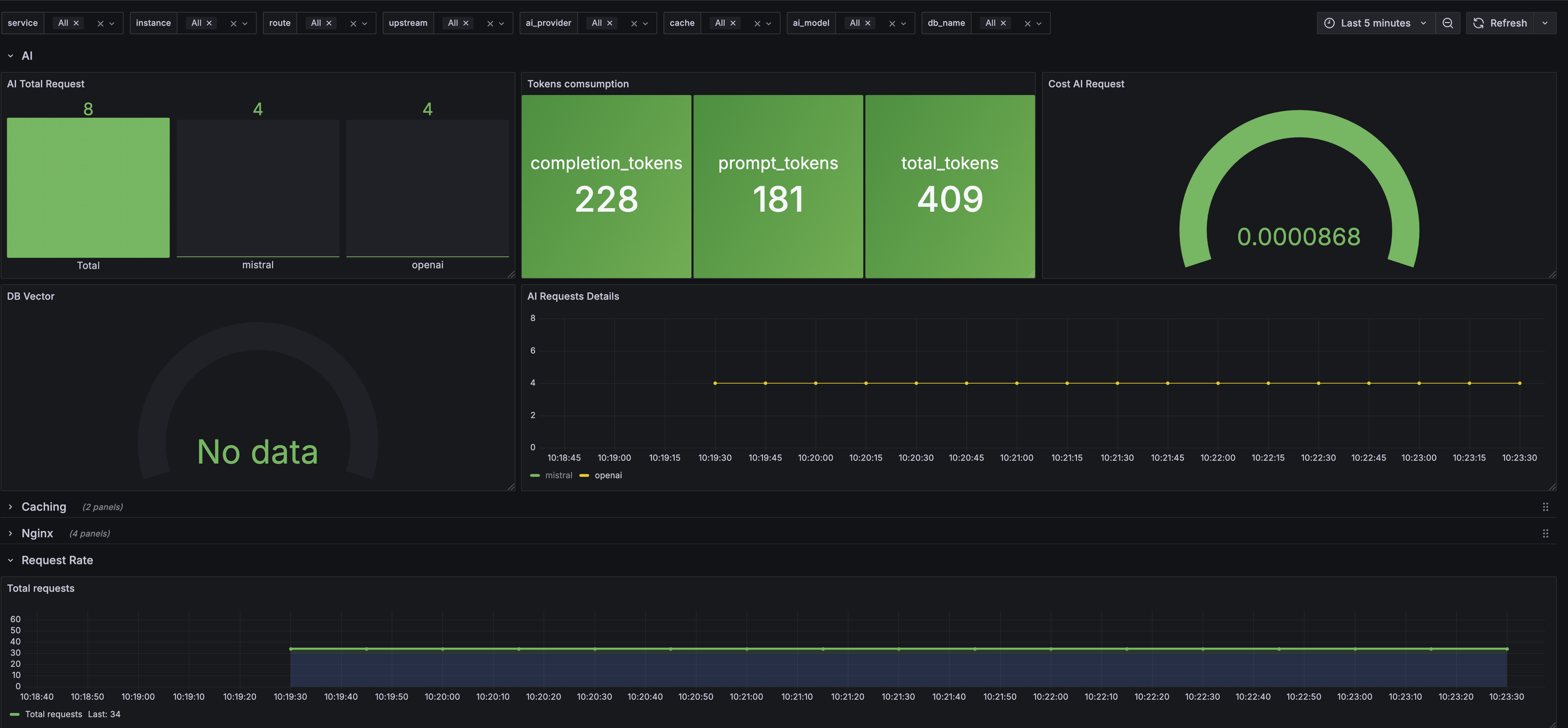

To build these dashboards, you would use PromQL queries to aggregate the cost and token metrics you are now collecting. For instance, using the metrics from the OneUptime article, you could calculate the total daily cost by model with a query like this:
sum by (gen_ai_request_model) (
  rate(gen_ai_usage_cost_sum[24h]) * 86400
)
With this data, we can define our two key metrics:
-
Cost-per-Request: This is simply the cost calculated for a single LLM call. The
calculate_costfunction in the OpenTelemetry example computes this directly. It's the most granular cost metric. -
Cost-per-Thousand-Tokens (CPTT): This is a normalized metric useful for comparing the efficiency of different models or tasks. It can be calculated on an aggregate basis in your dashboard.
Your cost analytics dashboard would track these metrics over time, sliced by model, feature, or user, providing a complete picture of your LLM expenditure.
Conclusion
In this lesson, you've bridged the gap between operational monitoring and financial governance. You now understand how to implement LLM cost tracking, a cornerstone of running AI services responsibly and at scale.
Key Takeaways:
- LLM cost tracking requires three components: capturing per-request token counts, maintaining a pricing table, and implementing calculation logic.
- You can implement this with a custom OpenTelemetry instrumentation, which offers deep integration and flexibility, or by using an AI gateway like LiteLLM for a rapid, out-of-the-box solution.
- Cost metrics like cost-per-request and cost-per-thousand-tokens are crucial for FinOps.
- These metrics are best analyzed through dedicated Grafana dashboards that visualize cost trends and allow you to slice data by model, feature, or other business-relevant dimensions.
You've now learned to collect metrics, build operational dashboards, and track costs. In our next lesson, we will use this foundation to configure alerts for SLO violations and anomalous inference patterns. This will automate the process of watching your dashboards, enabling your systems to notify you proactively when reliability targets are at risk.