Recommended resources
The freely available resources this lesson will direct you to.
- Data Modeling: One Big Table vs Kimball vs Relational for data engineerswww.youtube.com
- Data Warehousing Interview Questions | Dimensions | Aggregate Tables | Factless Factwww.youtube.com
- Design Tip #133 Factless Fact Tables for Simplification - Kimball Groupwww.kimballgroup.com
- How to create a factless fact table in a data warehouse — bConceptswww.bconcepts.pt
Hello! Last lesson, you followed one order line through an accumulating snapshot, updating its row as milestones became known. This lesson asks a different question: what if the thing you need to analyze is simply that an event occurred? An attendance record, for example, needs no sales amount or quantity to be useful.
You will design a factless fact table for observed attendance, then a second one for scheduled attendance. Keeping what happened separate from what was expected to happen lets you count events and investigate non-events without mistaking missing data for an absence.
An event can be the fact
A factless fact table has no numeric measure column. Its row establishes a relationship between dimensions: a particular student attended a particular class on a particular date. You count its rows rather than sum a stored measure.
Watch the factless-fact portion of Data Warehousing Interview Questions | Dimensions | Aggregate Tables | Factless Fact from Learn at Knowstar. Its leave and attendance examples make the basic event pattern visible before we add the more difficult question of eligibility.
Data Warehousing Interview Questions | Dimensions | Aggregate Tables | Factless Fact
Watch the factless-fact explanation to see how dimension keys can record an occurrence without a numeric measure.
Watch the event example. Focus on what one row asserts, not merely on the absence of a measure column. We will give that assertion a more precise grain below.
Suppose your source is a stream of classroom badge scans. A scan is a source-system event, but your analytical question is which students attended each class session? You might reasonably declare this fact-table grain:
One row represents one student’s confirmed attendance at one scheduled class session.
That sentence governs the load. If a student scans twice while entering, those scans should not silently become two attendances at this grain. If the source records only a class and calendar day, a simpler grain—one student, class, and day—is valid only if that class meets at most once per day, or if the business intentionally treats multiple meetings as one attendance. Otherwise, retain a session identifier so that two meetings remain distinguishable.
The supplied attendance schema shows a factless fact table at the center of a star. Its links to student, class, teacher, date, and facility dimensions describe an observed attendance from several angles.
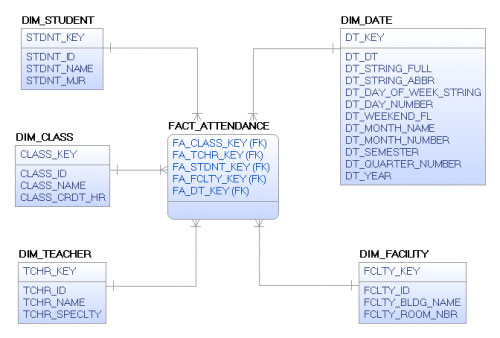
Those additional keys are useful only when their values are unambiguous for the declared row. For instance, if a class changes rooms between sessions, the facility must reflect the session attended, not an assumed permanent room for the class. The diagram also cannot, by itself, identify an absent student: it depicts attendances that were recorded, not everyone who was expected to attend.
Read Bob Becker’s Kimball Group Design Tip #133 Factless Fact Tables for Simplification for its concise distinction between event and coverage rows.
Design Tip #133 Factless Fact Tables for Simplification - Kimball Group
Bob Becker of Kimball Group contrasts a recorded event with coverage: a record of where an event could or should occur. This distinction is the organizing idea for the rest of the lesson.
In the opening paragraph beneath the article title, read event versus coverage. Start where the author introduces student attendance and finish with the promoted-but-not-sold example. Keep the two kinds of row separate as you read.
A factless table is therefore not an unfinished conventional fact table. It is complete when the occurrence or relationship itself is the analytical subject.
Coverage supplies the missing denominator
An attendance table can tell you that three students attended. It cannot tell you whether three, four, or thirty students should have attended. Absence has no attendance event to record.
For that, design a separate coverage, or eligibility, factless table. In our example, give it this grain:
One row represents one student eligible and expected to attend one scheduled class session.
Use the same student and session identifiers in the observed-event and coverage tables. At a one-session-per-class-per-day grain, both can instead use student_key, class_key, and date_key. The columns may look identical, but the assertions are not:
| Table | What a row asserts | What no row asserts |
|---|---|---|
fact_attendance |
Attendance was confirmed. | No confirmed attendance is recorded. |
fact_expected_attendance |
The student was expected at that scheduled session. | No expectation is recorded under the coverage rules. |
Neither missing-row statement, on its own, means “absent.” Only a covered student-session without a matching confirmed attendance is a candidate absence.
An enrollment table is a useful input, but enrollment alone may not be the right coverage grain. A student enrolled in a class for a term is not expected to attend on every calendar day: classes have schedules, closures, cancellations, and enrollment start and end dates. To populate session-level coverage, use the scheduled sessions and the enrollments valid for each session. This is a modeling rule; the exact scheduling and enrollment tables depend on the source system. The coverage load must also decide whether an excused student is excluded from the expected population or retained with some separately defined status. Otherwise, the resulting “absence” metric has an unstable meaning.
How to Create a Factless Fact Table in a Data Warehouse, from bConcepts, provides a compact attendance schema, row-count query, and coverage-based absence query. Its enrollment example is a starting point; apply the scheduled-session refinement above when “expected today” differs from “enrolled at some point.”
How to create a factless fact table in a data warehouse — bConcepts
Read the bConcepts tutorial to connect the two business assertions to fact-table keys and an anti-join query.
In “Step 3: Create the factless fact table,” start at “The attendance table holds keys only” and read the attendance model through “Step 5: Count events.” Notice the composite key and why the query uses COUNT(*). Then, in “Step 6: Answer absences with coverage,” read the coverage query through “Verify the result.” Ask what scheduled dates and effective enrollment periods its simpler enrollment table would need for a dependable daily absence report.
Coverage is useful beyond attendance. An item scheduled for a store promotion can have a coverage row for each eligible store, item, and promotional day. Sales are observed events in a separate table. An eligible combination with no sale answers “Which promoted items did not sell?” The coverage table defines the population against which that question is meaningful.
Design the two tables so their rows can be compared
For a class that meets once on each scheduled day, the core design can be expressed without committing to database-specific DDL:
fact_expected_attendance
  student_key
  class_key
  date_key
  unique (student_key, class_key, date_key)

fact_attendance
  student_key
  class_key
  date_key
  unique (student_key, class_key, date_key)
Both tables reference the same corresponding student, class, and date dimensions. The unique combination expresses the chosen grain and makes repeated loads safer. It is not a claim that every fact table’s dimension foreign keys are automatically unique; uniqueness follows from the business rule you declared. If there can be two class sessions on one day, add a session identifier to both tables and use it in the uniqueness rule and comparisons.
Imagine the coverage and event rows for one class on one scheduled date:
| Student key | Expected row? | Confirmed attendance row? |
|---|---|---|
| 11 | Yes | Yes |
| 12 | Yes | Yes |
| 13 | Yes | Yes |
| 14 | Yes | No |
There are four covered student-sessions, three confirmed attendances, and one candidate absence, student 14. At this grain, COUNT(*) over the attendance rows is three; over the coverage rows it is four. Across a month, however, COUNT(*) counts student-session occurrences, not distinct students. That distinction matters when naming a report metric.
Your SQL can express the comparison as an anti-join. Here 20260711 and 10 stand for the selected date and class keys:
SELECT c.student_key
FROM fact_expected_attendance AS c
WHERE c.class_key = 10
  AND c.date_key = 20260711
  AND NOT EXISTS (
      SELECT 1
      FROM fact_attendance AS a
      WHERE a.student_key = c.student_key
        AND a.class_key   = c.class_key
        AND a.date_key    = c.date_key
  );
NOT EXISTS tests all three parts of the grain. Checking only the student would incorrectly treat attendance in another class as a match; checking only student and class could use an attendance from a different day. At session grain, test the session identifier instead of relying on class and date to identify one meeting. A LEFT JOIN followed by a no-match filter is another way to express the same comparison, as in the reading.
Notice why this is not a direct join of the two fact tables to calculate a measure. The query asks whether a matching event exists for each coverage row. It preserves one result per uncovered expectation. If either table accidentally contains duplicate rows at the declared grain, both counts and some join-based reports become misleading.
Decide when “did not happen” is trustworthy
A missing attendance row has several possible explanations: the student did not attend, the badge event arrived late, the scan failed, or the attendance load has not finished. Coverage has its own failure modes: a session was cancelled, an enrollment became effective late, or an eligibility rule was applied to the wrong date.
Define an as-of point for a non-event report. For example, an attendance report for a completed session might be published only after the source attendance feed and the coverage load for that session have both passed their completeness checks. Until then, label unmatched rows “not yet confirmed,” rather than reporting them definitively as absences. If late corrections are allowed, document whether prior absence reports are restated.
Two checks make this design easier to operate:
- Coverage validity: each coverage row corresponds to a genuinely scheduled session and an enrollment valid on that session date. Do not manufacture expectations by pairing every enrolled student with every day in a date dimension.
- Event reconciliation: investigate attendance rows with no matching coverage row. A legitimate guest or authorized exception may require a defined rule; a mismatched key or schedule may indicate a load defect. Do not discard these events just to make the tables agree.
This also distinguishes factless attendance from last lesson’s accumulating snapshot. A later confirmation may add an attendance event or correct a previous load, but it is not another milestone update to an order-line lifecycle row. The row means “attendance occurred”; the coverage row means “attendance was expected.” Each has its own source, loading rule, and grain.
Closing perspective
A factless fact table records a business assertion without needing a numeric measure. Event rows say what was observed; coverage rows establish where an event was eligible or expected. Count rows to measure occurrences, and compare coverage against events to find candidate non-events. The result is trustworthy only when the grains match, coverage reflects the correct schedule and effective eligibility, and both feeds are complete for the reporting period.
Next, you will tackle a different relationship problem: when several dimension members legitimately relate to one fact row, a bridge table and explicit weighting rules can preserve that relationship without double counting.