Recommended resources
The freely available resources this lesson will direct you to.
- The 3 Common Types of Fact Tables | Data Modeling 101www.youtube.com
- Types of Fact Tables in Data Warehouse | Transaction, Periodic and Accumulatingwww.youtube.com
- Design Tip #130 Accumulating Snapshots for Complex Workflows - Kimball Groupwww.kimballgroup.com
- Modeling Fact Tables in Warehouse - Microsoft Fabriclearn.microsoft.com
Hello! In the previous lesson, you modeled inventory as a periodic snapshot: one row per product, warehouse, and closing day. Today the clock works differently. Instead of recording a state at every regular cutoff, you will follow one process instance as it passes through milestones.
By the end of this lesson, you should be able to declare an accumulating snapshot’s grain, choose its milestone date roles and measures, and specify how an open row changes as the process advances. Order fulfillment will provide a concrete pipeline.
One row follows one process instance
Suppose an order line is accepted on Monday, released for fulfillment on Tuesday, shipped on Thursday, and delivered the following Monday. A periodic snapshot could record its state every day. An accumulating snapshot instead keeps one row for that order line and revisits the row as each milestone becomes known.
Watch the accumulating-snapshot portion of The 3 Common Types of Fact Tables | Data Modeling 101 from Kahan Data Solutions. It gives a compact visual account of why updating a fact row is appropriate for this particular pattern.
The 3 Common Types of Fact Tables | Data Modeling 101
Watch how a single pipeline record acquires milestone dates, then consider the cost of keeping that record mutable.
Watch the pipeline example for its one-row-per-instance design and repeated use of a date dimension. Then watch the trade-off for what update logic adds to the design. The speaker uses null for dates that have not occurred; later in this lesson, we will use explicit date-dimension members to distinguish different reasons a date is unavailable.
The distinction from last lesson is worth making precise. An inventory balance on April 1 and another on April 2 are two observations at two cutoffs. An order line created on April 1 and delivered on April 7 is one instance with an evolving set of known milestones. Neither design replaces the other: the business question determines which observation you need.
Choose the instance before the milestones
An accumulating snapshot needs a stable answer to “Which process instance does this row follow?” For our example, declare the grain in a business sentence:
One row represents one order line from acceptance until its fulfillment is complete or cancelled.
An order number alone does not identify that grain: an order can contain several lines. Use the source order number together with the source line number to identify the instance for loading and deduplication. You may retain those identifiers in the fact as degenerate dimensions. The product, customer, and other descriptive context belong in dimensions where appropriate.
This choice also limits the questions the row can answer. If an order line can leave in three separate shipments, one row per order line is not one row per shipment. The snapshot can hold cumulative shipped quantity and clearly defined first-shipment or fully-shipped milestones, but it cannot preserve every shipment’s individual details in that single row. Those events require their own transaction-grain records if analysts need them.
The supplied Order Fulfillment Accumulating Fact diagram illustrates a richer version of this design. Read its central box from the date keys near the top to the lag measures at the bottom.
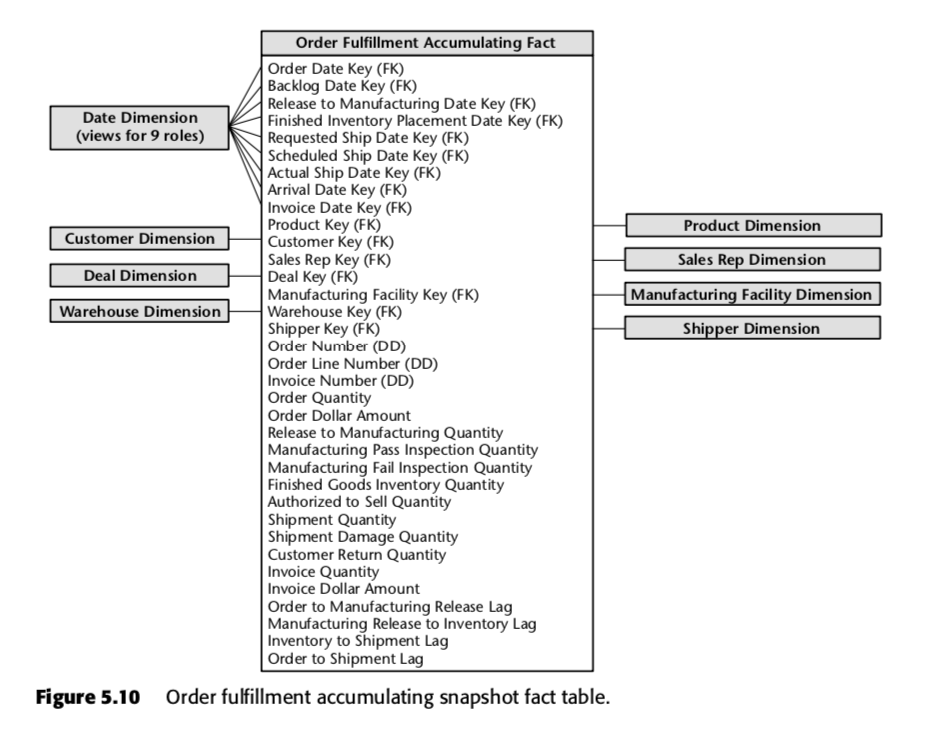
Notice three distinct kinds of column in the diagram. Date keys identify milestones such as order, actual ship, arrival, and invoice dates. Dimension keys identify context such as product and customer. Measures describe quantities, amounts, and lags. The diagram also includes requested and scheduled ship dates; these express expectations, which need not be the same as the eventual actual ship date. Its “DD” identifiers are degenerate dimensions, not separate date dimensions.
Do not copy every column into a new design by default. First agree on the instance grain and on the business meaning of each milestone.
Select milestone dates that answer questions
For a manageable order-line pipeline, consider these roles:
| Date role in the fact | Business meaning |
|---|---|
order_date_key |
The line was accepted |
release_date_key |
Fulfillment work was authorized to begin |
scheduled_ship_date_key |
The currently agreed shipping target |
full_ship_date_key |
All quantity assigned to this line had shipped |
delivery_date_key |
Delivery for the line was complete |
cancellation_date_key |
The line was cancelled, if applicable |
Each key can reference the same physical date dimension under a different role. That lets an analyst group by order month, filter by actual shipping week, or compare deliveries against scheduled ship dates without pretending those dates mean the same thing. A scheduled date is a plan and may be revised; a full-ship date records an achieved event. Document which version of a revised plan the snapshot retains.
Microsoft Fabric’s Modeling Fact Tables in Warehouse describes the characteristic insert-and-update behavior and the multiple date roles of an accumulating snapshot.
Modeling Fact Tables in Warehouse - Microsoft Fabric
Read the accumulating-snapshot explanation from Microsoft Fabric to connect the row’s update pattern with its milestone date keys and duration measures.
Under “Fact design concepts,” find “Fact table types” and its “Accumulating snapshot fact tables” subsection. Read the milestone discussion, beginning with how the row is first loaded and ending with why durations are useful. Focus on the distinct roles of the date keys, not just their number.
A milestone earns a column when people need to filter or trend by that event, measure its delay, or distinguish it from another event. Kimball Group’s Design Tip #130: Accumulating Snapshots for Complex Workflows frames this as a choice about critical dates, rather than a requirement to put every possible event date in the snapshot.
Design Tip #130 Accumulating Snapshots for Complex Workflows - Kimball Group
Read Margy Ross’s guidance from Kimball Group on selecting the dates worth exposing as roles in a workflow fact.
In the paragraph beginning “Be forewarned” immediately after the article’s introduction, read the date guidance. Stop there: the later discussion of dozens of event dates and all possible lags addresses a more complex workflow than this lesson’s order pipeline. Notice that a date used for filtering or time-series reporting deserves particular attention.
The articles describe related but different decisions. One explains how the row and date keys behave; the other helps decide which dates merit dedicated roles.
Specify what an unfinished row means
An order line should enter the snapshot soon after acceptance, rather than waiting until delivery. Otherwise, the table would omit precisely the open work that a pipeline report needs to see. Its initial row has the order date and ordered quantity, but later milestones are not yet known.
Treat the reason for an absent milestone explicitly. One workable date-dimension policy is to reserve different members for Pending, Not applicable, and Unknown:
- Pending: the milestone could still occur; an open line has not fully shipped yet.
- Not applicable: the workflow ended in a way that rules the milestone out; for example, a cancelled line will not be delivered.
- Unknown: the milestone may have occurred, but its date is missing or unreliable.
These are different analytical states. Using an unknown date as if it meant “not yet shipped” would inflate an open-order count. Using an arbitrary calendar date would corrupt duration calculations. If your physical design instead permits SQL nulls for pending dates, keep an equally clear policy for distinguishing them from unknown and inapplicable dates. Never subtract special date keys to calculate a duration; resolve genuine keys to calendar dates first.
Here is a small snapshot viewed on April 6. Dates are shown as calendar values for readability; a physical fact would carry the corresponding date keys.
| Order line | Ordered | Released | Fully shipped | Delivered | Current state | Shipped / ordered |
|---|---|---|---|---|---|---|
| 101 / 1 | Apr 1 | Apr 2 | Apr 4 | Apr 6 | Delivered | 10 / 10 |
| 102 / 1 | Apr 1 | Apr 3 | Pending | Pending | Partially shipped | 3 / 8 |
| 103 / 1 | Apr 2 | Not applicable | Not applicable | Not applicable | Cancelled Apr 3 | 0 / 6 |
For line 102, full_ship_date_key remains Pending even though three units have shipped: fully shipped has a deliberately stricter meaning than first shipment. If first-shipment delay matters, add a separately named first-shipment milestone rather than putting April’s partial shipment date into the full-ship column. For line 103, the cancellation date and state explain why later fulfillment milestones will not occur.
Measures, updates, and trustworthy pipeline reports
The milestone dates support elapsed-time measures. For line 101, order-to-full-shipment took three calendar days, and full-shipment-to-delivery took two. You may derive those values from the date roles, or persist frequently used durations with documented calculation rules. For line 102, order-to-full-shipment is not zero: its endpoint has not occurred, so the completed duration is unavailable.
The fact can also hold measures true to its declared grain: ordered_quantity, shipped_quantity_to_date, and an order-line amount, for example. Define whether a quantity is cumulative or final. Unlike a daily inventory snapshot, the row’s shipped_quantity_to_date is updated as the same order line progresses. A current pipeline report may sum that measure across compatible order lines, but it must not sum multiple historical copies of the same line as though they were different orders.
A reliable load therefore needs to identify and update the same instance:
- On acceptance, insert the order-line row with its order date, context keys, initial measures, and Pending future milestones.
- On each relevant event, find the row by its stable source instance identifier, fill the achieved milestone, and update cumulative measures and current state.
- On completion or cancellation, set the appropriate terminal state and date roles. Handle duplicate and late-arriving events so that replaying a load neither duplicates the line nor moves a milestone to an incorrect date.
These are design rules, not yet a database-specific load implementation. They are especially important for incremental data pipelines: an append-only load aimed at this table would create several rows for one order line and silently change its grain.
Finally, an accumulating snapshot normally presents the latest known lifecycle state. It readily answers “Which accepted lines are still open?” and “For fully shipped lines, how long did shipping take?” It does not, by itself, reliably answer “Which lines were open at the close of every day last month?” Later updates have changed their states. That historical as-of question calls for preserved events or another time-based record, rather than treating today’s snapshot as yesterday’s.
Closing perspective
An accumulating snapshot follows one stable process instance per row. Its date keys give important milestones distinct business roles; its measures and state are updated as work progresses. The grain, definitions of first versus complete events, pending-date policy, and update rules together determine whether pipeline lags and open-work counts can be trusted.
The next lesson takes a different view of events: you will design a factless fact table to record what happened—or what was eligible to happen—without requiring a numeric measurement on every row.