Recommended resources
The freely available resources this lesson will direct you to.
Hello again! In our last few lessons, we've built a complete user login and logout system. You now know how to create sign-up and login forms, and how to make the UI change dynamically based on whether a user is authenticated. This is a huge step in building a real app.
But there's a lingering question. When you log into a website, close your browser, and come back a day later, you're often still logged in. How does the website remember you? This "memory" isn't magic; it's a core piece of web engineering. Today, we'll demystify what keeps you logged in between visits by exploring the two main techniques: sessions and tokens. Understanding this will clarify what services like Supabase or Firebase are doing for you automatically when you use their authentication features.
The Problem: A Forgetful Web
Before we dive into the solutions, we need to understand the problem. The fundamental protocol of the web, HTTP, is stateless. This means that every single request your browser sends to a server is treated as a completely new, independent event. The server has no built-in memory of past requests.
Imagine calling a support hotline where every time you speak, you have to reintroduce yourself and explain your entire problem from the beginning. It would be incredibly inefficient. That's what the web would be like without a way to maintain state. Sessions and tokens are the solutions to this "amnesia" problem.
Approach 1: Server-Side Sessions (The Coat Check Method)
The traditional way to solve this is with server-side sessions. The logic is simple and can be compared to a coat check at a fancy event.
- Log In (Check your coat): You provide your username and password. The server verifies them.
- Get a Ticket (Session ID): The server creates a "session" for you in its database (it hangs your coat on a numbered hook) and gives you back a unique, random string of characters called a Session ID (your coat check ticket).
- Store the Ticket (Cookie): Your browser stores this Session ID in a special, small file called a cookie.
- Subsequent Requests (Show your ticket): For every subsequent request you make to that website (clicking a link, submitting a form), your browser automatically includes the cookie with the Session ID.
- Server Verification (Find your coat): The server receives the request, reads the Session ID from the cookie, looks it up in its session database, and confirms who you are. It "finds your coat" and knows you're an authenticated user.
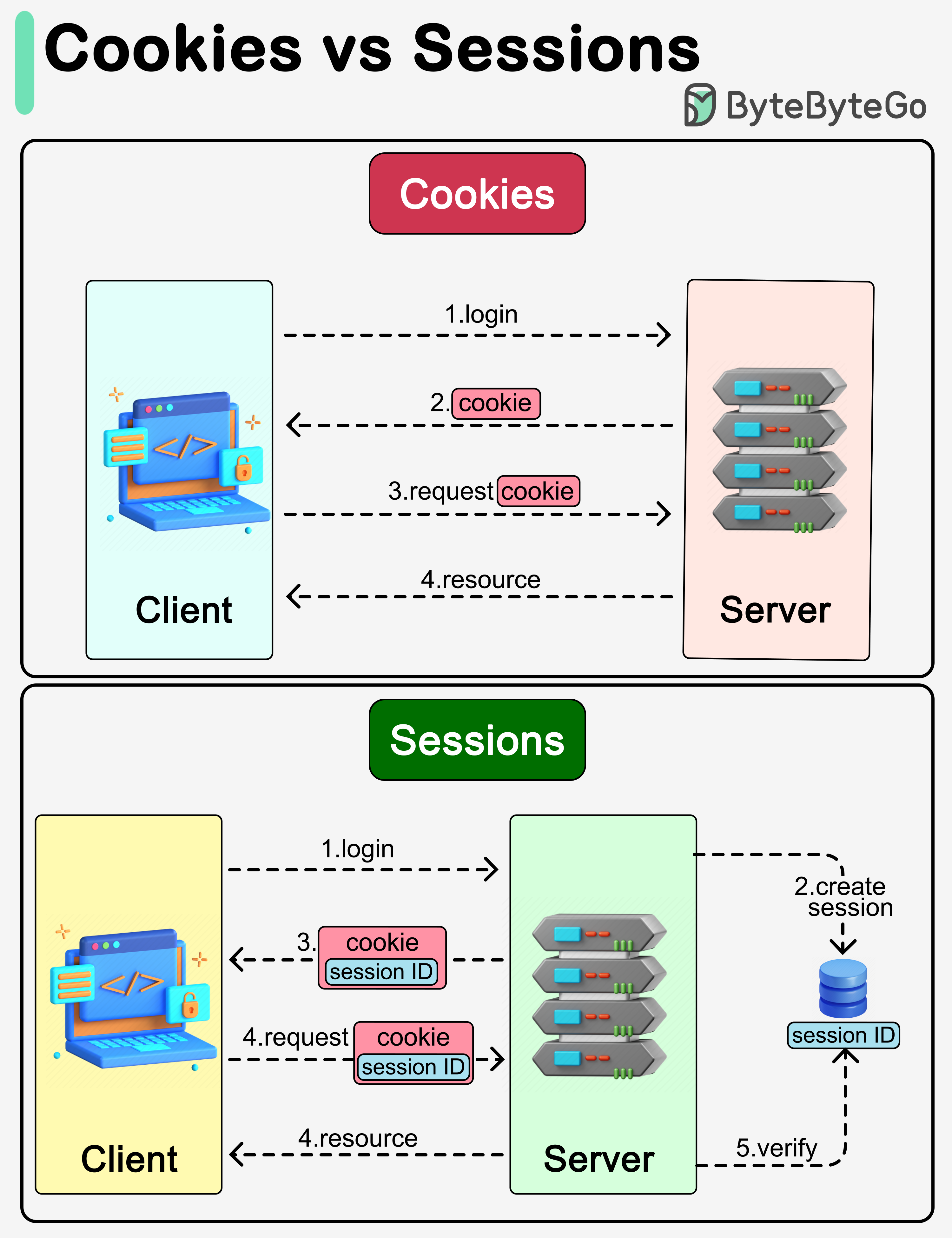
This process is explained very clearly in the following video. It uses a bank login as an example and has a great analogy of a gym membership card.
Difference between cookies, session and tokens
The video "Difference between cookies, session and tokens" by Valentin Despa provides an excellent, beginner-friendly explanation of the session-and-cookie mechanism.
Watch from the beginning to the main flow to see the entire process of exchanging credentials for a session ID. Then, watch the short analogy from the gym card. Finally, the segment from cookie-based auth reinforces why the server, not the client, stores the important information.
The key takeaway for sessions is that the server does the remembering. The client (your browser) just holds a simple, meaningless key.
Approach 2: Client-Side Tokens (The All-Access Pass Method)
A more modern approach, and the one you'll frequently see when your AI assistant generates code using services like Supabase, is token-based authentication, most commonly using JSON Web Tokens (JWTs).
This method works more like an all-access festival wristband.
- Log In (Get your wristband): You provide your username and password. The server verifies them.
- Get a Signed Token: Instead of creating a session in its database, the server generates a special, encoded string of text—the JWT. This token is like a detailed, tamper-proof wristband. It contains information inside it, such as your user ID, your permissions, and an expiration date. It's also cryptographically "signed" by the server with a secret key.
- Store the Token: Your app stores this token on the client-side—often in the browser's "local storage," which is like a small storage locker for that website.
- Subsequent Requests (Show your wristband): For every subsequent request to protected parts of the app, your code includes this token in the request headers (specifically, the
Authorizationheader). - Server Verification (Check the wristband): The server receives the request, pulls out the token, and checks the signature. Since only the server has the secret key, it can instantly verify if the token is authentic and hasn't been tampered with. It then reads the user information from within the token and processes the request. It doesn't need to look anything up in a database.

The Fireship channel has a famously concise video that sums up both approaches in under two minutes.
Session vs Token Authentication in 100 Seconds
Watch "Session vs Token Authentication in 100 Seconds" to get a rapid visual summary of both methods.
First, watch the part on sessions. Then, watch the part on tokens. This will quickly solidify the visual flow of each approach in your mind.
The key takeaway for tokens is that the client does the remembering. The server becomes "stateless," which has significant advantages for modern applications.
Why You'll Mostly See Tokens in Vibe Coding
So, why do services like Supabase, Firebase, and many modern APIs prefer tokens? The following article gives a great breakdown, but here's the gist in the context of your goals.
Sessions, Tokens, and Rock'n'Roll - DEV Community
This article from DEV Community provides a more in-depth but still very accessible comparison of the two methods.
Start by reading the sections Sessions and Cookies to reinforce your understanding of the traditional approach. Then, read the sections Sessions and Tokens and the follow-up, JWTs and browsers. This explains why tokens are useful beyond just web browsers (like for mobile apps) and introduces the concept of a JWT as a "talking" token that carries its own data. This is the core reason they are so powerful.
As the article explains, tokens are more flexible and scalable:
- Platform Independence: A token can be issued to a web browser, a native iOS/Android app, or even a smart device on your hobby workbench. A cookie-based session is primarily designed for browsers. This is crucial for your goal of building for web, iOS, and Android.
- Scalability: Because the server doesn't need to store session data, it's easier to scale an application to handle millions of users. Any server in a large system can verify a token without needing to connect to a central session database.
- Self-Contained: The token itself contains the user's information. When your app receives the token after login, it can immediately decode it (without the secret key) and get the user's name or profile picture to display in the UI, without having to make another request to the server.
The article from GeeksforGeeks provides a very clear table summarizing these differences.
Session-Based Authentication vs. JSON Web Tokens (JWTs) in ...
This article offers a structured comparison that's easy to digest.
Focus on the table in the section Differences between Session-Based Authentication and JWTs. Pay special attention to the rows for "Storage Location," "Statefulness," and "Scalability," as these are the most important distinctions.
When your LLM generates code and you see a session object from Supabase, that object contains an access_token and a refresh_token. That access_token is the JWT—your app's all-access pass.
Conclusion
You now understand the two fundamental ways an application remembers a logged-in user. This isn't just abstract theory; it explains a critical piece of the infrastructure your AI assistant sets up for you.
Key Takeaways:
- The web is inherently stateless (forgetful), requiring a mechanism to remember users.
- Sessions are the "coat check" method: the server stores the user's data and gives the browser a simple
Session IDin a cookie as a ticket. This is stateful on the server. - Tokens (JWTs) are the "all-access pass" method: the server gives the client a self-contained, signed token that holds user data. The server doesn't need to store anything. This is stateless on the server.
- Modern development, especially for APIs, mobile apps, and scalable web apps, heavily favors tokens due to their flexibility and scalability. Services like Firebase and Supabase use them by default.
Now that you know how login state is stored, it's a perfect time to consider how to protect it. In our next lesson, we will identify common security mistakes to avoid when handling user accounts, ensuring the apps you build are not only functional but also safe.