Recommended resources
The freely available resources this lesson will direct you to.
- Best Practices for React Data Security, Logins, Passwords, JWTswww.youtube.com
- Vibe Coding Has A Security Problem (And How To Fix It)www.youtube.com
- Vibe check: The vibe coder’s security checklist for AI generated codewww.aikido.dev
- Your Vibe-Coded App Almost Certainly Has Security Holes. Here’s How To Catch Them. | by Christopher Montes | Apr, 2026 | Level Up Codinglevelup.gitconnected.com
Hello again. In our last lesson, we explored how applications "remember" a user is logged in using sessions and tokens. You learned that these tokens are like a digital key or an all-access pass that your application uses for every subsequent request. This is a powerful mechanism, but with great power comes the need for great responsibility. If these keys fall into the wrong hands, your app and your users' data are at risk.
Today, we're going to tackle that responsibility head-on. This lesson is all about identifying the most common security mistakes people make when building apps, especially when "vibe coding" with AI assistants. As a designer building functional apps, you're focused on the user experience and getting things to work. AI is fantastic at that, but it often treats security as an afterthought. It will build a door but won't check if it's locked unless you specifically ask. Our goal today is to give you the keys—both literally and figuratively—to know what to ask and what to check, ensuring the beautiful apps you design are also safe and trustworthy.
The Vibe Coder's Security Blind Spot
Research and real-world incidents have shown that AI-assisted code can sometimes be less secure than code written by hand, not because the AI is bad, but because it makes developers feel secure when they aren't. It optimizes for the functional goal you give it ("build a login page"), not the non-functional requirement of security.
The following article was written specifically for people using AI to build apps. It's a fantastic primer on why this security gap exists and how to start closing it.
This article from Level Up Coding clearly explains the core problem with AI-generated code and security.
Please read the first section, "Why AI Doesn’t Tell You About Security Problems." It perfectly frames the mindset we'll be adopting in this lesson: you have to be the one to ask the AI to care about security.
With that context, let's walk through the most common mistakes and how you can spot and fix them, often just by asking your AI the right questions.
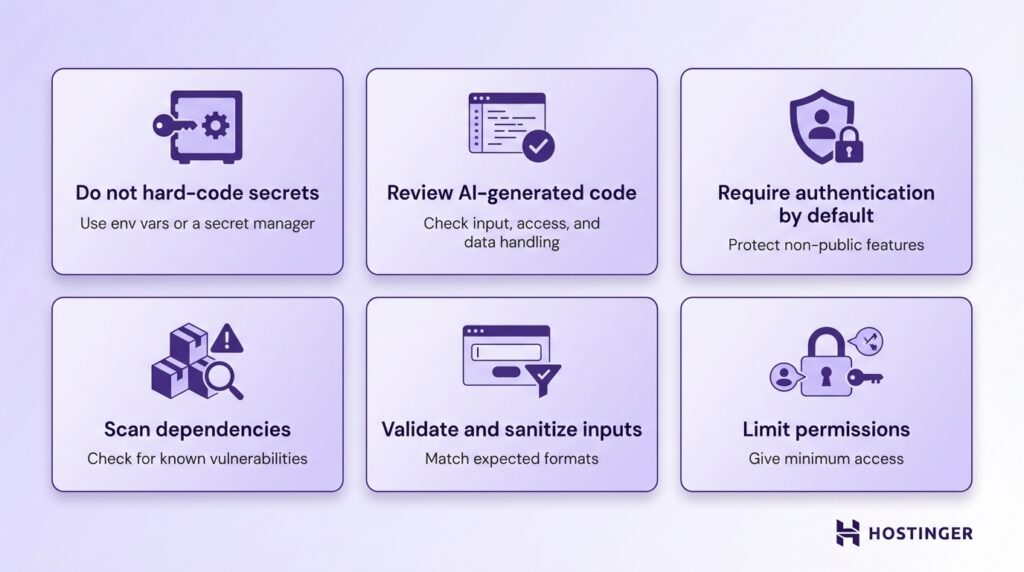
Mistake 1: Leaving Your Keys Lying Around (Secrets & Permissions)
This is the single most common and dangerous category of mistakes. It involves exposing the credentials and rules that control access to your app's most sensitive parts.
Hard-coding Secrets
In previous lessons, we discussed using .env files for API keys. The reason is simple: you must never write sensitive information like API keys, database passwords, or secret tokens directly into your source code. This is called "hard-coding." If you do this and your code is ever public (like on GitHub), those keys are immediately compromised.
- How to check: Search your code for variable names like
API_KEY,SECRET,PASSWORDand see if the value is a real key string like"sk-..."instead of a reference to an environment variable likeprocess.env.OPENAI_API_KEY. - The AI Fix: A great prompt is: "Review my code and move all hard-coded secrets to environment variables. Then, add the
.envfile to.gitignore."
Misconfiguring Access Rules (RLS)
This is the mistake that has taken down many vibe-coded apps. When you use a service like Supabase or Firebase, you're given a powerful feature that lets your frontend app talk directly to the database. To keep this secure, they use Row-Level Security (RLS) in Supabase or Security Rules in Firebase.
Think of RLS as a bouncer for every single row of data in your database. It's a set of rules you write that says, for example, "A user can only see and edit the row in the profiles table that has their own user ID."
If you forget to turn RLS on or write the rules incorrectly, it's like having no bouncer at all. Anyone can walk in and see, change, or delete all of your user data.
The following video explains this problem with painful clarity, based on the creator's real-world experience of being hacked.
Vibe Coding Has A Security Problem (And How To Fix It)
In "Vibe Coding Has A Security Problem," developer Chris Raroque explains the #1 issue he sees in apps built with AI and Supabase/Firebase.
Watch the section on misconfigured RLS. Pay close attention to his explanation of how the modern app architecture of Supabase/Firebase works and the common mistake of storing user subscription status on an editable table.
As Chris explains, it's not enough for the rule to be technically correct; the data model matters too. A user shouldn't be able to edit their own is_premium status.
- How to check: In your Supabase dashboard, go to the "Authentication" -> "Policies" section. Every table that holds user data should have RLS enabled and policies for
SELECT,INSERT,UPDATE, andDELETE. - The AI Fix: You can ask your AI to audit your rules with very specific prompts: "Can a user read another user's data with my current RLS rules? Can a user update their own subscription status to 'premium'? Can a user change their rate limit?"
Calling Sensitive APIs from the Frontend
This is a direct consequence of hard-coding secrets. If you call the OpenAI API directly from your React or Vue code, you have to include your OpenAI API key in that frontend code. As we've established, anyone can find it there. An attacker can then take your key and use it to rack up thousands of dollars in bills that you are responsible for.
The correct way is to have your frontend call your own backend (e.g., a Supabase Function or Vercel Serverless Function), and that backend function—which runs on a secure server—is the only thing that holds the secret key and calls the sensitive API.
The same video explains this mistake perfectly.
Vibe Coding Has A Security Problem (And How To Fix It)
Chris Raroque continues with another critical mistake he sees constantly.
Watch the segment on calling sensitive APIs from the frontend. He clarifies the misconception that environment variables on the frontend are secure. They are not.
Mistake 2: Leaving the Doors Unlocked (Access Control & Rate Limits)
This category is about ensuring only authenticated users can access protected areas and that they can't abuse the system.
Authentication Bypass
This sounds complex, but the test is incredibly simple. If you have a page that should only be visible to logged-in users (like /dashboard), what happens if you paste that URL into a new incognito browser window? If you can see the page without logging in, your authentication is broken. Your app might be hiding the link to the page, but it isn't securing the page itself.
- How to check: As described above, try to access protected URLs and API endpoints without being logged in.
- The AI Fix: "Add authentication middleware to my server that runs before every protected route. It should return a 401 Unauthorized error for any unauthenticated requests. Never rely on client-side route guards alone for security."
No Backend Rate Limits
Especially for apps with AI features, you need to limit how many times a user can perform an action in a given time. You might build a limit on the frontend (e.g., hiding a button after 5 clicks). But a savvy user can always bypass the frontend and call your backend API directly. Without a backend rate limit, they could call your AI endpoint thousands of times, again, racking up huge costs.
Mistake 3: Trusting Strangers (Input & Dependencies)
Your app doesn't exist in a vacuum. It takes in data from users and uses code written by other people. Both can be sources of vulnerability if you're not careful.
Input Injection
This happens when your application takes input from a user (e.g., in a search box, profile name, or comment field) and executes it as code. The two most famous types are:
- Cross-Site Scripting (XSS): An attacker injects malicious JavaScript code that then runs in other users' browsers, potentially stealing their login tokens.
- SQL Injection (SQLi): An attacker injects malicious SQL commands that trick your database into revealing or deleting data it shouldn't.
You don't need to be an expert to do a basic check.
The same article provides a very hands-on, non-technical way to test for these vulnerabilities.
Read the section "Input Injection". The author gives you a list of strings to copy and paste into every text field in your app. If an alert box pops up or the page behaves strangely, you have a problem.
Dependency Vulnerabilities
As we learned in Module 2, npm install brings in code from hundreds of other developers. What if one of those packages has a known security hole? Your package manager has a built-in tool to check for this.
- How to check: In your terminal, in your project folder, run
npm audit. It will scan yourpackage.jsonfile and report any known vulnerabilities in your dependencies. - The AI Fix: If
npm audit fixdoesn't work, you can ask: "Update all dependencies with known high or critical vulnerabilities. If an update isn't possible, suggest an alternative package."
Mistake 4: Talking Too Much (Information Leakage)
Sometimes, the danger isn't what your app does, but what it says.
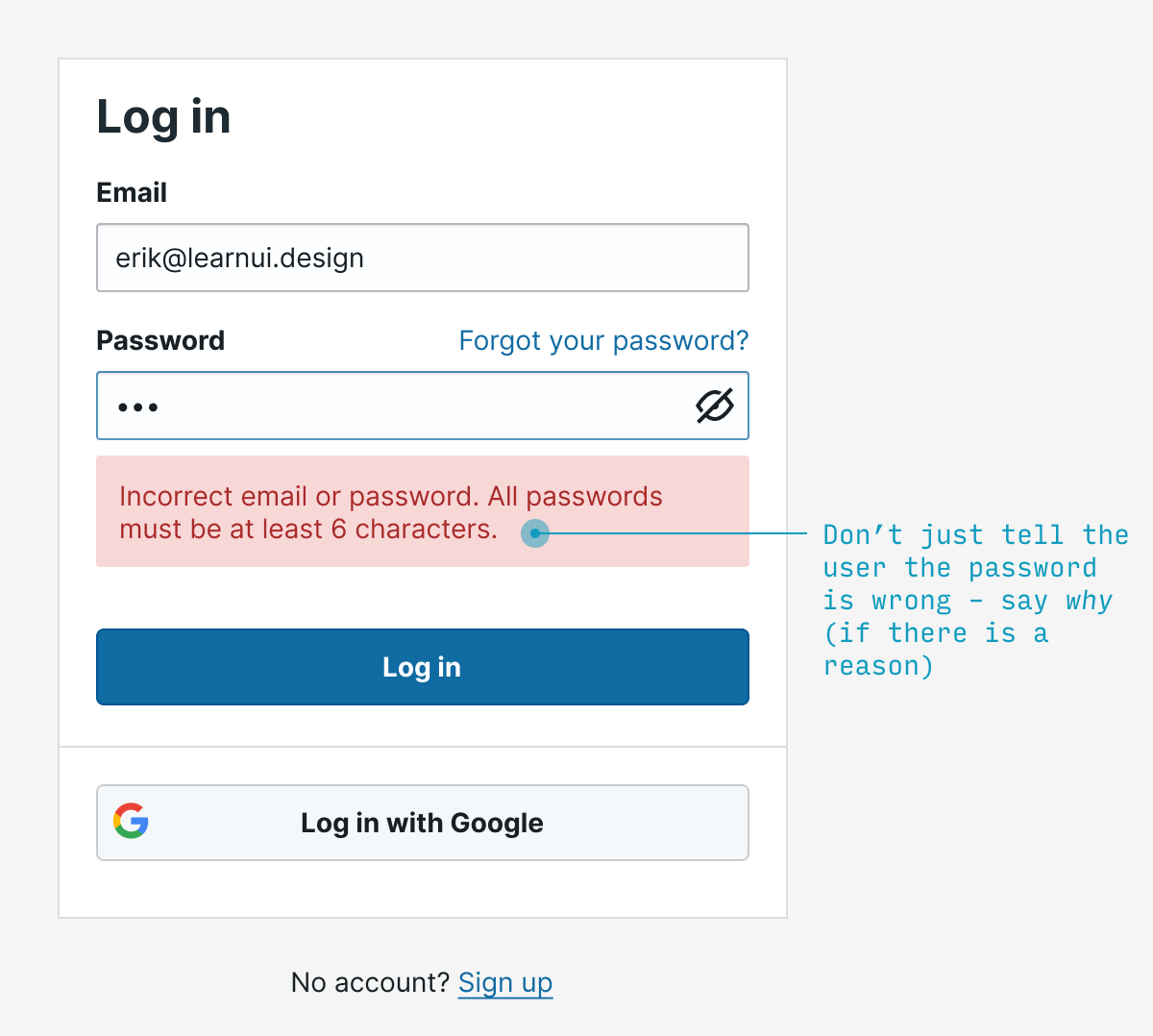
Verbose Error Messages
When something breaks, your app might show a detailed error message. This is helpful for you during development, but in production, it can give an attacker a roadmap of your system, including database table names, file paths, and software versions.
Leaving Development Tools On
In a React application, developers use tools like React DevTools to inspect the app's state. This is incredibly useful for debugging but should be disabled in your final production app. Leaving it on could expose sensitive information that your app is holding in its state, like user data or even access tokens.
The following video shows a very practical step-by-step on how to disable this for a React app and why it's important.
Best Practices for React Data Security, Logins, Passwords, JWTs
This video by Dave Gray, "Best Practices for React Data Security," demonstrates several concrete security improvements.
First, watch how to disable React DevTools in production. Then, watch the next section on the importance of not storing unnecessary data in your application's state, which is a related concept.
The Ultimate AI Security Prompt
You don't need to memorize all of this. The single most important takeaway is that you need to be deliberate about security. After you've vibe-coded a new feature and it's working, take one more step before you deploy it. Use your AI assistant one last time, but change its role from "builder" to "inspector."
The article from Level Up Coding provides the perfect prompt for this.
This final section gives you a "magic prompt" to turn your AI into a security auditor.
Read the section "How to Make AI Do the Security Pass For You" and copy the prompt it provides. This is your new best friend in the vibe coding workflow.
Conclusion
Building secure applications is a deep and complex field, but you don't need to be a security expert to avoid the most common pitfalls. By understanding these fundamental mistakes, you can protect your app, your users, and yourself.
Key Takeaways:
- AI doesn't prioritize security by default. You must explicitly ask it to.
- Never hard-code secrets. Use environment variables (
.envfiles) for all API keys and credentials, and keep them out of your version control (.gitignore). - Configure access rules (RLS) correctly. This is the main line of defense for services like Supabase and Firebase. Think like an attacker: "How could I abuse this?"
- Backend only for sensitive calls. Any interaction with a third-party API that requires a secret key must happen on your backend, not your frontend.
- Validate input, audit dependencies. Don't trust data from users or code from strangers without checking it first.
- Don't leak information. Keep error messages generic and disable development tools in production.
- Use the "Security Engineer" prompt. Make security auditing a final, required step in your development process.
This lesson concludes our module on adding user logins. You now have the skills to not only create a full authentication system but also to make it reasonably secure. In our next module, "Publishing to App Stores," we'll see how having a secure and trustworthy app is a critical step for getting approved by Apple and Google and earning the confidence of your future users.