Recommended resources
The freely available resources this lesson will direct you to.
Hello! In our last lesson, you did a fantastic job of packaging our word frequency counter script into a reusable function. That function contained a for loop at its heart, which did the actual work of processing the list of words.
Today, we're going to put that for loop under the microscope. This lesson is all about mastering how to iterate over Python's two most important data structures: lists and dictionaries. You'll learn the different ways to loop through them, how to process their contents, and which patterns are most effective.
Understanding these iteration techniques is non-negotiable for the NLP projects you're aiming for. Whether it's cleaning words in a list, analyzing a dictionary of word frequencies, or processing text from a file, loops are the engine that drives it all.
Revisiting Loops: Iterating Over Lists
You've already seen the basic for loop with range() and with lists. The most common and "Pythonic" way to go through a list is to iterate directly over its elements.
Python lists, sets, and tuples explained 🍍
For a quick refresher, watch this short segment from the Bro Code channel. It demonstrates the basic syntax for looping through a list.
Focus on the example from this section, where he iterates through a list of fruits. Notice the common convention of using a plural name for the list (fruits) and a singular name for the loop variable (fruit).
This simple structure, for item in list:, is incredibly powerful. Inside this loop, you can perform any operation on each item. This generally falls into three categories:
- Inspecting: Checking each item against a condition (e.g.,
if item == 'target':). - Transforming: Creating a new, modified list (e.g., converting all words to uppercase).
- Aggregating: Calculating a single result from the list (e.g., summing all numbers).
Let's see this in action. The PYnative website has a great collection of coding exercises that illustrate these patterns.
40 Python Loops Coding Exercises with Solutions – PYnative
Let's examine two practical examples of processing lists from this PYnative article.
First, read through Exercise 8, which shows the classic "frequency counting" pattern. This is an example of inspecting and aggregating. Next, look at Exercise 30. This demonstrates how to build a new list containing only unique items from the original. This is a common transforming task, where you filter items based on a condition (if num not in unique_list).
These examples show a common workflow: initialize an empty variable (like count = 0 or unique_list = []) before the loop, then update it with new information inside the loop.
Nested Loops for Nested Lists
Sometimes, lists contain other lists. This is called a nested list or a 2D list. To access every individual element, you need nested loops—an outer loop to iterate through the main list, and an inner loop to iterate through each sub-list.
This is a key concept for handling structured data, which you'll frequently encounter in AI and data science.
40 Python Loops Coding Exercises with Solutions – PYnative
This technique is best understood with an example. Let's look at another exercise from the same PYnative article.
Read through the problem, hint, and solution for Exercise 39. Pay close attention to how the outer loop gets each sublist and the inner loop gets each item from that sublist. This pattern effectively "flattens" the nested structure.
Iterating Over Dictionaries
Iterating over dictionaries is a bit different because each entry has two parts: a key and a value. There are three main ways to do this, and choosing the right one makes your code much cleaner and more efficient.
The image below shows the code for all three methods, along with their output.

Let's break them down:
- Looping through keys:
for key in my_dict:
This is the default behavior. It gives you each key, and if you need the value, you have to look it up usingmy_dict[key]. - Looping through values:
for value in my_dict.values():
This method gives you direct access to the values if you don't need the corresponding keys. - Looping through key-value pairs:
for key, value in my_dict.items():
This is the most powerful and common method. The.items()method returns each key-value pair as a tuple, which you can unpack directly into two variables (keyandvalue). This gives you both pieces of information simultaneously.
The .items() method is almost always what you want. It's more readable and efficient than accessing the value with my_dict[key] in every iteration.
Python Dictionaries (Visually Explained) | #Python Course 37
The instructor in the "Data with Baraa" video makes this point very clearly. Watch this segment to see a side-by-side comparison.
He first demonstrates the less efficient way from this section, then shows the much cleaner .items() method from this part. The visual contrast makes the benefit obvious.
Applying Dictionary Iteration
Let's connect this back to our word frequency counter. In previous lessons, we built a dictionary like {'apple': 3, 'banana': 2, 'orange': 1}. The flowchart below illustrates the logic for creating this dictionary.
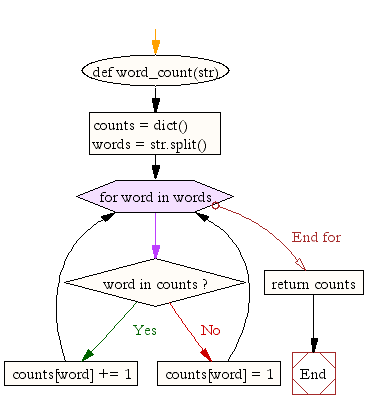
This flowchart perfectly visualizes the for loop combined with an if/else statement to process a collection and build a dictionary.
Now, how would we use this dictionary? We can iterate over it to find interesting information. For example, let's find all words that appear more than once.
word_counts = {'apple': 3, 'banana': 2, 'orange': 1}
frequent_words = {}


# Use .items() to get both the word and its count
for word, count in word_counts.items():


    # Check if the count meets our condition
    if count > 1:


        # If it does, add it to our new dictionary
        frequent_words[word] = count

print(frequent_words)


# Expected Output: {'apple': 3, 'banana': 2}
This "filter and build" pattern is extremely common. You iterate through one data structure, apply a condition, and build a new, filtered data structure.
Your Turn: Grouping Words by Length
Now it's time to put these concepts together. Your task is to write a function that takes a list of words and groups them into a dictionary based on their length.
Task:
Define a function named group_by_length that takes one argument: a list of strings called words. The function should return a dictionary where the keys are integers representing word lengths, and the values are lists of all words that have that length.
For example, given the input ['the', 'quick', 'brown', 'fox', 'jumps'], the function should return {3: ['the', 'fox'], 5: ['quick', 'brown', 'jumps']}.
Instructions:
- Define the function
group_by_lengththat accepts a listwords. - Inside the function, create an empty dictionary to store your results (e.g.,
grouped_words = {}). - Loop through each
wordin thewordslist. - Inside the loop, get the length of the current
wordusinglen(word). This length will be your dictionary key. - Check if this length key already exists in your
grouped_wordsdictionary.- If the key does not exist, it's the first time you've seen a word of this length. Add the key to the dictionary, and set its value to be a new list containing just the current
word. - If the key does exist, it means you've already found other words of this length. Append the current
wordto the existing list associated with that key.
- If the key does not exist, it's the first time you've seen a word of this length. Add the key to the dictionary, and set its value to be a new list containing just the current
- After the loop finishes,
returnthegrouped_wordsdictionary.
Use the starter code below to implement your solution.
def group_by_length(words):


    # 2. Create an empty dictionary
    grouped_words = {}


    # 3. Loop through each word
    for word in words:


        # 4. Get the length of the word
        word_len = len(word)


        # 5. Check if the length is already a key
        if word_len not in grouped_words:


            # If not, create a new entry with a list
            grouped_words[word_len] = [word]
        else:


            # If it exists, append the word to the list
            grouped_words[word_len].append(word)


    # 6. Return the final dictionary
    return grouped_words


# --- Test your function ---
text = ['the', 'quick', 'brown', 'fox', 'jumps', 'over', 'the', 'lazy', 'dog']
grouped = group_by_length(text)
print(grouped)


# Expected Output: {3: ['the', 'fox', 'the', 'dog'], 5: ['quick', 'brown', 'jumps'], 4: ['over', 'lazy']}
This exercise beautifully combines iterating over a list with the conditional logic needed to build up a dictionary, which is a core skill for data processing.
Conclusion
In this lesson, you've taken a deep dive into using for loops to process collections of data, a cornerstone of Python programming.
Here are the key takeaways:
- You can iterate directly over list elements using the
for item in my_list:syntax. - You can process list items by inspecting, transforming, or aggregating them within the loop.
- Dictionaries offer three ways to iterate: over keys (default), values (
.values()), or key-value pairs (.items()). - Using
for key, value in my_dict.items():is the most effective and readable way to work with dictionary data, as it gives you both components in each step of the loop.
You are now equipped with the fundamental tools for processing collections. So far, we've only worked with data that we've typed directly into our code. In the next lesson, we'll take a major step toward real-world applications by learning how to read data from and write data to plain text files. You'll see how the iteration skills you've just mastered can be used to process a file line by line, preparing us to handle the large text datasets used in NLP.