Recommended resources
The freely available resources this lesson will direct you to.
Hello! In our last session, we built a word frequency counter using dictionaries. While effective, imagine you needed to count frequencies for ten different texts. You'd have to copy and paste that same block of code ten times, a process that is both tedious and prone to error. This is where functions become indispensable.
This lesson addresses exactly that problem. You will learn how to define your own Python functions with parameters and return values. This is one of the most important concepts in programming, as it allows you to package code into reusable, organized, and powerful blocks. Mastering functions is a critical step on our path to building the sophisticated, multi-component NLP applications you're interested in, like chatbots and text processors.
What is a Function and Why Use One?
At its core, a function is a named block of code designed to perform a specific task. Instead of rewriting the code every time you need the task done, you simply "call" the function by its name.
The most obvious benefit is code reusability, but functions also bring clarity and organization to your programs. By breaking a large problem down into smaller, manageable tasks, each handled by a specific function, your code becomes easier to read, test, and maintain.
The article "Writing Functions in Python" explains this philosophy well. It introduces the idea of thinking of a function as a tool you build for a specific job.
Writing Functions in Python— A Beginner's Guide
Please read the introduction and the section "First, why write functions?".
Start by reading the definition of a function, from the first paragraph. Then, focus on the section Why Write Functions?, which highlights the advantages beyond simple code reuse. The author's analogy of building a tool, starting with a simple rock and gradually improving it, is particularly useful.
The Anatomy of a Python Function
Now that you understand the "why," let's look at the "how." A function has a specific structure. The image below from Pynative breaks down a simple Python function into its core components.
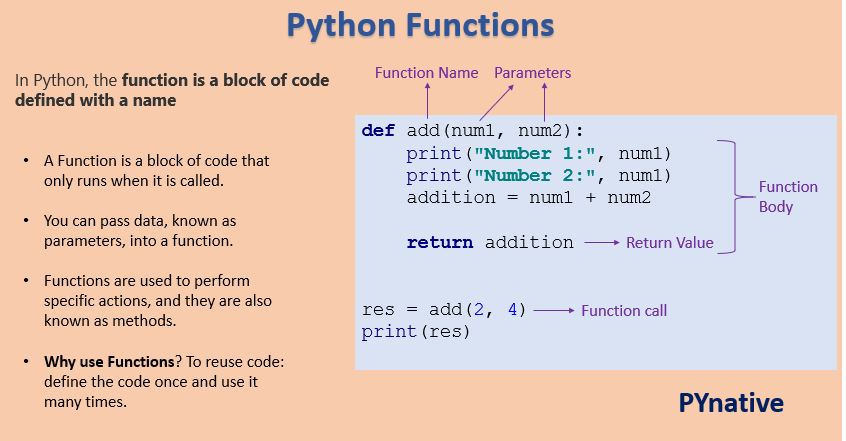
Let's break these parts down:
defkeyword: This signals the start of a function definition.- Function Name: A unique, descriptive name that follows Python's variable naming rules (e.g.,
calculate_average). - Parameters: Variables listed inside the parentheses
(). They act as placeholders for the data you will pass into the function when you call it. A function can have zero or more parameters. - Colon
:: Marks the end of the function header. - Function Body: An indented block of code that performs the function's task.
returnstatement: (Optional) Sends a result back to wherever the function was called.
A short video from the Bro Code channel provides a great dynamic introduction to defining and calling your first function.
Functions in Python are easy 📞
This video clearly demonstrates the basic syntax and the concept of passing data to a function.
Watch the first two parts of the video. First, watch the segment on defining and calling a function to see how a simple block of code is made reusable. Next, focus on how to pass arguments to parameters. Pay close attention to the distinction between parameters (the placeholders in the function definition) and arguments (the actual values you provide when calling the function).
Getting a Result: The return Statement
Many functions perform a calculation or a transformation and need to send a result back. A function that just prints a value to the screen is of limited use, because you can't use that printed value in other parts of your code. The return statement is how a function hands back its result.
This is a fundamental concept, and the distinction between print() and return inside a function is a very common point of confusion for beginners.
print()is for display purposes only. It shows a value on the screen for a human to see.returnactually outputs a value from the function that your program can capture in a variable and use for further processing.
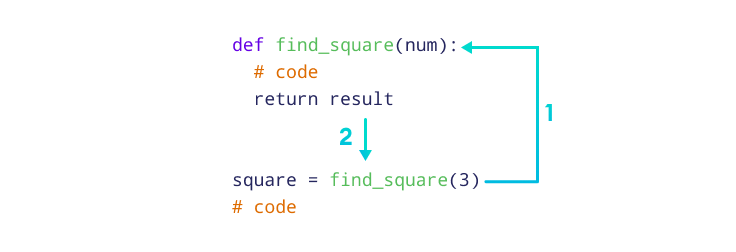
Let's watch two short videos that make this difference crystal clear. The first continues the Bro Code video, and the second, from Coding with Estefania, is entirely dedicated to this topic.
Functions in Python are easy 📞
This video will show you how to use return to get a value back from a function.
Watch the section on the return statement. Notice how the result of the add, subtract, and multiply functions is captured in a variable and then printed.
Now, let's solidify this concept. The next video is short and exceptionally clear about what happens when a function doesn't have a return statement.
print() vs. return in Python Functions
This video provides a direct comparison of print vs. return.
Watch the entire video. It first explains how return works by storing the output in a variable. Then, it shows what happens when you only use print, and why the function implicitly returns None. The final recap summarizes the key difference.
By default, if you don't include a return statement, a Python function automatically returns a special value called None. This is why trying to assign the result of a print-only function to a variable gives you None.
Your First Function: From Script to Reusable Tool
Let's apply this step-by-step approach to the word frequency counter you built in the previous lesson. We will transform it from a one-off script into a reusable function.
Here's the code from last time:
# The original script
words = ['like', 'a', 'rose', 'a', 'rose', 'is', 'a', 'rose']

word_counts = {}

for word in words:
    if word in word_counts:
        word_counts[word] = word_counts[word] + 1
    else:
        word_counts[word] = 1

print(word_counts)


# Output: {'like': 1, 'a': 3, 'rose': 3, 'is': 1}
Now, let's package this logic into a function called count_word_frequency.
- Define the function signature: We need a function that accepts one piece of data: a list of words. We'll call the parameter
text_list.def count_word_frequency(text_list): - Add the function body: Copy the logic from your script and indent it so it's inside the function.
def count_word_frequency(text_list): word_counts = {} # The parameter `text_list` is used here instead of the hardcoded `words` for word in text_list: if word in word_counts: word_counts[word] = word_counts[word] + 1 else: word_counts[word] = 1 - Return the result: Instead of printing the dictionary, we'll
returnit so we can use it elsewhere.def count_word_frequency(text_list): word_counts = {} for word in text_list: if word in word_counts: word_counts[word] = word_counts[word] + 1 else: word_counts[word] = 1 return word_counts # Return the dictionary - Call the function and use its result: Now you can call your function with any list of words and store the returned dictionary in a variable.
sentence1 = ['this', 'is', 'the', 'first', 'sentence']
sentence2 = ['this', 'is', 'another', 'sentence', 'a', 'second', 'sentence']


# Call the function for the first sentence
freq1 = count_word_frequency(sentence1)
print("Frequencies for sentence 1:", freq1)


# Call the same function for the second sentence
freq2 = count_word_frequency(sentence2)
print("Frequencies for sentence 2:", freq2)
Notice how we defined the logic once and reused it for two different inputs. This is the power of functions.
Your Turn: Calculate Word Percentage
Now it's your turn to build a function from scratch. This exercise is inspired by the NLTK book, a classic resource in Natural Language Processing.
Task:
Define a function named calculate_percentage that takes two arguments: a word (a string) and a text_list (a list of strings). The function should calculate how often the given word appears in the text list and return the result as a percentage.
The formula is:
For example, if the word is "rose" and the list is ['a', 'rose', 'is', 'a', 'rose'], the count of "rose" is 2 and the total number of words is 5. The percentage is .
Instructions:
- Define a function
calculate_percentagethat accepts two parameters:wordandtext_list. - Inside the function, get the total number of words in
text_listusing thelen()function. - Inside the function, count how many times
wordappears intext_list. You can do this with aforloop and a counter variable, or you can use the built-in list method.count(). For example,text_list.count(word). - Calculate the percentage using the formula above. Be careful: if the list is empty, you'll be dividing by zero, which causes an error. Add an
ifstatement to check if the total number of words is 0. If it is,return 0.0. - Return the calculated percentage.
Use the starter code below to complete your task.
def calculate_percentage(word, text_list):


    # 1. Get the total number of words
    total_words = len(text_list)


    # 2. Handle the case of an empty list to avoid division by zero
    if total_words == 0:
        return 0.0


    # 3. Count the occurrences of the specific word
    word_count = text_list.count(word)


    # 4. Calculate the percentage
    percentage = (word_count / total_words) * 100


    # 5. Return the final result
    return percentage


# --- Test your function ---
my_text = ['a', 'rose', 'is', 'a', 'rose']


# Calculate percentage for the word 'rose'
rose_percentage = calculate_percentage('rose', my_text)
print(f"The word 'rose' makes up {rose_percentage}% of the text.")


# Calculate percentage for the word 'a'
a_percentage = calculate_percentage('a', my_text)
print(f"The word 'a' makes up {a_percentage}% of the text.")


# Test with an empty list
empty_percentage = calculate_percentage('hello', [])
print(f"The percentage in an empty list is: {empty_percentage}%")
Conclusion
In this lesson, you've learned one of the most fundamental skills in programming: how to create and use functions. By encapsulating logic into named, reusable blocks, you can write cleaner, more organized, and more powerful code.
Key takeaways from today:
- Functions promote reusability and organization. They are the building blocks of larger programs.
- Functions are defined with the
defkeyword, followed by a name, parameters in(), and a colon. - Parameters are the placeholders in a function's definition, while arguments are the actual values passed to the function when it's called.
- The
returnstatement is used to send a value back from a function, allowing you to use the function's output in other parts of your code. A function without an explicitreturnstatement returnsNone.
You now have a solid grasp of Python's main data structures (lists and dictionaries) and the primary way of structuring code (functions). In our next lesson, we'll dive deeper into how to effectively combine these concepts, focusing on iterating over lists and dictionaries to process collections of data—a skill that is absolutely essential for the text preprocessing pipelines we will soon be building.