Recommended resources
The freely available resources this lesson will direct you to.
Hello! Following our work on lists, we're now ready to tackle another fundamental Python data structure. Where lists are perfect for ordered sequences of items, you'll often need a way to store data that is labeled or associated with a specific identifier. This is where dictionaries come in.
In this lesson, we will explore Python's dictionaries. You'll learn how to create them, and how to access, add, and modify the data they contain. This skill is crucial for almost any data-centric application, from simple configuration files to the complex data objects you'll encounter in AI and NLP, such as representing word counts or features of a text sample.
From Index to Key: Introducing Dictionaries
In the last lesson, you learned that lists are collections where each item is found by its numerical position, or index. For example, in a list representing a sentence, sentence[0] gives you the first word.
Dictionaries offer a different way to organize data. Instead of using a numerical index, you use a custom label called a key to look up an associated value. This creates a key:value pair. Think of it like a real-world dictionary: you look up a word (the key) to find its definition (the value).
This key-value system is incredibly powerful. For your interest in NLP, imagine you want to count how many times each word appears in a document. A dictionary is the perfect tool: the word itself is the key, and its count is the value.
Let's begin with a video that provides a clear, visual introduction to what dictionaries are and how they are structured.
Python Dictionaries: Visually Explained
This video from the Visually Explained channel does an excellent job of illustrating the core concept of a dictionary. Watch the first two sections, covering how to create a dictionary with key-value pairs and then how to access a value using its key.
Focus on the syntax: the curly braces {}, the colon : separating the key and value, and the comma , separating the pairs.
As you saw, dictionaries allow you to store and retrieve data using meaningful names, which can make your code much more readable and intuitive than using numerical indices.
Creating, Accessing, and Modifying Dictionaries
Now that you have the basic idea, let's get into the specifics of working with dictionaries.
Creating a Dictionary
The most common way to create a dictionary is by using curly braces {}, as shown in the video. You can create an empty dictionary and add to it later, or initialize it with some key-value pairs from the start.

The article "Python Dictionary: What It Is and How to Use It" from Dataquest provides a concise reference for this.
Python Dictionary: What It Is and How to Use It
This article provides clear, practical examples of the most common dictionary operations. We'll be referring to it throughout the lesson.
Start by reading the section on creation. It shows both the {} syntax and the dict() constructor.
Accessing Values
To get a value out of a dictionary, you provide its key inside square brackets [].
capitals = {'USA': 'Washington D.C.', 'India': 'New Delhi'}
print(capitals['USA'])


# Output: Washington D.C.
However, a problem arises if you try to access a key that doesn't exist. This will cause your program to crash with a KeyError. To handle this safely, you can use the .get() method. If the key doesn't exist, .get() will return None (a special Python value representing nothing) instead of raising an error.
This image clearly illustrates the difference in behavior.
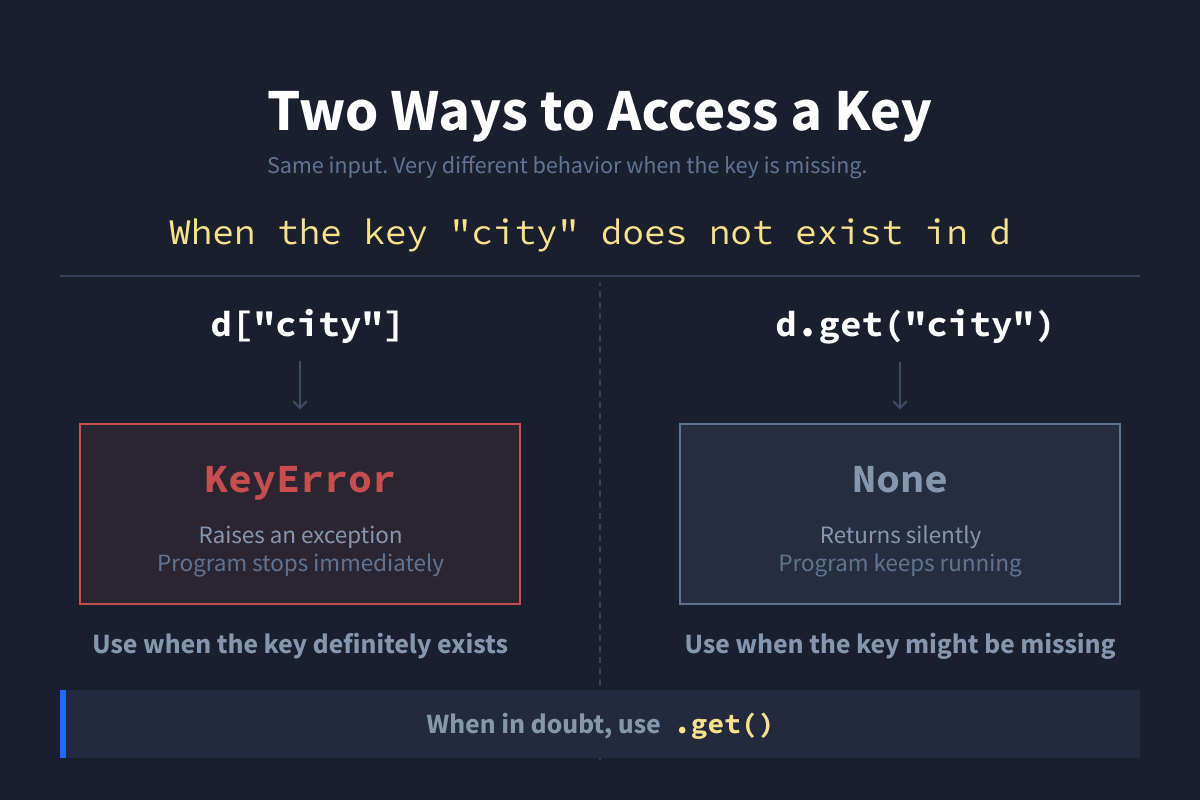
The Dataquest article you just looked at explains this crucial difference.
Python Dictionary: What It Is and How to Use It
This section of the Dataquest article is essential for writing robust code that doesn't crash unexpectedly.
Read the section titled Accessing Values. Pay close attention to the example showing what happens when a key is missing.
The general rule is: use square brackets [] when you are certain the key exists, and use .get() when the key might be missing.
Adding and Modifying Pairs
Adding a new key-value pair and updating an existing one use the exact same syntax. Python handles it for you automatically:
- If the key does not exist, a new key-value pair is created.
- If the key already exists, its value is updated.
# Create a dictionary for a user profile
user_profile = {'name': 'Alice', 'role': 'developer'}


# Add a new key-value pair
user_profile['city'] = 'New York'


# user_profile is now {'name': 'Alice', 'role': 'developer', 'city': 'New York'}


# Modify an existing key-value pair
user_profile['role'] = 'senior developer'


# user_profile is now {'name': 'Alice', 'role': 'senior developer', 'city': 'New York'}
Let's refer back to the Dataquest article for a textual summary of this process.
Python Dictionary: What It Is and How to Use It
This part of the article reinforces the simple but powerful syntax for adding and updating dictionary entries.
Please read the section on adding and updating items.
A Practical Example: Updating Employee Records
To see how these operations work in a more realistic context, let's consider a practical task. Imagine you have a list of employees, where each employee is represented by a dictionary. Your task is to give a 10% bonus to all employees who are developers.
This requires you to:
- Iterate through the list of employees (a concept from our last lesson).
- For each employee, check if their 'role' is 'developer'.
- If it is, add a new key-value pair to that employee's dictionary to store their bonus.
The article "Mastering Python Dictionaries" from CodeSignal walks through this exact problem.
Mastering Python Dictionaries Through Practical Exercises
This resource provides excellent, problem-oriented examples that show the power of dictionaries.
Find "Problem 3: Bonus Calculator". Read the explanation of the efficient approach and then study the solution code. This demonstrates how to modify dictionaries that are themselves inside a list.
This example is a great demonstration of how lists and dictionaries work together to represent structured data, a pattern you will see constantly in data science and AI.
Your Turn: Word Frequency Counter
Now, let's apply what you've learned to a task that is a direct stepping stone towards NLP. Your goal is to write a simple word frequency counter. You will take a list of words and create a dictionary that maps each unique word to the number of times it appears.
Task:
- Start with the following list of words:
words = ['like', 'a', 'rose', 'a', 'rose', 'is', 'a', 'rose']. - Create an empty dictionary called
word_counts. - Write a
forloop to iterate through thewordslist. - Inside the loop, for each
word:- Check if the
wordis already a key in yourword_countsdictionary. - If it is, increment its count by 1.
- If it is not, add it to the dictionary with a count of 1.
- Check if the
- After the loop finishes, print the
word_countsdictionary.
Your final output should be: {'like': 1, 'a': 3, 'rose': 3, 'is': 1}.
# Here is the starting list.
words = ['like', 'a', 'rose', 'a', 'rose', 'is', 'a', 'rose']


# 1. Create an empty dictionary
word_counts = {}


# 2. Loop through the list of words
for word in words:


    # 3. Check if the word is in the dictionary and update its count
    if word in word_counts:
        word_counts[word] = word_counts[word] + 1
    else:
        word_counts[word] = 1


# 4. Print the final dictionary
print(word_counts)
This exercise combines list iteration with the dictionary operations you've learned today, forming a foundational pattern for text analysis.
Conclusion
In this lesson, you've added another essential tool to your Python toolkit. While lists store ordered sequences, dictionaries excel at storing labeled data.
Here are the key takeaways:
- Dictionaries store data in
key:valuepairs and are created with curly braces{}. - They are ideal for data where items are identified by a label, not a position.
- You access values using keys:
my_dict['key']for when you're sure the key exists, andmy_dict.get('key')for a safer approach. - You can add and modify entries with a simple assignment:
my_dict['key'] = new_value.
You've now covered the first two major data structures in Python. In the next lesson, we'll turn our attention to another core concept: defining functions. This will allow you to package code—like the word frequency counter you just built—into reusable, named blocks that make your programs more organized and powerful.