Recommended resources
The freely available resources this lesson will direct you to.
Welcome to the second module of our course! In the previous module, we built a solid foundation in controlling the flow of your programs with if statements and loops like for and while. Now, it's time to learn how to manage and organize data. So far, we've mostly worked with one piece of data at a time. To build the complex AI applications you're interested in, you'll need ways to handle collections of data.
This lesson introduces Python's most fundamental data structure: the list. Lists are essential for almost any non-trivial program, and they are the primary way we will represent textual data in our journey toward Natural Language Processing (NLP). By the end of this lesson, you will be able to create lists, access and modify their contents using indexing and slicing, and add or remove elements.
What is a List?
A list is an ordered, changeable collection of items. You can think of it like a shopping list or a to-do list: the items have a specific order, and you can add, remove, or change items on the fly. In Python, lists are incredibly versatile; they can hold numbers, strings, or even other lists.
For your goal of building NLP tools, this concept is crucial. A sentence is, at its core, an ordered sequence of words and punctuation. Lists are the perfect tool to represent this.
The book Language Processing and Python from the Natural Language Toolkit (NLTK) project introduces this idea right away. Let's start there to see how lists are used to represent text.
1. Language Processing and Python
This chapter from a classic NLP textbook directly connects Python lists to the task of representing text. It provides a practical, goal-oriented introduction to why lists are so important.
Please read the first two sections: Section 2.1 Lists: Focus on how a sentence is broken down into a list of strings. Notice the sent1 = ['Call', 'me', 'Ishmael', '.'] example. This is a pattern we will use constantly. Section 2.2 Indexing Lists: Pay close attention to how square brackets [] are used to access individual words by their position (index). The concept of zero-based indexing is critical here.
As you saw, creating a list is as simple as enclosing comma-separated items in square brackets. And accessing an item is done by providing its numerical index, starting from 0.
Creating and Accessing Lists
Let's solidify these core concepts with a focused video demonstration. The following video from Programming with Mosh is a very clear and concise walkthrough of creating lists and accessing their elements.
This video covers the basics of list creation and indexing, including some handy shortcuts.
Please watch the first two segments: Creating Lists: This covers various ways to create a list, including using the * operator for repetition and the list() function with range(). Accessing Elements: Watch how positive and negative indices are used to get specific items and how you can modify an item in place.
To recap the key points from the video:
- Creation:
my_list = [1, "hello", 3.14] - Zero-based Indexing:
my_list[0]gives you the first element (1). - Negative Indexing:
my_list[-1]gives you the last element (3.14). - Mutability: Lists are "mutable," meaning you can change them.
my_list[0] = 99would change the list to[99, "hello", 3.14].
Slicing: Getting Portions of a List
Often, you'll want to work with a sub-section of a list, not just a single element. This is done through slicing. Slicing lets you extract a new list containing a range of elements from the original. The syntax is my_list[start:stop].
An important rule to remember is that the start index is inclusive, but the stop index is exclusive. So, my_list[0:3] gets elements at indices 0, 1, and 2, but not 3.
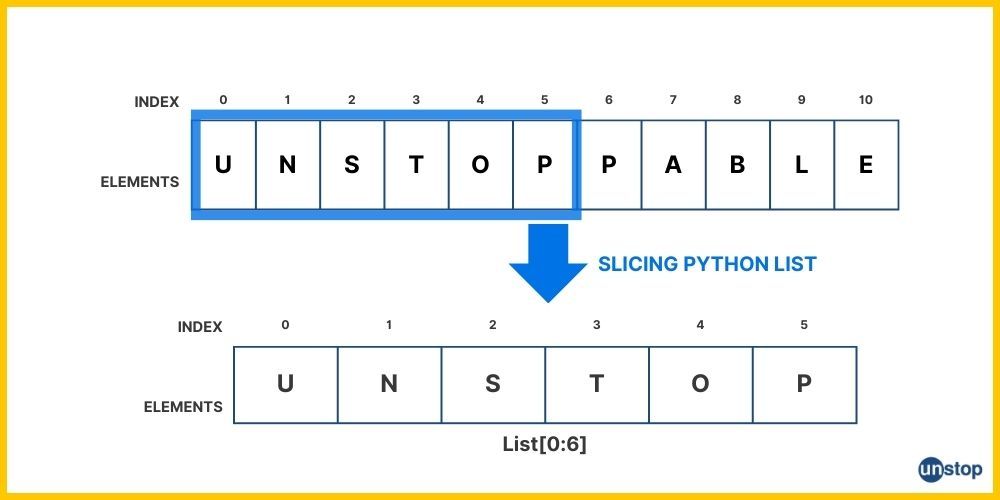
The video from Mosh also has an excellent segment on slicing that covers some powerful variations.
This segment demonstrates slicing in detail, including the optional "step" parameter.
Watch the section on slicing lists. Pay attention to these patterns: letters[0:3]: Gets the first three items. letters[:3]: A shortcut for the same thing (start defaults to 0). letters[1:]: Gets everything from the second item to the end. letters[:]: Creates a copy of the entire list. numbers[::2]: Uses a "step" to get every second element. numbers[::-1]: A clever trick to reverse the list.
Slicing is a powerful tool for manipulating sequential data and will be invaluable when you need to analyze parts of a sentence or document.
Manipulating Lists: Adding and Removing Elements
The true power of lists comes from their dynamic nature. You can add and remove items as needed. This is fundamental for building up data collections or filtering them down.
There are four primary methods you'll use to change the contents of a list: append, insert, remove, and pop.
append(item): Adds a single item to the end of the list.insert(index, item): Adds a single item at a specific index, shifting everything else to the right.remove(value): Searches for the first occurrence of avalueand removes it.pop(index): Removes the item at a specificindex. If you don't provide an index, it removes the last item.
The following resource from GeeksforGeeks provides clear examples for each of these operations.
This article provides a quick and clear reference for the most common list manipulation methods.
Please read these two sections: Adding Elements: Review the code examples for append(), insert(), and extend(). Removing Elements: Look at the examples for remove(), pop(), the del statement, and clear().
To see these methods in action, the Telusko video offers a live coding demonstration that walks through adding and removing elements step-by-step.
#5 Python Tutorial for Beginners | List in Python
This video provides a practical demonstration of modifying lists.
Watch the following segments showing how to add and remove items: append(): See how to add an item to the end. insert(): Watch how to add an item at a specific index. remove() and pop(): This is a key section. Observe the difference between removing by value (remove) and removing by index (pop).
Understanding the difference between remove() (by value) and pop() (by index) is crucial. You'll choose one over the other depending on whether you know the item you want to delete or just its position.
Your Turn: Practice with Lists
Let's put all these concepts together with a small task that mimics a step in text processing.
Task: You are given a sentence represented as a list. Your goal is to clean it up by removing an unnecessary word, inserting a more descriptive word, and adding punctuation.
- Start with this list:
sentence = ['the', 'quick', 'fox', 'jumps'] - The word 'the' is a common "stop word" that is often removed in NLP. Use the
remove()method to remove'the'from the list. - You decide the word 'brown' should be included. Use the
insert()method to add'brown'right before'fox'. (Hint: what index does'fox'have after you removed'the'?). - The sentence is now missing its end. Use the
append()method to add a period'.'to the end of the list. - Finally, print the complete, modified sentence. Your expected output should be:
['quick', 'brown', 'fox', 'jumps', '.']
Try to solve this in your own Python environment.
# Here is the starting list.
sentence = ['the', 'quick', 'fox', 'jumps']


# 1. Remove the word 'the'


# 2. Insert the word 'brown' at the correct position


# 3. Append a period '.' to the end


# 4. Print the final sentence
print(sentence)
This exercise combines the core manipulation techniques you've learned today and directly relates to the kind of preprocessing you'll perform on text data in later modules.
Conclusion
In this lesson, you've taken a significant step from working with single variables to managing collections of data. You now have a firm grasp of Python's most important data structure, the list.
Here are the key takeaways:
- Lists are ordered, mutable collections defined with square brackets
[]. - They are the natural way to represent sequential data, such as the words in a sentence.
- You can access individual items using indexing (
my_list[i]) and sub-lists using slicing (my_list[i:j]). - You can dynamically modify lists by adding items with
.append()and.insert(), or removing them with.remove()and.pop().
You've now covered the first learning outcome of this module. In our next lesson, we will explore Python's other essential data structure: dictionaries. While lists are organized by numerical index, dictionaries allow you to store and retrieve data using custom keys, behaving much like a real-world dictionary or a phone book. This will open up even more possibilities for structuring your program's data.