Recommended resources
The freely available resources this lesson will direct you to.
Hello! In our previous lesson, we took a close look at the IPv4 header and the function of each field that guides a packet across networks. We focused on the roles of the 32-bit source and destination address fields. Now, it's time to shift our attention to the structure and meaning of the IPv4 addresses themselves.
This lesson directly addresses a topic you were keen to cover: classifying IPv4 addresses. You will learn how to categorize any IPv4 address into its designated class (A, B, or C) and, just as importantly, how to distinguish between globally unique public addresses and the private addresses used within our local networks. Mastering this is a fundamental building block for understanding network design and is essential for the subnetting topics we'll tackle soon.
Why Do We Have Public and Private IPs?
Before we get into the different "classes" of addresses, it's important to understand a more fundamental division: public vs. private. You've likely seen an address like 192.168.1.10 on your home network. Why can't that address be used directly on the internet? The answer lies in the history of the internet and a clever solution to a big problem.
This animated video provides an excellent explanation of the origins and purpose of public and private IP addresses.
Watch this "Public vs Private IP Address" video to understand why the two types of addresses exist and how they work together.
Watch the video from the beginning to the explanation of NAT. Focus on: The definition of a public IP address and how you get one from your Internet Service Provider (ISP). The reason private IP addresses were created (to prevent the exhaustion of IPv4 addresses). The role of Network Address Translation (NAT), a service in your router that translates private IPs to a public IP for internet access.
To summarize the key distinction:
- Public IP Addresses: These are globally unique and routable on the public internet. A device must have a public IP (or access to one via NAT) to communicate with servers like
google.com. These are assigned by ISPs. - Private IP Addresses: These are reserved for use within an internal network (like your home, school, or a corporate office). They are not unique globally; the same
192.168.1.xnetwork can be used in millions of homes. Routers on the internet are configured to drop any traffic they see coming from these private ranges.
The Original IPv4 Addressing Scheme: Classful Addressing
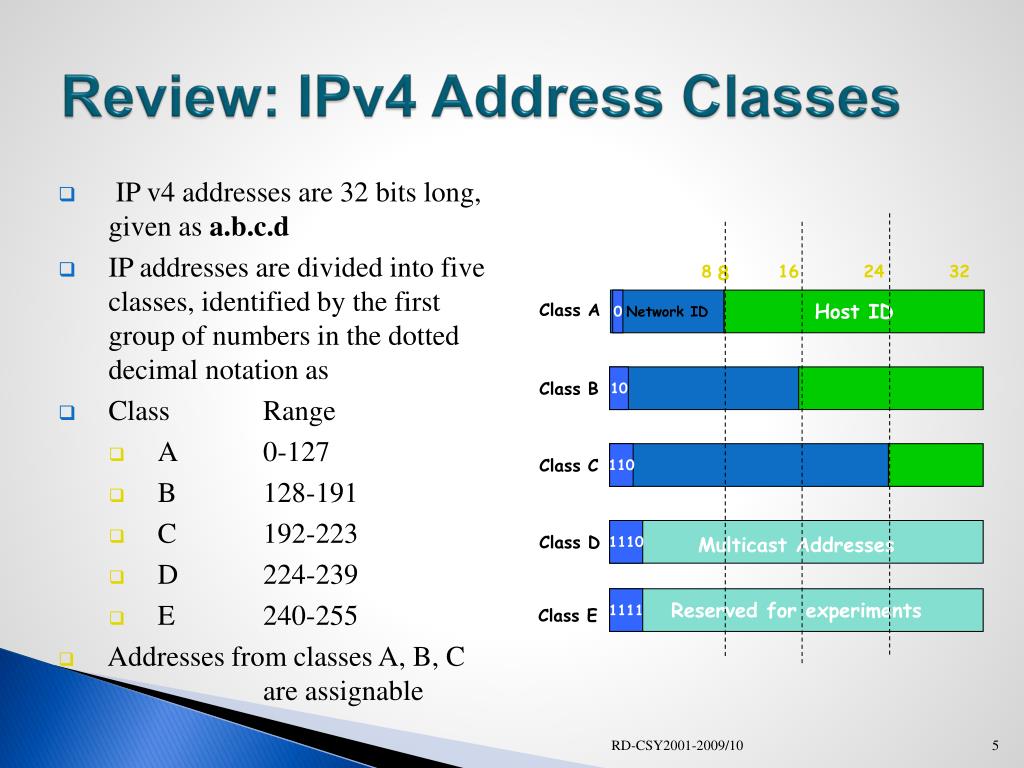
When IPv4 was first designed, addresses were divided into five "classes" (A, B, C, D, and E). This system, known as classful addressing, determined the size of a network based on the first few bits of the IP address. While modern networking uses a more flexible method called Classless Inter-Domain Routing (CIDR), understanding the original classes is still crucial for CCNA certification and for grasping the fundamentals of IP allocation.
The three main classes you'll work with are A, B, and C, which are used for assigning addresses to network devices (hosts).
Let's watch a video that breaks down these classes.
IP Subnetting tutorial | How to subnet IPv4 addresses
This video tutorial on IP subnetting provides a clear explanation of the five IP address classes and how to identify them.
Watch the segment from "what is an IP address". Pay close attention to how the value of the first octet (the first number in the dotted-decimal address) determines the class.
As the video explains, you can identify the class of an IP address simply by looking at the first number:
- Class A: The first octet is between 1 and 126. These were designed for very large networks.
- Example:
8.8.8.8(Google's DNS) is a Class A address.
- Example:
- Class B: The first octet is between 128 and 191. These were for medium-to-large networks.
- Example:
129.42.10.5is a Class B address.
- Example:
- Class C: The first octet is between 192 and 223. These were for small networks.
- Example:
204.79.197.200(bing.com) is a Class C address.
- Example:
For completeness, the other two classes are:
- Class D:
224.0.0.0to239.255.255.255. Reserved for multicast, where one packet is sent to a group of interested receivers. - Class E:
240.0.0.0to255.255.255.255. Reserved for experimental purposes.
The image below provides a great visual summary of this structure.
Private Address Ranges (RFC 1918)
Now let's connect the two concepts. Within the public IP ranges of Classes A, B, and C, specific blocks are reserved for private use, as defined in a standard called RFC 1918. Any IP address within these blocks is a private IP.
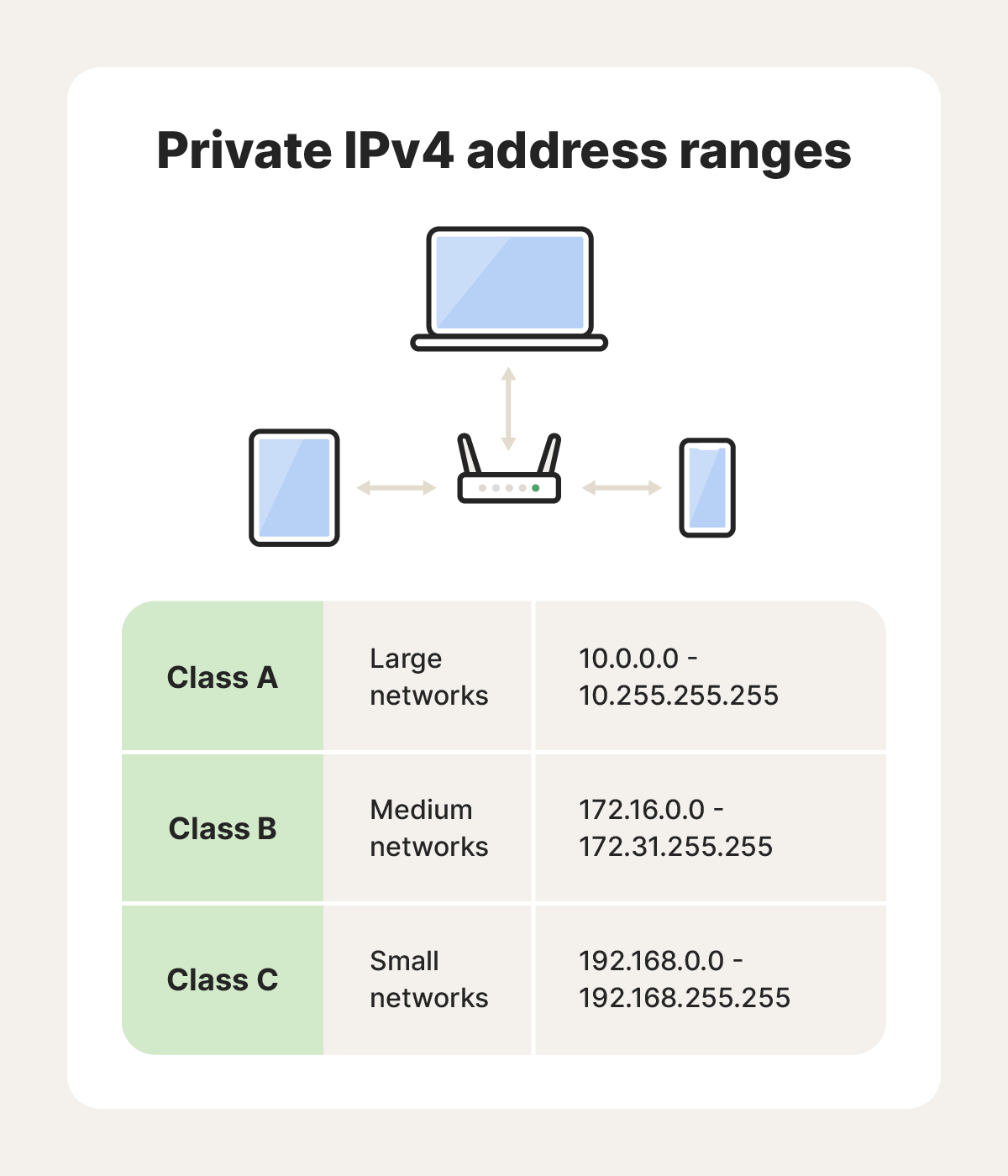
The private IP address ranges are:
| Class | Private IP Range | Default Mask (CIDR) |
|---|---|---|
| A | 10.0.0.0 to 10.255.255.255 |
/8 |
| B | 172.16.0.0 to 172.31.255.255 |
/12 |
| C | 192.168.0.0 to 192.168.255.255 |
/16 |
Important Note: The Class B private range (172.16.0.0 - 172.31.255.255) is often a point of confusion. It does not encompass all of the 172.x.x.x addresses. An address like 172.32.1.1 is a public Class B address.
Special Address Ranges
Besides the main private ranges, there are other special, non-routable addresses you should recognize. The video you watched earlier mentioned a couple of these.
IP Subnetting tutorial | How to subnet IPv4 addresses
Let's revisit the "IP Subnetting tutorial" video to learn about special address ranges.
Watch the section on private and special IPs. This part explicitly lists the private ranges and introduces two other important ones: loopback and APIPA.
The key special ranges are:
- Loopback Range (
127.0.0.0to127.255.255.255): Reserved for a host to direct traffic to itself. The most common address is127.0.0.1. Pinging this address is a common first step in troubleshooting to confirm that the TCP/IP protocol stack is working correctly on your own machine. - APIPA/Link-Local Range (
169.254.0.0to169.254.255.255): Automatic Private IP Addressing. If a device is configured to get an IP address automatically (via DHCP) but cannot find a DHCP server, it will assign itself an address from this range. If you see an IP address starting with169.254, it's a clear sign of a network connectivity problem.
Check Your Understanding
Let's put this all together. For each IP address below, determine its class (A, B, or C) and whether it's public or private.
10.50.25.10172.32.1.100192.168.10.5150.150.150.150191.25.35.45
Click to see the answers
10.50.25.10: Class A, Private. (The first octet10is in the Class A range, and it falls within the10.0.0.0/8private block).172.32.1.100: Class B, Public. (The first octet172is in the Class B range, but it is outside the private172.16.0.0to172.31.255.255block).192.168.10.5: Class C, Private. (The first octet192is in the Class C range, and it falls within the192.168.0.0/16private block).150.150.150.150: Class B, Public. (The first octet150is in the Class B range and is not part of any private range).191.25.35.45: Class B, Public. (The first octet191is in the Class B range and is not part of any private range).
Conclusion
In this lesson, we established the fundamental division of IPv4 addresses into public and private spaces and explored the historical classful addressing system. You are now equipped to look at an IPv4 address and quickly determine its class and whether it's intended for internal use or for the public internet.
Key Takeaways:
- Public IPs are globally unique, assigned by ISPs, and are required for internet communication.
- Private IPs (RFC 1918 ranges) are used for internal networks and are not routable on the internet. They rely on NAT to communicate with external resources.
- Classful addressing (A, B, C) is a legacy system that categorizes addresses based on the value of the first octet.
- Class A: 1-126
- Class B: 128-191
- Class C: 192-223
- Special ranges like Loopback (
127.0.0.1) and APIPA (169.254.x.x) are used for local testing and automatic configuration, respectively.
We've classified addresses by looking at the first octet in decimal notation. In our next lesson, we will dive deeper into the full 32-bit structure of an IPv4 address and its crucial partner, the subnet mask. We'll explore how they are represented in both dotted-decimal and binary, which is the key to unlocking the "easy subnetting" you asked about.