Recommended resources
The freely available resources this lesson will direct you to.
Welcome back! In our last lesson, we dove into the Transport layer to see how TCP and UDP manage data streams. We saw that this data is prepared and then handed down to the next layer for delivery. Now, we'll examine that delivery mechanism itself: the IPv4 packet.
Your goal for this lesson is to identify the components of an IPv4 header and understand their crucial roles in packet forwarding. Think of the IPv4 header as the "envelope" that carries your TCP or UDP segment. We're going to open that envelope and inspect all the information written on it that ensures your data gets from a source network to a destination network, even if they are on opposite sides of the world.
The Anatomy of an IPv4 Packet
As we discussed in the context of the OSI model, data is encapsulated as it moves down the protocol stack. A segment from the Transport Layer (Layer 4) is wrapped inside a packet at the Network Layer (Layer 3). This packet consists of two main parts: the IPv4 Header and the Payload (which is the TCP or UDP segment).
The header contains all the control information routers need to make forwarding decisions. Let's start with a visual overview of its structure.
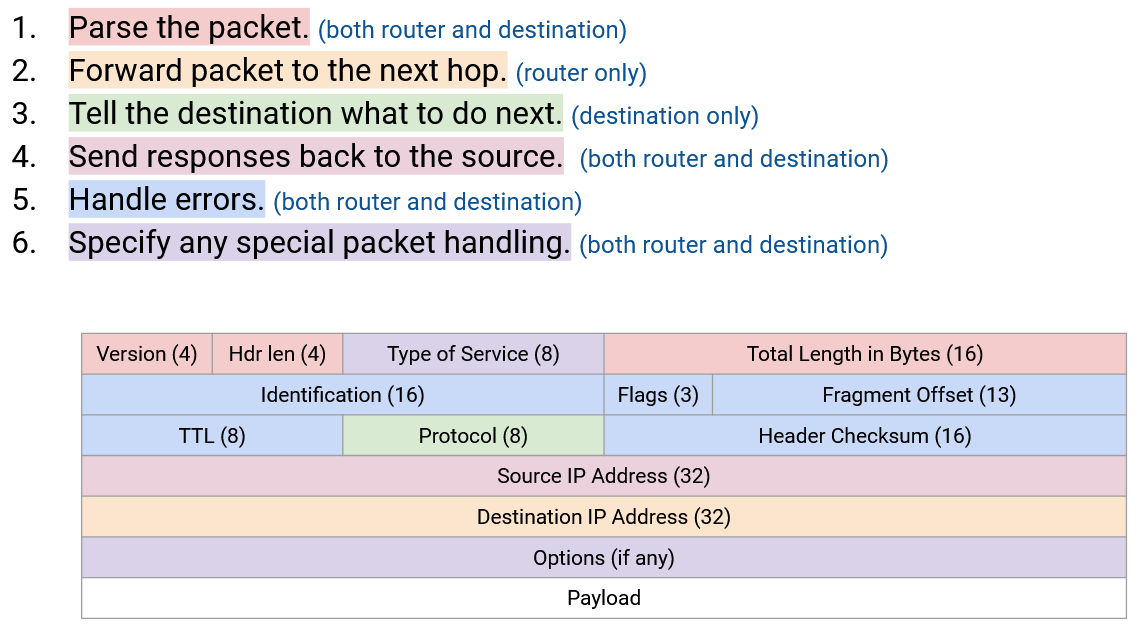
The header looks complex, but we will break it down field by field. Each field has a specific purpose, from identifying the IP version to preventing infinite routing loops.
A Guided Tour of the IPv4 Header
To understand the function of each field, we'll watch a detailed breakdown from a CCNA-focused course. This video explains not just what each field is, but why it's essential for network communication.
Free CCNA | IPv4 Header | Day 10 | CCNA 200-301 Complete Course
The video "Free CCNA | IPv4 Header" by Jeremy's IT Lab provides a comprehensive walkthrough of every field in the IPv4 header, explaining its purpose and size.
First, watch the introduction to understand where the IPv4 packet fits into the overall data encapsulation process. Then, watch the detailed explanation of each field from the main segment of the video. As you watch, I'll provide a structured summary below to help you organize the information.
As you follow the video, use this breakdown to solidify your understanding.
Core Identification and Length Fields
These fields provide the most basic information about the packet.
- Version (4 bits): Always
0100(the number 4) for IPv4. This is the very first thing a device reads to know how to interpret the rest of the header. If it were a '6', the device would expect a completely different IPv6 header structure. - Internet Header Length (IHL) (4 bits): The length of the header in 4-byte words. The minimum value is
5(5 x 4 = 20 bytes), which is the size of a standard header without any options. The maximum value is15(15 x 4 = 60 bytes). - Total Length (16 bits): The total size of the entire packet (header + payload) in bytes. The maximum size of an IPv4 packet is 65,535 bytes.
Traffic Handling and Prioritization
These fields help manage traffic flow and prioritize certain types of data.
- Differentiated Services Code Point (DSCP) (6 bits): Used for Quality of Service (QoS). This field allows routers to identify and give priority to delay-sensitive traffic like voice or video calls.
- Explicit Congestion Notification (ECN) (2 bits): A mechanism to signal network congestion without dropping packets, helping to prevent packet loss and retransmissions.
Fragmentation Fields
Not all networks can handle the same packet size. The maximum size a network link can handle is its Maximum Transmission Unit (MTU). If a packet is larger than the next network's MTU, a router must break it into smaller pieces, or fragments. These fields manage that process.
- Identification (16 bits): A unique number assigned to the original packet. All fragments of that packet will carry the same identification number so the receiving host knows they belong together.
- Flags (3 bits):
- Don't Fragment (DF) bit: If set, this tells routers they are not allowed to fragment the packet. If the packet is too large for the next hop, it will be dropped.
- More Fragments (MF) bit: This bit is set on all fragments except the very last one. This tells the receiving host when it has received all the pieces.
- Fragment Offset (13 bits): Specifies the exact position of this fragment's data relative to the beginning of the original packet. This allows the receiving host to reassemble the fragments in the correct order, even if they arrive out of sequence.
Routing and Delivery Control
These fields are critical for the packet's journey across the internet.
- Time to Live (TTL) (8 bits): This is a hop-count limit that prevents packets from getting stuck in routing loops forever. Each time a router forwards the packet, it decrements the TTL value by one. If the TTL reaches zero, the packet is discarded.
- Protocol (8 bits): This field tells the receiving host's operating system which transport layer protocol the payload should be handed to. This is how it knows if the data is a TCP segment or a UDP datagram. Common values are 6 (TCP) and 17 (UDP). This directly connects to our previous lesson.
- Header Checksum (16 bits): An error-checking value calculated for the header only. If the header gets corrupted in transit, the checksum will be invalid and the packet will be dropped. Because the TTL value changes at every hop, each router must recalculate the checksum.
The Most Critical Fields for Addressing
These are the two fields that make routing possible.
- Source IP Address (32 bits): The IPv4 address of the device that sent the packet.
- Destination IP Address (32 bits): The IPv4 address of the intended recipient. This is the primary field a router uses to decide where to send the packet next.
Seeing the Header in a Real Packet Capture
Theory is great, but seeing these fields populated with real data in a tool like Wireshark makes the concepts concrete. The next part of the video does exactly that, analyzing both standard and fragmented packets.
Free CCNA | IPv4 Header | Day 10 | CCNA 200-301 Complete Course
This segment of the video demonstrates a practical analysis of an IPv4 header using Wireshark, showing you what these fields look like in a live network.
Please watch the Wireshark demonstration from this section. As you watch, focus on: How Wireshark neatly decodes each header field for you. The values for a normal, unfragmented ping packet (standard ping). How the Identification, Flags, and Fragment Offset fields change when a packet is fragmented (fragmented ping). What happens when a large packet is sent with the Don't Fragment (DF) bit set (DF bit ping).
This practical example ties everything together, showing how the header fields work in concert to ensure data is correctly routed, fragmented, and reassembled.
Summary of IPv4 Header Fields
Here is a quick-reference table summarizing the key fields we've discussed. You may find it helpful to review this after watching the videos.
| Field | Size | Description |
|---|---|---|
| Version | 4 bits | Identifies the IP version (e.g., 4 for IPv4). |
| IHL | 4 bits | Header length in 4-byte words (min 5, max 15). |
| DSCP | 6 bits | Used for Quality of Service (QoS) traffic prioritization. |
| Total Length | 16 bits | Total size of the packet (header + data) in bytes. |
| Identification | 16 bits | Groups related fragments of a single IP packet. |
| Flags | 3 bits | Controls fragmentation (Don't Fragment, More Fragments). |
| Fragment Offset | 13 bits | Specifies the position of a fragment in the original packet. |
| Time to Live (TTL) | 8 bits | Hop count limit to prevent routing loops. Decremented by each router. |
| Protocol | 8 bits | Identifies the encapsulated protocol (e.g., TCP=6, UDP=17). |
| Header Checksum | 16 bits | Error-checking for the header. Recalculated at each hop. |
| Source Address | 32 bits | The IPv4 address of the sender. |
| Destination Address | 32 bits | The IPv4 address of the recipient; used for routing decisions. |
| Options | Variable | Optional parameters; rarely used in modern networks. |
Conclusion
In this lesson, you've dissected the IPv4 header and learned the specific role each component plays in packet forwarding. You now understand how a packet contains not only its data payload but also a rich set of instructions that guide it across complex networks.
Key Takeaways:
- The IPv4 header is a minimum of 20 bytes and contains essential control information for routing.
- The Destination IP Address is the most critical field for a router's forwarding decision.
- The TTL field is a safety mechanism that prevents packets from looping endlessly through the network.
- Fragmentation is the process of splitting large packets to cross networks with smaller MTUs, managed by the
Identification,Flags, andFragment Offsetfields. - The Protocol field acts as a bridge, telling the destination's operating system whether the payload is a TCP segment, a UDP datagram, or something else.
We've just spent this lesson talking about the 32-bit source and destination address fields. In the next lesson, we will focus on the addresses themselves. We will cover how to classify IPv4 addresses into classes (A, B, C) and distinguish private from public address ranges, a topic you specifically requested and which is fundamental to all IP networking.