Recommended resources
The freely available resources this lesson will direct you to.
- TCP vs UDP Explained // Hands On Lab Example with Wiresharkwww.youtube.com
- Free CCNA | Wireshark Demo (TCP/UDP) | Day 30 Lab | CCNA 200-301 Complete Coursewww.youtube.com
- [PDF] Lab - Using Wireshark to Examine TCP and UDP Capturescontenthub.netacad.com
- Examine a captured packet using Wiresharkwww.techtarget.com
Welcome to your first lesson in the Advanced Networking course! We're kicking things off by diving into the heart of the TCP/IP suite: the Transport Layer. Your goal for this lesson is to compare the behavior of TCP and UDP, using the professional network analysis tool Wireshark to see firsthand how connection-oriented communication differs from connectionless communication.
You already have a foundational understanding of what TCP and UDP are, so today we'll move beyond simple definitions. We will inspect the actual data packets to understand why TCP is considered reliable and why UDP is valued for its speed. This skill is fundamental for any network engineering or security role, as it forms the basis for troubleshooting, performance tuning, and security analysis.
Understanding the Core Difference: A Phone Call vs. a Postcard
At the Transport Layer (Layer 4 of the OSI model), TCP (Transmission Control Protocol) and UDP (User Datagram Protocol) are the two primary protocols that applications use to send data over a network. Their fundamental difference lies in how they handle connections.
-
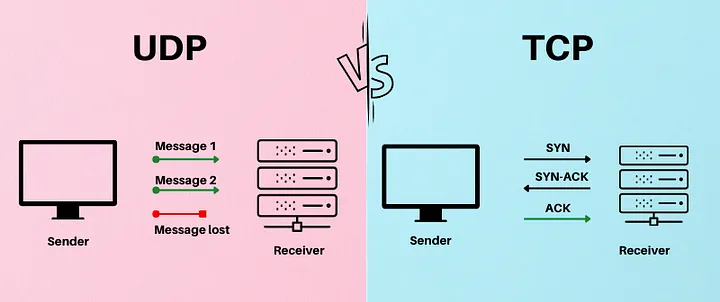
TCP (Transmission Control Protocol) is connection-oriented. Think of it like a phone call. You must first establish a connection (dial the number and wait for the other person to pick up and say "hello"). During the conversation, you get acknowledgements ("uh-huh," "okay") that your message is being received. When you're done, you both agree to end the call ("goodbye"). This process ensures reliable, ordered delivery of data. It's used for applications where data integrity is critical, such as web browsing (HTTP/S) and file transfers (FTP).
-
UDP (User Datagram Protocol) is connectionless. This is more like sending a postcard. You write the message, put an address on it, and drop it in the mailbox. You don't establish a connection with the recipient beforehand, and you don't get a notification when it arrives. It's fast and has very low overhead, but it doesn't guarantee delivery or that packets will arrive in order. This makes it perfect for applications where speed is more important than 100% reliability, like video streaming, online gaming, and DNS lookups.
To solidify where these protocols fit within the larger networking framework, let's review a quick article.
Examine a captured packet using Wireshark
This brief section from an article on TechTarget will help you place TCP and UDP within the context of the TCP/IP model, which is how Wireshark organizes its output.
Please read the section titled "Interpret the Packet Details pane". Focus on the descriptions of the Transport layer protocols (TCP and UDP) and how the article defines them as connection-oriented (stateful) versus connectionless (stateless).
Seeing the Difference in Action with Wireshark
Now that we have the theory down, let's see what this looks like in a real network capture. The following video provides an excellent side-by-side analysis of a DNS query (using UDP) and a standard TCP session.
TCP vs UDP Explained // Hands On Lab Example with Wireshark
In this video, "TCP vs UDP Explained," network expert Chris Greer uses Wireshark to demonstrate the key differences between the two protocols at the packet level.
Watch the entire video. As you do, pay close attention to these key moments: UDP analysis: Notice how simple the UDP header is and that the communication is a straightforward request-response with no setup. TCP handshake: Observe the three-way handshake (SYN, SYN-ACK, ACK) that establishes the connection before any data is sent. This is the "connection-oriented" part in action. TCP reliability: Understand how TCP uses sequence numbers to track data and acknowledgements to ensure reliability. TCP teardown: See how the connection is formally closed, reinforcing TCP's stateful nature.
Your Turn: A Hands-On Packet Analysis
It's time to put your knowledge into practice by performing your own packet capture. You'll use Wireshark to capture both TCP and UDP traffic generated by your own computer.
If you don't have Wireshark installed, you can download it for free from wireshark.org. It's an essential tool for network professionals. The first few minutes of the video below give a great overview if you're new to the tool.
Free CCNA | Wireshark Demo (TCP/UDP) | Day 30 Lab | CCNA 200-301 Complete Course
The video "Free CCNA | Wireshark Demo (TCP/UDP)" from Jeremy's IT Lab provides a practical, CCNA-focused walkthrough of capturing and analyzing TCP and UDP packets.
You don't need to watch the whole video, but use it as a guide for your exercise. The introduction explains why Wireshark is such a powerful tool. This segment shows exactly how to spot the TCP 3-way handshake in a capture. This segment shows a UDP DNS query, which you'll replicate.
Your Task (Approx. 20 minutes):
- Start a Capture: Open Wireshark and start a capture on your primary network interface (e.g., Wi-Fi or Ethernet).
- Generate Traffic:
- TCP: Open a web browser and navigate to
http://example.com. Usinghttpinstead ofhttps-is useful here because the traffic won't be encrypted, making the TCP headers and payload easier to inspect. - UDP: Open your system's command prompt (on Windows) or terminal (on macOS/Linux) and type the command
nslookup www.cisco.com. This will generate a DNS query, which uses UDP.
- TCP: Open a web browser and navigate to
- Stop and Filter: Stop the Wireshark capture. To reduce the noise, use the display filter bar at the top of the Wireshark window.
- Type
tcpand press Enter. Look for the packets that established the connection toexample.com. - Clear that filter, then type
dnsand press Enter. Look for the query you sent forwww.cisco.com.
- Type
Analysis:
- For the TCP stream: Can you identify the three-way handshake? You are looking for a sequence of three packets labeled
[SYN],[SYN, ACK], and[ACK], just like in the videos and the image below. This sequence is the definitive proof of a connection being established.
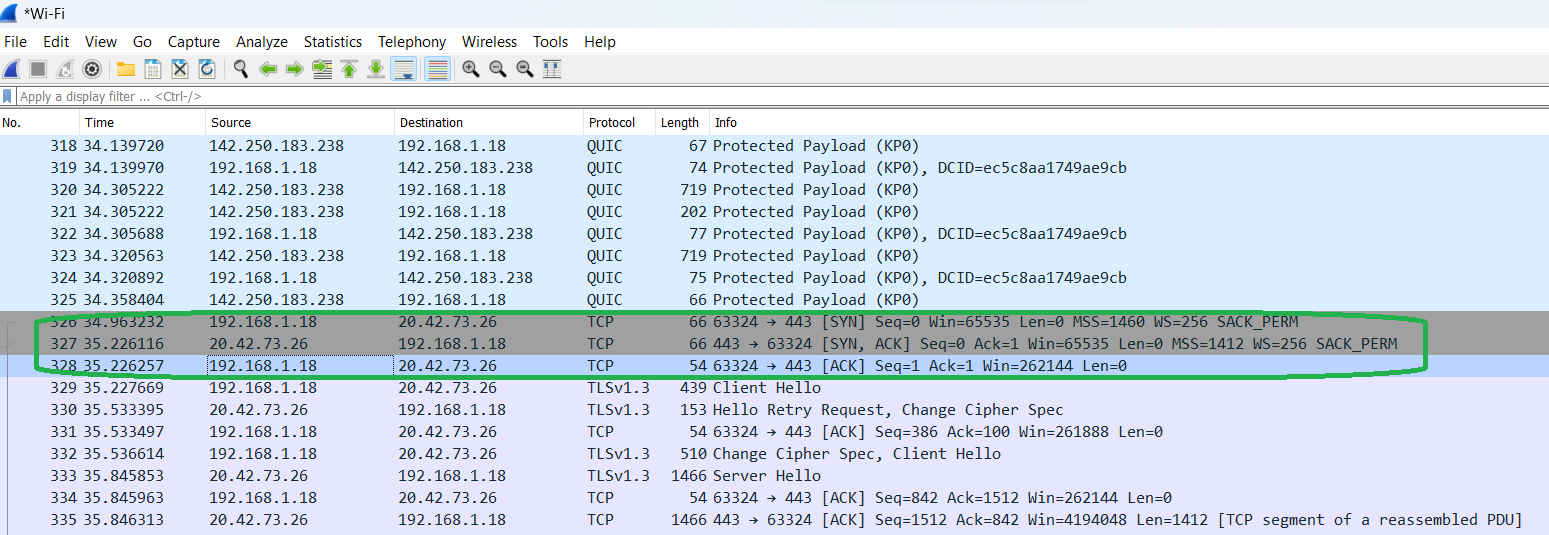
- For the DNS (UDP) stream: Notice the absence of a handshake. The communication is a simple two-packet exchange: a "Standard query" and a "Standard query response". This demonstrates the direct, connectionless nature of UDP.
This exercise directly addresses the learning outcome by having you use a packet capture to find the evidence that distinguishes connection-oriented from connectionless communication.
Conclusion
In this lesson, you moved from a theoretical knowledge of TCP and UDP to a practical understanding of their behavior. You saw how TCP's reliability isn't magic—it's a carefully managed process of establishing, maintaining, and tearing down a connection, which you identified through the three-way handshake in Wireshark. In contrast, you observed UDP's "fire-and-forget" efficiency by analyzing a simple, two-packet DNS query.
Key Takeaways:
- TCP is connection-oriented: It uses a three-way handshake (SYN, SYN-ACK, ACK) to establish a reliable, stateful session. It guarantees ordered delivery of data.
- UDP is connectionless: It is stateless and sends data without establishing a prior connection, prioritizing speed and low overhead over reliability.
- Wireshark is a powerful tool that allows you to see these protocol behaviors in action by inspecting individual packets.
In our next lesson, we will zoom out one layer to examine the IPv4 header. You'll learn how this "envelope" carries TCP and UDP segments across different networks and what information it contains to ensure packets reach their final destination.