Recommended resources
The freely available resources this lesson will direct you to.
Welcome! In our last lesson, you learned how to classify IPv4 addresses into their respective classes (A, B, C) and how to tell the difference between public and private address ranges, all by looking at the numbers in the familiar dotted-decimal format.
This lesson will peel back that decimal layer to reveal the underlying structure that computers actually work with. We will explore how a 32-bit IPv4 address and its essential partner, the subnet mask, are constructed in both dotted-decimal and binary notation. Fully grasping this is the single most important step toward mastering subnetting, a topic you've expressed a strong interest in.
The True Form of an IPv4 Address: 32 Bits
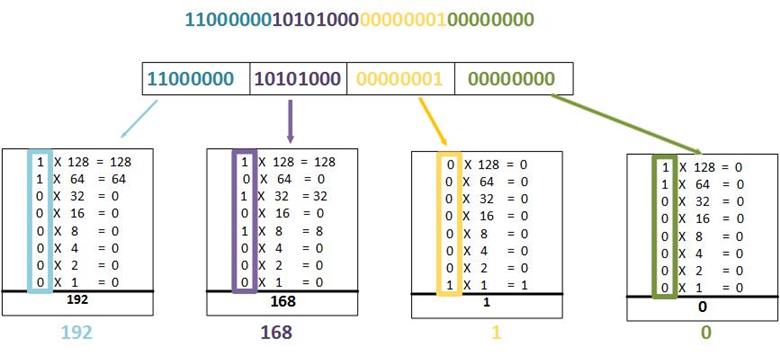
While we write IP addresses like 192.168.1.1 for convenience, a computer sees this as a continuous string of 32 ones and zeros. To make this large binary number manageable, we break it into four 8-bit sections, which are called octets. The dotted-decimal format is simply the decimal value of each of those four octets.
Let's start with a video that clearly explains this fundamental structure.
Free CCNA | IPv4 Addressing (Part 1) | Day 7 | CCNA 200-301 Complete Course
This video from Jeremy's IT Lab, titled "Free CCNA | IPv4 Addressing (Part 1)," will introduce you to the 32-bit nature of IPv4 addresses and the two ways we represent them.
Watch the segment from IPv4 header to binary. Focus on the relationship between the 32-bit address, the four 8-bit octets, and the translation from binary to the human-readable dotted-decimal format.
As the video showed, an address like 192.168.1.254 is just a friendly representation of the 32-bit number 11000000101010000000000111111110. To work with networking concepts like subnetting, you need to be able to convert between these two notations fluently.
Mastering Binary Conversion
Each bit in an 8-bit octet has a fixed decimal value based on its position. These values are all powers of two, starting from on the far right and moving up to on the far left.
The values for each position in an octet are:
| Bit Position | 7 | 6 | 5 | 4 | 3 | 2 | 1 | 0 |
|---|---|---|---|---|---|---|---|---|
| Power of 2 | ||||||||
| Decimal Value | 128 | 64 | 32 | 16 | 8 | 4 | 2 | 1 |
To convert a binary octet to decimal, you simply add up the decimal values of the positions that have a 1. For example, the binary number 11000000 is 128 + 64 = 192.
The following video segments provide a systematic method for converting in both directions.
Free CCNA | IPv4 Addressing (Part 1) | Day 7 | CCNA 200-301 Complete Course
Let's continue with the video from Jeremy's IT Lab to learn and practice the conversion process.
Watch these three consecutive sections carefully: First, see how binary works with the powers of two. Next, learn how to convert from binary to decimal. Finally, watch the method for converting from decimal to binary. The presenter's subtraction method for decimal-to-binary conversion is very reliable.
The image below shows this process applied to a full 32-bit address, breaking it down octet by octet.
Practice Your Skills
Now it's time for some hands-on practice. The best way to get comfortable with binary is to do it yourself.
Free CCNA | IPv4 Addressing (Part 1) | Day 7 | CCNA 200-301 Complete Course
The video from Jeremy's IT Lab includes an excellent practice quiz.
Watch the quiz section starting at the practice questions. For each of the 10 questions, pause the video and try to calculate the answer yourself before the solution is revealed. This will quickly build your confidence.
The Subnet Mask: Dividing Network from Host
An IP address alone doesn't tell a device which part of the address identifies the network it's on and which part identifies the specific device (the host). That's the job of the subnet mask.
A subnet mask is also a 32-bit number that works alongside an IP address. The rule is simple:
- A
1in the subnet mask means the corresponding bit in the IP address is part of the network portion. - A
0in the subnet mask means the corresponding bit in the IP address is part of the host portion.
This article gives a very clear, side-by-side view of an IP address and its subnet mask in both binary and decimal.
Subnetting: What it is and How it Works
Read the beginning of this article from Auvik to see how the IP address and subnet mask work together.
Read the sections "What is subnetting?" and the text and binary examples immediately following it. Focus on the visual comparison of the IP address and the subnet mask in binary, and how the mask's 1s and 0s define the network and host portions.
As you saw in the article, a mask like 255.255.255.0 is 11111111.11111111.11111111.00000000 in binary. The 24 consecutive 1s "mask off" the first 24 bits of the IP address, defining them as the network portion. The remaining 8 bits are the host portion.
CIDR Notation: A Simpler Way to Write Masks
Writing out 255.255.255.0 is cumbersome. Modern networking uses a much shorter method called Classless Inter-Domain Routing (CIDR) notation. CIDR notation simply states the number of consecutive 1s at the beginning of the subnet mask, preceded by a forward slash (/).
255.0.0.0is8ones, so it's written as /8.255.255.0.0is16ones, so it's written as /16.255.255.255.0is24ones, so it's written as /24.
This notation is much more flexible, as it's not limited to full octets. A mask with 28 ones is simply /28.

This next reading selection explains the convenience and logic of CIDR notation.
Subnetting: What it is and How it Works
Let's return to the Auvik article to learn about CIDR.
Read the section "Saving time with CIDR notation". It provides a concise explanation of why this notation is used and how it directly relates to the dotted-decimal mask.
So, when you see an address like 192.168.101.15/24, you now know this means:
- The IP address is
192.168.101.15. - The subnet mask has 24 ones, making it
255.255.255.0. - The network portion of the address is the first 24 bits (
192.168.101). - The host portion of the address is the last 8 bits (
15).
Conclusion
In this lesson, we deconstructed the familiar dotted-decimal IPv4 address into its fundamental 32-bit binary form. You now have the tools to translate between these two notations and understand the critical role of the subnet mask in defining the network and host portions of an address.
Key Takeaways:
- An IPv4 address is a 32-bit number, displayed as four 8-bit octets in dotted-decimal format for readability.
- Conversion between binary and decimal for each octet is done using the powers of two (128, 64, 32, 16, 8, 4, 2, 1).
- A subnet mask is a 32-bit number that differentiates the network portion (where mask bits are
1) from the host portion (where mask bits are0). - CIDR notation (e.g.,
/24) is a shorthand that specifies the number of leading1s in the subnet mask, defining the length of the network prefix.
You have now built the essential foundation needed for subnetting. In the next lesson, we will apply this knowledge to perform practical calculations. You will learn how to take any IP address and its CIDR prefix and determine the network address, the broadcast address, and the range of usable IP addresses within that subnet.