Recommended resources
The freely available resources this lesson will direct you to.
- How to solve ANY Subnetting Problems in 60 seconds or less - Subnetting Mastery - Part 3 of 7www.youtube.com
- subnetting doesn't have to be hard... | CCNA Basicswww.youtube.com
- 4 Examples | IP Subnetting | CIDR | VLSMipcisco.com
- Subnetting Finally Makes Sense | IT Support Groupthisisanitsupportgroup.com
Hello! In our last lesson, we established the fundamental structure of an IPv4 address, moving between the human-readable dotted-decimal format and the 32-bit binary that computers use. You also learned how subnet masks and the shorthand CIDR notation (e.g., /24) are used to divide an IP address into its network and host portions.
Today, we'll build directly on that foundation to tackle "easy subnetting," as you requested. This lesson focuses on the core practical skill of network engineering: taking any IP address and CIDR prefix and precisely calculating the key characteristics of its subnet. By the end of our session, you'll be able to determine a subnet's network address, broadcast address, and the range of IP addresses available for you to assign to devices.
The Four Questions of Subnetting
For any given IP address and its subnet mask, a network engineer needs to be able to answer four fundamental questions. These questions define the boundaries and capacity of any subnet.
- What is the Network Address? This is the very first address in the subnet. It acts as the identifier for the entire subnet and cannot be assigned to a device.
- What is the Broadcast Address? This is the very last address in the subnet. Packets sent here are received by all devices on that subnet. It also cannot be assigned to a single device.
- What is the valid host range? These are the IP addresses that fall between the network and broadcast addresses. They are the ones you can actually assign to computers, servers, printers, and other devices.
- How many usable hosts are there? This is the total count of assignable IP addresses in the subnet.
This short video introduces these four questions, setting the stage for the calculations to come.
subnetting doesn't have to be hard... | CCNA Basics
Watch the introduction of the video "subnetting doesn't have to be hard... | CCNA Basics" from the Paolo Reyes channel.
This clip, from the beginning to the four main questions, outlines exactly what we are trying to solve for in any subnetting problem.
The Fundamental Method: Working in Binary
To understand what's happening under the hood, let's first look at how to find these addresses using the binary conversions you practiced in the last lesson.
- Network Address: To find this, you take the IP address in binary and change all the host bits (the part corresponding to the 0s in the subnet mask) to 0.
- Broadcast Address: To find this, you take the IP address in binary and change all the host bits to 1.
The following video segment demonstrates this process. While it's not the fastest method, watching it once is crucial for building a solid mental model of why the faster methods work.
subnetting doesn't have to be hard... | CCNA Basics
Let's continue with the same video from Paolo Reyes to see the binary method in action.
Watch the section from binary conversion to the formula. Pay close attention to how setting the host bits to all 0s or all 1s directly gives you the network and broadcast addresses, respectively.
As the video explains, the number of usable hosts can be found with a simple formula, where is the number of host bits (which you find by calculating ):
The -2 is critical—it accounts for the network and broadcast addresses, which are reserved. This is a very common point of error on certification exams.
The Fast Method: The "Magic Number" or "Block Size"
Doing binary conversions every time is slow and prone to error, especially under pressure. For CCNA-level tasks and real-world efficiency, you need a faster way. The most popular method involves finding a "magic number," also known as the block size.
This number tells you the size of each subnet and where the boundaries are. Here's the process:
- Identify the "interesting octet": This is the octet where the subnet mask is not 255 or 0. For CIDR prefixes from /25 to /31, it's the 4th octet. For /17 to /23, it's the 3rd, and so on.
- Find the Magic Number (Block Size): Subtract the value of the interesting octet in the subnet mask from 256.
- Example: For a /27 mask (
255.255.255.224), the interesting octet is 224. - Magic Number =
256 - 224 = 32.
- Example: For a /27 mask (
- Find the Network Address: List the multiples of the magic number (0, 32, 64, 96, ...). Find which multiple your IP address's interesting octet falls on or just after. The lower bound of that range is your network address for that octet.
- Find the Broadcast Address: The broadcast address is one less than the start of the next block.
Let's watch a clear demonstration of this technique.
subnetting doesn't have to be hard... | CCNA Basics
The next segment of the Paolo Reyes video provides an excellent walkthrough of the "magic number" method.
Watch from the faster method. The video explains how to calculate the magic number and use it to quickly find the network and broadcast addresses without writing out any binary.
This method is so important that it's worth seeing it explained textually as well. The following article calls it the "Block Size Method"—it's the exact same concept.
Subnetting Finally Makes Sense
This article from IT Support Group provides a great textual explanation and a fully worked example.
Read the following three sections: Start with "The Block Size Method" to see a table of common block sizes. Continue to "Walking Through a Real Calculation" for a step-by-step example. Finish with "Quick Mental Math Trick" to see how to apply this to quickly find which subnet an IP belongs to.
A Reference for Speed
As you practice, you'll start to memorize the common CIDR values, their masks, and block sizes. A cheat sheet is an invaluable tool for speeding up this process.
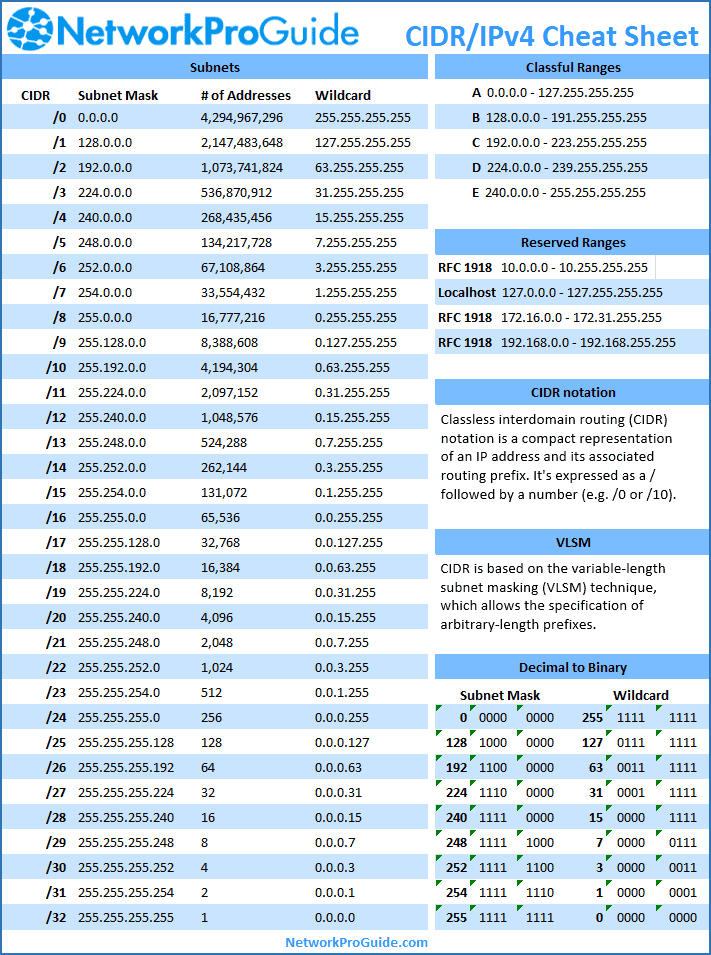
Putting It All Together: Practice Problems
Let's apply what you've learned. For each problem below, calculate the:
a) Subnet Mask
b) Network Address
c) Broadcast Address
d) Valid Host Range
e) Total and Usable number of hosts
Pause and try to solve them yourself before reading the solution.
Problem 1: Your IP address is 172.20.50.100 /28
Solution
- Given: IP
172.20.50.100, CIDR/28.
-
Subnet Mask (a): A
/28prefix means 28 network bits. This is255.255.255.240. The interesting octet is the 4th one, with a value of240. -
Block Size:
256 - 240 = 16. Subnets will increment in blocks of 16 in the fourth octet. -
Network Address (b): List multiples of 16:
0, 16, 32, 48, 64, 80, 96, 112, ....
The host IP's fourth octet is100, which falls between 96 and 112. The network address is the lower boundary.- Network Address:
172.20.50.96
- Network Address:
-
Broadcast Address (c): The next network starts at
172.20.50.112. The broadcast address is the IP right before that.- Broadcast Address:
172.20.50.111
- Broadcast Address:
-
Valid Host Range (d): The range is from the IP after the network address to the IP before the broadcast address.
- First Host:
172.20.50.97 - Last Host:
172.20.50.110 - Range:
172.20.50.97-172.20.50.110
- First Host:
-
Number of Hosts (e):
- Host bits .
- Total addresses = (same as the block size).
- Usable hosts = .
Problem 2: Your IP address is 10.10.10.10 /22
Solution
- Given: IP
10.10.10.10, CIDR/22.
-
Subnet Mask (a): A
/22prefix means the interesting octet is the third one. The mask is255.255.252.0. The value in the interesting (third) octet is252. -
Block Size:
256 - 252 = 4. Subnets will increment in blocks of 4 in the third octet. -
Network Address (b): List multiples of 4:
0, 4, 8, 12, ....
The host IP's third octet is10, which falls between 8 and 12. The network address is the lower boundary. When we find the network address, all host bits become 0. Since the third octet is part of the network and the fourth is all hosts, the fourth octet becomes 0.- Network Address:
10.10.8.0
- Network Address:
-
Broadcast Address (c): The next network starts at
10.10.12.0. The broadcast address is the IP right before that. When we set all host bits to 1, the third octet's host bits become 1 and the fourth octet (all host bits) becomes 255. This gives us10.10.11.255.- Broadcast Address:
10.10.11.255
- Broadcast Address:
-
Valid Host Range (d):
- First Host:
10.10.8.1 - Last Host:
10.10.11.254 - Range:
10.10.8.1-10.10.11.254
- First Host:
-
Number of Hosts (e):
- Host bits .
- Total addresses = .
- Usable hosts = .
Conclusion
Congratulations! You have just learned the most fundamental calculation in IP networking. Mastering this process is non-negotiable for anyone serious about a career in this field, and it is a cornerstone of CCNA certification. While the binary method is good for understanding the theory, the "Magic Number" / "Block Size" method is what you will use day-to-day for speed and accuracy.
Key Takeaways:
- Every subnet is defined by a network address (first IP, all host bits 0), a broadcast address (last IP, all host bits 1), and a valid host range in between.
- The number of usable hosts is calculated with the formula , where is the number of host bits. Never forget the
-2! - The Block Size (or Magic Number) method is the fastest way to solve these problems:
Block Size = 256 - (value of the mask's interesting octet). - The network addresses are always multiples of the block size.
In our next lesson, we will move from calculating the properties of a given subnet to designing a network. You'll learn how to take a large block of addresses and divide it into multiple smaller subnets to meet the requirements of different departments or services.