Recommended resources
The freely available resources this lesson will direct you to.

Welcome to the next lesson in our TCP/IP module. In our previous session, you mastered the essential skill of analyzing a given IP address and subnet mask to determine its network address, broadcast address, and the range of usable IPs. You learned the "magic number" method to do this quickly and accurately.
Today, we shift from analysis to design. Instead of examining a single subnet, you will learn how to take a large block of IP addresses and divide it into multiple smaller networks. This is a fundamental task for any network engineer, allowing you to create organized, secure, and efficient network structures. This lesson directly addresses your goal of mastering "easy subnetting" by applying the calculation skills you've already built to a practical design scenario.
Why Divide a Network?
Before we dive into the "how," let's quickly cover the "why." Subnetting isn't just a mathematical exercise; it's a critical tool for network management. In your work with network security and engineering, you'll divide networks to achieve several key goals.
This section of the article "Understanding Subnetting" from the DEV Community outlines the practical, real-world reasons for creating subnets.
Read the section titled "Why Subnet?" to understand the main motivations, which include: Security Isolation: Creating separate networks for guest Wi-Fi, sensitive servers, or IoT devices. Performance Improvement: Reducing the size of broadcast domains to minimize unnecessary traffic. Organization: Structuring a network by department, physical location, or device function.
The Core Concept: Borrowing Bits for Networks
In the last lesson, we saw that a subnet mask splits an IP address into a network portion and a host portion. To create more networks, we must extend the network portion by "borrowing" bits from the host portion.
The key question is: How many bits do we need to borrow?
The answer depends on the number of subnets you need. The relationship is governed by a simple formula, where n is the number of bits you borrow:
If you need to create 5 subnets, you must find the smallest power of 2 that is greater than or equal to 5.
- (Not enough)
- (Still not enough)
- (This works! We need to borrow 3 bits.)
This will create 8 subnets, and you can use 5 of them for your design, leaving 3 for future expansion.
This video provides an excellent visual demonstration of "borrowing" or "hacking" bits from the host portion to create the networks you need.
let’s subnet your home network // You SUCK at subnetting // EP 6
The video "let’s subnet your home network" from the NetworkChuck channel has a great segment on this core concept.
Watch the section from "hack the host bits". Pay close attention to how he uses the 2^n logic to determine that creating 4 networks requires borrowing 2 bits, and creating 17 networks would require borrowing 5 bits.
The Subnetting Design Process
With this core concept in mind, designing a basic subnetting scheme follows a clear, four-step process.
- Determine the bits to borrow: Based on your required number of subnets, use the formula to find the number of bits (
n) you must borrow from the host portion. - Calculate the new subnet mask: Add the number of borrowed bits (
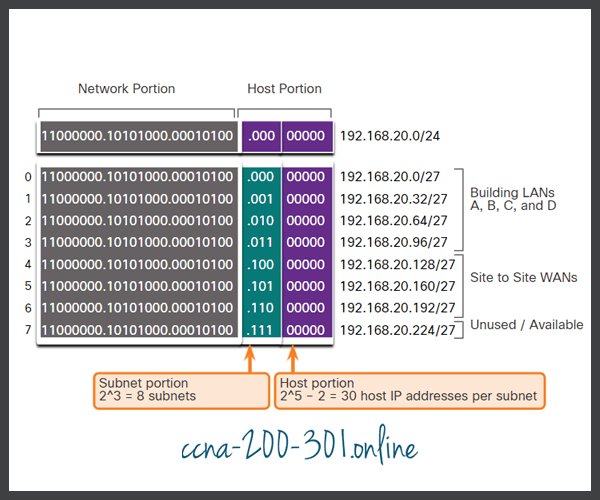
n) to the original CIDR prefix. For example, if you start with a/24network and borrow 3 bits, your new subnets will all use a/27prefix. Convert this to dotted-decimal notation (a/27is255.255.255.224). - Find the block size (increment): Just like in our last lesson, use the new subnet mask to find the block size.
Block Size = 256 - (value of the interesting octet). This tells you the increment for your new network addresses. - List the subnet ranges: Starting from the original network address, list the new subnets by adding the block size to the "interesting octet" for each subsequent network.
The image below provides a fantastic visual summary of this entire process, showing a /24 network being divided into 8 smaller /27 subnets by borrowing 3 bits.
A Fully Worked Example
Let's solidify this with a step-by-step written example. This is the exact process you'll use in real-world scenarios and on certification exams.
Let's study a complete, step-by-step example from the "Subnetting an IP Address" white paper.
Focus on the section "Putting It All Together" and the first example table under it, which starts with "Here is a class C example demonstrating everything." Follow the logic for taking the 209.44.33.0 /24 network and satisfying a requirement for 6 subnets. Pay close attention to how they determine the bits to borrow (Step 3A), calculate the new mask (Step 4), and then list out all the resulting subnets with their ranges (Step 5).
Practice Makes Permanent
Now it's your turn to be the network designer. Use the four-step process to solve the following problem.
Problem: You are the network administrator for a small company and have been assigned the network address block 172.25.0.0 /16. You need to create at least 12 separate subnets for different departments (Sales, Marketing, Engineering, etc.).
Your Task:
- How many bits do you need to borrow?
- What will the new subnet mask be in CIDR and dotted-decimal notation?
- What is the block size (increment), and in which octet does it apply?
- List the first five new subnets, including their Network Address, full Usable Host Range, and Broadcast Address.
Solution
-
Bits to Borrow: You need 12 subnets.
- (Not enough)
- (Sufficient)
- You must borrow 4 bits.
-
New Subnet Mask:
- The original prefix is
/16. The new prefix is/16 + 4 = /20. - A
/20mask is255.255.240.0.
- The original prefix is
-
Block Size:
- The "interesting octet" (where the mask is not 255 or 0) is the third octet, which has a value of
240. - Block Size =
256 - 240 = 16. - The block size is 16, and it applies to the third octet.
- The "interesting octet" (where the mask is not 255 or 0) is the third octet, which has a value of
-
List of First Five Subnets:
- Subnet 1:
- Network Address:
172.25.0.0 /20 - Broadcast Address:
172.25.15.255 - Usable Range:
172.25.0.1-172.25.15.254
- Network Address:
- Subnet 2:
- Network Address:
172.25.16.0 /20 - Broadcast Address:
172.25.31.255 - Usable Range:
172.25.16.1-172.25.31.254
- Network Address:
- Subnet 3:
- Network Address:
172.25.32.0 /20 - Broadcast Address:
172.25.47.255 - Usable Range:
172.25.32.1-172.25.47.254
- Network Address:
- Subnet 4:
- Network Address:
172.25.48.0 /20 - Broadcast Address:
172.25.63.255 - Usable Range:
172.25.48.1-172.25.63.254
- Network Address:
- Subnet 5:
- Network Address:
172.25.64.0 /20 - Broadcast Address:
172.25.79.255 - Usable Range:
172.25.64.1-172.25.79.254
- Network Address:
- Subnet 1:
Conclusion
In this lesson, you've moved from simply analyzing subnets to designing them. You learned how to take a network requirement—the need for a certain number of subnets—and translate it into a concrete IP addressing scheme. By borrowing bits from the host portion, you can create new, smaller networks, each with its own distinct range of addresses. This skill is foundational for building logical, secure, and high-performing network infrastructures.
Key Takeaways:
- Subnetting is done for security, performance, and organization.
- The number of subnets you can create is determined by the formula , where
nis the number of bits you borrow from the host portion. - Borrowing
nbits addsnto the original CIDR prefix, creating a new, longer subnet mask for all the new subnets. - The "block size" method from the previous lesson is used to find the network addresses of the new subnets based on the new mask.
In our next lesson, we will take this concept a step further with Variable Length Subnet Masking (VLSM). You'll learn how to subnet a subnet, allowing you to create networks of different sizes to match specific needs and use your IP address space even more efficiently.