Recommended resources
The freely available resources this lesson will direct you to.
Hello! In our last lesson, you learned how to design a basic subnetting scheme by dividing a large network block into multiple, equal-sized subnets. This was a crucial step in moving from analyzing networks to designing them.
Today, we'll build on that skill to make your network designs far more efficient. You'll learn about Variable Length Subnet Masking (VLSM), a technique that allows you to "subnet a subnet" to create networks of different sizes. This directly addresses the inflexibility of the fixed-length method from our previous lesson and is a cornerstone of modern IP address management, bringing you closer to your goal of mastering subnetting.
The Problem with Fixed-Size Subnets
In the previous lesson, we divided a /16 network into 16 separate /20 subnets. Each of those subnets could support 4094 hosts (). This is great if all your departments need thousands of hosts, but what if one subnet is for a point-to-point WAN link that only needs 2 hosts? You would be wasting over 4000 addresses!
This inefficiency is the core problem that VLSM solves. Instead of using the same subnet mask for every subnet, VLSM allows you to use different masks, tailoring the size of each subnet to its specific requirement. This conserves IP addresses, a critical task in any network.
VLSM Subnetting Explained with Examples
This article from ComputerNetworkingNotes provides a concise introduction to the concept.
Read the first two sections, down to the heading "VLSM Subnetting example". Focus on the comparison between FLSM (Fixed Length Subnet Masking) and VLSM, and how VLSM provides the flexibility to meet varied requirements.
The VLSM Design Process
The logic of VLSM is systematic and powerful. The most important rule is to always start with the largest host requirement and work your way down to the smallest.
Here is the process:
- List all network requirements: Identify every segment that needs its own subnet (e.g., different LANs, WAN links between routers) and the number of hosts required for each.
- Sort the requirements: Arrange the list in descending order, from the largest number of required hosts to the smallest.
- Allocate the largest subnet: Starting with your base network address, find the smallest possible block size (and corresponding subnet mask/CIDR) that can satisfy the largest host requirement. Assign this first subnet.
- Allocate the next largest subnet: Take the next available IP address after the block you just allocated. This becomes the starting point for your next allocation. Find the smallest block size that meets the second-largest requirement and assign it.
- Repeat: Continue this process iteratively, moving down your sorted list and carving out appropriately sized blocks from the remaining address space until all requirements are met.
Let's watch this process in action. This video provides an excellent, step-by-step demonstration of designing a VLSM scheme.
VLSM Subnetting - subnetting a subnet
This video, "VLSM Subnetting - subnetting a subnet" from the Sunny Classroom channel, walks through a complete example.
Watch the entire video. Pay close attention to these key stages: The first and most important step: arranging all network segments in descending order of size. Allocating the first subnet for the largest requirement (55 hosts). Notice how the next available address is now .64. Subnetting a subnet: The next requirement (25 hosts) is met by taking an unused block from the previous step and breaking it down further. Handling small networks like point-to-point links, which only need 4 addresses total (2 usable). The final summary, which recaps the entire iterative process.
A Detailed Walkthrough
Now that you've seen the process visually, let's reinforce it with a written example. Understanding how to calculate the required host bits and the resulting subnet mask is key.
Remember the formula for finding the number of hosts a certain number of host bits (h) can provide:
To implement VLSM, you need to work backward. Given a host requirement, you must find the smallest h that satisfies the inequality.
For example, if you need 50 hosts:
- (Not enough)
- (This works!)
So, you would need 6 host bits. Since an IPv4 address has 32 bits total, the subnet mask would have network bits, making it a /26 mask.
Let's apply this logic by following a complete example.
Understanding Variable Length Subnet Masks (VLSM)
This guide from Study-CCNA provides a clear, step-by-step implementation of VLSM.
Read from "Step 1. Identify the host requirement" down to the end of the article. Follow the example for the network topology shown. In Step 1, note how all network segments, including WAN links, are listed and sorted. In Steps 3-6, focus on the calculation for the HQ LAN (the largest requirement). See how they determine the host bits, calculate the /26 subnet mask, and find the network/broadcast/usable range. Finally, review the summary table under "Completing the Variable-Length Subnet Mask Subnetting Process". This table shows the final allocation for all the remaining subnets, demonstrating how each subsequent network starts where the previous one left off.
Practice: Design Your Own VLSM Scheme
It's time to apply what you've learned. You are the network engineer for a company with a main office and two branch offices. You have been assigned the IP address block 192.168.77.0 /24 to subnet for the entire network.
The network topology and requirements are as follows:
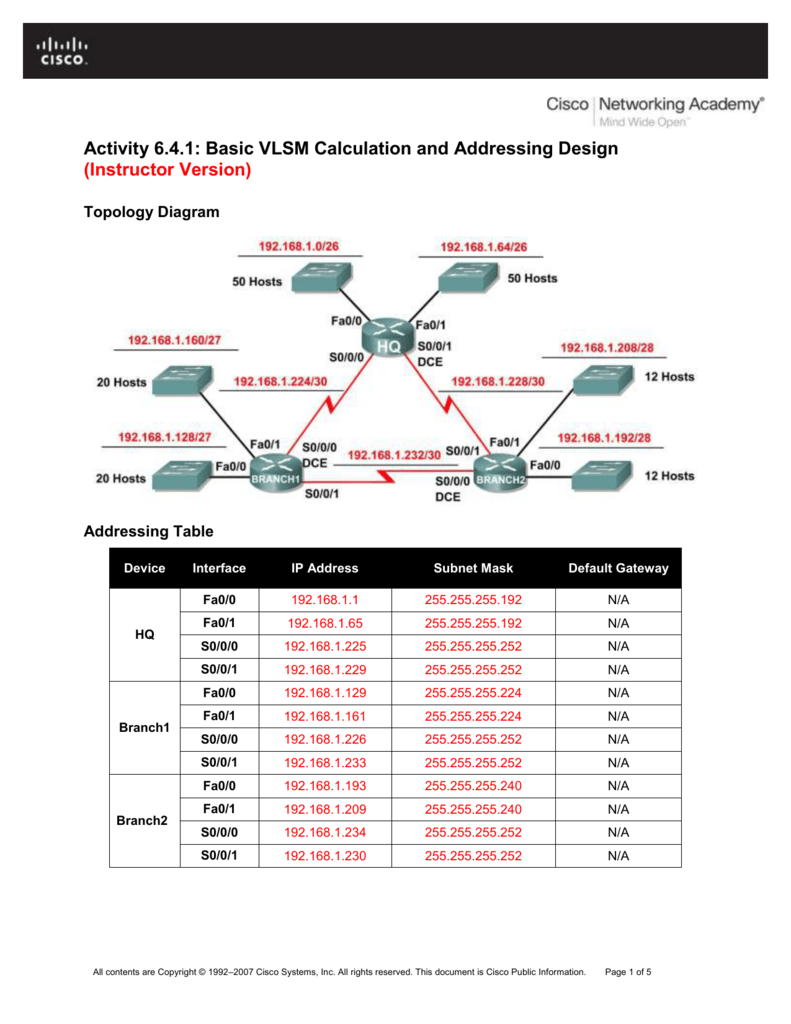
Your Task:
Create a complete VLSM addressing plan. For each of the 5 required subnets, determine:
- The required block size.
- The Subnet Mask (in CIDR and dotted-decimal).
- The Network Address.
- The range of Usable IP Addresses.
- The Broadcast Address.
Present your answer in a table, starting with the largest requirement first.
Solution
Here is the step-by-step solution.
1. List and Sort Requirements
| Network | Required Hosts | Block Size Needed | Host Bits (h) | CIDR (/n) |
|---|---|---|---|---|
| HQ LAN | 50 | 64 () | 6 | /26 |
| Branch1 LAN | 20 | 32 () | 5 | /27 |
| Branch2 LAN | 12 | 16 () | 4 | /28 |
| WAN HQ-Br1 | 2 | 4 () | 2 | /30 |
| WAN HQ-Br2 | 2 | 4 () | 2 | /30 |
2. Allocate Subnets Iteratively
- HQ LAN (50 hosts): Needs a block of 64.
- Start at
192.168.77.0. The block is192.168.77.0-192.168.77.63. - Next available address is
192.168.77.64.
- Start at
- Branch1 LAN (20 hosts): Needs a block of 32.
- Start at
192.168.77.64. The block is192.168.77.64-192.168.77.95. - Next available address is
192.168.77.96.
- Start at
- Branch2 LAN (12 hosts): Needs a block of 16.
- Start at
192.168.77.96. The block is192.168.77.96-192.168.77.111. - Next available address is
192.168.77.112.
- Start at
- WAN HQ-Br1 (2 hosts): Needs a block of 4.
- Start at
192.168.77.112. The block is192.168.77.112-192.168.77.115. - Next available address is
192.168.77.116.
- Start at
- WAN HQ-Br2 (2 hosts): Needs a block of 4.
- Start at
192.168.77.116. The block is192.168.77.116-192.168.77.119.
- Start at
3. Final Addressing Table
| Network | Mask (CIDR) | Mask (Dotted-Decimal) | Network Address | Usable Range | Broadcast |
|---|---|---|---|---|---|
| HQ LAN | /26 | 255.255.255.192 | 192.168.77.0 | .1 - .62 | 192.168.77.63 |
| Branch1 LAN | /27 | 255.255.255.224 | 192.168.77.64 | .65 - .94 | 192.168.77.95 |
| Branch2 LAN | /28 | 255.255.255.240 | 192.168.77.96 | .97 - .110 | 192.168.77.111 |
| WAN HQ-Br1 | /30 | 255.255.255.252 | 192.168.77.112 | .113 - .114 | 192.168.77.115 |
| WAN HQ-Br2 | /30 | 255.255.255.252 | 192.168.77.116 | .117 - .118 | 192.168.77.119 |
Conclusion
Congratulations! You have now learned one of the most important and practical skills in IP networking. By mastering VLSM, you can design IP addressing schemes that are highly efficient, minimizing waste and organizing the network logically based on actual needs. This moves far beyond the one-size-fits-all approach of fixed-length subnetting.
Key Takeaways:
- VLSM (Variable Length Subnet Masking) allows you to use different subnet masks for different subnets, creating subnets of varying sizes.
- The primary benefit of VLSM is the efficient use of the IP address space.
- The cardinal rule of VLSM is to sort your network requirements from largest to smallest and allocate addresses in that order.
- The process is iterative: you allocate a block for the largest need, and then treat the remaining address space as the pool for the next largest need.
In our next lesson, we will transition from designing IP address schemes to troubleshooting them. You will learn how to use essential command-line tools like ping, traceroute, and ipconfig/ifconfig to diagnose and solve common IP connectivity issues.