Recommended resources
The freely available resources this lesson will direct you to.
- Route Precedence -- How does a Router choose a path when multiple paths exist?www.youtube.com
- Cisco - CCENT/CCNA R&S (100-105) - Path Selection (Routing table, AD, Metric) .33www.youtube.com
- Administrative distance & metricstudy-ccna.com
- Administrative Distance Chart – Explained with CLI, Lab, Use ...networkjourney.com
Hello! In our last lesson, we established the foundational rule of IP routing: the longest prefix match. We learned that a router always prioritizes the most specific path to a destination.
Now, we will explore what happens when that first rule isn't enough to make a decision. This lesson focuses on the crucial tie-breaking criteria a router uses: Administrative Distance (AD) and Metric. By the end of our session, you'll be able to compare these two criteria and understand their exact roles in the router's path selection process. This is the second step toward mastering how routers think.
The Router's Decision Hierarchy
As we previewed last time, a router's decision-making process is a strict, three-step hierarchy. Once the first step is conclusive, the router stops and makes its decision. It only proceeds to the next step if there's a tie.
- Longest Prefix Match: The router looks for all routes that match the destination IP address and chooses the one(s) with the longest prefix length. (Covered in the previous lesson).
- Administrative Distance (AD): If two or more routes have the same longest prefix length, the router chooses the one from the most trustworthy routing source, determined by the lowest AD.
- Metric: If the routes also have the same AD, the router chooses the one with the lowest metric, which represents the "best" path according to that specific routing protocol.
Let's begin by getting a clear overview of how Administrative Distance and Metric fit into this process.
Cisco - CCENT/CCNA R&S (100-105) - Path Selection (Routing table, AD, Metric) .33
The video "Path Selection (Routing table, AD, Metric)" by Ryan Beney provides a concise explanation of the entire path selection order. We will focus on the second and third steps.
First, watch the section explaining Administrative Distance. Note how it's used to decide between different routing protocols. Next, watch the explanation of Metric. Pay attention to how the metric is specific to each protocol and is only used when the AD is the same.
Step 2: Administrative Distance - The "Trustworthiness" Score
As the video explained, Administrative Distance (AD) is a number from 0 to 255 that a router uses to rate the trustworthiness of a routing source. It is not a measure of the path's quality (like speed or distance); it is simply a pre-assigned value of how believable a protocol is. A lower AD is always better.
A router only uses AD when it has learned about the exact same prefix from two or more different sources (e.g., from OSPF and a static route).
Let's look at the default AD values for common routing sources on Cisco devices. You should commit these to memory for your CCNA studies.
This article from NetworkJourney provides an excellent table of default AD values and a clear comparison between AD and Metric.
First, review the table under the section "Administrative Distance (Default Values)". Pay close attention to the values for Connected, Static, EIGRP, OSPF, and RIP. Then, scroll down to the FAQ section and read item #7, "What’s the difference between Administrative Distance and Routing Metric?". The table here provides a perfect summary of the concepts we're covering.
The key takeaway is that AD is used to decide between different protocols, not within a single protocol. For example, if a router learns about the network 192.168.1.0/24 from both EIGRP (default AD 90) and OSPF (default AD 110), it will always prefer the EIGRP route and install it in the routing table.
Step 3: Metric - The "Best Path" Calculation
What happens if a router learns multiple paths to the same destination from the same routing protocol? Since the AD will be identical, the router needs another tie-breaker. This is where the Metric comes in.
A Metric is a value calculated by a routing protocol to determine the "cost" of a path. Like AD, a lower metric is better. Unlike AD, the way a metric is calculated is unique to each protocol.
- RIP (Routing Information Protocol): Uses hop count. The path with the fewest routers (hops) wins.
- OSPF (Open Shortest Path First): Uses cost, which is calculated based on the bandwidth of the links. Faster links have a lower cost.
- EIGRP (Enhanced Interior Gateway Routing Protocol): Uses a complex composite metric based on bandwidth and delay by default.
A router only compares metrics for routes that have the same prefix length and the same AD.
Visualizing the Decision in the Routing Table
When you look at a router's routing table using the show ip route command, you can see these values clearly. The entry [AD/Metric] shows both criteria.
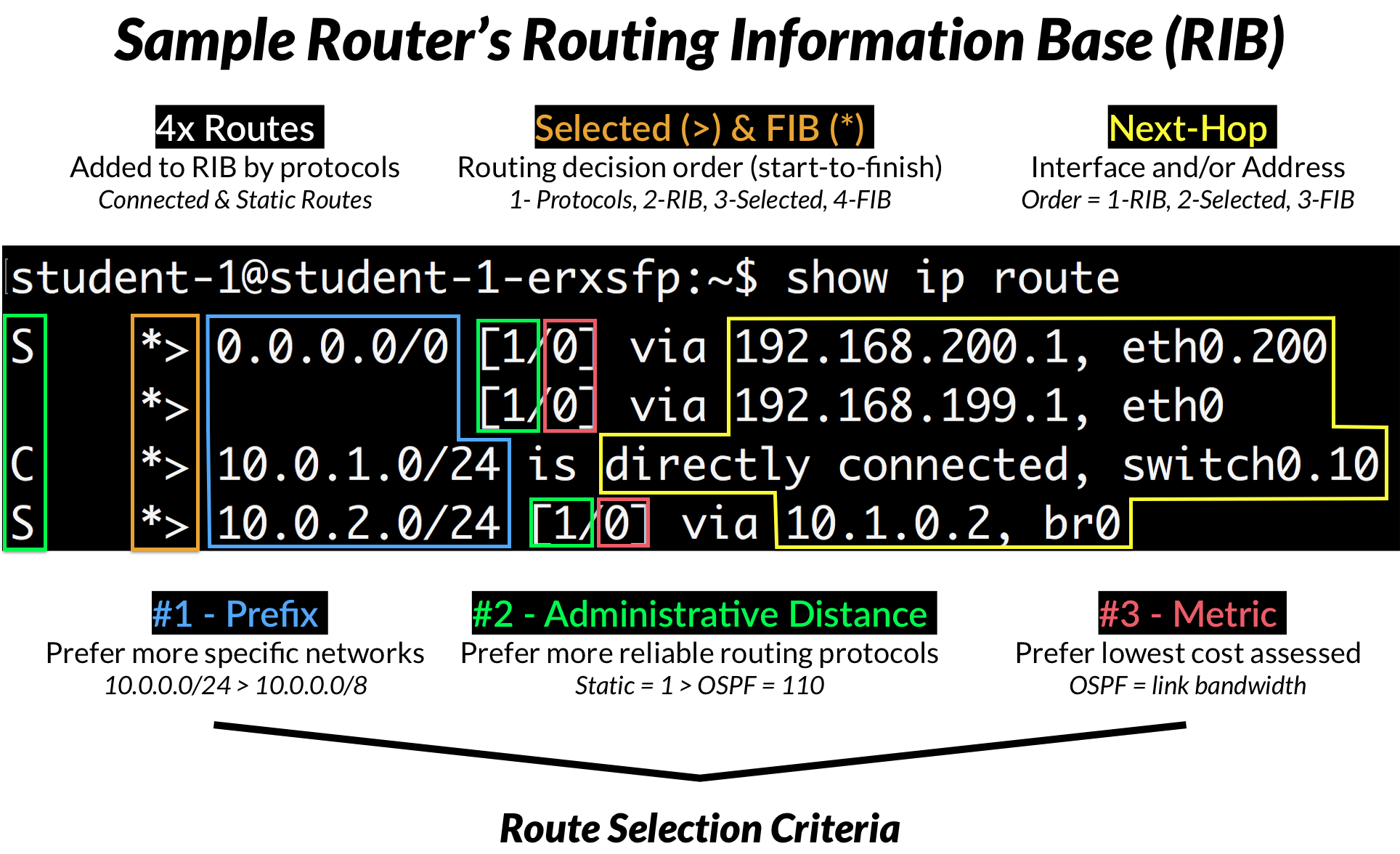
AD and Metric in Action
Now let's see these principles demonstrated in a practical lab scenario. This will help solidify how a router applies the rules in order.
Route Precedence -- How does a Router choose a path when multiple paths exist?
The video "Route Precedence" from Practical Networking provides an excellent step-by-step demonstration of route selection.
First, watch the section on the Metric. Observe how the router has two OSPF paths and initially load-balances, but after the metric (cost) on one path is increased, it exclusively chooses the path with the lower metric. Next, see what happens when a new protocol is introduced in the section on Administrative Distance. Even though the OSPF path has a great metric, the router immediately prefers the newly learned EIGRP route because its AD (90) is lower than OSPF's (110). This powerfully demonstrates that AD is checked before the metric.
The video makes a crucial point: the router didn't even look at the metric of the EIGRP route when comparing it to the OSPF route. It saw that the AD of EIGRP (90) was better than the AD of OSPF (110) and made its decision instantly. The metric is only used to break a tie between routes from the same protocol.
Conclusion
In this lesson, we dissected the tie-breaking rules a router uses to select the best path. You now understand the distinct roles of Administrative Distance and Metric and, most importantly, the strict order in which they are applied.
Key Takeaways:
- The router's path selection process is a strict hierarchy: 1. Longest Prefix Match, 2. Administrative Distance, 3. Metric.
- Administrative Distance (AD) measures the trustworthiness of a routing source (protocol). It is used to choose between different protocols offering a route to the same prefix. The lower AD wins.
- Metric measures the "cost" of a path as calculated within a single routing protocol. It is only used to choose between multiple paths learned from the same protocol. The lower metric wins.
- A router will always choose a route with a better AD over a route with a better metric if the two are in conflict.
We have now covered the complete logic for how a router selects a single best path. In our next lesson, we will put this knowledge into practice by learning how to configure and verify static routes, including the all-important default route. Since static routes have a default AD of 1, you'll immediately see their high "trustworthiness" in action.