Recommended resources
The freely available resources this lesson will direct you to.
- CCNA Study Reviewer - 3.2 How a router makes a forwarding decision by default (with Flashcards)www.youtube.com
- Free CCNA | Routing Fundamentals | Day 11 (part 1) | CCNA 200-301 Complete Coursewww.youtube.com
- Longest prefix match - Learn Tech From Zerolearntechfromzero.com
- Longest Prefix Match Routingnetworklessons.com
Welcome to the next stage of our journey into advanced networking. In our previous lessons, we mastered Layer 2 concepts, culminating in configuring EtherChannel to bundle physical links. We now move up the OSI model to Layer 3, where routers operate and make intelligent decisions about forwarding data across different networks.
This lesson focuses on the single most fundamental process a router performs: packet forwarding. You will learn how a router uses its routing table to decide where to send an incoming IP packet. We'll explore the structure of the routing table and, most importantly, the primary rule it uses to select the best path. This is a crucial concept that underpins all IP routing.
1. The Router's Brain: The Routing Table
Unlike a Layer 2 switch, which uses a MAC address table to forward frames within a single network, a router uses an IP routing table to forward packets between networks. This table is a set of instructions that tells the router which path to use for any given destination IP address.
Let's begin by understanding what a routing table is and how it gets its most basic entries.
Free CCNA | Routing Fundamentals | Day 11 (part 1) | CCNA 200-301 Complete Course
The video "Free CCNA | Routing Fundamentals" from Jeremy's IT Lab provides a fantastic introduction to routing and the routing table.
Start by watching the section that introduces routing and the routing table. Then, continue with the explanation of Connected (C) and Local (L) routes. Pay close attention to how these routes are automatically added when you configure an IP address on a router's interface.
As you saw, a router automatically knows about its directly connected networks. For each active interface with an IP address, the router adds two entries to its routing table:
- Connected (C) Route: A route to the entire network segment the interface is on (e.g.,
192.168.1.0/24). This tells the router how to reach any host on that specific network. - Local (L) Route: A route to the exact IP address of the router's own interface (e.g.,
192.168.1.1/32). This tells the router that packets destined for this specific IP are for the router itself. Notice the/32prefix, which signifies a single, highly-specific address.
2. The Golden Rule: Longest Prefix Match
Now, a critical question arises. What happens if a packet's destination IP address matches both a Connected route and a Local route? For instance, if a packet destined for 192.168.1.1 arrives, it matches both the 192.168.1.0/24 network and the specific 192.168.1.1/32 address.
The router resolves this using its single most important rule for packet forwarding: the longest prefix match.
The router will always choose the route with the most specific network mask—that is, the one with the longest prefix length (the highest number after the /).
Let's see this rule in action.
Free CCNA | Routing Fundamentals | Day 11 (part 1) | CCNA 200-301 Complete Course
Return to the Jeremy's IT Lab video to see a clear explanation of this core principle.
Watch the segment on route selection and the 'most specific' match. This will clarify why the /32 Local route is chosen over the /24 Connected route for a packet destined to the router's own IP.
To solidify this concept, let's review a text-based explanation that breaks down the process.
This article from Learn Tech From Zero provides a clear, step-by-step breakdown of the longest prefix match rule.
Read from the beginning, starting with "What is the Routing Table," through the "Example: Step-by-Step Longest Prefix Match" section. Focus on: The components of a routing table. Why more than one route might match a destination. How the prefix length (/24 is longer than /16) determines the "specificity" of a route. The example where a packet to 192.168.1.10 matches three routes, but the /24 route is chosen because it has the longest prefix.
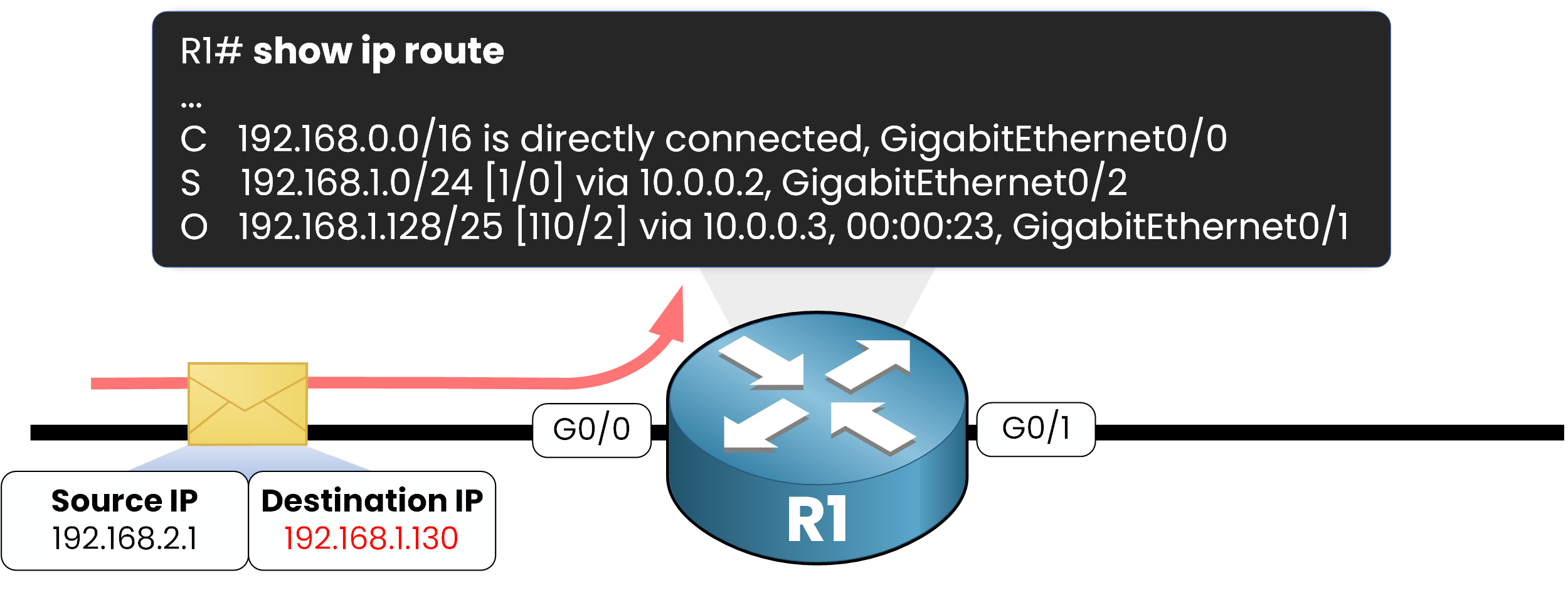
The image below perfectly illustrates this entire process. A packet arrives, the router consults its table, and it forwards the packet based on the entry with the longest prefix match.
3. The Forwarding Decision in Action
Let's apply this rule to a few scenarios to see how a router behaves with different packets.
Free CCNA | Routing Fundamentals | Day 11 (part 1) | CCNA 200-301 Complete Course
Let's go back to Jeremy's IT Lab one last time for some practical examples.
Watch the section with forwarding decision examples. Pay special attention to the last example, which shows what happens when a packet arrives for a destination that has no matching route in the table.
As you saw, if a router receives a packet and has no matching route in its table (and no "default route," which we'll discuss later), it has no choice but to drop the packet. Unlike a switch that floods unknown frames, a router will not forward a packet if it doesn't know the way.
This flowchart provides a high-level summary of the entire process.

4. The Full Decision Hierarchy: A Preview
The longest prefix match is always the first and most important rule. But what happens if a router has multiple routes to the exact same destination network (e.g., two different paths to 192.168.1.0/24)? This is where secondary criteria come into play.
The router's complete decision-making hierarchy is as follows:
- Longest Prefix Match: Always choose the most specific route.
- Administrative Distance (AD): If prefix lengths are equal, trust the route from the more believable source.
- Metric: If AD is also equal, choose the path with the lowest cost.
Let's watch a short video that frames this hierarchy clearly.
CCNA Study Reviewer - 3.2 How a router makes a forwarding decision by default (with Flashcards)
This video from East Charmer clearly outlines the router's decision-making order.
Watch the introduction to understand the hierarchy concept. Review the explanation of longest prefix match, which reinforces what you've already learned. Finally, watch the summary and exam tips. This section powerfully states that prefix length always trumps the other criteria. We will not cover Administrative Distance and Metric in detail today—that is the focus of our next lesson. The goal here is to understand where the longest prefix match fits into the overall process.
Conclusion
In this lesson, you've learned the fundamental logic a router uses to forward packets. This process is deliberate, efficient, and hierarchical, ensuring that traffic is sent along the most precise path known to the router.
Key Takeaways:
- A router's primary function is to forward IP packets between networks using a routing table.
- The routing table contains entries for known destination networks, including the network address, prefix length, and the next hop or outgoing interface.
- The number one rule in IP routing is the longest prefix match: the router always prefers the most specific route (the one with the longest prefix).
- A
/25route is more specific than a/24route, and a/24is more specific than a/16. - If no entry in the routing table matches a packet's destination, the router will drop the packet (unless a default route is configured).
- The full decision hierarchy is: Longest Prefix Match > Administrative Distance > Metric.
We have now established the primary rule for route selection. In our next lesson, we will explore the tie-breakers: Administrative Distance and Metric. You'll learn how a router chooses between multiple routes when they all have the same prefix length.