Recommended resources
The freely available resources this lesson will direct you to.
Hello! In the previous lesson, you enabled Swift 6 language mode and used Xcode’s Issue Navigator to find strict-concurrency diagnostics. Now you’ll fix one common kind: code outside the main actor trying to access state that belongs to the user interface.
The goal is not merely to make an error disappear. You’ll put UI-owned state behind a main-actor boundary, then make the caller respect that boundary. Allow about 35–40 minutes, including the short resource passages and a build in Xcode.
Read the diagnostic as a boundary violation
In the screenshot below, a closure submitted to a global dispatch queue calls methodOne(). The compiler flags that call because the method belongs to a main-actor-isolated view controller, while the closure does not have main-actor isolation. Adding @MainActor to the eventual UI method does not make the global-queue closure switch actors.
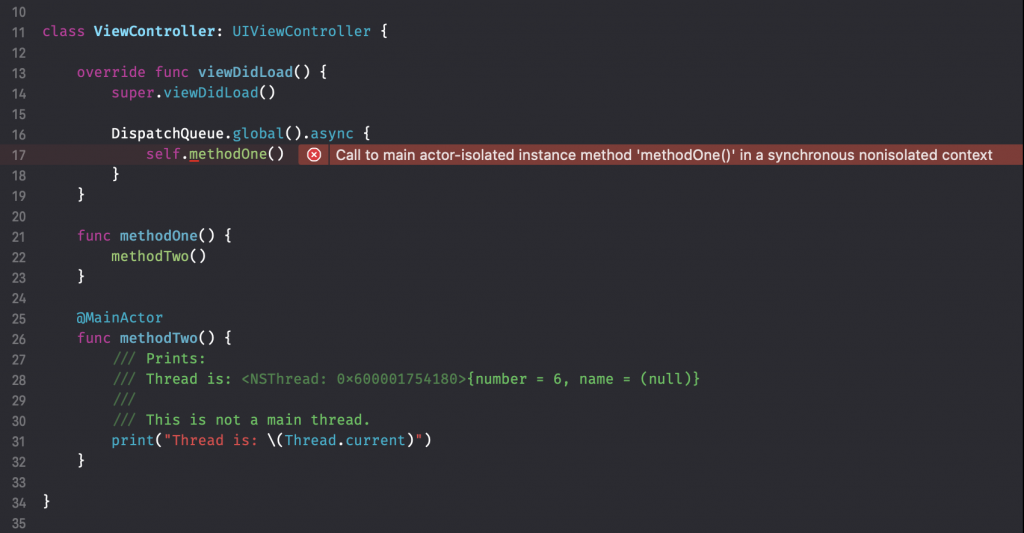
An actor provides an isolation boundary for code and data. The main actor is the boundary used for work tied to the main thread, including UI updates. Marking a declaration @MainActor tells the compiler which accesses must occur within that boundary. A synchronous call from elsewhere cannot simply proceed and hope it happens to be on the right thread.
Apple Developer’s WWDC25: Embracing Swift concurrency gives a concise explanation of this model:
WWDC25: Embracing Swift concurrency | Apple
Watch this passage for the relationship between the main actor, the main thread, and the @MainActor annotation.
Watch main-actor isolation, stopping before the discussion of a newer main-actor-by-default build setting. That setting is separate from selecting Swift 6 language mode in the project you migrated last lesson.
The distinction matters: an annotation establishes a rule; it does not silently repair every caller. Swift 6 reports callers that cannot satisfy the rule so you can decide whether they should run on the main actor or reach it asynchronously.
Put the UI-owned state on the main actor
Suppose an existing app has a model whose status is displayed by a SwiftUI screen. For now, the important point about ObservableObject and @Published is that changes to status can drive the screen’s display; you’ll examine SwiftUI state-management choices in a later module.
import Combine

@MainActor
final class StatusModel: ObservableObject {
    @Published private(set) var status = "Waiting"

    func updateStatus(_ newStatus: String) {
        status = newStatus
    }
}
Placing @MainActor on the class protects both the UI-owned property and its update method. An isolated caller can read status and call updateStatus directly. Code outside the main actor must use an appropriate actor-aware call. This is stronger than relying on every future caller to remember to dispatch before changing the property.
Read the class, property, and method examples in Antoine van der Lee’s @MainActor in Swift explained with code examples:
@MainActor in Swift explained with code examples
Read this portion to compare isolating a whole view model with isolating only one property or method.
In “How to use MainActor in Swift?”, begin where the author introduces the declarations that can carry the attribute. Read the examples through the individually annotated method. Focus on what each annotation protects: a class annotation covers its instance state and methods, whereas a property or method annotation has a narrower scope. Stop before the closure example.
For this StatusModel, the class-wide annotation expresses the design clearly: its mutable state exists to serve the UI. That does not mean every part of an app should be placed on the main actor. Lengthy computation does not become faster or safer for responsiveness just because its eventual result appears on a screen.
Repair the caller, not just the declaration
Imagine that an existing callback is a plain, synchronous function with no guarantee that it runs on the main actor:
func receiveStatus(_ status: String, model: StatusModel) {
    model.updateStatus(status) // Swift 6: main-actor-isolated call
}
The call is the problem. StatusModel has an isolation rule, but receiveStatus has no main-actor guarantee. In Xcode, select the diagnostic and inspect both locations: the highlighted call and the isolated declaration it refers to.
If the callback truly can arrive from outside the main actor, keep its contract honest and schedule its UI update on the main actor:
func receiveStatus(_ status: String, model: StatusModel) {
    Task { @MainActor in
        model.updateStatus(status)
    }
}
The task’s closure is main-actor isolated, so the update happens within the boundary protecting model. This is an asynchronous handoff: receiveStatus can return before the status changes. Use this pattern when the callback cannot itself wait for the update and that timing is acceptable.
There is a different fix when the function itself is guaranteed to be called on the main actor:
@MainActor
func receiveStatusFromUI(_ status: String, model: StatusModel) {
    model.updateStatus(status)
}
Now the call needs no handoff. But its callers must also respect the function’s isolation. Do not put @MainActor on an arbitrary-thread callback merely to silence its current error; that moves the diagnostic to its callers or misstates the callback’s contract. Likewise, annotating only updateStatus would not protect the rest of a UI-owned model as clearly as annotating the model itself.
In an async function outside the main actor, you can instead use await to make an isolated call and wait for it to complete. The essential decision is the same in every case: does this caller already have a main-actor guarantee, or does it need to cross the boundary?
Try the migration in Xcode
Set aside roughly 15 minutes for this small build-and-fix pass. In an app target using Swift 6 language mode, add the StatusModel and the first, nonisolated version of receiveStatus shown above. Build and locate the diagnostic in the Issue Navigator. Confirm that it identifies the call to updateStatus, rather than treating @MainActor as a way to run the call automatically.
Replace that callback with the Task { @MainActor in ... } version and build again. The isolation diagnostic for this call should be gone. If you are working in an existing project instead, look for the same shape: a UI-owned property or method, a caller with no main-actor guarantee, and an error at the access. Compiler wording can vary by toolchain.
Before accepting a fix, check three things in the surrounding code:
- Ownership: Is the mutable state genuinely used to drive the UI? If so, is its owning type or property isolated?
- Caller contract: Can the caller be proven to run on the main actor, or might it arrive elsewhere?
- Timing: Is scheduling a task acceptable, or must an asynchronous caller
awaitcompletion?
This check prevents a common migration mistake: changing the location of an annotation without resolving how code reaches the isolated state.
Takeaways
A representative Swift 6 UI-isolation error means a caller lacks permission to access main-actor-owned code or data from its current context. Isolating a UI-owned model with @MainActor makes that ownership explicit; repairing a nonisolated callback with a main-actor task makes the access valid. If a caller is already guaranteed to be on the main actor, isolating that caller may be simpler—but the guarantee must be real.
Next, you’ll examine a different concurrency diagnostic: transferring value data across tasks, and when making that data Sendable resolves the warning.