Recommended resources
The freely available resources this lesson will direct you to.
Hello! Last lesson, you put UI-owned state on the main actor and repaired a caller that needed to reach it. That protected the model. But what happens when the model needs to send data to a separate actor—for example, one responsible for saving it?
This lesson addresses that second boundary. You’ll identify a cross-actor data-race diagnostic, make a suitable value type Sendable, and check the result in Xcode. Allow about 35–40 minutes, including the readings and a build.
Why an actor boundary can still produce a warning
Imagine a SwiftUI model on the main actor and a storage actor that saves its data. Each actor protects its own mutable state. The difficult part is the value passed between them: could the receiving actor and the sender end up accessing the same mutable object at once?
The diagram shows that concern between two separate actors. The flame marks a reference to mutable state, not a problem that actor isolation automatically solves.
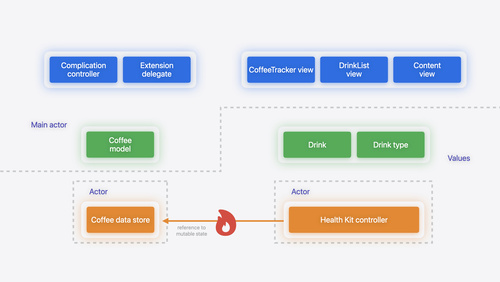
Apple Developer’s Migrate your app to Swift 6 examines a related case: a main-actor model sends an array of drinks to a storage actor. Read the transcript for the diagnostic and the choice of a safe transferred type.
Migrate your app to Swift 6 - WWDC24 - Videos - Apple Developer
Read this Apple Developer presentation for a concrete migration example: an array retained by a UI model is also passed to another actor.
On the video page, open the transcript. After the discussion of changing var declarations to let, find the passage beginning “They are being caused by us passing around arrays of drinks between different actors.” Read the actor-boundary example. Then continue from “Incidentally, this is an example of a single line change” through the explanation that the next type is an enum; read the follow-up build. Focus on why fixing the element type can resolve warnings involving an array, and why a public type needs an explicit conformance.
The important distinction is between protecting mutable state and transferring data. @MainActor keeps a UI model’s mutable properties within one isolation domain. Sendable expresses that a value of a particular type can safely cross into another domain. Neither annotation is a substitute for the other.
What a checked Sendable conformance promises
Sendable is a protocol with no methods to implement. For a straightforward struct or enum, declaring conformance asks the compiler to check whether its stored data can be safely transferred. A struct containing a mutable reference does not become safe merely because the outer container is a value type.
The Swift 6 migration guide shows both the diagnostic and the explicit fix for a public struct:
Common Compiler Errors | Documentation
Read the Swift 6 migration guide’s ColorComponents example to see why a public value type can still trigger a sending error.
Under “Crossing Isolation Boundaries,” go to “Implicitly-Sendable Types.” Begin at the public struct ColorComponents code example and read the public-type example, stopping before “Preconcurrency Import.” Compare the diagnostic at await applyBackground(backgroundColor) with the proposed Sendable declaration. Notice that conformance is part of the public type’s contract, not just a local warning suppression.
Some non-public value types whose contents are all Sendable can have sendability inferred. Public types do not receive that inference: publishing a Sendable conformance promises clients that the type will remain safe to transfer. For an array, its elements matter too—an array of a non-Sendable custom type is not made safe merely by using Array.
A let property makes the example easy to reason about, but let is not the general test for sendability. The type and behavior of every stored value matter. Conversely, a struct can have var properties and still be Sendable when its contents have safe value semantics. Do not add @unchecked Sendable to bypass a failing check: that shifts the proof of safety from the compiler to you.
Repair a representative UI-to-storage transfer
Here is a small version you can paste into an app target compiling in Swift 6 language mode. It extends the pattern from the previous lesson: the model is main-actor-isolated, while the archive has its own actor isolation. The archive only keeps the latest batch in memory so that the boundary, rather than file storage, is the focus.
import Combine

public enum StatusCategory {
    case waiting
    case ready
}

public struct StatusSnapshot {
    public let text: String
    public let category: StatusCategory

    public init(text: String, category: StatusCategory) {
        self.text = text
        self.category = category
    }
}

actor StatusArchive {
    private var lastSaved: [StatusSnapshot] = []

    func save(_ batch: [StatusSnapshot]) {
        lastSaved = batch
    }
}

@MainActor
final class StatusModel: ObservableObject {
    @Published private(set) var snapshots = [
        StatusSnapshot(text: "Waiting", category: .waiting)
    ]

    private let archive = StatusArchive()

    func persist() async {
        await archive.save(snapshots)
    }
}
Build this version first. The model retains snapshots while persist() passes its array to another actor. In Swift 6, expect a sending/data-race diagnostic at or near await archive.save(snapshots); the precise wording depends on the toolchain. The await permits the actor-isolated call, but does not itself establish that the argument is safe to transfer.
Now change only the two type declarations:
public enum StatusCategory: Sendable {
    case waiting
    case ready
}

public struct StatusSnapshot: Sendable {
    public let text: String
    public let category: StatusCategory

    public init(text: String, category: StatusCategory) {
        self.text = text
        self.category = category
    }
}
Why both? StatusSnapshot contains a StatusCategory. Checking the struct’s conformance therefore requires the category to be Sendable too. Its cases carry no mutable reference data, so this is a suitable checked conformance. The snapshot also contains a String, which is Sendable. Consequently, the array has Sendable elements.
The model can still change its own snapshots on the main actor after initiating a save. The storage actor receives value data from that call, not permission to mutate the UI model’s property. This is different from handing both actors the same mutable class instance, as in the risk illustrated earlier.
Verify the fix in Xcode
Set aside about 15 minutes for a build-and-inspect pass:
- With the first version of the declarations, build your Swift 6 app target. Open the Issue Navigator and inspect the sending diagnostic at
archive.save(snapshots). Identify the source (the main-actor model), destination (the storage actor), and transferred type ([StatusSnapshot]). - Add
SendabletoStatusSnapshotand build again. If the compiler points tocategory, inspect its type rather than removing the property or bypassing the check. - Add
SendabletoStatusCategoryand rebuild. Confirm that the diagnostic associated with this transfer is gone. Other migration diagnostics elsewhere in a project can remain.
If you adapt this example to your own code, inspect each stored property before adding conformance. A let holding a mutable class instance is still a reference to an object that might change elsewhere. In that situation, redesigning the transferred payload as value data is often more appropriate than declaring the reference safe without evidence.
Takeaways
@MainActor protects UI-owned state; Sendable addresses whether data can safely cross from that isolation domain to another actor. In the example, explicitly conforming the public snapshot and its nested enum lets the compiler validate an array sent to storage. The goal is not simply a clean build—it is a transfer that does not share unprotected mutable state.
Next, you’ll use modern SwiftUI state observation to build a screen while retaining a path for iOS 13.