Recommended resources
The freely available resources this lesson will direct you to.
- Profiling And Detecting All Things SSL With JA3 - John Althouse and Jeff Atkinsonwww.youtube.com
- Browser Fingerprinting Masterclass: How It Works & How To Protect Yourselfwww.youtube.com
- JA4 fingerprints and inter-request signals - The Cloudflare Blogblog.cloudflare.com
- JA4+ network fingerprinting - APNIC Blogblog.apnic.net
Hello! Welcome to the next lesson in our course on architecting security products.
In our last session, we designed a complete IP reputation system, from data collection to a low-latency scoring and lookup architecture. We established that an IP's reputation is a powerful signal. However, sophisticated adversaries don't stick to one IP address; they use vast pools of proxies and compromised devices to rotate their identity. This makes tracking them by IP address alone a difficult cat-and-mouse game.
To build a more resilient defense, we need to identify the actor, not just their temporary network address. This is where device fingerprinting comes in. This lesson focuses on the first step in that direction, directly addressing our learning outcome: Design passive device fingerprinting techniques using TLS and HTTP header analysis.
We will explore how to create a unique signature for a client application by analyzing the data it willingly sends as part of standard network protocols, without needing to run any code on the client's machine. We'll cover two key techniques:
- TLS Fingerprinting: How to identify a client based on the specific parameters of its encrypted connection setup.
- HTTP Header Fingerprinting: How to find signals within plain HTTP headers that distinguish automated clients from human users.
The Concept of Passive Fingerprinting
Before we dive into the technical design, it's important to understand what fingerprinting is and to distinguish between its two main forms: passive and active. In this lesson, we are focused entirely on passive techniques.
Browser Fingerprinting Masterclass: How It Works & How To Protect Yourself
To build a first-principles understanding, let's watch a segment from the 'Browser Fingerprinting Masterclass' by Techlore. It provides an excellent overview of what fingerprinting is and clarifies the crucial distinction between passive collection and active probing.
Please watch the following sections: What is Fingerprinting? (01:25 - 03:01): This explains how unique attributes (entropy) are collected to form a fingerprint. Passive vs. Active Collection (03:01 - 04:28): Pay close attention to this distinction. This lesson covers passive collection; the next will cover active probing. Legitimate Uses (16:26 - 16:59): This connects the concept directly to our goal of building security products for bot mitigation and fraud detection.
As the video explains, passive fingerprinting relies on information that is revealed automatically in network communications. Your system doesn't need to ask for it; the client provides it for free. Our job as security architects is to find the unique, high-entropy signals within that data.
Part 1: TLS Client Fingerprinting
The vast majority of web traffic is encrypted with TLS. While the application data itself is protected, the initial handshake to set up the encrypted channel happens in the clear. The very first packet sent by a client in this handshake, the ClientHello, is a goldmine for passive fingerprinting.
Different applications and libraries (e.g., Chrome on Windows, Safari on iOS, a Python requests script, a Go-based malware implant) construct this ClientHello packet in slightly different ways. These differences create a fingerprint.

JA3: The Original TLS Fingerprinting Method
In 2017, researchers from Salesforce standardized a method for creating a consistent fingerprint from the ClientHello packet, which they named JA3.
Profiling And Detecting All Things SSL With JA3 - John Althouse and Jeff Atkinson
The creators of JA3 gave a talk explaining its design and purpose. Let's watch a few key clips to understand the core idea.
Please watch the following segments from 'Profiling And Detecting All Things SSL With JA3': The Client Hello Signal (07:10 - 10:13): This explains why the Client Hello is a good source for fingerprinting and shows how it differs between a browser and malware. Generating the JA3 Hash (11:19 - 13:39): This details the exact process: concatenating specific field values in order and then creating an MD5 hash.
The JA3 method is simple and effective:
- Gather the values for: TLS Version, accepted Cipher Suites, list of Extensions, Elliptic Curves, and Elliptic Curve Point Formats.
- Concatenate these values into a single string, in the order they appear in the packet.
- Generate an MD5 hash of that string.
The resulting 32-character hash is the JA3 fingerprint. For example, a specific version of the TrickBot malware has the JA3 hash 623de93db1358b9889508544a7f55557, regardless of its IP address or destination. This is a much more stable indicator than an IP.
The same creators also introduced JA3S, which fingerprints the server's ServerHello response. Combining a JA3 and JA3S hash for a single connection can create an extremely high-fidelity signature for a specific client-server interaction.
The Evolution to JA4: Overcoming Randomization
JA3 was highly successful, but its reliance on the order of TLS extensions became a weakness. To combat fingerprinting, major browsers like Chrome began randomizing the order of extensions in their ClientHello messages. This meant the same browser could produce a different JA3 hash on every connection, rendering the fingerprint useless for tracking.
The security community responded with a more robust successor: JA4.
JA4 fingerprints and inter-request signals
To understand this evolution, let's read a blog post from Cloudflare that explains the limitations of JA3 and the design of its successor, JA4.
Please read the following sections of the post: JA3 Fingerprint: Focus on the summary of why JA3 became less useful, particularly the point about randomization. Enter JA4 fingerprint: This introduces the new standard. The JA4 breakdown (the list from 1 to 8): Study the components of the JA4 fingerprint. This is the core of the new design.
JA4's design is more sophisticated and resilient. Instead of hashing ordered strings, it sorts the ciphers and extensions before hashing. This makes it immune to randomization.
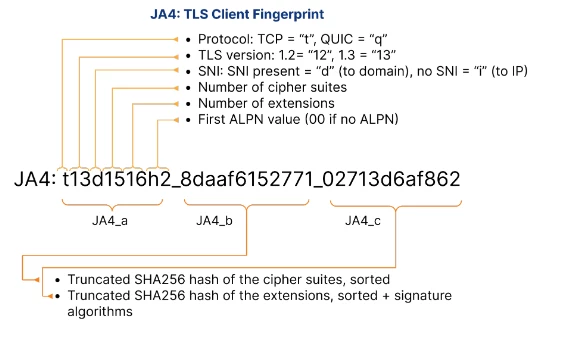
A JA4 fingerprint, like t13d1516h2_8daaf6152771_02713d6af862 for Chrome, is composed of three parts:
t13d1516h2: The human-readable part.t: Protocol (TLS over TCP)13: TLS Version (1.3)d: SNI is present (a domain name, not an IP)15: Number of cipher suites16: Number of extensionsh2: First ALPN value (HTTP/2)
8daaf6152771: A hash of the sorted list of cipher suites.02713d6af862: A hash of the sorted list of extensions and signature algorithms.
This design is a significant improvement, providing both a quick human-readable signature and two randomization-resistant hashes.
System Design for TLS Fingerprinting
Now, how do we build a system to generate these fingerprints?
-
Interception Point: The
ClientHellois the very first packet after the TCP handshake. To inspect it, you need a component at the network edge that terminates TLS. This could be your reverse proxy (like Nginx, Envoy), a dedicated load balancer, or the application server itself. -
Parsing: You need a high-performance parser that can read the raw bytes of the
ClientHelloand extract the relevant fields without adding significant latency. -
Fingerprint Generation: Once the fields are parsed, your code applies the JA4 logic: build the human-readable string, sort the ciphers and extensions, hash them, and combine the parts.
-
Telemetry: The generated fingerprint is then attached to the request as metadata. It should be logged with every request and fed into any downstream security systems (like your bot detection engine or SIEM).
Given your background, you'll appreciate the engineering challenge of doing this at scale. The Cloudflare blog post you just read offers a fantastic case study.
JA4 fingerprints and inter-request signals
Let's revisit the Cloudflare blog post to look at the implementation details of their parser. This is a great example of designing a high-performance system component from first principles.
Please read the section 'Parsing ClientHello'. Pay attention to the engineering decisions: Choice of language (Rust for memory safety and performance). Memory management strategy (amortized zero heap allocations). Performance optimizations (SIMD instructions). Testing and integration strategy.
This example shows that building a production-grade fingerprinter requires careful low-level design to avoid impacting the performance of the main application.
Part 2: HTTP Header Fingerprinting
TLS fingerprinting identifies the client application or library. But we can get even more signal by looking at the next layer up: the HTTP protocol itself. Once the TLS channel is established, the client sends an HTTP request, which also contains a wealth of passive signals in its headers.
Just like with TLS, different clients construct their HTTP requests in unique ways. Key signals include:
- The presence, absence, and values of headers like
User-Agent,Accept,Accept-Language, andAccept-Encoding. - The order in which the headers are sent. Most libraries and browsers send headers in a consistent order.
The JA4+ suite includes a standard for this as well: JA4H.
JA4+ network fingerprinting - APNIC Blog
To understand this technique, let's read the 'JA4+ network fingerprinting' blog post from APNIC, written by one of the creators of JA3 and JA4.
Please read the section 'JA4H: HTTP client fingerprint'. Focus on: Where this fingerprinting is best applied (after TLS decryption). The key signal provided by the Accept-Language header. The modular design of the JA4H fingerprint.
As the article notes, a simple but powerful heuristic is that automated tools and bots often omit the Accept-Language header, as they don't have a "user" with a language preference. The absence of this header is a strong signal of non-human traffic.
System Design for HTTP Fingerprinting
-
Interception Point: Unlike TLS fingerprinting, HTTP fingerprinting must happen after TLS is decrypted. This is typically done in the same place: a reverse proxy, WAF, or application server.
-
Parsing: Standard HTTP libraries can easily parse headers. The key is to use a library that also preserves the order in which headers were received, as this is a crucial part of the fingerprint.
-
Fingerprint Generation: The logic would be to:
- Concatenate the values of specific headers (e.g.,
User-Agent,Accept). - Create a hash of the ordered list of all header names.
- Combine these into a signature, like JA4H.
- Concatenate the values of specific headers (e.g.,
-
Signal Correlation: The real power comes from combining signals. For a single incoming request, your system can now generate:
- An IP Reputation Score (from our last lesson).
- A JA4 TLS Fingerprint (identifying the client library).
- A JA4H HTTP Fingerprint (identifying client behavior).
When a request arrives with a clean IP but a JA4 fingerprint known to belong to a credential-stuffing tool and a JA4H fingerprint missing an Accept-Language header, you can be highly confident it's malicious.
Conclusion
In this lesson, we designed the next layer of our detection capabilities, moving beyond transient IP addresses to create stable fingerprints for client applications.
Key Takeaways:
- Passive Fingerprinting is the art of identifying clients using information they provide voluntarily in standard protocol communications.
- TLS Fingerprinting (JA4) creates a robust signature from the TLS
ClientHellopacket, identifying the underlying application or library (e.g., Chrome, Python, malware). Its design is resilient to modern anti-fingerprinting techniques like extension randomization. - HTTP Header Fingerprinting (JA4H) uses the content and order of HTTP headers to find signals of automation, such as a missing
Accept-Languageheader. - System Design for these techniques requires careful placement at the network edge (a TLS-terminating proxy) and a focus on high-performance parsing to avoid adding latency.
- Signal Fusion is key: combining IP reputation, TLS fingerprints, and HTTP fingerprints provides a high-fidelity verdict on whether traffic is legitimate.
Preview of the Next Lesson:
Passive techniques are powerful because they're invisible to the client. However, a dedicated attacker can still attempt to spoof them by crafting ClientHello packets and HTTP headers that mimic a real browser. To defeat this, we need to escalate. In our next lesson, we will "Design active device fingerprinting using JavaScript-based challenges," where we'll turn the tables and actively probe the client to uncover its true nature.