Recommended resources
The freely available resources this lesson will direct you to.
- Browser Fingerprinting Masterclass: How It Works & How To Protect Yourselfwww.youtube.com
- browser fingerprinting explained - how it works and why it's bad.www.youtube.com
- AI Bot Detection and Blocking - Liferay.Devliferay.dev
- Roll your own bot detection: fingerprinting/JavaScript (part 1)securityboulevard.com
Hello! Let's dive into the next stage of our journey in architecting security products.
In our last lesson, we designed passive fingerprinting systems using TLS (JA4) and HTTP (JA4H) headers. These techniques are powerful because they are invisible to the client, allowing us to identify client applications and libraries based on the data they provide willingly. However, their main limitation is that a dedicated attacker can learn to mimic the network signatures of legitimate browsers, effectively spoofing their identity.
To counter this, we must escalate our detection strategy. We need to move from passively observing to actively probing. This brings us to today's learning outcome: Design active device fingerprinting using JavaScript-based challenges and evaluate advanced techniques like canvas fingerprinting.
Instead of just analyzing what a client sends, we will now run code in the client's browser to force it to reveal its true characteristics. We'll explore how to design these JavaScript challenges, with a special focus on advanced, high-entropy techniques like canvas fingerprinting, and discuss how to make these systems resilient to reverse engineering.
What is Active Device Fingerprinting?
Active fingerprinting, also known as active probing, involves executing JavaScript on the client side to collect a rich set of attributes about the browser, operating system, and hardware. While passive fingerprinting is limited to analyzing the network packets a client sends, active fingerprinting allows us to ask specific questions and run tests within the client's environment.
Browser Fingerprinting Masterclass: How It Works & How To Protect Yourself
To start, let's watch a section of the 'Browser Fingerprinting Masterclass' by Techlore. This segment clearly explains active probing and introduces some of the key techniques we will be designing today.
Please watch the section on Active Probing (03:28 - 06:02). Pay close attention to the introduction of canvas, WebGL, and audio fingerprinting. These are the kinds of 'challenges' we can issue to a client to uncover its unique properties.
As the video illustrates, a browser can expose a vast number of attributes through JavaScript APIs. Individually, many of these attributes (like your screen resolution or browser version) are not unique. However, when combined, the total collection of these attributes—the fingerprint—can become highly unique, much like a human fingerprint.
The simplest form of a JS challenge is one that merely checks if the client can execute JavaScript at all. Many basic bots are just HTTP clients that parse HTML but don't run scripts.
Let's look at a very simple example of a JavaScript challenge from an article on the Liferay Developer blog. This demonstrates the first-principles concept of using a JS challenge to filter out non-browser clients.
Please read the Introduction and the subsection The Filter: AnubisBotDetectionFilter.java. Focus on the mechanism: the server generates a unique string (nonce), the client-side JavaScript's task is to reverse it, and the server verifies the result. This illustrates a basic, but effective, active challenge.
This string-reversal challenge is a great starting point. It's a binary test: either the client can solve it or it can't. To deal with more sophisticated bots that use full browser automation frameworks (like Puppeteer or Playwright), we need to design much more nuanced and complex challenges.
Designing a Fingerprinting Script
To build a robust active fingerprinting system, we need to architect a client-side script that collects a wide array of signals. For this, we'll design a FingerprintCollector component.
Roll your own bot detection: fingerprinting/JavaScript (part 1)
The article 'Roll your own bot detection' provides an excellent blueprint for designing a fingerprinting script. It outlines the architecture of a FingerprintCollector class and explains the rationale behind the signals it gathers.
Please read the following sections: Start from 'What is fingerprinting' and read down to 'Let’s implement a fingerprinting script'. This section defines key concepts like uniqueness, stability, and resilience, which are critical for our design. Continue through 'Let’s implement a fingerprinting script' and 'What each attribute captures'. Study the structure of the FingerprintCollector class and review the table of attributes. Note how many of them are designed to detect inconsistencies (e.g., maxTouchPoints for a fake mobile browser).
As you've read, our design goal for bot detection is resilience. We want a fingerprint that is difficult for an attacker to spoof or manipulate. A resilient system is built by collecting many signals and, more importantly, by looking for inconsistencies between them. For example, a client might claim its userAgent is Chrome on Windows, but the navigator.platform property might reveal MacIntel. This contradiction is a strong signal of deception.
Your design for a FingerprintCollector should therefore include signals that fall into several categories:
- Hardware Traits:
hardwareConcurrency,deviceMemory - Browser/OS Environment:
language,timezone,platform - Rendering Quirks: Canvas, WebGL (we'll cover this next)
- Automation Indicators:
navigator.webdriver, checks for Playwright/Puppeteer hooks
Advanced Technique: Canvas Fingerprinting
One of the most powerful active fingerprinting techniques is canvas fingerprinting. It exploits the fact that the same drawing instructions will produce slightly different image outputs on different machines due to variations in the GPU, graphics drivers, operating system, and font rendering engines.
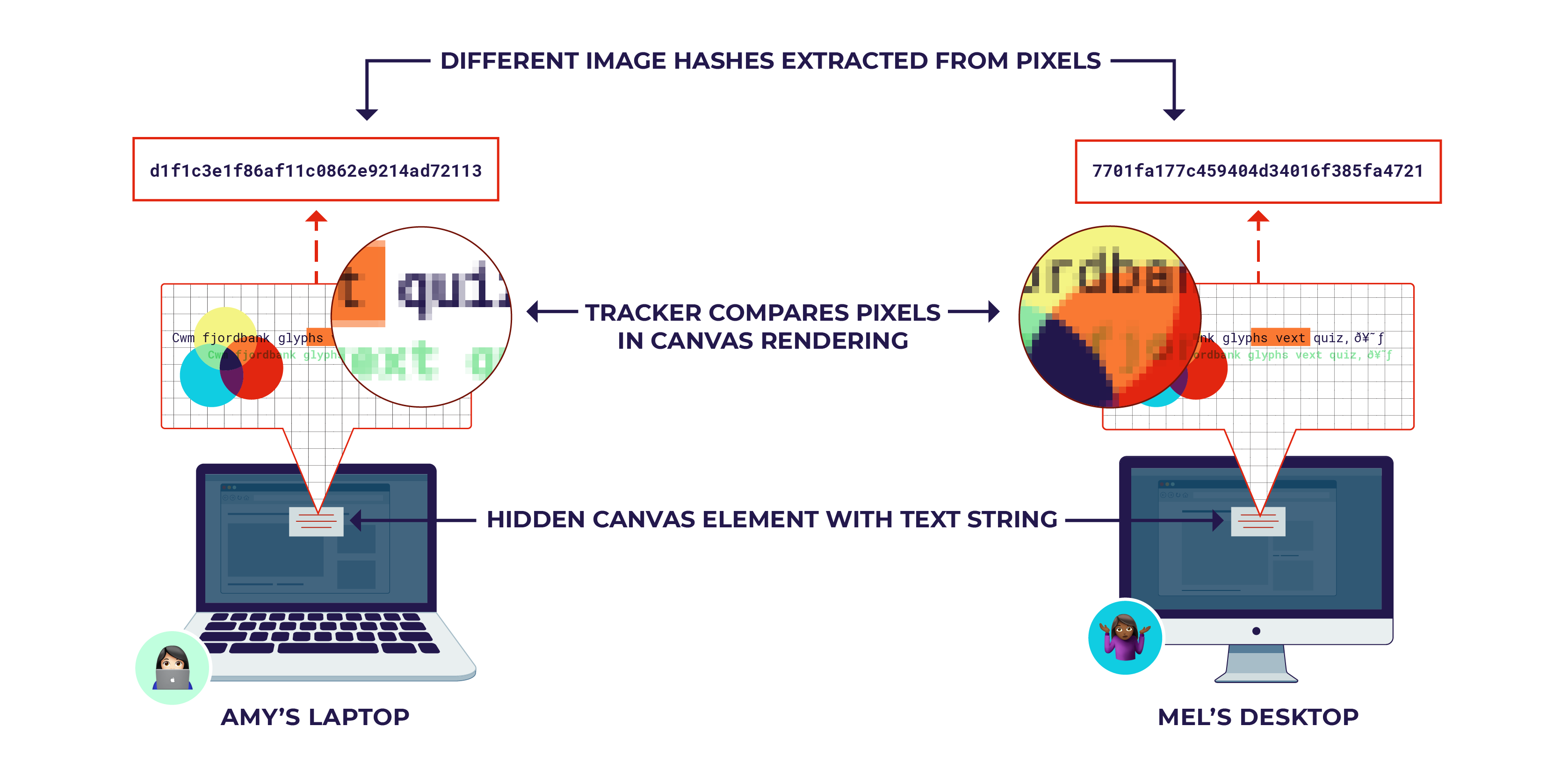
The process is as follows:
- Use JavaScript to create a
<canvas>element (it can be hidden and off-screen). - Issue a series of drawing commands to the canvas context (e.g., render text, draw shapes and gradients).
- Use the
toDataURL()method to export the rendered canvas as a base64-encoded image. - Hash the resulting base64 string (e.g., with SHA-256).
This final hash is the canvas fingerprint. Because it's a high-entropy signal, it's very effective at distinguishing between devices. However, its effectiveness also makes it a primary target for evasion.
Evaluating Canvas Fingerprinting: Tamper Detection
A simple bot or privacy tool might block the toDataURL() call entirely. More advanced "anti-detect" browsers will interfere with the rendering process, for example, by adding random noise to the canvas output on every page load to generate a new fingerprint each time.
Therefore, when we design our canvas fingerprinting module, we must not only generate the fingerprint but also detect tampering. This is a crucial design principle: the tampering attempt is often a stronger signal of a bot than the fingerprint itself.
Roll your own bot detection: fingerprinting/JavaScript (part 1)
Let's return to 'Roll your own bot detection' to see how to implement this from an architectural perspective. The article provides a code example that combines fingerprint generation with tamper detection.
Please read the section 'Fingerprint tampering: focus on the canvas fingerprint'. Analyze the #collectCanvasInfo method. Notice that it returns an object containing not just the hash, but also booleans like hasAntiCanvasExtension. This is an excellent example of building a resilient detection mechanism.
The code you just reviewed demonstrates a key architectural pattern for active fingerprinting: for every signal you collect, you should also try to collect meta-signals about its integrity. Was the API call blocked? Does the error stack trace point to a known browser extension? Does the output look noisy or randomized?
Other advanced techniques like WebGL fingerprinting (rendering 3D graphics) and AudioContext fingerprinting (processing an audio signal) operate on the same principle:
- Initiate a complex rendering or processing task.
- Extract a unique signature from the output.
- Build in checks to detect interference with the process.
Architecting for a Hostile Environment
Any security logic you deploy to the client side runs in a hostile environment. The attacker controls the browser and its developer tools. If they can read your fingerprinting script, they can analyze its logic, find ways to bypass it, or even reconstruct a "clean" fingerprint payload without running your code at all.
As a system architect, you must design your client-side components to be as difficult to reverse-engineer as possible. Two primary defenses are encryption and obfuscation.
Roll your own bot detection: fingerprinting/JavaScript (part 1)
The final part of our design involves hardening the fingerprinting script itself. This section from 'Roll your own bot detection' explains how to use payload encryption and code obfuscation to raise the cost for attackers.
Please read the sections 'Making fingerprint collection harder to reverse engineer' and 'Integrating the fingerprinting script'. Focus on: The difference between sending a plaintext JSON payload and an encrypted one. The distinction between minification and obfuscation. How the final encrypted and obfuscated script is integrated into a login flow.
This strategy doesn't make your script impossible to crack, but it achieves a critical security goal: it raises the cost and effort for the attacker. By forcing them to either spend significant time on reverse engineering or run your (obfuscated) script as intended, you strip away their advantage and make your detection signals more reliable.
The final design of your active fingerprinting system should look like this:
- Client-Side: An obfuscated
FingerprintCollector.jsscript runs in the browser. - Collection: It gathers dozens of signals, including results from advanced challenges like canvas and WebGL fingerprinting. It also runs tamper-detection checks.
- Encryption: Each signal is encrypted individually before being added to the final payload.
- Transmission: The encrypted, base64-encoded fingerprint payload is sent to the server along with a user action (e.g., login, signup).
- Server-Side: The server decrypts the payload, analyzes the signals and their integrity checks, and uses the resulting fingerprint to inform a risk score or a rate-limiting decision.
Conclusion
In this lesson, we have designed a robust system for active device fingerprinting, moving beyond passive observation to actively challenge the client.
Key Takeaways:
- Active Fingerprinting uses JavaScript to probe the client's environment, providing far richer data than passive methods.
- Design starts with simple challenges (like checking for JS execution) and scales to advanced techniques like canvas, WebGL, and audio fingerprinting to defeat sophisticated bots.
- Evaluating advanced techniques means building in tamper detection. The attempt to evade fingerprinting is a powerful signal in itself.
- Resilience is key: Client-side security code must be architected for a hostile environment using payload encryption and code obfuscation to make reverse engineering difficult and costly for attackers.
Preview of the Next Lesson:
Active fingerprinting gives us a high-fidelity snapshot of a device at a specific moment in time (e.g., at login). But what about the user's behavior during their session? A sophisticated bot might have a perfect fingerprint but move the mouse in an unnaturally straight line.
In our next lesson, we will "Design a telemetry collection system for behavioral analysis, efficiently capturing user interactions like mouse movements and keystrokes." We will move from a static snapshot to continuous behavioral monitoring, adding another critical layer to our bot detection architecture.