Recommended resources
The freely available resources this lesson will direct you to.
Hello! In our previous module, we delved deep into Access Control Lists, finishing with a crucial lesson on verification and troubleshooting. You learned how to diagnose and fix common ACL errors, ensuring your security policies work as intended.
We are now starting a new module focused on another cornerstone of modern networking: Network Address Translation (NAT). This lesson will explain the purpose of NAT and help you distinguish between its three primary types: static NAT, dynamic NAT, and Port Address Translation (PAT), also known as NAT overload. You'll discover how NAT solves one of the biggest challenges in the history of the internet and enables private networks to communicate with the outside world.
1. The Problem: Running Out of Addresses
In an early lesson, you learned about public vs. private IPv4 addresses. The distinction between them isn't just academic; it's fundamental to how the modern internet functions. The core issue is that the IPv4 protocol provides a finite number of addresses (about 4.3 billion), a number that was exhausted years ago due to the explosive growth of internet-connected devices.
So, how does your home network, with multiple devices, access the internet when your Internet Service Provider (ISP) likely only gives you a single public IP address? The answer is NAT.
To understand the problem and the general concept of the solution, let's watch an introductory video from Jeremy's IT Lab.
Free CCNA | NAT (Part 1) | Day 44 | CCNA 200-301 Complete Course
This video provides an excellent overview of the IPv4 address exhaustion problem and introduces NAT as a key solution.
Watch the section from the beginning to 08:17. Pay close attention to: The explanation of why IPv4 addresses are a limited resource. The role of private IP address ranges (RFC 1918) as a part of the solution. The fundamental limitation of private addresses: they cannot be routed on the public internet. How NAT is introduced as the mechanism that bridges this gap, allowing devices with private IPs to communicate online.
As the video explains, NAT acts as a translator on your network's edge router, modifying IP packet headers to allow your entire private network to appear as a single public IP address to the outside world.
2. The Language of NAT
To discuss NAT accurately, we need to learn four key terms that Cisco uses to describe addresses from different perspectives. These terms can be a little confusing at first, but they are essential for understanding how NAT configurations work. The terms are built from two pairs of words:
- Inside vs. Outside: Refers to the location of the device relative to the NAT router. "Inside" is your private network; "outside" is the public internet.
- Local vs. Global: Refers to the IP address as seen from a certain perspective. "Local" is the address viewed from inside your network; "Global" is the address viewed from the public internet.
Let's read a clear definition of these four resulting terms.
NAT Inside and Outside Addresses
This section from the Free CCNA Study Guide provides clear, concise definitions for the four main NAT address types.
Read the section titled "NAT Inside and Outside Addresses". Focus on understanding the definition of each of the four address types: Inside local Inside global Outside local Outside global Try to associate each term with the example network diagram provided in the text.
Here is a summary table to help you keep these terms straight:
| Term | Description | Example |
|---|---|---|
| Inside Local | The private IP address of a host on your internal network. | Your PC's IP: 192.168.1.10 |
| Inside Global | The public IP address that represents an inside host to the outside world. | Your public IP from the ISP: 203.0.113.5 |
| Outside Local | The IP address of an external host as it appears to your internal network. | A web server's IP: 8.8.8.8 |
| Outside Global | The real, public IP address of an external host. | The same web server's IP: 8.8.8.8 |
For the scope of the CCNA, the Outside Local and Outside Global addresses are almost always the same. The key translation you need to focus on is between the Inside Local and Inside Global addresses.
3. Types of Network Address Translation
NAT isn't a single process; it's a technology that can be implemented in three distinct ways, each with different characteristics and use cases.
This resource provides a great introduction to the three types of NAT.
Read the section titled "Types of NAT". Focus on the definitions and key differences between: Static NAT Dynamic NAT NAT Overload (PAT)
Now let's visualize these three types to solidify your understanding. The following image provides a clear side-by-side comparison.
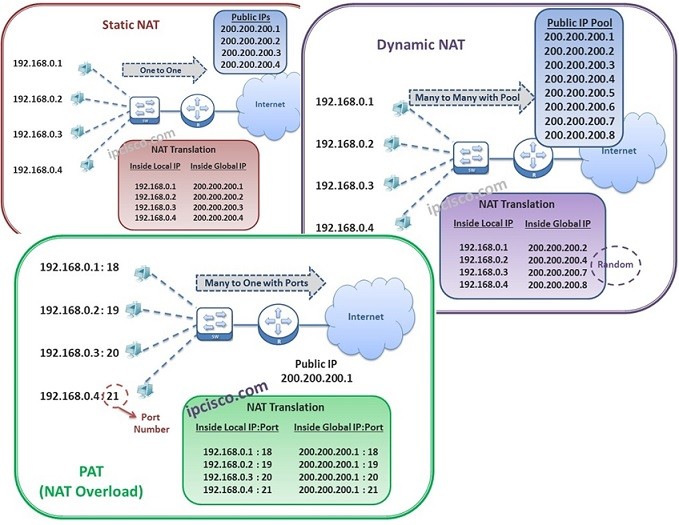
To see these processes in action, the following video provides a simple, animated explanation of each type.
NAT Explained | Overload, Dynamic & Static
The CertBros channel provides clear, visual explanations of the three NAT types.
Watch the following segments that break down each NAT type: Port Address Translation (PAT): Start with the most common type, also known as Overload. Notice how the router uses port numbers to keep track of which internal device made which request. Dynamic NAT: Next, watch the explanation of Dynamic NAT. The key idea here is the "pool" of public addresses. What happens if more devices want to get online than there are addresses in the pool? Static NAT: Finally, watch the segment on Static NAT. Observe that this is a fixed, one-to-one mapping that you configure manually. Why would this be useful for a public-facing server?
Conclusion
In this lesson, you explored the fundamental concepts of Network Address Translation. You learned that NAT was developed primarily to mitigate IPv4 address exhaustion, and it achieves this by translating non-routable private IP addresses into routable public IP addresses at the edge of a network.
Key Takeaways:
- NAT's Purpose: To conserve public IPv4 addresses and allow devices on a private network to access the public internet. It also adds a layer of security by hiding internal IP structures.
- NAT Terminology: Understanding the four address types—Inside Local, Inside Global, Outside Local, and Outside Global—is critical for configuring and troubleshooting NAT.
- Static NAT: Creates a permanent, one-to-one mapping between a private IP and a public IP. It's ideal for making an internal host (like a web server) accessible from the internet.
- Dynamic NAT: Maps private IPs to an available IP from a pool of public addresses on a first-come, first-served basis. It is still a one-to-one mapping for the duration of the connection.
- PAT (NAT Overload): The most common form of NAT. It maps multiple private IPs to a single public IP by using unique port numbers to track individual conversations. This is a many-to-one mapping and the most efficient method for address conservation.
Now that you understand the "why" and "what" of NAT, our next lesson will move into the "how." You will learn to configure and verify static NAT and PAT on a Cisco router, applying these theoretical concepts in a practical, hands-on context.