Recommended resources
The freely available resources this lesson will direct you to.
Hello! In our last lesson, you learned how to configure extended ACLs to create precise traffic filtering rules. While getting the syntax right is important, a single misconfiguration can either neutralize your security policy or bring down the network. That's why verification and troubleshooting are just as crucial as configuration.
This lesson focuses on the practical side of managing ACLs. We will cover how to verify your ACLs are applied correctly and troubleshoot common misconfigurations, such as incorrect statement order, wrong application direction, and unintended effects of the implicit deny rule. By the end, you will have a systematic process for diagnosing and fixing ACL-related issues.
1. The Verification Toolkit
Before you can troubleshoot, you need to know how to inspect the current state of your ACLs. Two show commands are essential for this:
show ip access-listsshow ip interface <interface_name>
Let's look at what each one tells you.
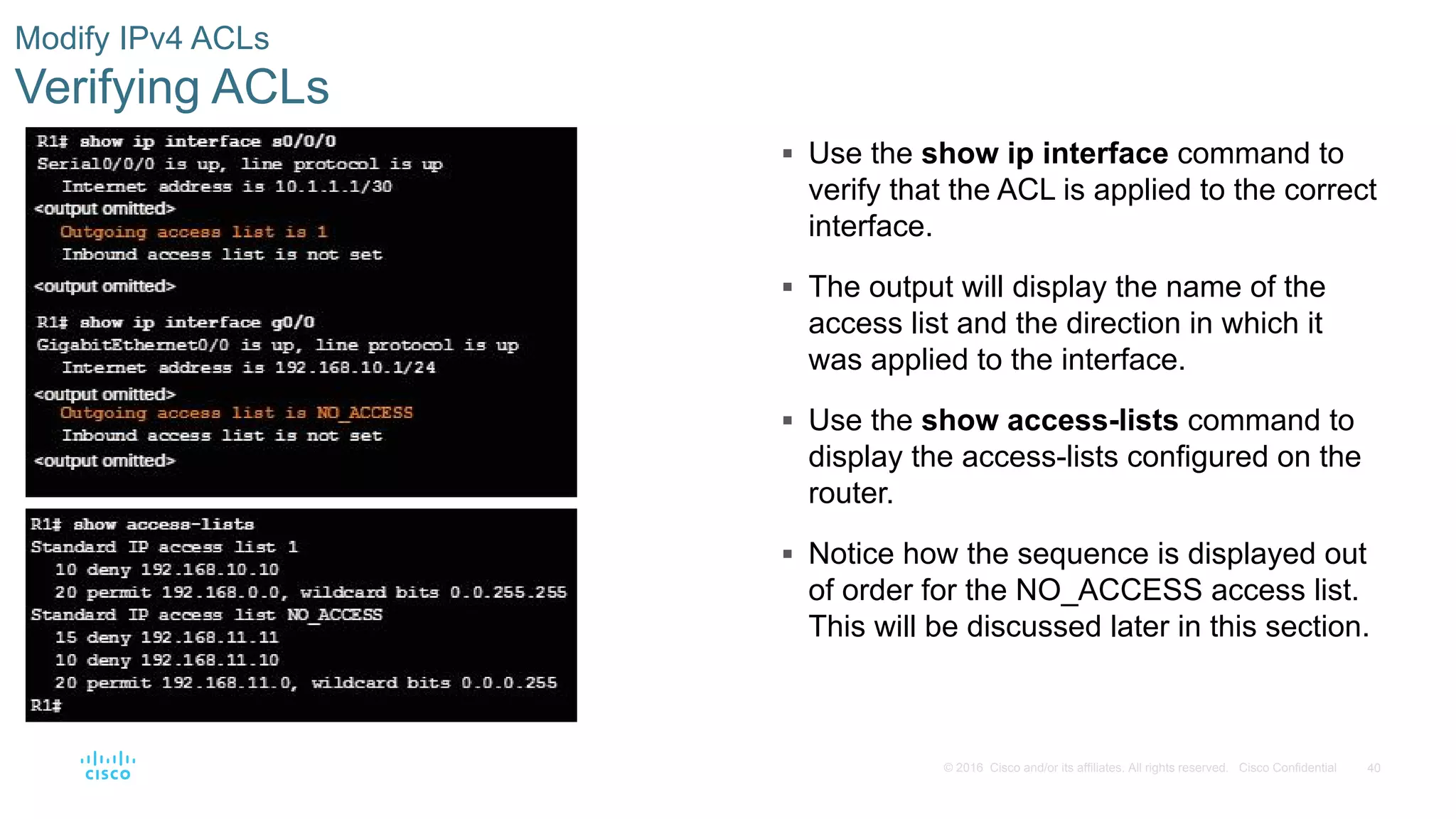
-
The
show ip access-listscommand displays all the ACLs on the router. Crucially, it shows you the individual Access Control Entries (ACEs) in the order they are processed. Many versions of Cisco IOS will also show a "matches" counter next to each line, telling you how many packets have matched that specific rule. This is incredibly useful for seeing if a rule is actually being used. -
The
show ip interface <interface>command tells you if an ACL is applied to a specific interface and, importantly, in which direction (inorout). An ACL that is configured but not applied to an interface does nothing.
2. Common Misconfiguration #1: Incorrect Statement Order
The most fundamental concept to remember when troubleshooting ACLs is their top-down, first-match logic. The router examines a packet against the first rule in the list. If it matches, the router executes the permit or deny action and stops processing the ACL for that packet. If it doesn't match, it moves to the second rule, and so on.

This logic leads to a critical error: placing a general rule before a specific one. For example, if permit ip any any comes before deny host 10.1.1.1, the specific deny rule will never be reached, because every packet will match the general permit rule first.
Watch this video to see a demonstration of this exact problem.
FREE CCNA Lab 072: ACL Troubleshooting
This video from Jeremy's IT Lab demonstrates how an incorrectly ordered ACL fails and how to fix it.
Watch the section from 00:40 to 02:40. The demonstrator finds that a PC can still ping a server it's supposed to be blocked from. By using show access-lists, they identify that a permit any statement is placed before the deny host statement, rendering the deny rule ineffective. Notice how they solve it by removing the entire ACL and recreating it in the correct order.
With modern named ACLs, you don't always have to delete the whole list. You can use sequence numbers to insert or remove specific lines, giving you more flexibility to reorder rules. The key takeaway is always to place your most specific rules at the top of the list and the most general rules at the bottom.
3. Common Misconfiguration #2: The Implicit Deny
As we've discussed, every ACL has an invisible deny ip any any at the very end. If a packet doesn't match any of your permit rules, it will be dropped. A common mistake is to create an ACL that only denies traffic, forgetting that this implicit rule will then block everything else.
Let's walk through a detailed troubleshooting scenario where the implicit deny causes unexpected problems.
4.4.2.9 Packet Tracer - Troubleshooting IPv4 ACLs
This video from Tech Acad provides a step-by-step walkthrough of diagnosing an issue caused by the implicit deny rule.
Watch this detailed troubleshooting exercise from 01:30 to 12:45. The task is to deny one host from accessing a server's TCP services, but other access should work. Testing (02:04 - 05:52): Notice how almost everything fails, not just the intended block. Pings and access to other servers are also blocked. This is a huge red flag. Investigation (06:14 - 08:06): The show running-config command reveals an ACL with a single deny statement. The troubleshooter correctly identifies that the implicit deny any is the cause of the widespread failure. Solution (08:12 - 09:25): They add a permit ip any any statement to the end of the ACL. Verification (09:30 - 12:45): Retesting shows that the intended TCP block now works, but all other traffic (like ping and access to other servers) is correctly permitted.
4. Common Misconfiguration #3: Incorrect Application
An ACL can be perfectly written but still fail if it's not applied correctly. This usually happens in one of two ways:
- It's applied to the wrong interface.
- It's applied in the wrong direction (
invs.out).
The direction is critical.
- An inbound (
in) ACL filters traffic as it enters an interface, before it's routed. - An outbound (
out) ACL filters traffic as it exits an interface, after it's been routed.
Applying an ACL in the wrong direction can cause it to either not work at all or filter the wrong traffic. The following reading provides a set of troubleshooting exercises that highlight this and other common issues.
Lab – Troubleshooting ACL Configuration and Placement
This lab guide walks through several common troubleshooting scenarios, forcing you to think like a network technician.
Read through the troubleshooting steps in Part 2, Part 3, and Part 4. You don't need to perform the lab, but focus on the logic described. In Part 2 (Step 1f & 1g), notice how an ACL is applied in the wrong direction (outgoing when it should be incoming). In Part 3, they find an extended ACL with the wrong port number and host address. In Part 4, an IPv6 ACL is correctly written but fails because it's applied outgoing instead of incoming. For each problem, observe the process: verify connectivity, examine the ACL rules, examine the interface application, and then correct the error.
5. A Systematic Troubleshooting Process
When faced with a potential ACL issue, avoid making random changes. Follow a structured approach:
- Understand the Goal: Clearly define what traffic should be permitted and what should be denied.
- Test and Verify the Problem: Use tools like
ping,traceroute, or application-level tests (e.g., web browser, FTP client) to confirm that traffic is not flowing as expected. - Examine the ACL Rules (
show ip access-lists):- Check the order: Are specific rules placed before general ones?
- Check the logic: Are the source/destination addresses, protocols, and port numbers correct?
- Check the match counters: Are the correct rules being hit? If a
denyrule you expect to be hit has 0 matches, the traffic is likely being permitted by a rule above it. - Consider the implicit deny: Did you forget to permit other necessary traffic?
- Examine the ACL Application (
show ip interface):- Is the ACL on the right interface?
- Is it in the right direction (
inorout)? Remember the best practice: extended ACLs close to the source, standard ACLs close to the destination.
- Implement the Fix: Make one targeted change based on your diagnosis.
- Re-test: Go back to step 2 and verify that the fix worked and didn't introduce new problems.
Conclusion
You now have the tools and the methodology to not only create ACLs but also ensure they work correctly in a live network. Mastering troubleshooting is what separates a novice from an expert.
Key Takeaways:
- Verify ACLs using
show ip access-liststo see the rules andshow ip interfaceto check application. - ACLs are processed top-down; statement order is critical. Place specific rules before general ones.
- The implicit
deny ip any anywill block all traffic not explicitly permitted. Always account for it. - Applying an ACL to the wrong interface or in the wrong direction (
invs.out) will cause it to fail. - Follow a systematic process to test, diagnose, and resolve ACL issues efficiently.
In the next module, we'll switch gears to another fundamental networking technology: Network Address Translation (NAT). You'll learn how NAT allows organizations to use private IP addresses internally while still giving users full access to the public internet, a process that is essential for conserving the limited supply of public IPv4 addresses.