Recommended resources
The freely available resources this lesson will direct you to.
Welcome to your next lesson on OSPF! In our previous session, we established the crucial difference between distance-vector and link-state routing protocols. We learned that link-state protocols, like OSPF, provide each router with a complete map of the network, enabling faster and more intelligent routing decisions.
Today, we'll dive into the mechanics of how OSPF actually builds and uses that map. Our goal is to understand the three fundamental steps in the OSPF process:
- Neighbor Discovery: How routers find each other.
- LSDB Exchange: How they share their network maps (Link-State Databases).
- SPF Algorithm Calculation: How they compute the best routes based on the complete map.
By the end of this lesson, you will be able to describe this entire sequence, which forms the operational core of OSPF.
The Three Pillars of OSPF Operation
Before we dissect each step, let's get a high-level overview. OSPF's operation can be broken down into a logical three-step flow.
The video "OSPF Explained | Step by Step" from the CertBros channel provides a concise introduction to these three core steps.
Watch the initial part of the video that outlines the process from becoming neighbors to choosing the best routes. This will provide a mental framework for the rest of the lesson.
As you saw, the entire process is about establishing relationships, exchanging information, and then calculating paths. Now, let's explore each of these steps in detail.
Step 1: Neighbor Discovery
Before routers can share any routing information, they must first discover each other and agree to become neighbors. This process is highly structured and relies on two key elements: a unique identity and a common language.
The Router ID (RID)
Every OSPF-enabled router needs a unique name within the network. This is its Router ID (RID), a 32-bit number formatted like an IPv4 address. The RID is crucial for the SPF algorithm to distinguish between different routers in its network map.
A Cisco router determines its RID using the following logic, in order of preference:
- The ID explicitly configured with the
router-idcommand under the OSPF process. (This is the recommended best practice). - If not manually configured, the highest IP address of any of its up loopback interfaces.
- If no loopback interfaces are configured, the highest IP address of any of its up physical interfaces.
Hello Packets and Neighbor States
Once a router has an RID and OSPF is enabled on an interface, it begins sending out Hello packets to the multicast address 224.0.0.5 (AllSPFRouters). These packets serve several purposes:
- Discover neighbors: Routers on the same link learn of each other's existence by receiving Hellos.
- Establish parameters: They carry crucial information like Area ID and timers. These must match for two routers to become neighbors.
- Maintain relationships: Continuous receipt of Hellos tells a router its neighbor is still alive. If Hellos stop for a certain period (the "Dead" interval), the neighbor is considered down.
For two routers to become neighbors, they must progress through a series of neighbor states. The first major milestone is the 2-Way state, which indicates a successful bidirectional neighbor relationship.
The following video provides an excellent, detailed walk-through of the initial states.
Free CCNA | OSPF Part 2 | Day 27 | CCNA 200-301 Complete Course
This segment from Jeremy's IT Lab's "Free CCNA | OSPF Part 2" video clearly explains the first phase of neighbor formation.
Watch the section covering the initial neighbor states. Pay close attention to the definition of each state: Down: No recent Hello packets received. Init: A Hello has been received, but it doesn't contain our own router's RID. This means communication is not yet bidirectional. 2-Way: A Hello has been received that does contain our own RID. Bidirectional communication is established, and the routers are now neighbors.
Step 2: LSDB Exchange and Adjacency
After reaching the 2-Way state, neighbors are ready to exchange their Link-State Databases (LSDBs). This process is called forming an adjacency. Routers that form a full adjacency will have identical LSDBs.
On multi-access networks like Ethernet, where many routers can connect to the same segment, electing a Designated Router (DR) and a Backup Designated Router (BDR) makes this process much more efficient. Instead of every router forming an adjacency with every other router (which would create adjacencies), all routers on the segment only form a full adjacency with the DR and BDR. This prevents an excessive number of Link-State Advertisements (LSAs) from flooding the network. We will cover the DR/BDR election process in more detail in a future lesson.
The process of forming an adjacency and synchronizing databases involves several more states and specialized OSPF packet types.
OSPF Packet Types
Five types of packets orchestrate the entire OSPF process:
| Type | Name | Purpose |
|---|---|---|
| 1 | Hello | Discovers and maintains neighbor relationships. |
| 2 | Database Description (DBD) | Summarizes the LSDB content. Used to check if databases are in sync. |
| 3 | Link-State Request (LSR) | Requests specific LSAs from a neighbor. |
| 4 | Link-State Update (LSU) | Sends the requested LSAs. An LSU is a container for one or more LSAs. |
| 5 | Link-State Acknowledgment (LSAck) | Confirms receipt of an LSU, making the LSA exchange reliable. |
Adjacency States
The journey from a 2-Way neighbor to a fully adjacent one continues through the following states:
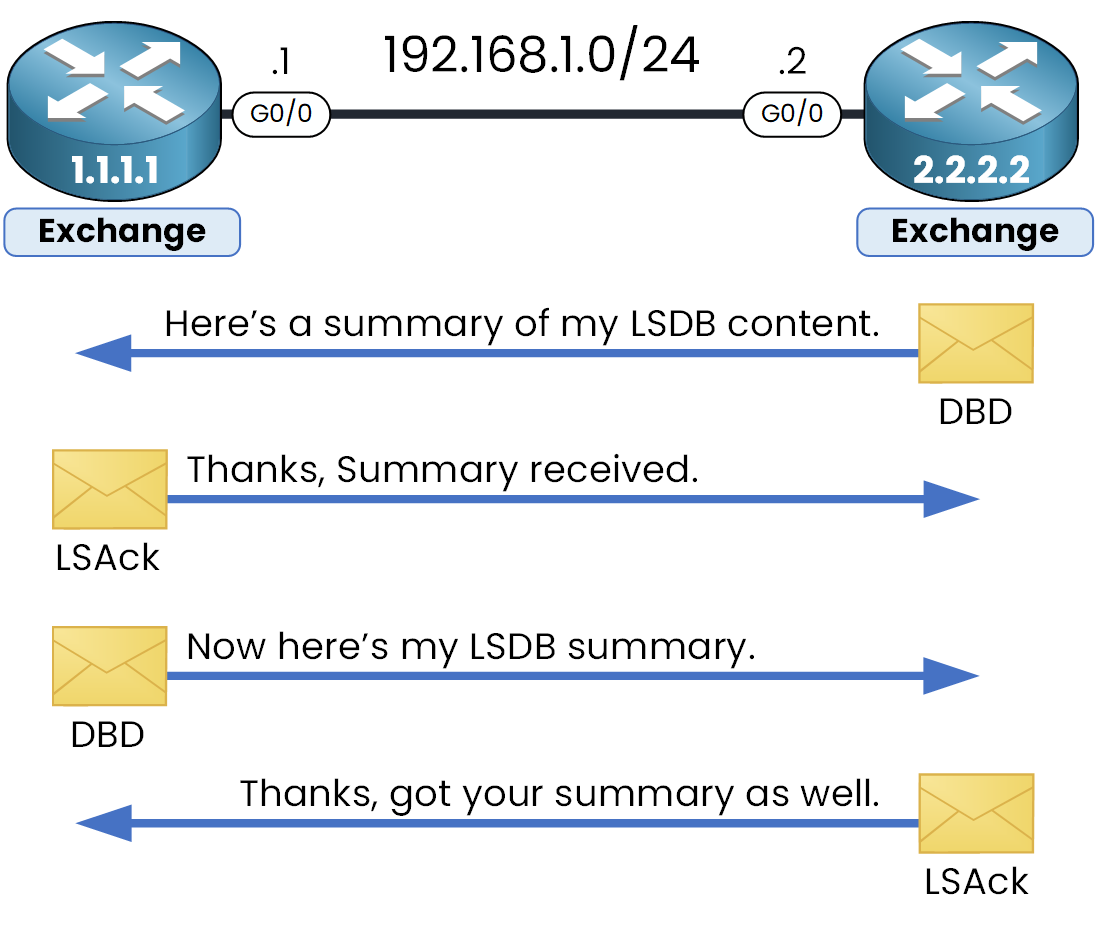
Let's watch the second part of the video from Jeremy's IT Lab, which walks through these final states.
Free CCNA | OSPF Part 2 | Day 27 | CCNA 200-301 Complete Course
This segment continues the state machine explanation, covering the database exchange and concluding with a helpful summary.
First, watch the detailed explanation of the adjacency states: ExStart: Routers decide which will be the Master and Slave for the exchange, based on the higher RID. The Master controls the sequence of the exchange. Exchange: Routers exchange DBD packets, which are like a table of contents for their LSDBs. Loading: Routers send LSRs to request any LSAs they are missing, receive them in LSUs, and confirm with LSAcks. Full: The LSDBs are identical. The routers are fully adjacent. Then, watch the summary of the entire process and the five OSPF message types to reinforce what you've just learned.
Step 3: SPF Algorithm Calculation
Once a router reaches the Full adjacency state with its neighbors, its LSDB is complete and synchronized. It now has a full topological map of the network area. The final step is to use this map to calculate the best route to every destination.
This is where the Shortest Path First (SPF) algorithm, also known as Dijkstra's algorithm, comes in. Each router runs the SPF algorithm independently on its own LSDB. The algorithm places the router itself at the root of a tree and calculates the shortest path to every other node (router) and leaf (network) in the topology.
OSPF Cost
How does SPF define "shortest"? It uses a metric called cost. The cost of a link is, by default, calculated based on its bandwidth. The formula is:
The default reference bandwidth is 100 Mbps. Therefore:
- A 10 Mbps Ethernet link has a cost of .
- A 100 Mbps FastEthernet link has a cost of .
- A 1 Gbps GigabitEthernet link would also have a cost of 1, because the cost must be an integer. For modern high-speed networks, the reference bandwidth must be manually increased to differentiate between faster links.
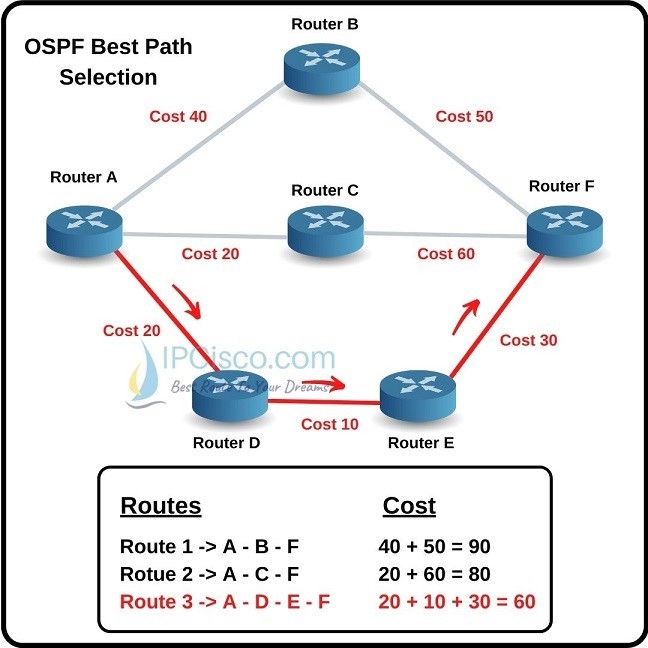
The SPF algorithm calculates the total cost of a path by summing the costs of all the outgoing interfaces along that path. The path with the lowest cumulative cost is chosen as the best path and is installed in the routing table.
This video and diagram beautifully illustrate the cost calculation and path selection.
Let's return to the "OSPF Explained" video to see how the SPF algorithm works in practice.
Watch the final segment on choosing the best routes. Focus on how the cost is calculated for different link types and how the cumulative cost determines the winning route.
Conclusion
In this lesson, we've unpacked the inner workings of OSPF. You've seen how it progresses logically from discovering its surroundings to building a complete map and finally using that map to navigate the network efficiently.
Key Takeaways:
- OSPF operates in three main stages: neighbor discovery, LSDB exchange, and SPF calculation.
- Routers use Hello packets to discover neighbors and progress through states like Down, Init, and 2-Way.
- To form a full adjacency and synchronize databases, routers use DBD, LSR, LSU, and LSAck packets, moving through the ExStart, Exchange, Loading, and Full states.
- The Link-State Database (LSDB) is a complete map of the network topology.
- Each router independently runs the SPF algorithm on its LSDB to calculate a shortest-path tree from its own perspective.
- The SPF algorithm uses cost, a metric based on link bandwidth, to determine the best path. The path with the lowest cumulative cost wins.
Now that you understand how OSPF functions within a single network segment or area, we are prepared to explore how it scales. In the next lesson, we will examine OSPF areas, a powerful feature for creating a hierarchical network design that improves stability and performance in large-scale deployments.