Recommended resources
The freely available resources this lesson will direct you to.
Welcome to Module 8, where we pivot from the operational reliability of a single model to the broader challenge of managing the entire model lifecycle. In our previous module, we focused on ensuring a deployed model service is robust, implementing patterns like timeouts to handle slow requests. But what happens when you want to update that model? How do you track different versions, decide which one to deploy, and roll back if something goes wrong?
This is the domain of Release Engineering for LLMs, and our first step is to establish a source of truth. Today's lesson addresses exactly that, focusing on how to configure a model registry for versioning and managing your LLM artifacts. A model registry is the backbone of any MLOps pipeline, providing the central inventory needed for automated deployments, evaluations, and rollbacks.
We'll use MLflow, a popular open-source platform, as our primary tool. You'll learn:
- The core concepts and architecture of a model registry.
- How to programmatically register and manage models using the MLflow SDK.
- A key technique for packaging complex LLM artifacts (like a base model plus adapters) for versioning.
- How to design a production-grade registry architecture using your existing cloud and infrastructure skills.
1. Why a Model Registry is Crucial for MLOps
In traditional software engineering, you have Git for versioning code. In MLOps, the situation is more complex. The "artifact" you deploy isn't just code; it's a combination of code, model weights, configurations, and data lineage. For LLMs, this complexity explodes. A single "model" might consist of a massive base model, a small fine-tuned adapter (like a LoRA), a specific prompt template, and a tokenizer configuration.
Storing multi-gigabyte model weights in Git is impractical. This is where a model registry comes in. It's a specialized system designed to handle the versioning, storage, and lifecycle management of machine learning models.
Model Versioning Infrastructure: Managing ML Artifacts at Scale ...
This article from Introl provides an excellent overview of the challenges and solutions in model versioning, with specific attention to LLMs.
As you read, focus on these key areas: "The versioning challenge": Understand the four main problems: binary artifacts, configuration explosion, dataset dependency, and evaluation coupling. Think about how these apply to the systems you manage. "Model registry architecture": Familiarize yourself with the four core components (Version control, Metadata storage, Artifact storage, Lifecycle management) and the typical registry workflow (Registration → Staging → Promotion). "LLM-specific considerations": This is the most critical part. Pay close attention to what needs to be versioned for an LLM: base models, fine-tuned weights/adapters, prompt templates, and retrieval configurations.
The article makes it clear that a model registry is more than just a file store; it's a metadata-rich database that provides the lineage and context needed for reproducibility and governance—concepts central to your SRE background.
2. The MLflow Model Registry: A Practical Workflow
MLflow is one of the most widely adopted open-source MLOps platforms. Its Model Registry provides the exact functionality we've been discussing.
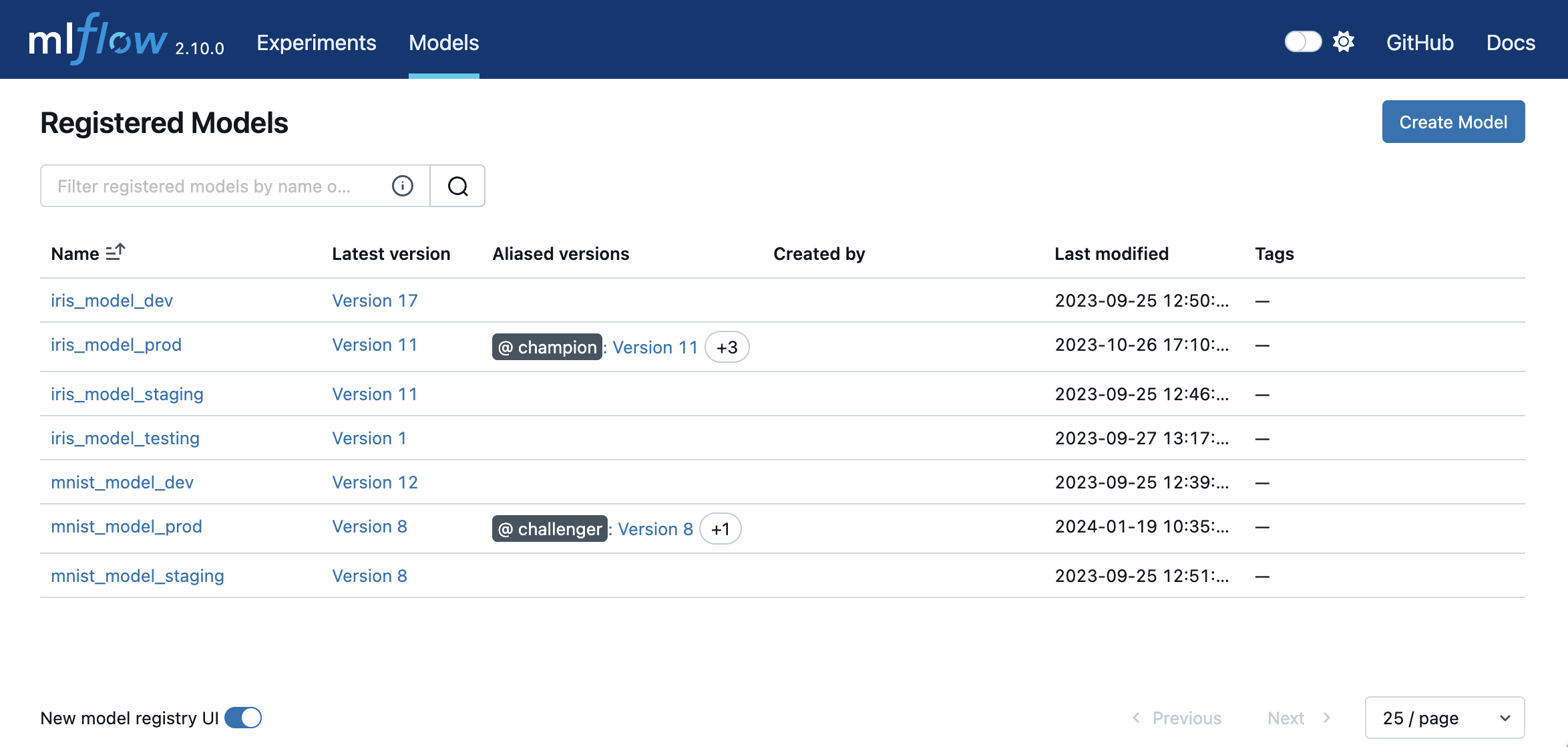
The core concepts to grasp are:
- Registered Model: A named entity for a specific model, like
customer-support-chatbot. It contains all the versions of that model. - Model Version: An immutable, numbered version of a Registered Model (e.g.,
Version 1,Version 2). Each version is linked to a specific training run and its artifacts. - Stage: A label indicating a model version's lifecycle status. MLflow provides default stages:
Staging,Production, andArchived. You transition versions between these stages as part of your release process.
The following video provides a hands-on crash course. We will focus on the most important workflows for an MLOps pipeline.
MLflow Crash Course - Model Registry and Model Deployment
This "MLflow Crash Course" from DagsHub demonstrates the key programmatic interactions with the Model Registry.
Please watch the following segments: Core Concepts: This section introduces the registry's purpose and defines the key terms: registered model, model version, and stage. Log and Register: This shows the ideal way to register a model—simultaneously logging and registering it within your training script. This is the pattern you would use in an automated CI/CD pipeline. Update and Transition Stages: See how to use the API and the UI to promote a model version to a new stage (e.g., Staging). This is the core action for managing a model's lifecycle. Load from Registry: Learn how to load a model for inference by referencing its name and stage (e.g., models:/great-mario-model/Staging). This is how a deployment service would fetch the correct model to serve.
Here is a summary of the key API calls for a typical workflow:
import mlflow


# In your training script, inside an MLflow run
with mlflow.start_run() as run:


    # ... training code that produces a `trained_model` object ...


    # Log the model and register it in one step
    # This is the preferred method for automated pipelines
    mlflow.sklearn.log_model(
        sk_model=trained_model,
        artifact_path="model",
        registered_model_name="fraud-detection-model"
    )
    run_id = run.info.run_id


# Later, in a separate script for CI/CD or manual promotion
client = mlflow.tracking.MlflowClient()


# Get the latest version created for our model
latest_version_info = client.get_latest_versions("fraud-detection-model", stages=["None"])[0]
latest_version = latest_version_info.version


# Transition this new version to "Staging" for evaluation
client.transition_model_version_stage(
    name="fraud-detection-model",
    version=latest_version,
    stage="Staging",
    archive_existing_versions=True # Archive any old model in "Staging"
)


# In your deployment service, load the model currently in "Production"
production_model = mlflow.pyfunc.load_model(
    model_uri="models:/fraud-detection-model/Production"
)


# Now you can use production_model.predict(...)
3. Versioning Complex LLM Artifacts with pyfunc
As we've discussed, an "LLM" is often more than just a set of weights. How do you version a base model combined with a LoRA adapter and a specific prompt template?
MLflow's pyfunc model flavor is the solution. It allows you to package any arbitrary Python code as a versionable model. You create a custom Python class that inherits from mlflow.pyfunc.PythonModel. This class can load multiple artifacts (the base model, the adapter) and implement custom logic in its predict method.
The video you just reviewed has an excellent segment on this powerful feature.
MLflow Crash Course - Model Registry and Model Deployment
Let's revisit the "MLflow Crash Course" video to focus on this advanced but essential feature.
Watch the segment on Generic Python Functions. The key idea is that you can create a wrapper class to encapsulate all the logic needed for inference. Pay attention to: The load_context method: used for one-time setup, like loading heavy model weights into memory. The predict method: called for each inference request, containing the pre-processing, model inference, and post-processing logic. The artifacts dictionary: this is how you pass file paths (like for your model weights or adapters) to load_context.
Let's imagine a scenario where we want to package a transformers model with a PEFT (LoRA) adapter. The pyfunc model would look like this:
import mlflow
import transformers
from peft import PeftModel
import torch

class LlamaAdapterModel(mlflow.pyfunc.PythonModel):

    def load_context(self, context):
        """
        This method is called once when the model is loaded.
        It's used to load the base model and apply the adapter.
        """
        base_model_path = context.artifacts["base_model"]
        adapter_path = context.artifacts["adapter"]

        self.tokenizer = transformers.AutoTokenizer.from_pretrained(base_model_path)

        base_model = transformers.AutoModelForCausalLM.from_pretrained(
            base_model_path,
            torch_dtype=torch.bfloat16,
            device_map="auto"
        )


        # Load the LoRA adapter onto the base model
        self.model = PeftModel.from_pretrained(base_model, adapter_path)
        self.prompt_template = "Summarize this: {text}"

    def predict(self, context, model_input):
        """
        This method is called for every inference request.
        """


        # model_input is expected to be a pandas DataFrame
        texts = model_input[0].tolist()

        summaries = []
        for text in texts:


            # Apply the prompt template
            prompt = self.prompt_template.format(text=text)

            inputs = self.tokenizer(prompt, return_tensors="pt").to("cuda")
            outputs = self.model.generate(**inputs, max_new_tokens=50)
            summary = self.tokenizer.decode(outputs[0], skip_special_tokens=True)
            summaries.append(summary)

        return summaries


# --- To log this custom model ---
with mlflow.start_run():
    mlflow.pyfunc.log_model(
        "model",
        python_model=LlamaAdapterModel(),


        # These artifacts are packaged with the model
        artifacts={
            "base_model": "/path/to/llama-3.1-8b-instruct",
            "adapter": "/path/to/my-lora-adapter"
        },
        registered_model_name="summarizer-llama3.1-lora"
    )
This approach is incredibly powerful. The MLflow Model Registry now versions a self-contained object that includes not just the artifacts but also the precise logic to run them together.
4. Production Architecture for MLflow
For development, MLflow defaults to storing everything in a local mlruns directory. For a production system, this is not a viable solution. As an SRE, you know the importance of scalable, durable, and highly-available infrastructure. A production-grade MLflow setup typically consists of three distinct components:
- MLflow Client: The SDK running in your training scripts or CI/CD jobs.
- Tracking Server: A centralized server that logs and retrieves metadata (parameters, metrics, run info). This server connects to a backend database like PostgreSQL or MySQL for persistent storage.
- Artifact Store: A scalable object storage service, like AWS S3, Azure Blob Storage, or GCS, to store the large model files (the "artifacts").
This separation of concerns is a classic distributed systems pattern.

Your expertise in cloud infrastructure is directly applicable here. Setting this up involves provisioning an S3 bucket, creating IAM policies, and configuring the MLflow server to use these resources.
MLflow AWS S3 Integration | OpenCharts - Community Charts
This guide details the steps to configure MLflow with AWS S3 for artifact storage, a standard for production deployments.
Skim through this guide, focusing on the configuration concepts rather than running every command. As someone with deep AWS and Kubernetes experience, these patterns should be very familiar. S3 Bucket Setup: Note the recommendation to enable versioning on the S3 bucket itself, providing an extra layer of protection for your artifacts. IAM Configuration: Pay close attention to "Option 2: IAM Role (Production)". Using IAM roles for service accounts in EKS is a security best practice you're already familiar with. This is how you'd grant your MLflow server (and potentially training pods) permissions to the S3 bucket without hardcoding credentials. MLflow Configuration: Look at the Helm values.yaml example. See how the backendStore is pointed to a PostgreSQL instance and the artifactRoot is pointed to your S3 bucket. This declarative configuration is the standard way to deploy such services on Kubernetes.
This setup ensures that your model registry is not a single point of failure and can scale to handle thousands of models and terabytes of artifacts, fitting the reliability and scalability requirements of a production environment.
Conclusion
Today, you've learned how to establish the cornerstone of a CI/CD pipeline for LLMs: the model registry. We've seen that it's far more than a file server; it's a critical MLOps component for versioning, governance, and reproducibility.
Key Takeaways:
- A model registry is the central source of truth for versioned model artifacts and their metadata.
- For LLMs, artifacts include not just weights but also adapters, prompt templates, and configurations.
- MLflow provides a powerful open-source model registry with concepts like Registered Models, Versions, and Stages to manage the model lifecycle.
- The
mlflow.pyfuncflavor is essential for packaging complex LLM artifacts and their inference logic into a single, versionable unit. - A production-ready registry uses a decoupled architecture with a tracking server, a backend database (like PostgreSQL), and an object store (like S3) for artifacts.
Now that we have a system for versioning our models, a critical question arises: how do we know if Version 2 is actually better than Version 1? Simply registering a new model isn't enough; we need to evaluate it. In our next lesson, we will dive into the common LLM evaluation benchmarks and quality metrics used to detect regressions and drive promotion decisions in our MLOps pipeline.