Recommended resources
The freely available resources this lesson will direct you to.
Hello! In our last session, we focused on evaluating new model versions, establishing a crucial "quality gate" for your CI/CD pipeline using metrics like perplexity and standardized benchmarks. This ensures you only consider promoting models that are verifiably as good as, or better than, what's currently running.
Today, we'll address the next logical step: the release itself. Even with extensive offline evaluation, deploying a new model directly to all users is risky. Unforeseen interactions with production data or subtle performance regressions can have a major impact. This lesson will show you how to apply a core Site Reliability Engineering (SRE) principle to MLOps by implementing canary deployments. You will learn how to use specialized Kubernetes tools to gradually shift traffic to a new model version, monitor its performance in real-time, and automatically roll back if issues arise.
1. The Principle of Progressive Delivery
Before diving into the implementation, let's solidify the "why" behind this strategy. Standard Kubernetes rolling updates are good, but they don't offer fine-grained control or analysis. A canary deployment is a more advanced form of progressive delivery, where you de-risk a release by exposing it to a small subset of real users first—the "canaries in the coal mine."
The core idea is to:
- Deploy the new model version (
v2) alongside the stable version (v1). - Route a small percentage of traffic (e.g., 5%) to
v2. - Analyze performance metrics (latency, error rates, GPU utilization, and even model-specific metrics) for both versions.
- If
v2performs well, gradually increase its traffic share. - If
v2shows problems, immediately route all traffic back tov1and terminate the canary.
This video provides an excellent overview of progressive delivery and introduces the two primary ways to manage traffic splitting in Kubernetes.
Testing in Production! Progressive Delivery with Canary Deployments Explained!
Watch "Testing in Production! Progressive Delivery with Canary Deployments Explained!" from the DevOps & AI Toolkit channel to understand the core concepts.
Focus on these two key segments: The Rationale: This section explains why testing in production is necessary and introduces canary deployments to limit the "blast radius" of a faulty release. Advanced Traffic Splitting: Pay close attention to the argument for using a service mesh like Istio. The speaker explains why simply scaling pods is an imprecise way to split traffic and how a service mesh provides exact, percentage-based control, which is crucial for reliable analysis.
As you can see, controlling traffic by simply adjusting the number of pods for each version is a crude method. A service mesh like Istio, which operates at the network layer, allows us to decouple traffic routing from scaling. We can run a stable number of replicas for both model versions and use an Istio VirtualService to precisely dictate that, for instance, 90% of requests go to the stable service and 10% go to the canary service.
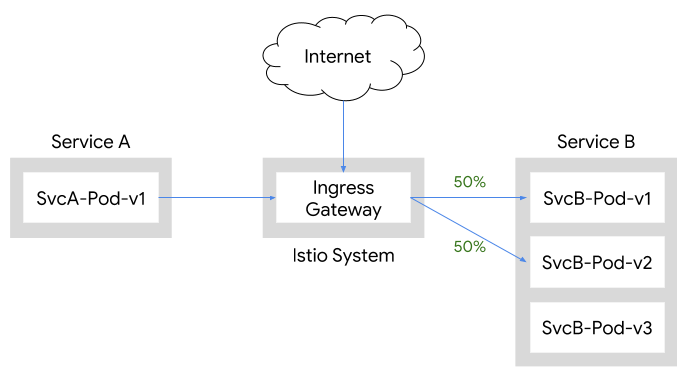
This diagram illustrates how an Istio Ingress Gateway can precisely split traffic. Here, traffic is divided 50/50 between two versions of a service (v1 and v2). This same mechanism allows us to configure any split, such as 90/10, for a canary release.
2. The Tools: Argo Rollouts for Orchestration
While a service mesh provides the traffic splitting mechanism, we need an orchestrator to automate the canary process—defining the steps, running the analysis, and making promote/rollback decisions. This is where Argo Rollouts, a Kubernetes controller and a CNCF project, comes in.
Argo Rollouts extends Kubernetes by providing a new resource, Rollout, which is a drop-in replacement for the standard Deployment resource. It allows you to define sophisticated deployment strategies like canary and blue-green directly in your manifests.
This next video demonstrates how Argo Rollouts works in practice.
Argo Rollouts - Canary Deployments Made Easy In Kubernetes
Watch "Argo Rollouts - Canary Deployments Made Easy In Kubernetes" for a practical walkthrough of a canary release.
As you watch, focus on the key components and the flow: Analysis Template: See how an AnalysisTemplate is defined to query Prometheus for metrics like success rate and request duration. This is the "brain" of the automated decision-making. Rollout Configuration: Pay close attention to the strategy.canary section of the Rollout manifest. Note the definition of stableService and canaryService, the trafficRouting integration, and the steps that define the progressive traffic increase and pauses. Failed Rollout: Observe what happens when the canary application is faulty. Argo Rollouts detects the metric violations and automatically rolls back, scaling down the canary pods and resetting traffic to the stable version. Successful Rollout: Watch how a healthy canary progresses through the steps, passing analysis at each stage, until it is fully promoted and becomes the new stable version.
The combination of Argo Rollouts and Istio provides a powerful, declarative, and automated system for canary deployments, which is a production-grade pattern for any service, including LLMs.
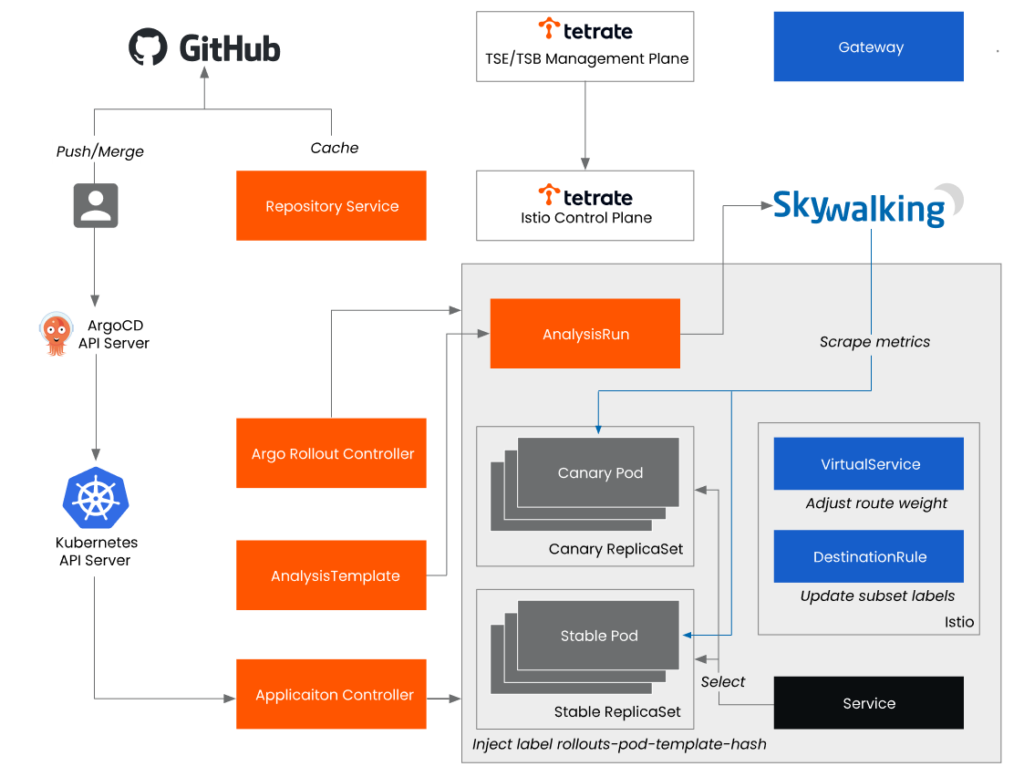
This architecture diagram shows how all the components fit together in a GitOps workflow. Changes in Git trigger ArgoCD, which applies the new Rollout configuration. Argo Rollouts then orchestrates the canary process, directing Istio to split traffic while using metrics from an observability tool (like Prometheus or Skywalking) to analyze performance.
3. Implementing a Canary Deployment
Now, let's walk through the concrete steps and YAML manifests required to implement this. Your extensive Kubernetes experience will be very helpful here, as we'll be defining several standard and custom resources.
We will follow the process outlined in the article "Canary Deployments Using Argo Rollouts and Istio Service-mesh." This guide provides a clear, step-by-step implementation.
Canary Deployments Using Argo Rollouts and Istio Service-mesh
This guide provides the full set of YAML manifests and commands to set up a canary deployment from scratch.
Read through the sections "Deployments 🚀", "Deploy argo rollout Terranates webapp", and "Set new image...". You don't need to run this on your own machine right now, but focus on understanding how the pieces connect.
Let's break down the key manifests from that guide.
Step 1: Define Services and Traffic Routing
First, we need two Kubernetes Services: one for the stable model and one for the canary model. Argo Rollouts will manage which pods are selected by each service.
We also need an Istio VirtualService to control traffic routing. Initially, it directs 100% of traffic to the stable service. Argo Rollouts will dynamically update this resource during the rollout.
# Stable Service (selects stable pods)
apiVersion: v1
kind: Service
metadata:
  name: llm-service-stable
spec:
  ports:
  - port: 8080
  selector:
    app: llm-server

---
# Canary Service (selects canary pods)
apiVersion: v1
kind: Service
metadata:
  name: llm-service-canary
spec:
  ports:
  - port: 8080
  selector:
    app: llm-server

---
# Istio VirtualService for traffic splitting
apiVersion: networking.istio.io/v1alpha3
kind: VirtualService
metadata:
  name: llm-virtual-service
spec:
  hosts:
  - "my-llm-service.example.com"
  http:
  - route:
    - destination:
        host: llm-service-stable # Stable model service
      weight: 100
    - destination:
        host: llm-service-canary # Canary model service
      weight: 0
Step 2: Define the Rollout Resource
This is the core of our setup. It looks similar to a Deployment but includes the strategy block.
apiVersion: argoproj.io/v1alpha1
kind: Rollout
metadata:
  name: llm-rollout
spec:
  replicas: 5
  selector:
    matchLabels:
      app: llm-server
  template: # This is your pod template, as in a standard Deployment
    metadata:
      labels:
        app: llm-server
    spec:
      containers:
      - name: llm-server
        image: my-repo/my-llm:v1.0 # The initial stable image
        ports:
        - containerPort: 8080
  strategy:
    canary:
      stableService: llm-service-stable # Reference to the stable service
      canaryService: llm-service-canary # Reference to the canary service
      trafficRouting:
        istio:
          virtualServices:
          - name: llm-virtual-service # The VirtualService to manage

      # This defines the progressive rollout steps
      steps:
      - setWeight: 10  # 1. Shift 10% of traffic to the canary
      - pause: {duration: 5m} # 2. Wait for 5 minutes to collect metrics

      - setWeight: 50  # 3. If metrics are good, shift to 50%
      - pause: {duration: 10m} # 4. Wait for 10 minutes

      # If all steps pass, Argo Rollouts promotes the canary to 100% automatically.
In this Rollout manifest:
- The
.spec.templatedefines the pod that will be deployed, just like in a standard KubernetesDeployment. This would contain your LLM serving container. - The
.strategy.canary.stepsarray is the heart of the automation. It's a sequence of actions.setWeightinstructs Argo Rollouts to patch the IstioVirtualServiceto achieve the desired traffic split.pausetells it to wait, either for a fixed duration or until a manual promotion command is issued.
Step 3: Trigger the Canary Deployment
With the initial v1.0 model deployed and stable, triggering the canary is as simple as updating the image on the Rollout resource, just as you would with a Deployment.
# Update the image to the new model version
kubectl argo rollouts set image llm-rollout llm-server=my-repo/my-llm:v2.0

# Watch the rollout progress
kubectl argo rollouts get rollout llm-rollout --watch
When this command is run, Argo Rollouts will:
- Create a new
ReplicaSetwith thev2.0image. - Wait for the canary pods to become ready.
- Begin executing the
stepsdefined in the strategy, starting by updating theVirtualServiceto send 10% of traffic to thellm-service-canary. - Pause and wait, giving your observability stack (Prometheus, Grafana, etc.) time to collect metrics.
- Continue to the next step if the previous one was successful.
In a fully automated setup, the pause steps would be replaced or augmented with an analysis block that references an AnalysisTemplate, as shown in the video. This template would contain Prometheus queries to check latency, error rates, and other SLOs, fully automating the promote/rollback decision.
Conclusion
In this lesson, you've learned how to implement a production-grade canary deployment strategy for your LLM services on Kubernetes. This approach directly leverages your existing SRE and DevOps expertise, applying proven reliability patterns to the new domain of MLOps.
Key Takeaways:
- Canary deployment is a progressive delivery strategy that minimizes the risk of a new release by exposing it to a small fraction of live traffic first.
- Argo Rollouts is a Kubernetes-native tool that automates the orchestration of canary deployments via a
Rolloutcustom resource. - A service mesh like Istio provides the precise, percentage-based traffic splitting required for effective canary analysis, configured via a
VirtualServiceresource. - The deployment process is defined in
stepswithin theRolloutmanifest, which control the gradual increase of traffic to the canary version. - Automated analysis can be integrated to automatically promote or roll back the canary based on real-time performance metrics from your observability stack.
You now have the tools to both evaluate a model before release and safely deploy it into production. But what if you have two model versions that both pass evaluation, and you want to know which one performs better against a key business metric like user engagement or conversion rate? This calls for a different strategy. In our next lesson, we will explore A/B testing for comparing model versions, where traffic is split for a longer duration to gather statistically significant business data.