Recommended resources
The freely available resources this lesson will direct you to.
Hello! Welcome to the second module of our course. In the first module, we built a foundational understanding of the core architectural patterns that underpin many security products. We explored proxies, policy engines, and multi-tenancy, treating them as reusable building blocks.
Now, we'll start applying those patterns to architect specific security products. Our first focus is the Web Application Firewall (WAF), a critical component for protecting web-based services.
Today's learning outcome is to: Architect the data flow and component placement for reverse proxy, transparent bridge, and cloud-hosted WAF deployment modes.
Understanding where a WAF sits in the network and how it handles traffic is the first and most fundamental architectural decision you'll make. Each deployment mode represents a distinct set of trade-offs in terms of performance, security, and operational complexity. Let's dive in.
1. The Core Principle: Inline Traffic Inspection
A WAF's primary job is to inspect HTTP/S traffic to identify and block attacks like SQL injection, Cross-Site Scripting (XSS), and others. To do this, it must be placed in the path of the traffic flowing between clients (users) and your application servers. The different deployment modes we'll discuss are simply different architectural strategies for achieving this inline placement.
2. Deployment Mode 1: Reverse Proxy
This is one of the most common deployment modes for a WAF. As you'll recall from our first module, a reverse proxy sits in front of web servers and forwards client requests to them. When a WAF operates in this mode, it is the reverse proxy.
To refresh your understanding of how reverse proxies work and the roles they play, let's start with a quick review.
Proxy vs Reverse Proxy (Real-world Examples)
The video 'Proxy vs Reverse Proxy' from ByteByteGo gives a clear, concise explanation of the reverse proxy concept, its placement, and its benefits like load balancing and SSL offloading—all of which are relevant to a WAF's function.
Please watch the segment on reverse proxies from 02:18 to 04:15. Pay attention to how it intercepts client requests and sits between the internet and the web servers.
Now, let's see how this applies specifically to a WAF.
Four Common Deployment Modes of WAF
The article 'Four Common Deployment Modes of WAF' provides diagrams and explanations for each mode. We'll use it to explore the specifics of the reverse proxy deployment.
Read the section titled 'Reverse Proxy'. Focus on the diagram and the description of how the WAF establishes two separate connections: one with the client and one with the server.
Architecture and Data Flow
In a reverse proxy deployment, the WAF becomes the public-facing endpoint for your application.

The data flow is as follows:
- DNS Resolution: The public DNS record for your application (e.g.,
www.yourapp.com) points to the IP address of the WAF. - Client Connection: A user's browser establishes a TCP connection and a TLS session directly with the WAF. The application server is completely hidden.
- Decryption and Inspection: The WAF terminates the TLS connection, decrypting the traffic so it can inspect the full, unencrypted HTTP request (headers, body, etc.).
- Policy Enforcement: The WAF's rule engine analyzes the request for malicious patterns.
- Backend Connection: If the request is deemed safe, the WAF initiates a new TCP connection and (optionally) a new TLS session to the appropriate backend application server. From the server's perspective, the WAF is the client.
- Response Handling: The server sends its response back to the WAF, which then forwards it to the original client over the initial connection.
Component Placement:
- The WAF is placed at the edge of your network, logically between the client and the application servers.
- It can be a dedicated hardware appliance, a software instance (like Nginx with ModSecurity), or a virtual appliance running in the cloud.
- It often integrates or sits just in front of a load balancer to distribute traffic to a pool of backend servers.
3. Deployment Mode 2: Transparent Bridge
The reverse proxy mode is powerful but requires network changes (like modifying DNS). The transparent bridge mode offers an alternative that is logically "invisible" to the network.
In this mode, the WAF is placed physically inline on the network path but operates at Layer 2 (the Data Link Layer) of the OSI model. It doesn't have an IP address configured on its data-path interfaces and doesn't terminate TCP connections. It simply inspects packets as they pass through, like a "bump on the wire."
Four Common Deployment Modes of WAF
Let's return to the 'Four Common Deployment Modes of WAF' article to understand the transparent bridge.
Please read the section 'Transparent Bridge'. Note the key difference from a reverse proxy: it does not participate in the TCP connection.
Architecture and Data Flow
The goal of this mode is to be minimally intrusive.
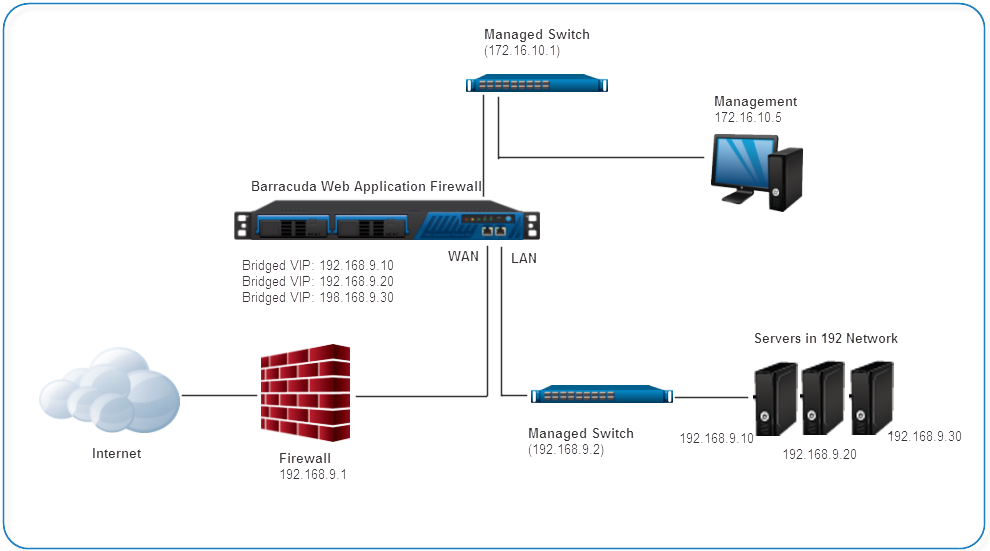
The data flow works like this:
- DNS Resolution: DNS points to the public IP of the firewall or load balancer, as it normally would. The WAF is not involved in DNS.
- Physical Placement: The WAF is physically connected between two network devices, for example, between the corporate firewall and the core switch that connects to your application servers. Its WAN and LAN ports form a "bridge."
- Packet Forwarding and Inspection: When an Ethernet frame arrives on one interface, the WAF inspects its contents.
- Policy Enforcement:
- If the packet is part of a benign request, the WAF forwards it out the other interface, unchanged.
- If the WAF detects an attack, it can either drop the malicious packets or, more actively, inject a TCP reset (RST) packet to tear down the connection.
- Connection Integrity: The end-to-end TCP connection remains between the client and the application server. The WAF is just an inspector in the middle, not a participant in the connection.
A critical limitation, noted in the comparison table of the article you read, is that a pure Layer 2 bridge cannot inspect encrypted (HTTPS) traffic. It has no way to terminate the TLS session because it isn't a party to the TCP connection. To overcome this, vendors often use a "transparent proxy" mode, which is a hybrid that does intercept TCP/TLS while spoofing IP addresses to appear transparent. However, the pure bridge mode is valued for its simplicity and resilience.
Component Placement:
- Physically inline on a network segment.
- Operates at Layer 2, making it invisible to routers and other Layer 3 devices.
- Requires no changes to IP addressing or DNS routing schemes.
4. Deployment Mode 3: Cloud-Hosted (WAF-as-a-Service)
This has become the dominant deployment model. Instead of deploying your own WAF appliance or software, you subscribe to a service from a provider like Cloudflare, Akamai, or a cloud provider's native service like AWS WAF.
Architecturally, a cloud-hosted WAF is a globally distributed reverse proxy network. You route your traffic through the provider's network, and they inspect it at an "edge" location close to your user before forwarding it to your origin servers.
Given your interest in system design, we can go deeper here. A cloud WAF is a fascinating example of a large-scale, multi-tenant distributed system.
Anatomy of AWS WAF: What Actually Protects Your Applications
The article 'Anatomy of AWS WAF' offers a fantastic first-principles look into the architecture of a major cloud WAF. It treats the WAF not just as a feature, but as a 'distributed real-time security execution platform'.
This is a detailed read. Focus on understanding the architectural model: Internal Evaluation Model (Section 2): Read this section carefully to understand the concept of the 'Request Evaluation Pipeline'. Pay close attention to 'Rule Priority Behavior' and 'Evaluation Short-Circuiting'. This is the core logic of the data plane. Layered Security Pipeline (Section 4.1): Understand the concept of designing the Web ACL as a pipeline with a 'cost gradient'—placing cheap, deterministic rules first to optimize performance and cost. Rule Evaluation Execution Model (Section 4.7): Skim the detailed execution flow diagram. This synthesizes the concepts of priority and short-circuiting into a complete data flow for a single request.
Architecture and Data Flow
The cloud WAF model abstracts the infrastructure away from you, but understanding its components is key to using it effectively.
- Traffic Ingestion (DNS & Anycast): You change your application's DNS CNAME record to point to an endpoint provided by the WAF provider (e.g.,
yourapp.com.cdn.cloudflare.net). These providers use Anycast IPs, which means a user's request is automatically routed to the nearest Point of Presence (PoP) in the provider's global network. - Edge Termination and Inspection: At the PoP, a reverse proxy server terminates the user's connection. The request is then passed to a policy engine (what AWS calls a Web ACL).
- Policy Enforcement Pipeline: As detailed in the article, the request flows through a highly optimized, ordered set of rules.
- Layer 1 (Allow/Block Lists): Cheap checks like "Is this a trusted IP?" or "Is this a known-bad IP?" are run first. If a match is found, evaluation short-circuits, and a decision is made immediately.
- Layer 2 (Signature/Managed Rules): If no decision is made, the request proceeds to more computationally expensive inspections, like checking for SQLi/XSS patterns using regular expressions.
- Layer 3 (Behavioral/Custom Rules): Finally, rate-limiting and complex custom business logic rules are applied.
- Forwarding to Origin: If the request passes all checks, the edge server initiates a new connection back to your origin server (which could be in any cloud or on-premise) to fetch the content. The origin's real IP address is hidden from the public.
Component Placement:
- Control Plane: This is the web UI or API where you define your security policies (e.g., the AWS WAF Console). These policies are then distributed to the global data plane.
- Data Plane: The global network of PoPs that receive traffic, execute the security policies, and forward clean traffic. This is where the actual inspection and enforcement happens.
5. Summary of Deployment Modes
| Dimension | Reverse Proxy | Transparent Bridge | Cloud-Hosted |
|---|---|---|---|
| Placement | Inline, Layer 7 | Inline, Layer 2 | Inline, Layer 7 (at provider's edge) |
| Traffic Flow | Terminates and re-establishes TCP/TLS connections. | Inspects packets in-flight; TCP/TLS is end-to-end. | Terminates and re-establishes TCP/TLS connections. |
| Network Changes | Requires DNS change to point to WAF IP. | None. Physically inserted into a network segment. | Requires DNS CNAME change to provider's endpoint. |
| HTTPS Inspection | Yes (terminates TLS). | No (in pure bridge mode). | Yes (terminates TLS at the edge). |
| Primary Advantage | Full control over traffic, rich features (caching, compression). | Operationally simple, "drop-in" deployment. | Scalability, offloads infrastructure management, DDoS protection. |
| Primary Disadvantage | Single point of failure, introduces latency. | Limited features (no TLS inspection), physical dependency. | Less control, dependent on provider, potential data privacy concerns. |
Conclusion
You can now architect the data flow and component placement for the three primary WAF deployment modes. We've seen that a WAF can be architected as a dedicated reverse proxy you manage, an invisible network bridge, or a massive, distributed reverse proxy service you consume.
Key Takeaways:
- Reverse Proxy WAFs act as a full proxy, giving deep visibility and control at the cost of operational complexity.
- Transparent Bridge WAFs are "bumps on the wire," offering simple deployment with no network re-architecting, but with functional limitations like the inability to inspect HTTPS traffic.
- Cloud-Hosted WAFs are the modern standard, offering immense scale and managed infrastructure by functioning as a global reverse proxy network. Their internal architecture is a sophisticated, multi-layered policy evaluation pipeline designed for performance.
In our next lesson, we will build directly on this knowledge. Now that we understand how these modes are architected, we will focus on why you would choose one over the other.
Preview of Next Lesson: Evaluate trade-offs across WAF deployment modes for different enterprise use cases and threat models.