Recommended resources
The freely available resources this lesson will direct you to.
Hello! Welcome back.
In our previous lesson, we put on the hat of an Identity Provider (IdP) and designed the intricate process of generating a SAML assertion. We architected the attribute mapping engine and, most importantly, the XML digital signature process that makes an assertion trustworthy. We ended with a signed, packaged SAML response, ready to be sent on its way.
Today, we switch roles. We are now the Service Provider (SP). That SAML response has just arrived at our doorstep (specifically, our Assertion Consumer Service endpoint), and we must decide if we can trust it. This is not a trivial task; a single flaw in our validation logic can undermine the entire security promise of Single Sign-On.
Our learning outcome for this lesson is to:
Design the SAML assertion validation process, including signature verification, timestamp checks, and audience restriction enforcement.
We will architect the security gatekeeper of a SAML-enabled application. This involves a multi-stage validation pipeline that cryptographically verifies the assertion's integrity and authenticity, checks its contextual validity, and protects against common attacks like signature wrapping and replay.
1. The Validation Entry Point: The Assertion Consumer Service (ACS)
The validation process begins the moment a SAML response arrives. In a typical SP-initiated flow, the user's browser sends this response via an HTTP POST request to a dedicated endpoint on our service called the Assertion Consumer Service (ACS).
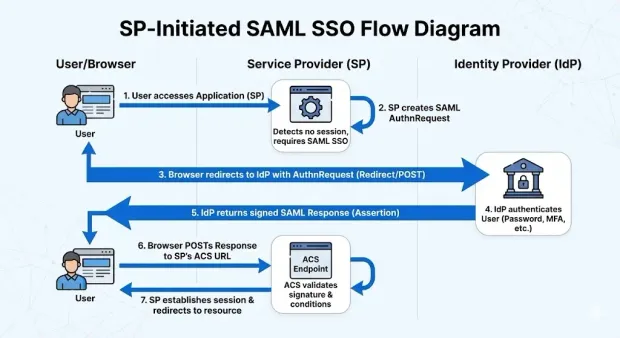
The ACS is responsible for receiving the response, decoding it, and orchestrating the entire validation pipeline. If all checks pass, it creates a local session for the user. If any check fails, it rejects the login attempt.
2. The Validation Gauntlet: A Step-by-Step Process
A robust validation process is a sequence of checks. A failure at any step should halt the process immediately. Based on industry best practices, we can design our validation logic as a checklist.
Implementing SAML Assertion Validation: Best Practices
The article 'What is a SAML Assertion in Single Sign-On?' from SSOJet provides an excellent, concise checklist for validating an assertion. We will use this as the high-level framework for our design.
Read the section titled 'Implementing SAML Assertion Validation: Best Practices'. Pay attention to the five key steps listed in the 'survival checklist'.
This checklist gives us a clear architectural plan for our validation service:
- Verify the Signature: Cryptographically confirm the assertion is authentic and unmodified.
- Check the Timestamps: Ensure the assertion is not expired or used prematurely.
- Validate the Audience: Confirm the assertion was intended for our service.
- Check the Issuer: Verify the assertion came from a known, trusted IdP.
- Perform a Replay Check: Ensure this exact assertion hasn't been used before.
Let's design each of these steps in detail.
3. Step 1: Signature Verification - The Citadel Gate
Signature verification is the most complex and critical step. A mistake here renders all other checks meaningless. As you recall from the previous lesson, signing XML is complicated due to its flexible structure. Verifying it is equally fraught with peril.
To understand the security risks and best practices, the following video provides a solid overview.
The 'A Developer's Guide to SAML' video from OktaDev dedicates significant time to the security aspects of implementation. The following segments detail the primary weak points and the specific validation steps needed to build a secure verifier.
Please watch the following four segments: Common Weak Points (17:28 - 18:25): This sets the stage by identifying flawed assertion validation and insecure XML parsers as top risks. Parser Security and Canonicalization (18:25 - 22:02): Explains why securing the XML parser is crucial (preventing XXE, DoS) and how canonicalization prevents specific attacks. Schema and XPath Validation (22:02 - 23:22): Discusses using schema validation to prevent signature wrapping attacks. Signature Validation (23:22 - 24:11): Focuses on the need to validate every signature and restrict accepted algorithms.
The key challenge in signature verification is not just checking the cryptography but ensuring that the data you use is the same data that was signed. The most famous attack against this is XML Signature Wrapping (XSW).
This next resource is a superb deep dive into the technical details of SAML signature vulnerabilities, which is essential for architecting a truly secure validator.
SAML's signature problem: It's not you, it's XML
The WorkOS engineering blog post 'SAML's signature problem: It's not you, it's XML' provides clear, code-level examples of how signature validation can fail and, more importantly, how to do it correctly.
Read through the sections from the beginning up to 'How to validate SAML assertions securely'. Focus on 'Problem 3: Signature wrapping (classic attack)' and the contrast between the vulnerable and best-practice code snippets. This illustrates the critical principle of tying verification to usage.
Drawing from these resources, here is the architectural design for our signature validation component:
-
Secure XML Parsing:
- The first step is to parse the incoming XML response. The parser must be configured securely.
- Disable Dangerous Features: Explicitly disable Document Type Definition (DTD) processing and external entity resolution. This is your primary defense against XML External Entity (XXE) attacks.
- Resource Limits: Impose a reasonable size limit on the incoming XML document to prevent denial-of-service (DoS) attacks from oversized payloads.
-
Signature and Reference Validation:
- Locate the
<ds:Signature>element within the assertion. - Retrieve the IdP's public key. This key should be pre-configured in your system as part of the trust relationship setup with the IdP (often from their metadata file).
- Perform the cryptographic signature verification on the
<ds:SignedInfo>block using the public key. This confirms the signature itself is valid. - Crucially, follow the reference. The
<ds:Reference>tag (e.g.,URI="#pfx123-456") points to the specific element that was signed. Your code must find the element with the matchingIDand re-calculate its digest (using the same algorithms specified in the signature) to ensure it matches the<ds:DigestValue>.
- Locate the
-
Tying Verification to Usage (Preventing XSW):
- This is the most important design principle. After you have successfully verified the signature and confirmed it corresponds to a specific
<saml:Assertion>element, your logic must only ever extract user data (NameID, attributes) from that verified element. - A common mistake is to verify a signature, see that it's valid, and then use a generic query like
getElementsByTagName("Assertion")[0]to get the data. An attacker can place a malicious, unsigned assertion first in the document to fool this naive logic. - Correct Design: The verification function should return a direct reference to the now-trusted XML node. All subsequent processing must be scoped to that node and its children.
- This is the most important design principle. After you have successfully verified the signature and confirmed it corresponds to a specific
-
Enforce Strong Cryptography:
- Your validator must have a configurable allow-list of acceptable signature and digest algorithms (e.g.,
rsa-sha256). - Explicitly reject any assertion that uses a weak algorithm or attempts to use a "none" algorithm to bypass signature checks.
- Your validator must have a configurable allow-list of acceptable signature and digest algorithms (e.g.,
4. Steps 2, 3, 4 & 5: Contextual and Security Checks
Once the signature is verified, you have a tamper-proof assertion. Now, you must check if it's valid in the current context.

These checks are more straightforward but no less critical.
Step 2: Check the Timestamps
- Purpose: Prevents the use of stale, potentially compromised assertions.
- Implementation:
- Locate the
<saml:Conditions>element. - Read the
NotBeforeandNotOnOrAfterattributes. - Compare these timestamps against the current time on your server.
- Clock Skew: Your design must account for slight time differences between your server and the IdP's server. A configurable clock skew tolerance (e.g., 60 seconds) should be applied. Reject the assertion if
currentTime < NotBefore - skeworcurrentTime > NotOnOrAfter + skew.
- Locate the
Step 3: Validate the Audience
- Purpose: Ensures an assertion meant for one service cannot be used to access another.
- Implementation:
- Within the
<saml:Conditions>element, find the<saml:AudienceRestriction>tag. - Extract the value from the
<saml:Audience>tag. - This value must exactly match your application's unique SAML identifier (its "Entity ID"). If it doesn't match, reject the assertion.
- Within the
Step 4: Check the Issuer
- Purpose: Confirms the assertion originated from a known, trusted partner.
- Implementation:
- Locate the
<saml:Issuer>element. - The value must exactly match the Entity ID of a pre-configured, trusted IdP in your system's database.
- Locate the
Step 5: Perform a Replay Check
- Purpose: Prevents an attacker from capturing a valid assertion and "replaying" it to gain access.
- Implementation:
- Every assertion has a unique identifier in its
IDattribute (e.g.,ID="_abc123xyz"). - Your system must maintain a temporary cache (e.g., in Redis or an in-memory store) of recently processed assertion IDs.
- Before processing an assertion, check if its
IDis already in the cache. If it is, this is a replay attack; reject it immediately. - If the ID is not present, add it to the cache.
- The cache lifetime for an ID should be longer than the assertion validity window (e.g., if assertions are valid for 5 minutes, cache IDs for at least 10 minutes) to be effective.
- Every assertion has a unique identifier in its
5. Finalizing the Login
If an assertion successfully passes all five stages of this validation gauntlet, it can be fully trusted. The final steps for the ACS are:
- Extract Identity: Parse the
NameIDfrom the (verified)<Subject>element and any relevant user details from the<AttributeStatement>. - Provision/Link User: Use the
NameIDto look up a user in your local user database. If the user doesn't exist, you might create a new account on the fly (Just-In-Time provisioning). - Create Session: Generate a standard application session for that user.
- Redirect: Redirect the user's browser to the final destination URL they were originally trying to access.
The user is now logged in, and the SSO flow is complete.
Conclusion
In this lesson, we architected the critical validation logic for a SAML Service Provider. We saw that building a secure verifier goes far beyond a simple cryptographic check. It requires a defense-in-depth approach that anticipates and mitigates specific XML-based attacks.
Key Takeaways:
- The Assertion Consumer Service (ACS) is the endpoint that orchestrates the entire validation process.
- Signature verification is the most complex step and must be designed to prevent vulnerabilities like XML Signature Wrapping (XSW) by strictly tying data usage to the verified element.
- A complete validation process is a pipeline of checks: Signature, Timestamps (with clock skew), Audience, Issuer, and Replay prevention.
- Securely configuring the underlying XML parser to disable dangerous features like DTDs is a foundational requirement.
Preview of the Next Lesson:
We have now designed the foundational components of a SAML-based identity system from both the IdP and SP perspectives. SAML, with its XML-based verbosity, has long been the standard for enterprise web SSO. However, the modern web, driven by APIs and mobile apps, often favors lighter, JSON-based protocols.
In our next lesson, we will begin our exploration of the advanced capabilities of identity platforms by looking at SAML's main successor: "Design the OIDC layer on top of OAuth 2.0, including ID token generation, claims management, and the UserInfo endpoint." We'll see how the principles of signed, verifiable claims are translated from XML to JSON, and architect the core of a modern OpenID Connect Provider.