Recommended resources
The freely available resources this lesson will direct you to.
Hello! Welcome back to our course on architecting security products.
In our last lesson, we designed session management systems, contrasting stateful session IDs with stateless JSON Web Tokens (JWTs). We saw how a JWT bundles verifiable claims about a user into a signed, self-contained token. This concept of a trusted, signed package of information is a cornerstone of modern identity systems.
Today, we extend that concept from authenticating a user for our own services to authenticating them for external, third-party services. This is the world of federated identity and Single Sign-On (SSO), and its foundational protocol in the enterprise world is SAML (Security Assertion Markup Language).
Our learning outcome for this lesson is to:
Design the SAML assertion generation process, including attribute mapping and XML digital signature creation.
We will architect the core function of a SAML Identity Provider (IdP): creating the "proof" of authentication that a Service Provider (SP) can trust. This "proof" is called a SAML Assertion. We'll break down what goes into an assertion, how we customize it for different partners (attribute mapping), and crucially, how we secure it with a digital signature.
1. Anatomy of a SAML Assertion
Think of a SAML Assertion as a more verbose, XML-based cousin of a JWT payload. It's a set of statements, or "claims," that an Identity Provider (IdP) makes about a user. After the IdP authenticates a user, it generates this assertion and sends it to the Service Provider (SP), who uses it to grant access.
To get a feel for the structure of SAML messages, please watch the following video segment.
This video from OktaDev provides a clear, developer-focused walkthrough of the XML structure of SAML requests and, more importantly for us, SAML responses which contain the assertion.
Watch the section from 12:49 to 14:14. Pay attention to the key elements within the SAML response and assertion: Issuer, Subject, Conditions, and the presence of a Signature.
Now, let's formalize that structure. A SAML Assertion is an XML document containing several key pieces of information.
Security Assertion Markup Language (SAML) V2.0 Technical Overview
The official SAML 2.0 Technical Overview from OASIS provides the definitive breakdown of an assertion's structure. It's a bit dense, but it's the ground truth.
Read section 4.3 'SAML Components', focusing on the description of 'Assertions' and the three kinds of statements. Then, review section 4.4.2 'Assertion, Subject, and Statement Structure' to see how these concepts map to an actual XML example. Don't worry about memorizing every tag; focus on the purpose of the main sections.
Based on the resources, we can identify the core components of an assertion that our IdP must generate:
Issuer: A unique identifier for our IdP. This tells the SP who is making the assertion.Subject: Identifies the user the assertion is about.NameID: The primary identifier for the user (e.g., email address, employee ID). TheFormatof theNameIDtells the SP how to interpret this value.
Conditions: Defines the assertion's validity constraints. This is crucial for security.NotBeforeandNotOnOrAfter: The time window during which the assertion is valid. This prevents replay attacks outside the valid window.AudienceRestriction: Specifies the intended recipient (the SP). An SP must reject assertions that are not addressed to it.
AuthnStatement: States how and when the user was authenticated (e.g.,PasswordProtectedTransportat a specific timestamp).AttributeStatement: Contains additional attributes about the user. This is where we'll perform attribute mapping.

2. Designing the Attribute Mapping Process
A user in our IdP's database might have attributes like first_name, last_name, and user_role. A partner SP, however, might expect these as givenName, surname, and memberOf. The process of translating between these is attribute mapping.
This mapping is not hard-coded; it must be a configurable part of our IdP's architecture. Each SP integrated with our IdP will have its own unique mapping requirements.
This short video segment explains the necessity of agreeing upon attribute formats and identifiers between the IdP and SP.
Watch from 01:50 to 03:11 and then from 09:31 to 09:57. Notice how federation fails without an agreed-upon user identifier and how additional user details are sent as attributes with specified formats.
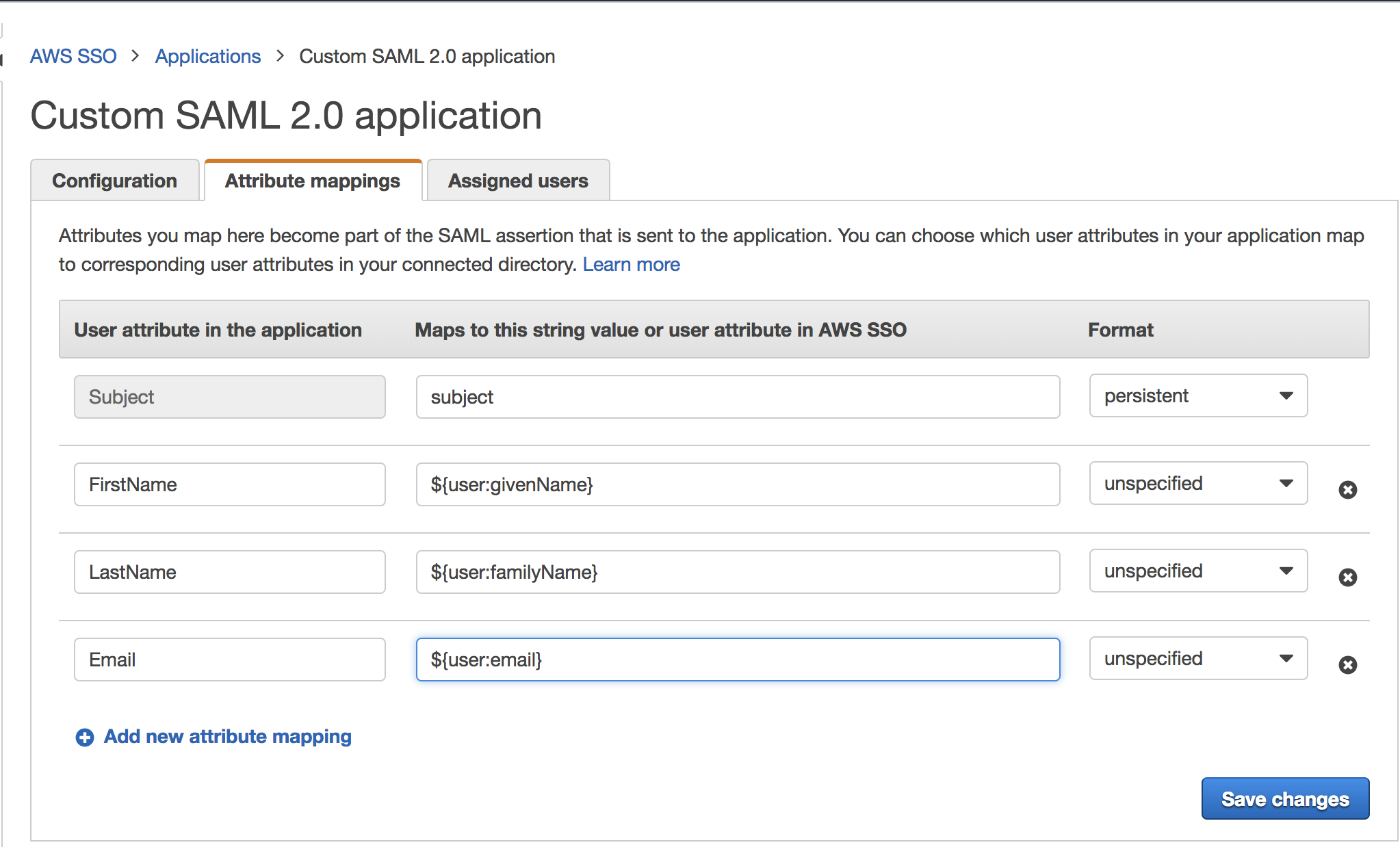
From an architectural standpoint, designing the attribute mapping component of our IdP involves a few key considerations:
- Data Model for Mapping Rules: We need a way to store these rules. A database table is a natural fit. It might look something like this:
sp_entity_id |
idp_attribute_name |
saml_attribute_name |
saml_name_format |
|---|---|---|---|
https://sp.example.com/saml |
user.email |
EmailAddress |
urn:oasis:names:tc:SAML:2.0:attrname-format:uri |
https://sp.example.com/saml |
user.firstName |
FirstName |
urn:oasis:names:tc:SAML:2.0:attrname-format:unspecified |
https://sp.another.com/saml |
user.email |
uid |
urn:oasis:names:tc:SAML:2.0:attrname-format:unspecified |
-
Attribute Retrieval: The assertion generation process must first fetch the user's attributes from the primary user store (e.g., Active Directory, an SQL database, a user management microservice).
-
Transformation Engine: The mapping logic will apply the configured rules to the retrieved attributes. This engine should:
- Handle 1:1 mappings (e.g.,
email->EmailAddress). - Support basic transformations (e.g., concatenating
firstNameandlastNameto produce afullNameattribute). - Potentially allow for more complex logic, like mapping an internal role ID to a more descriptive group name.
- Handle 1:1 mappings (e.g.,
The output of this process is the populated <AttributeStatement> element within our SAML assertion.
3. Designing the XML Digital Signature Process
An unsigned assertion is worthless. The SP has no way to trust that it genuinely came from the IdP or that it wasn't modified in transit by a malicious actor. Just as we signed JWTs with a secret key, we must sign SAML assertions.
The standard for this is XML Digital Signature (XML-DSig). The process is more complex than signing a JWT because XML's flexible structure (e.g., whitespace, attribute ordering) means that two textually different XML documents can be semantically identical. To create a consistent signature, we must first canonicalize the XML.
The most common method is an enveloped signature, where the <Signature> block is placed inside the <Assertion> element it is signing.
The following resource from the OpenSAML project (a widely used Java library for SAML) gives a fantastic, low-level overview of the signing process.
XML Digital Signatures - OpenSAML V2 User's Manual
This guide from the OpenSAML project is aimed at developers and details the precise, multi-step process for creating an XML Digital Signature. This gives us a perfect blueprint for our design.
Read the sections 'Signing a SAMLObject', 'Attaching a Signature...', 'Marshall the Object Tree', 'Computing the Signature Value', and review the 'Signing Examples'. You don't need to be a Java expert; focus on the sequence of operations described. This is the core algorithm for signature generation.
Let's architect this signing pipeline based on that guide. It's a three-phase process:
Phase 1: Construct and Prepare the Assertion
First, we build the full XML tree of the assertion without the signature itself. This includes the Issuer, Subject, Conditions, and the AttributeStatement we just generated. We also create a <Signature> template element that will be populated. This template includes a <Reference> that points to the ID of the assertion to be signed (e.g., <Reference URI="#assertion-id">).
Phase 2: Canonicalize and Digest
This is the key step to handle XML's flexibility.
- Canonicalization: The signing software takes the entire assertion element (the one referenced by the
URIin the<Reference>tag) and applies an XML Canonicalization algorithm (e.g., Exclusive XML Canonicalization). This algorithm produces a standard, unambiguous stream of bytes. It normalizes whitespace, attribute order, namespace declarations, etc. - Digesting: A cryptographic hash (e.g., SHA-256) is computed on the resulting byte stream. This hash value is called the digest.
- The digest value is Base64-encoded and placed inside the
<DigestValue>element within the<Signature>block.
Phase 3: Sign the Digest Information
We don't sign the entire document directly. Instead, we sign the information about what we signed.
- The
<SignedInfo>element (which contains information about the canonicalization method, signature algorithm, and the digest we just computed) is itself canonicalized into a byte stream. - The IdP uses its private key to sign this canonicalized
<SignedInfo>byte stream. - The resulting signature is Base64-encoded and placed in the
<SignatureValue>element. - Optionally, the IdP's public certificate is included in a
<KeyInfo>element so the SP can easily find the correct key to use for verification.
The final output is a complete <Assertion> element with a fully populated and valid <Signature> block inside it.
This process ensures that if even a single byte of the original assertion is changed (including adding an innocent-looking space), the digest will not match, and the signature verification at the SP will fail.
4. The Complete Assertion Generation Flow
Let's tie everything together into a single architectural flow for our IdP.
Trigger: A user has successfully authenticated.
- Input: The system has the authenticated
userobject and theEntityIDof the target SP. - Load Configuration: Retrieve the SP-specific configuration from the database using the
EntityID. This includes the Assertion Consumer Service (ACS) URL, requiredNameIDformat, and the attribute mapping rules. - Fetch Attributes: Query the user store (LDAP, DB) to get the user's raw attributes.
- Map Attributes: Execute the transformation engine to apply the mapping rules, producing a list of SAML
Attributeobjects. - Construct Assertion Shell: Create the in-memory XML structure for the assertion.
- Set
ID,Version,IssueInstant. - Set
Issuerto our IdP's EntityID. - Construct the
Subjectwith the correctNameIDand format. - Construct
Conditions, includingNotBefore,NotOnOrAfter, andAudienceRestrictionpointing to the SP's EntityID. - Add the
AuthnStatement. - Add the
AttributeStatementcontaining the mapped attributes.
- Set
- Execute Signing Pipeline:
- Attach a
Signaturetemplate to the assertion structure. - Marshal the structure into its DOM/XML representation.
- Canonicalize and Digest the assertion.
- Sign the
<SignedInfo>block using the IdP's private key.
- Attach a
- Package Response: Place the now-signed
<Assertion>inside a<samlp:Response>wrapper. The response also includes aStatuscode (e.g.,Success). - Prepare for Transport: Base64-encode the entire
<samlp:Response>XML. This payload is then typically placed in a hidden field of an HTML form that will be auto-submitted via the user's browser to the SP's ACS URL.
Conclusion
In this lesson, we designed the core manufacturing process of a SAML Identity Provider. We've moved from the abstract concept of "doing SSO" to a concrete architectural flow for generating the critical artifact: the SAML assertion.
Key Takeaways:
- A SAML Assertion is an XML-based security token containing statements about a user's identity, attributes, and authentication context.
- Attribute Mapping is a crucial, configurable translation layer that transforms user data from the IdP's internal format to the one expected by the SP. The design must support storing and applying these rules on a per-SP basis.
- XML Digital Signatures provide integrity and authenticity for the assertion. The process is more complex than JWT signing due to XML's nature, requiring canonicalization before hashing and signing with the IdP's private key.
- The entire generation process is a pipeline: fetch data, apply rules, build the XML structure, and finally, execute the multi-step signing algorithm.
Preview of the Next Lesson:
We've successfully designed the process for the IdP to create and send a signed assertion. But what does the Service Provider do with it? In our next lesson, we will switch perspectives and design the other half of the transaction: "Design the SAML assertion validation process, including signature verification, timestamp checks, and audience restriction enforcement." We will architect the security gate that consumes an assertion and decides whether to trust it.